Introduction
This user manual provides comprehensive instructions for the TECLUNG Metal Detector, Model GT. Designed for both adults and kids, this professional-grade metal detector features an IP68 waterproof 10-inch coil, 6-metal identification capabilities, and 4 distinct detection modes. It is engineered to be beginner-friendly, allowing users to quickly start their treasure hunting journey in various outdoor environments, including beaches.
What's in the Box
Upon unboxing your TECLUNG Metal Detector, please verify that all components listed below are present and in good condition:
- Metal Detector Control Unit with Armrest
- 10-inch IP68 Waterproof Search Coil
- Adjustable Stem (Multiple sections)
- 1 x Folding Shovel
- 1 x Headphones
- 2 x 9V Batteries
- User Manual (this document)

Image: Complete TECLUNG Metal Detector kit, showing all included accessories.
Setup and Assembly
Follow these steps to assemble your metal detector:
- Attach the Search Coil: Secure the 10-inch search coil to the lower stem using the provided bolt and nut. Ensure the coil is firmly attached but can still pivot.
- Connect Stem Sections: Connect the lower stem (with the search coil) to the middle stem, and then connect the middle stem to the upper stem (which has the control unit and armrest). Ensure the spring clips engage securely.
- Adjust Stem Length: Adjust the telescopic pole to a comfortable length for your height (adjustable from 28.7 inches to 47.2 inches). Lock the adjustment mechanism.
- Attach Armrest: Slide the armrest onto the upper stem and secure it in place.
- Route Cable: Wrap the search coil cable neatly around the stem, ensuring it is not too tight or loose, and secure it with the provided Velcro straps or clips.
- Connect Cable to Control Unit: Plug the search coil cable connector into the corresponding port on the control unit.
- Install Batteries: Open the battery compartment on the control unit and insert the two 9V batteries, observing the correct polarity. Close the compartment securely.

Image: Step-by-step assembly of the metal detector's stem and search coil.
Video: Unboxing and assembly guide for the TECLUNG Metal Detector. This video demonstrates how to unpack the components, assemble the stem and search coil, connect the cables, and install the batteries, providing a visual aid for the setup process.
Operating Instructions
Familiarize yourself with the control unit and detection modes for optimal performance.
Control Unit Overview

Image: Detailed view of the control panel, highlighting the LCD screen, power button, menu, enter, pinpoint, and backlight controls.
- Power ON/OFF: Press the power button to turn the detector on or off.
- LCD Backlit Display: The large LCD screen provides real-time feedback, including target type, numerical identification (0-99), signal strength, and battery status. The backlight ensures visibility in low-light conditions.
- Sensitivity Adjustment (SENS): Adjust the sensitivity level (5 levels available) to cope with electromagnetic interference and optimize detection depth. Higher sensitivity increases detection range but may also pick up more interference.
- Volume Control (VOL): Adjust the audio volume of the detection signals.
Detection Modes
The TECLUNG Metal Detector offers 4 professional detection modes:
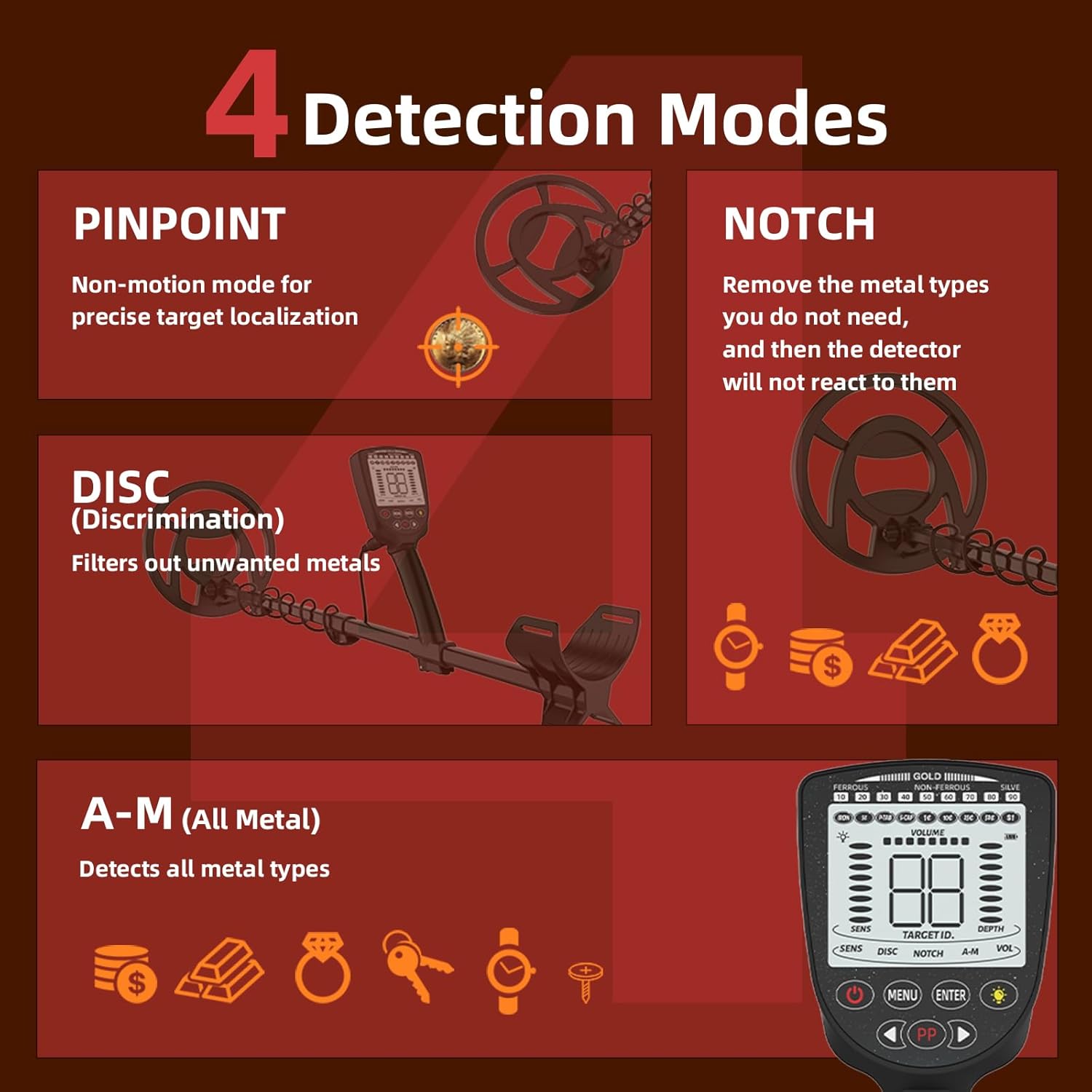
Image: Visual representation of the four primary detection modes and their functions.
- ALL-METAL Mode (A-M): This mode detects all types of metal without discrimination. It is ideal for general searching when you want to find any metallic object.
- DISC (Discrimination) Mode: Allows you to filter out unwanted metals, such as iron trash, so the detector only reacts to specific target types. Use the menu buttons to adjust the discrimination settings.
- NOTCH Mode: Similar to DISC, NOTCH mode enables you to selectively exclude certain metal categories from detection. This is useful for ignoring specific types of junk while still detecting others.
- PINPOINT Mode (PP): A non-motion mode used for precise localization of a detected target. Once a target is found in another mode, switch to PINPOINT to narrow down its exact location before digging.
Metal Identification
The detector distinguishes 6 types of metals (iron, nickel, zinc, copper, aluminum, silver) by tone (low/medium/high) and a numerical code (0-99) displayed on the LCD. This allows for accurate identification of high-value targets like coins and jewelry.
Video: Detailed operation of the TECLUNG Metal Detector, demonstrating power on, backlight control, sensitivity adjustment, and how different metals are identified in various modes (Non-Ferrous, Selective Recognition, All-Metal, Pinpoint).
Maintenance
- Cleaning: After each use, especially in sandy or wet conditions, wipe down the search coil with a damp cloth. The search coil is IP68 waterproof and can be rinsed.
- Control Box Care: The control box is NOT waterproof. Protect it from moisture, rain, and direct water exposure. If it gets wet, dry it immediately.
- Battery Storage: If storing the detector for an extended period (more than a month), remove the 9V batteries to prevent leakage and damage to the electronics.
- Storage: Store the metal detector in a cool, dry place, away from extreme temperatures and direct sunlight. The foldable design allows for easy storage and transport in the included backpack.
Troubleshooting
If you encounter issues with your TECLUNG Metal Detector, refer to the common problems and solutions below:
| Problem | Possible Cause | Solution |
|---|---|---|
| Detector does not power on. | Low or dead batteries; incorrect battery installation. | Ensure 9V batteries are new and installed with correct polarity. |
| Frequent false signals or erratic behavior. | High sensitivity setting; electromagnetic interference; mineralized ground. | Reduce sensitivity. Move away from power lines or other electronic devices. Use DISC or NOTCH mode to filter out unwanted signals. |
| No detection or weak signals. | Search coil not connected properly; low sensitivity; incorrect mode. | Check search coil cable connection. Increase sensitivity. Ensure you are in the appropriate detection mode (e.g., ALL-METAL). |
| Difficulty pinpointing targets. | Not using PINPOINT mode correctly. | Once a target is detected, switch to PINPOINT mode and slowly sweep the coil over the target area to narrow down its exact location. |
For further assistance with troubleshooting or parameter debugging, please contact customer support.
Specifications
- Brand: TECLUNG
- Model: GT
- Color: Black
- Material: ABS Plastic, Aluminum
- Power Source: Battery Powered (2 x 9V batteries included)
- Item Weight: 2 Pounds (approx. 0.91 kg)
- Product Dimensions (Extended): 48"L x 8"W x 4"H (approx. 122cm L x 20cm W x 10cm H)
- Adjustable Length: 28.7" - 47.2" (approx. 73cm - 120cm)
- Display Type: LCD (Large backlit display)
- Search Coil Size: 10 Inches (IP68 Waterproof)
- Detection Modes: ALL-METAL, DISC, NOTCH, PINPOINT
- Metal Identification: 6 types (Iron, Nickel, Zinc, Copper, Aluminum, Silver) by tone and numerical ID (0-99)
- Sensitivity Levels: 5 levels

Image: Illustration of the metal detector's adjustable and foldable stem lengths.
Warranty and Customer Support
TECLUNG is committed to customer satisfaction. We provide dedicated customer service support to address any questions, troubleshooting needs, or parameter debugging inquiries you may have. Messages are typically answered within 24 hours to ensure a positive and long-term user experience.
For support, please refer to the contact information provided with your purchase or visit the official TECLUNG website.


