
1. Introduction
This manual provides detailed instructions for the assembly, operation, and maintenance of your FLEXISPOT S1T-V2-AU Twin XL Adjustable Bed Frame Base. Please read all instructions carefully before use to ensure proper function and safety.

Image 1.1: FLEXISPOT Twin XL Adjustable Bed Frame Base.
Key Features:
- Simultaneous Operation: Head and foot sections adjust concurrently. The head inclines up to 60 degrees, and the foot inclines up to 20 degrees.
- Segmented Design: Facilitates easy transportation and single-person assembly.
- Durable Construction: Features a whisper-quiet motor tested for 5000 fatigue cycles at 600 lbs, and a sturdy steel frame.
- Oxford Fabric Bedspread: Enhances user comfort.
- Mattress Holder: Retainer bar secures the mattress, preventing movement.
- Mattress Compatibility: Compatible with memory foam, gel foam, and latex foam mattresses.
2. Safety Information
WARNING: Failure to follow these safety guidelines may result in injury or damage to the product.
- Do not exceed the maximum weight capacity of 600 lbs.
- Always follow assembly instructions carefully to prevent instability.
- Be cautious of sharp edges and moving motor components to avoid injury during assembly and operation.
- Keep children and pets away from the adjustable bed frame during operation.
- Ensure all power cords are properly routed and secured to prevent tripping hazards or damage.
3. Setup and Assembly
The FLEXISPOT S1T-V2-AU adjustable bed frame features a segmented design for simplified assembly and transport. Follow these steps for installation:
- Unpacking: Carefully remove all components from the packaging. Due to the segmented design, individual sections can be moved more easily.
- Frame Assembly: Connect the segmented frame sections as per the included diagram. Ensure all brackets are securely fastened.
- Leg Installation: Screw the bed legs into the designated points on the frame. The legs may have adjustable height options; refer to the specific leg instructions for details.
- Mattress Retainer Bar: Install the mattress retainer bar at the foot of the bed to prevent the mattress from sliding.
- Power Connection: Connect the power cord to the bed frame's motor and then plug it into a grounded electrical outlet.
- Optional Bedspread: If using the Oxford fabric bedspread, place it over the frame. Note: Some components, like the mattress retainer bar, may need to be temporarily removed or adjusted to fit the bedspread, then re-secured.

Image 3.1: Segmented design allows for easier transport and assembly.
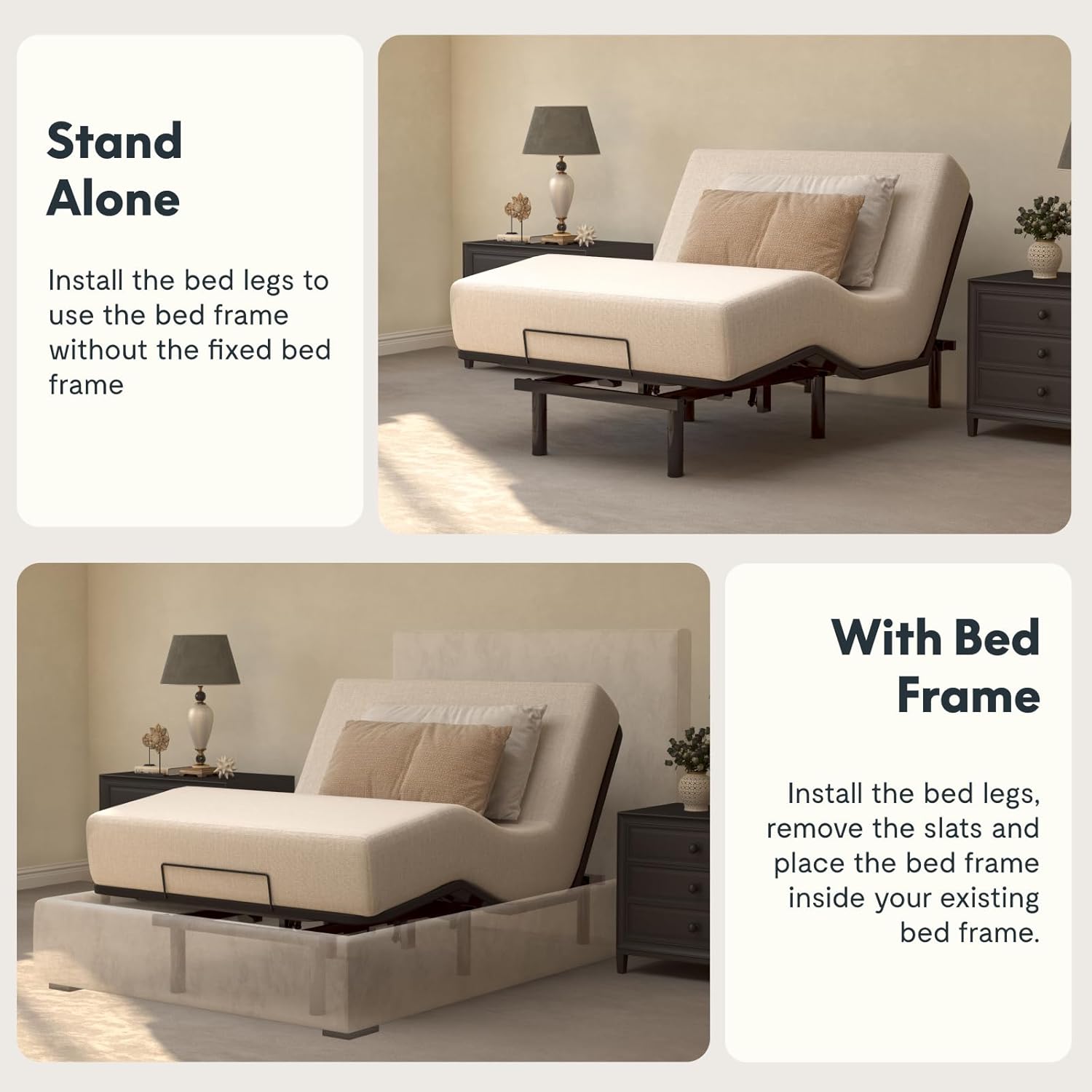
Image 3.2: The bed frame can be used standalone or integrated into an existing bed frame by removing slats.
Assembly Demonstration Video:
Video 3.1: This video demonstrates the assembly process and initial setup of the adjustable bed frame, including remote control pairing and basic functions.
4. Operating Instructions
The FLEXISPOT S1T-V2-AU is controlled by a wired remote. Familiarize yourself with the remote's functions:

Image 4.1: Wired remote control for adjusting bed positions.
Remote Control Functions:
- Head Up/Down Buttons: Adjust the head section of the bed.
- Foot Up/Down Buttons: Adjust the foot section of the bed.
- FLAT Button: Returns the bed to a completely flat position.
- ZG (Zero Gravity) Button: Activates the pre-programmed Zero Gravity position, which elevates the head and feet to promote circulation and reduce pressure.
- Anti-Snore Button: Activates a pre-programmed position designed to slightly elevate the head, which may help reduce snoring.
- Memory Buttons (M1, M2, M3): Allows you to save and recall up to three custom preferred positions. To save a position, adjust the bed to your desired setting, then press and hold a memory button until the remote indicates the position is saved (e.g., light flashes). To recall, simply press the saved memory button.
Note: The head and foot sections operate simultaneously. The remote control is wired to the bed frame for reliable operation.
5. Maintenance
Regular maintenance ensures the longevity and optimal performance of your adjustable bed frame.
- Cleaning: Wipe the frame with a damp cloth and mild detergent. Avoid harsh chemicals or abrasive cleaners. For the Oxford fabric bedspread, follow its specific cleaning instructions.
- Motor and Electrical Components: Periodically inspect all cables and connections for any signs of wear or damage. Ensure they are securely plugged in. Do not attempt to open or service the motor or control box yourself. Contact customer support for assistance.
- Moving Parts: Check that all moving parts operate smoothly. Do not apply lubricants unless specifically instructed by the manufacturer.
- Fasteners: Occasionally check all bolts and screws to ensure they are tight. Retighten if necessary.
6. Troubleshooting
If you encounter issues with your adjustable bed frame, refer to the following common troubleshooting steps:
Problem: Bed does not respond to remote control.
- Check Power: Ensure the power cord is securely plugged into a working electrical outlet and the bed frame.
- Remote Connection: Verify the remote control cable is properly connected to the bed frame's control box.
- Circuit Breaker: Check your home's circuit breaker to ensure power is supplied to the outlet.
Problem: Motor makes unusual noise.
- Obstructions: Inspect under the bed for any objects that might be obstructing the motor or moving parts.
- Weight Distribution: Ensure weight is evenly distributed on the bed and within the maximum capacity.
- Contact Support: If the noise persists or is severe, discontinue use and contact FLEXISPOT customer support.
Problem: Bed does not fully flatten or raise.
- Obstructions: Check for any items preventing the bed from moving freely.
- Reset: Press the FLAT button on the remote. If it doesn't fully flatten, try holding the down buttons for both head and foot for a few seconds.
For issues not covered here, please contact FLEXISPOT customer support.
7. Specifications
| Feature | Detail |
|---|---|
| Model Number | S1T-V2-AU |
| Size | Twin XL |
| Product Dimensions | 78.7"L x 37"W x 11.5"H |
| Weight Capacity | Max. 600 lbs. |
| Material | Carbon Steel, Oxford Fabric |
| Color | Black |
| Head Incline | 0-60 degrees |
| Foot Incline | 0-20 degrees |
| Motor Type | Whisper Quiet Durable Motor |
| Control Type | Wired Remote |
| Mattress Compatibility | Memory foam, Gel foam, Latex foam |
| Assembly Required | Yes |
| Item Weight | 84.9 pounds |
| UPC | 840460423540 |

Image 7.1: Product dimensions and specifications.

Image 7.2: Compatible mattress types: Memory, Latex, Gel, or Hybrid.
8. Warranty and Support
For warranty information, product support, or to purchase replacement parts, please visit the official FLEXISPOT website or contact their customer service department. Keep your purchase receipt and model number (S1T-V2-AU) handy for any inquiries.
You can find more information and contact details on the FLEXISPOT Store on Amazon.