
OMMO MD-7011
OMMO Professional Metal Detector User Manual
Model: MD-7011 | Brand: OMMO
1. Introduction
This manual provides comprehensive instructions for the OMMO Professional Metal Detector, Model MD-7011. It covers assembly, operation, maintenance, and troubleshooting to ensure safe and effective use of your device. Designed for both adults and children, this detector features a rechargeable battery, adjustable stem, IP68 waterproof search coil, and a clear LCD display with 6 detection modes, making it ideal for various treasure hunting adventures.
2. Safety Warnings
Please read and understand all safety warnings before operating the metal detector to prevent injury or damage to the device.
- Read the Manual: Always read the entire user manual before initial use and keep it for future reference.
- Electrical Hazards: Do not use the metal detector near live electrical wires or power lines. Always be aware of your surroundings.
- Water Immersion: The search coil is IP68 waterproof and can be submerged. However, the control unit is NOT waterproof. Do not submerge the control unit in water.
- Battery Safety: Use only the provided Type-C cable for charging. Do not attempt to open or replace the built-in lithium battery. Avoid extreme temperatures.
- Private Property: Always obtain permission before metal detecting on private property.
- Unexploded Ordnance: If you encounter what appears to be unexploded ordnance or dangerous materials, do not touch them. Mark the location and contact local authorities immediately.
- Children's Use: While suitable for children, adult supervision is recommended during operation.
3. Package Contents
Verify that all items are present in the package:
- 1 x OMMO Professional Metal Detector (Main Unit with Control Box, Adjustable Stem, Search Coil, Armrest)
- 1 x Headphone
- 1 x Type-C USB Charging Cable
- 1 x User Manual
4. Product Components
Familiarize yourself with the different parts of your metal detector:

Figure 4.1: Main Components of the OMMO Metal Detector. Note: The cable should be wound up to avoid signal interference.
- Search Coil: The waterproof detection coil that scans for metal objects.
- Control Box: Houses the LCD display, control buttons, and electronic circuitry.
- Handle Grip: Ergonomic grip for comfortable holding.
- Upper Stem: The upper part of the adjustable shaft.
- Lower Stem: The lower part of the adjustable shaft, connecting to the search coil.
- Buckle: Used to secure the adjustable stem at desired length.
- Armrest Stem: Connects the arm support to the main shaft.
- Arm Support: Padded support for the forearm to reduce fatigue during extended use.
5. Setup and Assembly
Follow these steps to assemble your metal detector:
- Attach the Search Coil: Connect the search coil to the lower stem using the provided bolt and knob. Ensure it is securely fastened but allows for slight angle adjustment.
- Connect Stems: Slide the lower stem into the upper stem.
- Attach Control Box and Armrest: Slide the control box onto the upper stem and secure it. Attach the armrest to the armrest stem and then to the main shaft.
- Adjust Stem Length: Loosen the buckle on the stem and adjust the length (from 69.8 cm to 124.5 cm) to a comfortable height that allows the search coil to be parallel to the ground when standing upright. Tighten the buckle.
- Connect Coil Cable: Carefully wrap the search coil cable around the stem, ensuring it is snug but not overly tight, and plug the connector into the port on the control box. Ensure the cable is wound tightly to prevent signal interference.
- Charge Battery: Before first use, fully charge the built-in lithium battery using the provided Type-C USB cable. Refer to Section 6 for charging instructions.
6. Charging the Battery
The OMMO metal detector is equipped with a high-capacity 1800mAh rechargeable lithium battery, providing over 15 hours of continuous operation on a full charge.
Figure 6.1: Charging the Metal Detector via Type-C USB.
- Locate the Type-C charging port on the control unit.
- Connect the provided Type-C USB cable to the detector and plug the other end into a standard USB power adapter (5V 2.5A recommended, not included), power bank, or car charger.
- The battery indicator on the LCD screen will show charging status. A full charge typically takes 4-5 hours.
- Once fully charged, disconnect the cable.
Note: The battery is integrated and not user-replaceable. If the battery needs replacement, please contact customer support.
7. Operating Instructions
7.1 Control Panel Overview
The intuitive LCD control box provides real-time data and easy access to all settings. Refer to the diagram below for button functions and display indicators.
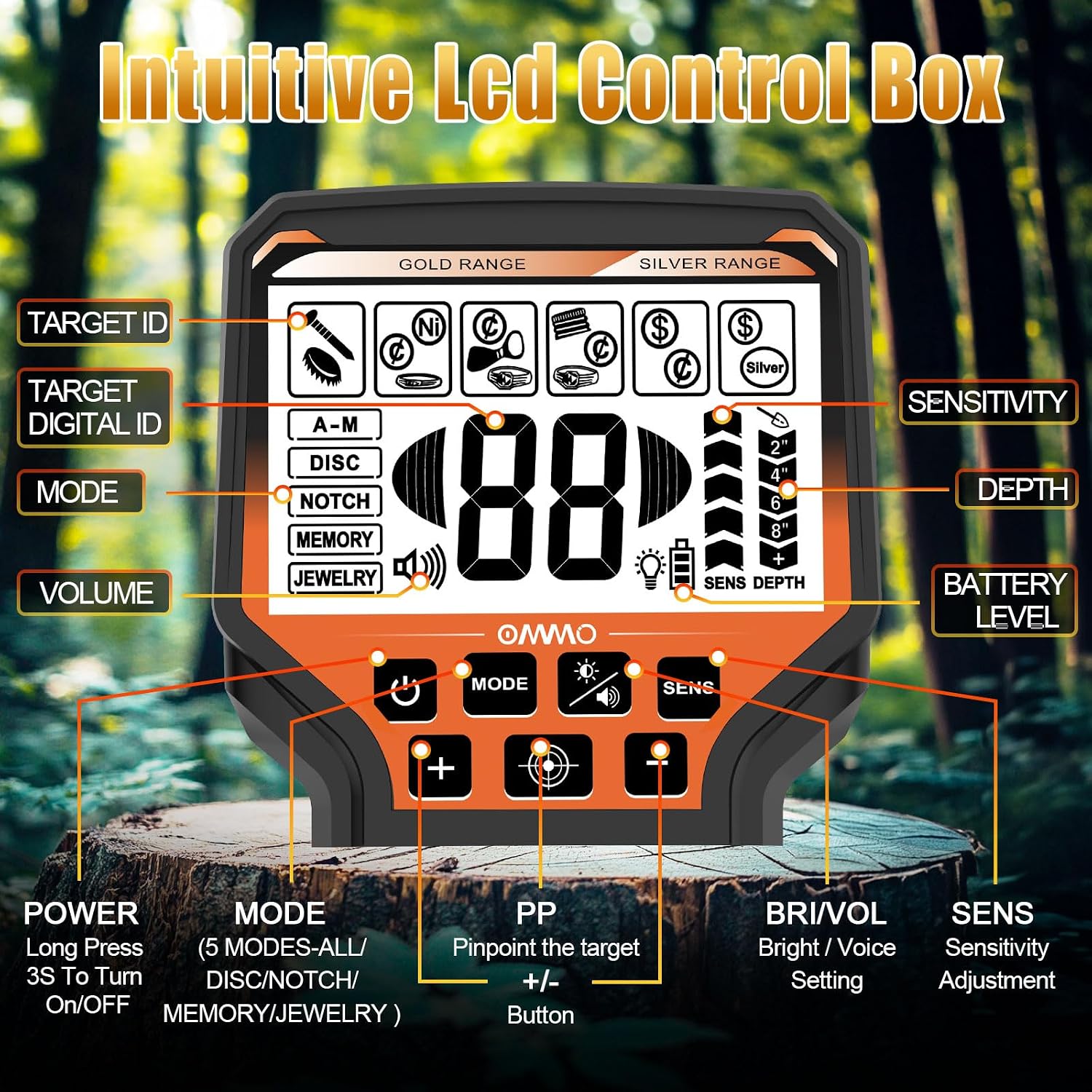
Figure 7.1: Intuitive LCD Control Box.
- POWER Button: Long press for 3 seconds to turn the detector ON/OFF.
- MODE Button: Press to cycle through the 6 detection modes (All-Metal, Disc, Notch, Memory, Jewelry, Pinpoint).
- PP (Pinpoint) Button: Press to activate Pinpoint mode for precise target location.
- BRI/VOL Button: Press to adjust screen brightness or volume. Use +/- buttons to change levels.
- SENS (Sensitivity) Button: Press to adjust sensitivity level. Use +/- buttons to change levels.
- +/- Buttons: Used to adjust sensitivity, volume, or brightness depending on the selected function.
- TARGET ID: Displays the probable type of metal detected (e.g., iron, nickel, aluminum, zinc, copper, silver, gold).
- DEPTH Indicator: Shows the estimated depth of the detected object (e.g., 2", 4", 6", 8").
- BATTERY LEVEL: Indicates the remaining battery charge.
7.2 Detection Modes
The OMMO metal detector offers 6 precise detection modes for efficient metal identification:
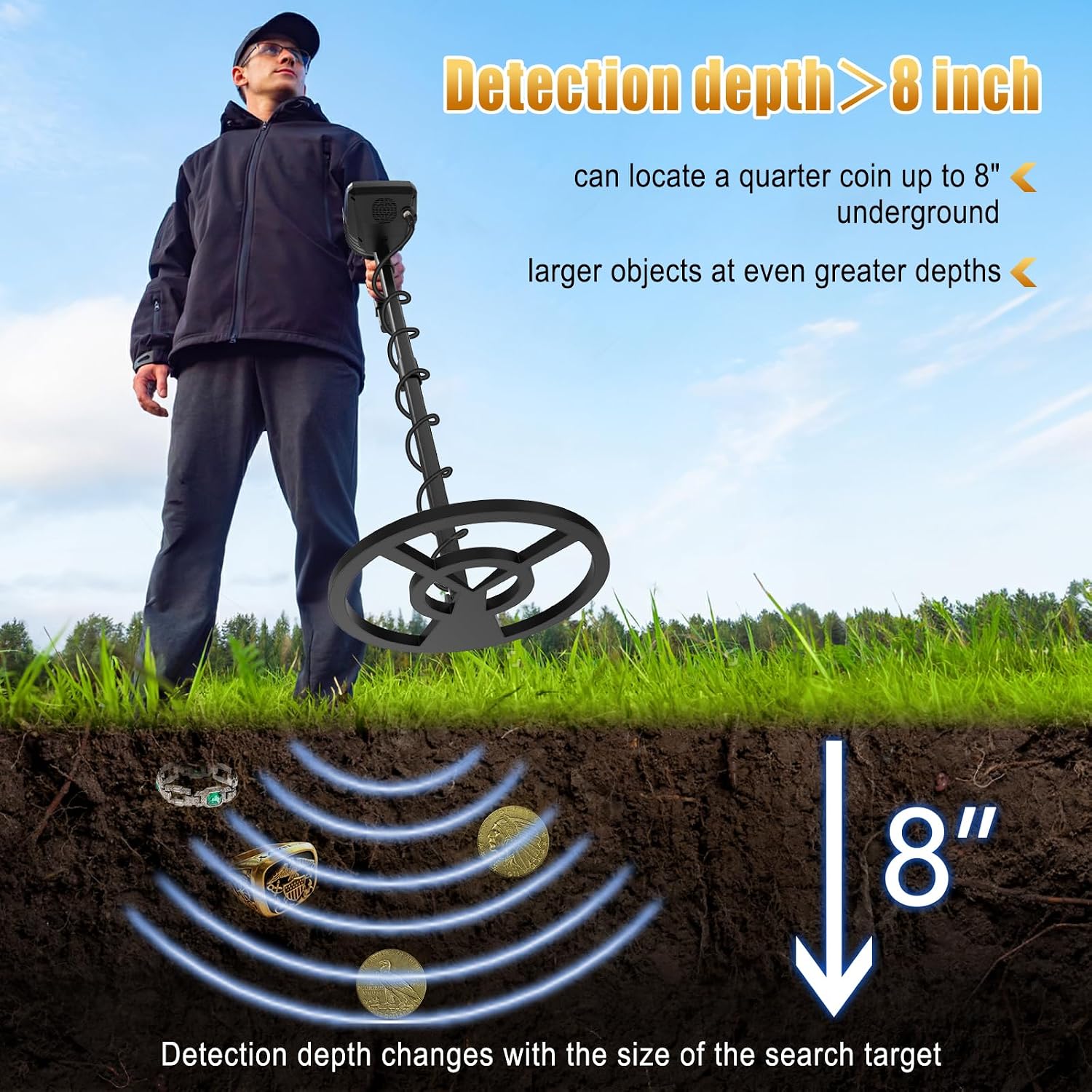
Figure 7.2: Six Operation Modes.
- All-Metal (A-M): Detects all types of metal. This mode offers the deepest detection depth and is ideal for general searching when you want to find anything metallic.
- Disc (Discrimination): Allows you to eliminate unwanted metal types (e.g., iron) from detection. This helps focus on more valuable targets.
- Notch: Provides freedom to eliminate specific unwanted metal categories by "notching" them out. More precise than Disc mode for selective rejection.
- Memory: Detects only the memorized metal type. Useful if you are specifically looking for a particular type of metal.
- Jewelry: Optimized for detecting jewelry and precious metals. This mode typically discriminates against iron and other common trash metals.
- Pinpoint (PP): Used to precisely locate the exact position of a detected target. Once a target is found in another mode, switch to Pinpoint to narrow down its location before digging.
7.3 Sensitivity Adjustment
Sensitivity controls how responsive the detector is to targets and ground conditions. Higher sensitivity increases detection depth but can also lead to more false signals in mineralized ground.
- Press the SENS button.
- Use the +/- buttons to increase or decrease the sensitivity level.
- Start with a moderate sensitivity setting and adjust as needed based on the environment. If the detector is chattering or giving false signals, reduce the sensitivity.
7.4 Depth Detection
The detector can locate small coins up to 8 inches (20.3 cm) underground and larger objects at even greater depths (up to 12 inches or 30.5 cm).

Figure 7.3: Detection Depth Capability.
The displayed depth is an estimate and can vary based on target size, composition, orientation, and ground mineralization.
7.5 Waterproof Search Coil
The 10-inch (25.4 cm) search coil is IP68 waterproof, allowing for exploration in shallow water, such as beaches, streams, or wet grass.

Figure 7.4: Waterproof Search Coil in Use.
Important: As stated in the safety warnings, the control box is NOT waterproof. Ensure the control box remains dry and above water at all times.
8. Maintenance
Proper maintenance will extend the life of your metal detector:
- Cleaning: After each use, especially in sandy or muddy conditions, wipe down the search coil and stem with a damp cloth. Do not use abrasive cleaners or solvents.
- Control Box Care: Keep the control box clean and dry. Avoid exposing it to direct sunlight for prolonged periods.
- Storage: Store the detector in a cool, dry place when not in use. If storing for an extended period, ensure the battery is partially charged (around 50%) to preserve its lifespan.
- Cable Management: Ensure the coil cable is not kinked or damaged.
9. Troubleshooting
If you encounter issues with your OMMO metal detector, refer to the following common problems and solutions:
| Problem | Possible Cause | Solution |
|---|---|---|
| Detector does not power on. | Low battery; Power button not pressed long enough. | Charge the battery fully. Long press the POWER button for 3 seconds. |
| Constant beeping or false signals. | High sensitivity; Electromagnetic interference; Mineralized ground; Testing indoors. | Reduce sensitivity. Move away from power lines or other electronic devices. Perform ground balance if available (this model does not explicitly state ground balance, so advise reducing sensitivity). Note: When testing indoors, the detector will often give false signals due to metal in walls, floors, and ceilings. Always test outdoors. |
| No detection or poor detection depth. | Low sensitivity; Incorrect mode; Coil not parallel to ground; Battery low. | Increase sensitivity. Ensure you are in an appropriate detection mode (e.g., All-Metal). Keep the search coil parallel to the ground and sweep slowly. Charge the battery. |
| LCD display is dim or unreadable. | Low battery; Brightness setting too low. | Charge the battery. Adjust brightness using the BRI/VOL button and +/- buttons. |
10. Specifications
Detailed technical specifications for the OMMO Metal Detector MD-7011:
| Feature | Specification |
|---|---|
| Model Number | MD-7011 |
| Brand | OMMO |
| Material | Plastic |
| Color | Orange |
| Power Source | Battery Powered (Rechargeable Lithium-ion) |
| Battery Type | 1 x 1800mAh Lithium-ion (included) |
| Adjustable Stem Length | 69.8 cm to 124.5 cm (approx. 27.5 to 49 inches) |
| Search Coil Size | 25.4 cm (10 inches) |
| Search Coil Waterproof Rating | IP68 |
| Max. Detection Depth (Small Objects) | Approx. 20.3 cm (8 inches) for small coins |
| Max. Detection Depth (Large Objects) | Approx. 30.5 cm (12 inches) |
| Product Dimensions (L x W x H) | 40 x 28 x 9 cm (approx. 15.7 x 11 x 3.5 inches) |
| Product Weight | 1.55 kg (approx. 3.4 lbs) |
| Detection Modes | 6 (All-Metal, Disc, Notch, Memory, Jewelry, Pinpoint) |
| Display | Large Backlit LCD |
11. Warranty and Support
OMMO is committed to providing high-quality products and excellent customer service. Your OMMO metal detector comes with a lifetime support guarantee.
- For any questions, technical assistance, or warranty claims, please contact OMMO customer support.
- Please have your model number (MD-7011) and purchase details ready when contacting support.
- Contact information can typically be found on the product packaging or the seller's page where you purchased the item.
Related documentsMD-7011


Ask a question about this manual
Ask about setup, troubleshooting, compatibility, parts, safety, or missing instructions. Manuals+ will review the question and use this page’s manual context to help answer it.