
AOPUTTRIVER AP-5000Y
AP-5000Y Digital Hot Wire Anemometer User Manual
Model: AP-5000Y | Brand: AOPUTTRIVER
1. Introduction
The AOPUTTRIVER AP-5000Y is a versatile 3-in-1 digital hot wire anemometer designed for precise measurement of wind speed, air volume (CFM/CMM), and temperature. Its retractable sensor and clear LCD display make it an essential tool for various applications, including HVAC system maintenance, environmental monitoring, and air flow analysis. This manual provides detailed instructions for the safe and effective operation of your AP-5000Y anemometer.
2. Safety Information
Please read all safety warnings and instructions carefully before operating the device to ensure safe and proper use. Keep this manual for future reference.
- Do not expose the device to extreme temperatures, high humidity, or corrosive environments.
- Avoid dropping the device or subjecting it to strong impacts.
- Do not attempt to disassemble, repair, or modify the device, as this will void the warranty and may cause damage or injury.
- Ensure the battery is correctly connected and charged before initial use.
- Disconnect the device from the power source before cleaning.
- Keep the device out of reach of children.
3. Product Overview
The AP-5000Y anemometer features a compact design with an extendable hot wire sensor. Below are the main components and controls:

Figure 3.1: AP-5000Y Digital Hot Wire Anemometer, showing the main unit, flexible probe, and Type-C charging cable.

Figure 3.2: Detailed diagram illustrating the main components: LCD screen, On/Off button, Mode button, Unit button, Data Hold button, Sensor, Sensor Protective Cover, and Connection Cable.
3.1. Key Features

Figure 3.3: Overview of the multi-functional features including 5 units, Max/Min/Avg display, LCD backlight, °C/°F option, auto power off, air flow/temperature measurement, and 360-degree bendable probe.

Figure 3.4: Illustration of the 3-in-1 capabilities: measuring wind speed (0.1-30m/s), wind temperature (0°C-45°C), and air volume (CMM 0-999900m³/min, CFM 0-999900ft³/min).
- 3-in-1 Measurement: Accurately measures wind speed, air volume (CFM/CMM), and temperature.
- Retractable Sensor: Designed for precise measurements in confined spaces, with a probe size of 298.5*40.84*23.7mm.
- LCD Display: Provides clear readings of maximum, minimum, real-time values for wind speed, air volume, temperature, and humidity. Includes dry-wet prevention touch keys, data hold, and battery level indicator.
- Type-C Connector: Enables convenient charging. (Note: Battery cable connection required before charging).
- Versatile Application: Widely used for environmental monitoring, air traffic control, and HVAC system adjustments.
4. Package Contents
Upon opening the package, please verify that all items listed below are included and in good condition:

Figure 4.1: Visual representation of the package contents, including the main unit, canvas bag, instruction manual, and data cable.
- AP-5000Y Digital Hot Wire Anemometer Unit x 1
- Canvas Bag x 1
- Instruction Manual x 1
- Type-C Data Cable x 1
5. Setup
Before first use, ensure the battery is properly connected and charged.
5.1. Battery Connection and Charging
Important: Before starting to use this anemometer, you need to connect the battery line interface!
- Use a small screwdriver to remove the battery cover.
- Connect the battery line interface.
- Tighten the battery cover.
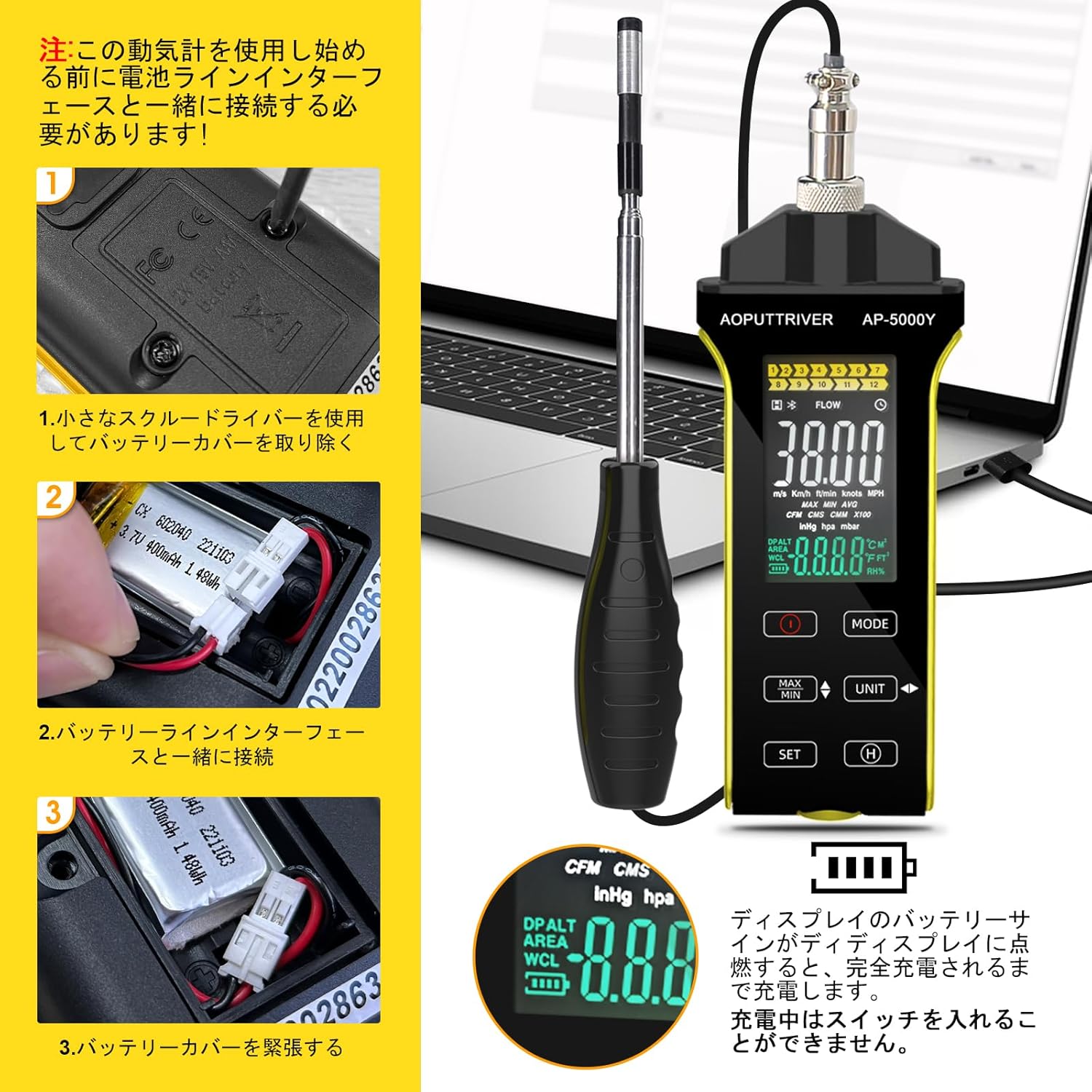
Figure 5.1: Visual guide for connecting the battery. Step 1: Remove cover. Step 2: Connect battery cable. Step 3: Replace cover. The image also shows the battery indicator on the LCD and notes that charging requires the device to be off.
The device can be charged via the Type-C connector. The display's battery sign will light up until fully charged. The device cannot be turned on while charging.
6. Operating Instructions
6.1. Power On/Off
Press the ON/OFF button to turn the device on or off.
6.2. Measurement Modes and Units
The AP-5000Y supports various measurement modes and units:
- Wind Speed: m/s, km/h, ft/min, knots, mph.
- Air Volume: CFM (ft³/min), CMM (m³/min).
- Temperature: °C / °F.

Figure 6.1: Table showing the measurement ranges, resolution, and accuracy for wind speed (TM/S, KM/H, FT/MIN, KNOTS, MPH) and air volume (CFM/CMM).
6.3. Using the Retractable Sensor
The flexible probe can be bent 360 degrees, making it easy to measure in narrow spaces such as air ducts or vents.

Figure 6.2: The extendable hot wire sensor being used to measure airflow inside a narrow duct, demonstrating its flexibility.

Figure 6.3: Illustration of the probe's extendable length and its ability to rotate 360 degrees for versatile measurement in various environments.
6.4. Display Functions
The LCD display provides comprehensive information:
- Real-time Values: Shows current wind speed, air volume, and temperature.
- MAX/MIN/AVG: Press the MAX/MIN button to cycle through maximum, minimum, and average readings for wind speed.
- Unit Conversion: Use the UNIT button to switch between different units (e.g., m/s, ft/min, °C, °F).
- Data Hold: Press the HOLD button to freeze the current reading on the display.
- Backlight: The LCD display features a backlight for visibility in low-light conditions.

Figure 6.4: The LCD display showing various measurement units and values, highlighting the backlight feature for clear visibility in both bright and dark environments.
7. Maintenance
7.1. Cleaning
- Wipe the device with a soft, dry cloth.
- Do not use abrasive cleaners, solvents, or strong chemicals.
- Keep the sensor clean and free from dust, lint, or debris to ensure accurate readings.
7.2. Storage
- Store the device in a cool, dry place away from direct sunlight and extreme temperatures when not in use.
- Ensure the sensor is retracted and protected by its cover during storage.
- If storing for an extended period, it is recommended to fully charge the battery before storage and recharge periodically to maintain battery health.
8. Troubleshooting
If you encounter any issues with your AP-5000Y anemometer, please refer to the table below for common problems and their solutions.
| Problem | Possible Cause | Solution |
|---|---|---|
| Device does not power on. | Battery not connected or discharged. | Ensure battery cable is connected (refer to Section 5.1). Charge the device using the Type-C cable. |
| Inaccurate readings. | Sensor is dirty or damaged. Incorrect measurement technique. | Clean the sensor carefully. Ensure the sensor is fully extended and positioned correctly in the airflow. Avoid obstructions. |
| Display is dim or blank. | Low battery. Backlight off. | Recharge the battery. Check if the backlight function is enabled (if applicable). |
| Cannot switch units/modes. | Buttons not pressed correctly or device frozen. | Ensure firm button presses. Try turning the device off and on again. |
9. Specifications
Detailed technical specifications for the AP-5000Y Digital Hot Wire Anemometer:
| Parameter | Value |
|---|---|
| Manufacturer | AOPUTTRIVER |
| Model | AP-5000Y |
| Wind Speed Range | 0.1 - 30 m/s |
| Wind Speed Accuracy | ±5% ±1 digit |
| Air Temperature Range | 0 - 45°C (32 - 113°F) |
| Air Volume Range (CFM/CMM) | 0 - 999900 m³/min (CMM) / ft³/min (CFM) |
| Measurement Resolution | 0.01 (for certain parameters) |
| Probe Dimensions | 298.5 x 40.84 x 23.7 mm |
| Power Source | Rechargeable Battery (Type-C charging) |
| Product Weight | 520 g |
| Package Dimensions | 31 x 18.2 x 5.7 cm |
10. Warranty and Support
AOPUTTRIVER products are manufactured to high quality standards and are backed by a manufacturer's warranty. For specific warranty terms and conditions, please refer to the documentation included with your purchase or visit the official AOPUTTRIVER website.
For technical support, troubleshooting assistance, or any inquiries regarding your AP-5000Y anemometer, please contact AOPUTTRIVER customer service through the contact information provided on the product packaging or their official website. Please retain your proof of purchase for warranty claims.
Related documentsAP-5000Y

Ask a question about this manual
Ask about setup, troubleshooting, compatibility, parts, safety, or missing instructions. Manuals+ will review the question and use this page’s manual context to help answer it.