
Introduction
Thank you for choosing the Tribesigns 63" Large Home Office Desk. This modern executive desk is designed to enhance your workspace with its sleek black finish and stylish metal legs. Crafted from high-quality engineered wood, it offers a durable and spacious surface for your work essentials. This manual provides detailed instructions for assembly, operation, maintenance, and troubleshooting to ensure you get the most out of your new desk.
Important Safety Information
Please read all safety warnings and instructions carefully before assembly and use.
- Do not place more than 200 pounds (90.7 kg) on the desk. Exceeding this weight limit may cause damage to the desk or lead to injury.
- Ensure the desk is assembled correctly and placed on a stable, level surface to prevent tipping.
- Always follow the assembly instructions carefully. Do not skip steps or use unauthorized parts.
- Keep small parts and packaging materials away from children to prevent choking hazards.
Parts List
Before beginning assembly, verify that all parts listed below are present and undamaged. If any parts are missing or damaged, please contact customer support.
| Part | Description | Quantity |
|---|---|---|
| A | Desktop Panel | 1 |
| B | Half-Moon Shaped Metal Legs | 2 |
| C | Metal Connecting Tube | 1 |
| D | Adjustable Foot Pads | 4 |
| E | Assembly Hardware Kit (Screws, Allen Wrench, etc.) | 1 Set |
Setup and Assembly
This desk is designed for easy assembly. It is recommended that two people assemble this product. All necessary tools are included in the hardware kit.
- Unpack and Identify Parts: Carefully remove all components from the packaging. Lay them out on a clean, soft surface (like a carpet or blanket) to prevent scratches. Refer to the Parts List to identify each component.
- Attach Foot Pads to Legs: Screw the adjustable foot pads (D) into the bottom of each half-moon shaped metal leg (B). Ensure they are securely tightened but allow for minor adjustments later.
- Connect Metal Legs with Tube: Align the metal connecting tube (C) between the two metal legs (B). Use the provided screws from the hardware kit (E) to secure the tube to both legs. Do not fully tighten screws yet.
- Attach Legs to Desktop: Carefully place the desktop panel (A) upside down on your soft surface. Position the assembled leg structure (B+C) onto the designated mounting points on the underside of the desktop.
- Secure Desktop: Use the remaining screws from the hardware kit (E) to firmly attach the leg structure to the desktop. Once all screws are in place, gradually tighten all screws on the entire desk structure, ensuring a snug and stable fit.
- Upright the Desk: With assistance, carefully flip the desk upright. Place it in its desired location.
- Adjust for Level: If the desk wobbles, gently adjust the foot pads (D) by twisting them until the desk is stable and level on your floor.
Operating Instructions
The Tribesigns 63" Large Home Office Desk is designed for straightforward use as a workstation. Once assembled and placed on a level surface, it is ready for immediate use.
- Placement: Position the desk in a suitable area, ensuring adequate space for movement and access to power outlets if using electronic devices.
- Weight Distribution: Distribute items evenly across the desktop surface. Avoid concentrating heavy loads in one small area.
- Cable Management: Utilize cable ties or clips (not included) to organize power cords and data cables, keeping your workspace tidy and safe.


Maintenance
Proper care will ensure the longevity and appearance of your Tribesigns desk.
- Cleaning: Wipe the desk surface with a dry cloth regularly to remove dust and light spills. For stubborn marks, use a slightly damp cloth with mild soap, then immediately dry the surface thoroughly.
- Avoid Harsh Chemicals: Do not use abrasive cleaners, strong detergents, or solvents, as these can damage the laminated finish.
- Protect Surface: Use coasters for drinks and placemats for hot items to prevent water rings or heat damage.
- Check Connections: Periodically check all screws and connections to ensure they remain tight. Retighten if necessary to maintain stability.

Troubleshooting
If you encounter any issues with your desk, refer to the following common problems and solutions:
| Problem | Possible Cause | Solution |
|---|---|---|
| Desk is wobbly/unstable | Uneven floor; loose screws; incorrect assembly. | Adjust the foot pads until the desk is level. Check and tighten all assembly screws. Review assembly steps. |
| Parts missing from package | Packaging error. | Contact Tribesigns customer support with your purchase details and the specific missing parts. |
| Surface scratches easily | Heavy objects dragged across surface; sharp objects. | Use desk mats or protective pads for items that may scratch the surface. The desk features a scratch-resistant finish, but extreme force can still cause damage. |
If the problem persists after attempting these solutions, please contact Tribesigns customer support for further assistance.
Specifications
| Attribute | Detail |
|---|---|
| Brand | Tribesigns |
| Model Name | Modern Executive Desk |
| Model Number | JL-XK00425CD-HQ |
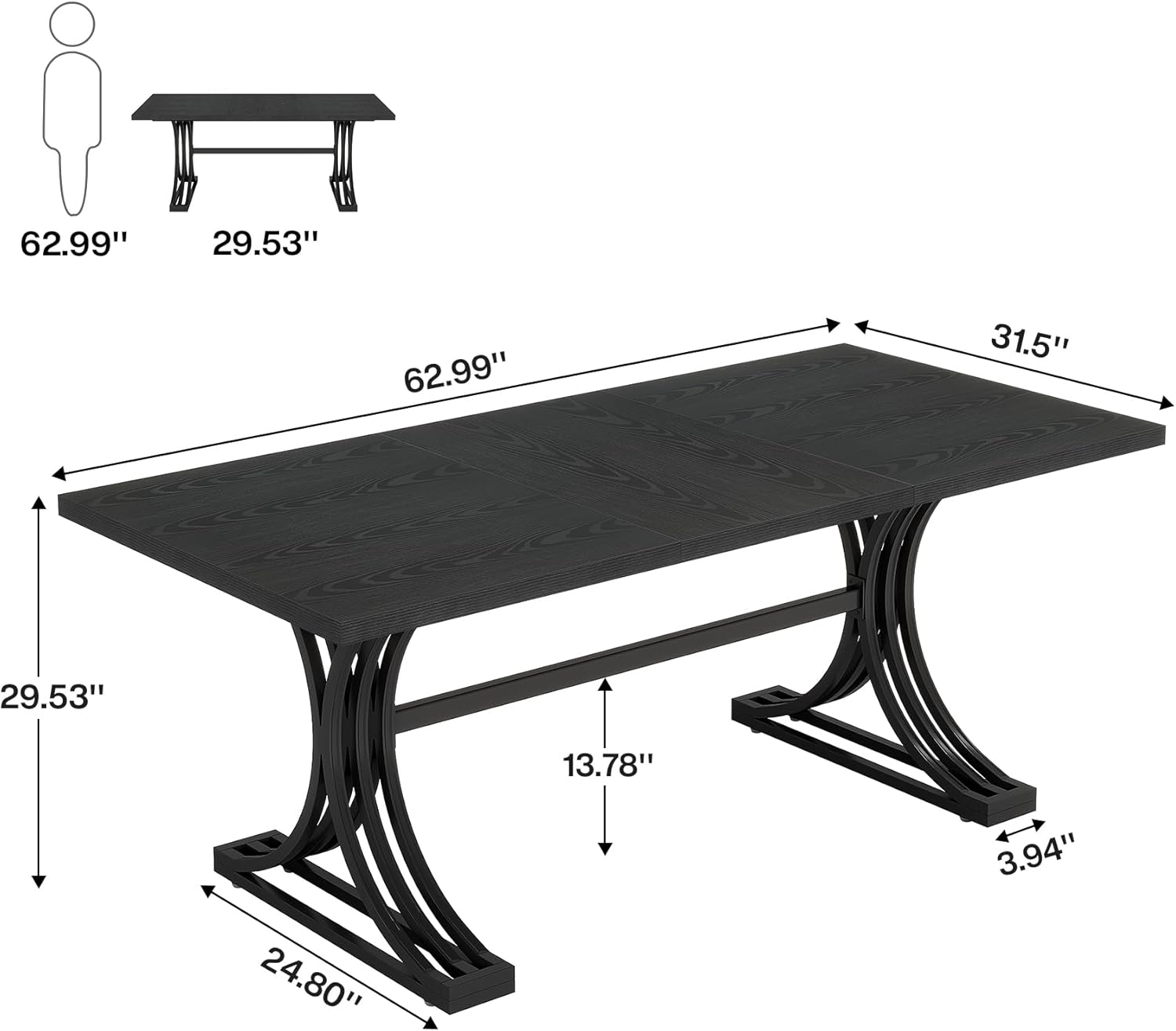
| Product Dimensions (D x W x H) | 31.5" x 62.99" x 29.53" (80cm x 160cm x 75cm) |
| Item Weight | 57 Pounds (25.85 kg) |
| Color | Black |
| Style | Mid-Century Modern |
| Top Material Type | Engineered Wood |
| Base Material | Metal |
| Finish Type | Laminated |
| Special Feature | Scratch Resistant |
| Maximum Weight Recommendation | 200 Pounds (90.7 kg) |
| Assembly Required | Yes |
| Recommended Number of People for Assembly | 2 |
Warranty and Support
This Tribesigns product comes with a Limited Warranty. For specific details regarding warranty coverage, duration, and terms, please refer to the warranty information included with your purchase or visit the official Tribesigns website.
For any questions, missing parts, or assistance with assembly or troubleshooting that is not covered in this manual, please contact Tribesigns customer support:
- Online Support: Visit the Tribesigns Store on Amazon for FAQs and contact options.
- Email Support: Refer to your purchase documentation for the customer service email address.
Please have your model number (JL-XK00425CD-HQ) and purchase date ready when contacting support.


