
VIHELM EZ9902
VIHELM EZ9902 3-in-1 pH/EC/Temperature Meter User Manual
Model: EZ9902 | Brand: VIHELM
1. Introduction
The VIHELM EZ9902 is a versatile 3-in-1 meter designed for accurate measurement of pH, Electrical Conductivity (EC), and Temperature in various liquid samples. This compact and portable device is ideal for applications in water quality testing, aquariums, hydroponics, pools, spas, and laboratory use. It features automatic temperature compensation (ATC) for reliable readings across different temperatures, a hold function to freeze measurements, and an auto-off function to conserve battery life.
2. Safety Information
- Keep the device out of reach of children.
- Do not attempt to disassemble or modify the meter, as this may void the warranty and cause damage.
- Handle the electrode with care to prevent damage.
- Ensure proper disposal of batteries according to local regulations.
- Avoid exposing the meter to extreme temperatures or direct sunlight for prolonged periods.
3. Package Contents
Verify that all items are present in the package:
- VIHELM EZ9902 3-in-1 Meter x1
- User Manual x1
Note: LR44 button cell batteries are not included and must be purchased separately.
4. Product Overview
Familiarize yourself with the components of your EZ9902 meter:
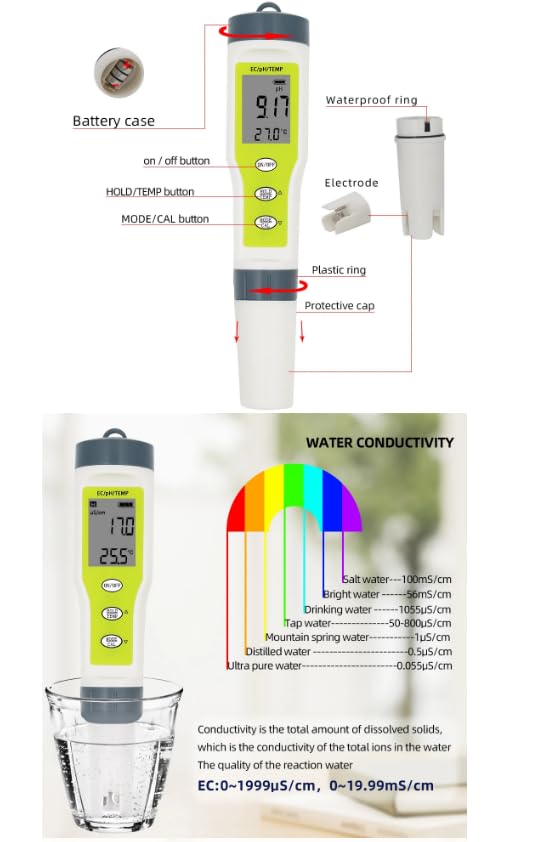
Image: Labeled diagram of the EZ9902 meter, showing the ON/OFF button, HOLD/TEMP button, MODE/CAL button, display, electrode, waterproof ring, plastic ring, and protective cap.
- ON/OFF Button: Powers the device on or off.
- HOLD/TEMP Button: Freezes the current reading on the display. Also used to switch temperature units (°C/°F).
- MODE/CAL Button: Switches between measurement modes (pH, EC, Temperature) and initiates calibration.
- LCD Display: Shows pH, EC, and temperature readings.
- Electrode: The sensing probe for pH and EC measurements.
- Protective Cap: Covers and protects the electrode when not in use.
- Battery Case: Located at the top, houses the LR44 batteries.
5. Specifications
| Measuring Range pH | 0.00 - 14.00 pH |
| Measuring Range EC | 0 - 19990 µS/cm |
| Measuring Range Temperature | 0.1 - 60.0 °C (32.0 - 140.0 °F) |
| Resolution pH | 0.01 pH |
| Resolution EC | 1 µS/cm |
| Resolution Temperature | 0.1 °C / 0.1 °F |
| Accuracy pH | ±0.01 pH |
| Accuracy EC | ±2% |
| Accuracy Temperature | ±0.5 °C |
| Calibration pH | 3-point automatic (6.86, 4.00, 9.18 pH) |
| Calibration EC | 1-point automatic (1413 µS/cm) |
| Automatic Temperature Compensation (ATC) | Yes |
| Auto Shut-off | 5 minutes of inactivity |
| Batteries | 3 x 1.5V LR44 button cells (not included) |
| Dimensions | 7.2 x 1.45 x 1.45 inches (183 x 37 x 37 mm) |
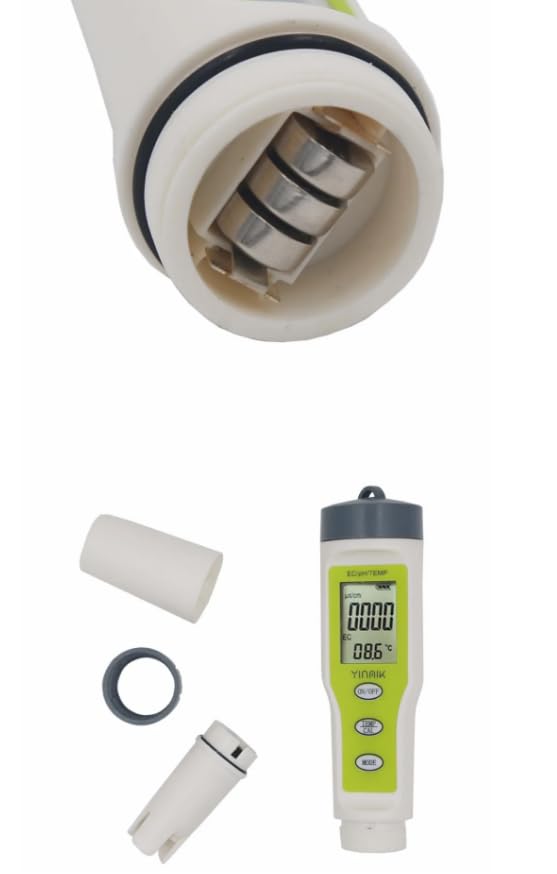
Image: The EZ9902 meter displaying its dimensions and the functions of its buttons (on/off, temp/CAL, mode).
6. Setup
6.1 Battery Installation
- Unscrew the battery case cover at the top of the meter.
- Insert three 1.5V LR44 button cell batteries, ensuring correct polarity (+/-).
- Securely screw the battery case cover back on.
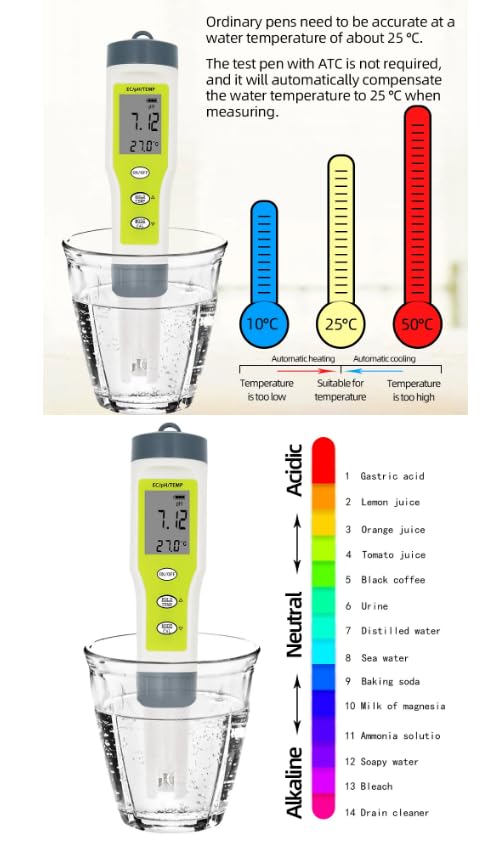
Image: Close-up view of the EZ9902 meter's battery compartment with batteries inserted, and the meter itself with its protective cap and a separate ring.
6.2 Initial Preparation
- Remove the protective cap from the electrode.
- Rinse the electrode with distilled water before first use and after each use.
7. Operation
7.1 Power On/Off
- Press the ON/OFF button to turn the meter on.
- Press the ON/OFF button again to turn the meter off. The meter will also automatically shut off after 5 minutes of inactivity.
7.2 Taking Measurements
- Turn on the meter.
- Immerse the electrode into the sample solution up to the immersion line.
- Gently stir the meter and wait for the reading to stabilize on the LCD display. The pH, EC, and temperature values will be shown simultaneously.
- After measurement, rinse the electrode with distilled water and replace the protective cap.
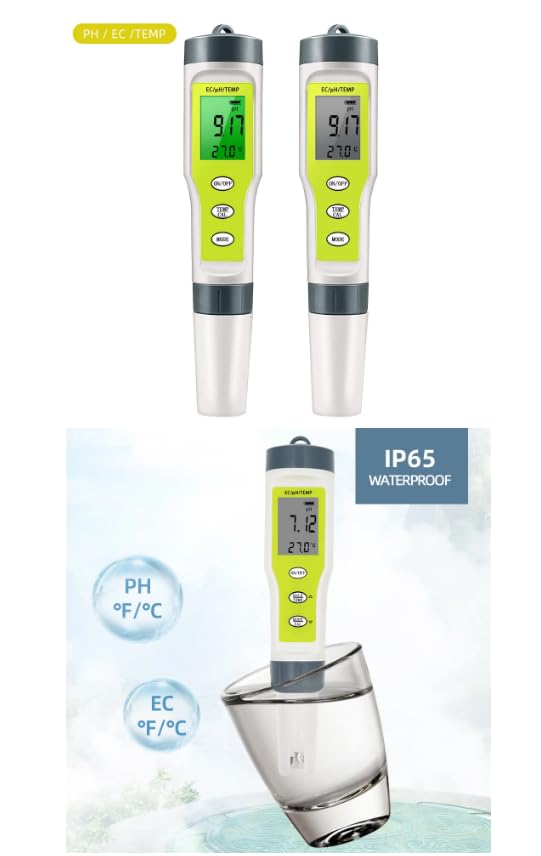
Image: Two EZ9902 meters, one showing a pH reading of 7.17 and temperature of 27.0°C, and another demonstrating its IP65 waterproof rating by being partially submerged in water.
7.3 Hold Function
- While measuring, press the HOLD/TEMP button to freeze the current reading on the display.
- Press the HOLD/TEMP button again to release the hold and resume live readings.
7.4 Temperature Unit Switching
- With the meter on, press and hold the HOLD/TEMP button for approximately 3 seconds to switch between Celsius (°C) and Fahrenheit (°F).
8. Calibration
Regular calibration ensures the accuracy of your meter. Use fresh calibration solutions for best results.
8.1 pH Calibration (3-point automatic)
- Prepare pH 6.86, pH 4.00, and pH 9.18 buffer solutions.
- Turn on the meter and immerse the electrode into the pH 6.86 buffer solution.
- Press and hold the MODE/CAL button until the display shows "CAL". Release the button.
- The meter will automatically recognize the buffer solution and calibrate. Wait for the reading to stabilize and for the display to indicate successful calibration (e.g., "END").
- Rinse the electrode with distilled water.
- Repeat steps 2-5 for pH 4.00 and pH 9.18 buffer solutions. It is recommended to calibrate in the order of 6.86, then 4.00, then 9.18 for optimal accuracy.
8.2 EC Calibration (1-point automatic)
- Prepare a 1413 µS/cm EC standard solution.
- Turn on the meter and switch to EC mode if necessary (though the meter displays both, ensure EC is the primary focus for calibration).
- Immerse the electrode into the 1413 µS/cm standard solution.
- Press and hold the MODE/CAL button until "CAL" appears. Release the button.
- The meter will automatically recognize the solution and calibrate. Wait for the reading to stabilize and for the display to indicate successful calibration.
- Rinse the electrode with distilled water.
9. Maintenance
9.1 Electrode Cleaning
- Always rinse the electrode with distilled water before and after each use to prevent contamination.
- If the electrode becomes heavily soiled, gently clean it with a soft brush and a mild detergent solution, then rinse thoroughly with distilled water.
9.2 Storage
- Always replace the protective cap after use to prevent the electrode from drying out. For pH electrodes, it is often recommended to keep the electrode tip moist with a few drops of storage solution or pH 4.0 buffer solution inside the cap.
- Store the meter in a cool, dry place away from direct sunlight.
9.3 Battery Replacement
- When the display becomes dim or the meter fails to power on, replace the LR44 batteries as described in Section 6.1.
10. Troubleshooting
| Problem | Possible Cause | Solution |
|---|---|---|
| Inaccurate readings | Uncalibrated meter, dirty electrode, expired calibration solution, air bubbles on electrode. | Calibrate the meter, clean the electrode, use fresh calibration solutions, gently tap the meter to dislodge bubbles. |
| Meter does not turn on | Dead batteries, incorrect battery installation. | Replace batteries, check battery polarity. |
| Readings fluctuate excessively | Damaged electrode, interference, unstable sample. | Ensure electrode is not damaged, avoid strong electromagnetic fields, ensure sample is still. |
| Auto-off not working | Internal malfunction. | Contact customer support. |
11. Warranty and Support
VIHELM products are manufactured to high-quality standards. This product comes with a limited warranty against defects in materials and workmanship. For specific warranty details, technical support, or service inquiries, please refer to the warranty card included with your purchase or contact your retailer.
Ask a question about this manual
Ask about setup, troubleshooting, compatibility, parts, safety, or missing instructions. Manuals+ will review the question and use this page’s manual context to help answer it.