
1. Important Safety Information
Please read all instructions carefully before assembly and use. Failure to follow these instructions may result in injury or damage to the product.
- Always keep children and pets away from the desk when in motion.
- Use the child lock feature (if available) to prevent unintended height adjustments.
- Be aware of the anti-collision feature; do not force the desk to move if it encounters an obstacle.
- Ensure all cables are properly managed to avoid entanglement during height adjustments.
- Do not overload the desk. The maximum weight capacity is 180 lbs.
- Only use the desk on a level surface.
2. Package Contents
Verify that all components are present before beginning assembly. If any parts are missing or damaged, please contact customer support.
- Desktop (0.6" thick, Rustic Brown)
- Desk Legs (2)
- Foot Pads (2)
- Crossbar/Frame Assembly
- Control Panel with LED Touchscreen
- Power Adapter and Cable
- Headphone Hook
- Assembly Hardware (screws, L-shaped installation tools)
- User Manual
3. Assembly Instructions
The DEVAISE ASJZ021 desk is designed for quick and simple assembly, typically within 15 minutes. All holes are pre-drilled, and accessories are clearly labeled.
Tools Required:
- Phillips head screwdriver (not included)
- L-shaped installation tools (included)
Step-by-Step Assembly:
- Unpack Components: Carefully remove all parts from the packaging and lay them out on a clean, soft surface to prevent scratches.
- Attach Foot Pads: Secure the foot pads to the bottom of each desk leg using the provided screws.
- Assemble Frame: Connect the desk legs to the crossbar/frame assembly. Ensure all connections are tight and secure.
- Attach Desktop: Carefully place the desktop onto the assembled frame. Align the pre-drilled holes on the desktop with the frame. Secure the desktop to the frame using the provided screws.
- Install Control Panel: Mount the LED touchscreen control panel to the underside of the desktop in the designated location. Connect the control panel cable to the motor.
- Connect Power: Plug the power adapter into the desk's motor and then into a wall outlet.
- Attach Headphone Hook: Install the headphone hook to the side of the desk as desired.

Image: Exploded view of desk components illustrating the 15-minute quick installation process.
4. Operating Instructions
The DEVAISE ASJZ021 Electric Standing Desk features a tri-motor system for smooth and quiet height adjustments and a smart LED touchscreen controller.
Control Panel Overview:

Image: Detailed view of the multi-function control panel with LED display, up/down arrows, memory presets (1, 2, 3), and 'S' button.
- LED Display: Shows the current desk height in real-time.
- Up/Down Arrows (▲ / ▼): Press and hold to adjust the desk height manually. Release to stop at the desired height.
- Memory Presets (1, 2, 3): Store and recall up to three personalized height settings.
- 'S' Button: Used for saving memory presets and activating the child lock function.
Height Adjustment:
The desk can be adjusted between 28.35 inches (sitting height) and 46.45 inches (standing height).

Image: Comparison of the desk at its minimum height of 28.35 inches and maximum height of 46.45 inches.
- Manual Adjustment: Press and hold the ▲ (Up) or ▼ (Down) button until the desk reaches your desired height.
- Setting Memory Presets:
- Adjust the desk to your preferred height using the Up/Down buttons.
- Press the 'S' button. The LED display will show 'S-'.
- Immediately press one of the memory buttons (1, 2, or 3). The display will show 'S-1', 'S-2', or 'S-3' to confirm the height is saved.
- Recalling Memory Presets: Simply press the corresponding memory button (1, 2, or 3) once. The desk will automatically move to the saved height.
Quiet Operation:
The tri-motor system operates quietly, typically below 50dB, ensuring minimal disruption in your workspace.

Image: Graphic illustrating the quiet operation of the desk, comparing its sound level (below 50dB) to soft breaths (10dB), whisper (25dB), and car horns (80dB).
5. Specifications
Detailed technical specifications for the DEVAISE ASJZ021 Electric Standing Desk.
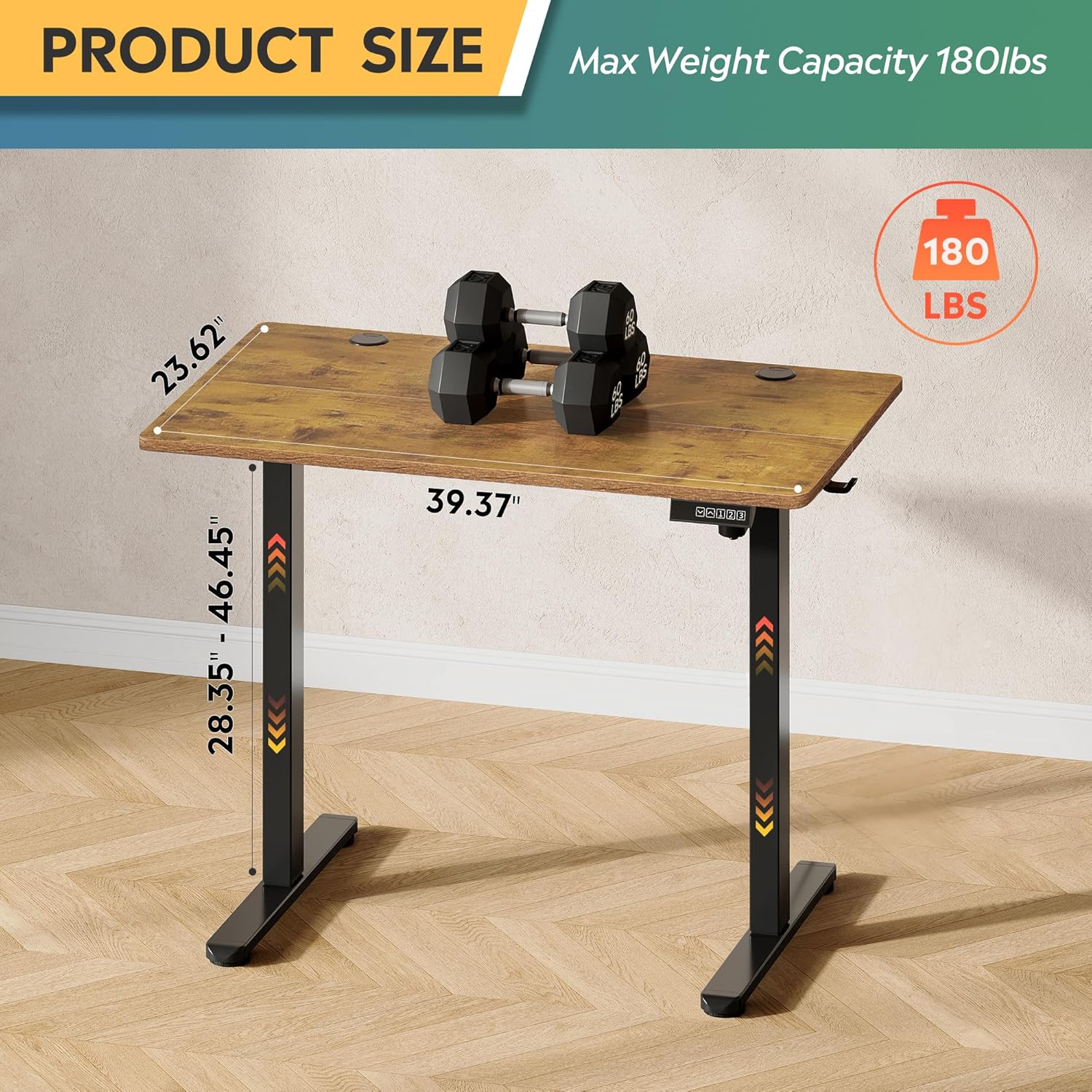
Image: Product dimensions (39.37"W x 23.62"D) and height range (28.35"-46.45"), highlighting the 180 lbs maximum weight capacity.
| Feature | Specification |
|---|---|
| Model Number | ASJZ021 |
| Product Dimensions (D x W x H) | 23.62"D x 39.37"W x 28.34"H |
| Minimum Height | 28.35 Inches |
| Maximum Height | 46.45 Inches |
| Tabletop Thickness | 0.6 Inches |
| Maximum Weight Recommendation | 180 Pounds |
| Item Weight | 37 Pounds |
| Lifting Mechanism | Electric (Tri-motor system) |
| Number of Height Positions | 3 Memory Presets |
| Noise Level | <50dB |
| Top Material Type | Engineered Wood |
| Base Material | Iron |
| Color | Rustic Brown (Desktop), Black (Base) |
| Special Features | Adjustable Height, Compact, Electric, LED Touchscreen |
6. Maintenance
Regular maintenance helps ensure the longevity and optimal performance of your standing desk.
- Cleaning: Wipe the desktop and frame with a soft, damp cloth. Avoid harsh chemicals or abrasive cleaners that could damage the finish.
- Cable Management: Periodically check and organize cables to prevent them from snagging or getting pinched during height adjustments.
- Screw Tightness: Occasionally check all screws and bolts to ensure they remain tight. Retighten if necessary.
- Motor Inspection: Listen for any unusual noises during operation. If you notice any issues, refer to the troubleshooting section or contact support.
7. Troubleshooting
If you encounter any issues with your DEVAISE ASJZ021 Electric Standing Desk, please refer to the following common problems and solutions.
| Problem | Possible Cause | Solution |
|---|---|---|
| Desk does not move | Power cable disconnected; Overload; Motor error | Check power connections. Reduce weight on desk. Unplug for 10 seconds, then plug back in. |
| Uneven height adjustment | Obstruction; Sensor issue | Clear any obstructions. Perform a reset (refer to control panel instructions or contact support). |
| Display shows an error code | Specific system error | Note the error code and consult the DEVAISE support website or contact customer service for specific guidance. |
| Desk stops moving unexpectedly | Anti-collision activated; Overheating protection | Check for obstructions. Allow the motor to cool down for 20 minutes before attempting to operate again. |
If the problem persists after attempting these solutions, please contact DEVAISE customer support.
8. Warranty and Support
DEVAISE is committed to providing quality products and customer satisfaction. Your purchase is backed by our support services.
- Customer Support: For any questions, concerns, or assistance with assembly or operation, please contact our 24/7 US-based support team. Refer to your purchase documentation for contact details.
- Warranty Information: Specific warranty terms and conditions may vary. Please refer to the warranty card included with your product or visit the official DEVAISE website for detailed information.
