
AWithZ P90C
AWithZ P90C Capacitor Battery Spot Welder User Manual
Model: P90C
1. Introduction and Safety Guidelines
This manual provides essential instructions for the safe and effective operation of your AWithZ P90C Capacitor Battery Spot Welder. Please read this manual thoroughly before use and retain it for future reference.
1.1 Important Safety Information
- Always wear appropriate personal protective equipment, including safety glasses and gloves, when operating the spot welder.
- Familiarize yourself with the minimum gear settings before attempting complex welds. Practice on scrap materials first.
- The spot welder utilizes a built-in Farad capacitor and does not store power. It must be connected to a power source during operation.
- Use only the provided 15A charger and adapter for power connection.
- The machine is equipped with high-temperature protection. If the unit overheats during prolonged use, it may temporarily shut down. Allow the machine to cool down before resuming operation.
2. Package Contents
Verify that all items listed below are included in your package:
- AWithZ P90C Spot Welding Machine
- 15A Charger
- Foot Pedal (2m long)
- 3 Pairs of Replacement Welding Pins
- 5-meter Nickel Plated Sheet (thickness 0.15mm)
- 18650 Battery Holder
- File
- User Manual

Image 2.1: The AWithZ P90C Spot Welder with its complete set of accessories, including welding pens, foot pedal, charger, nickel strip, battery holder, and replacement tips.
3. Product Features
The AWithZ P90C Spot Welder is designed for efficient and precise battery pack building and repair, offering a range of features for both professionals and DIY enthusiasts.
- Quick Start: The unit can be ready for welding within 5 minutes of connecting to power, indicated by an "OK" message on the display. It supports a wide voltage input of 100-240V.
- Dual Operating Modes: Choose between Automatic Mode for quick operation or Foot Pedal Mode for precise positioning.
- Wide Application Range: Suitable for welding various battery types, including 18650, 14500, 21700, 26650, 326650, and LiFePO4 cells. It can also weld different materials such as 1.2mm nickel-plated sheet, 1.2mm stainless steel sheet, 1.2mm iron sheet, 0.3mm pure nickel sheet, and 0.2mm copper sheet.
- Professional Performance: Equipped with two built-in super energy storage capacitors, providing a maximum pulse welding power of 69.2KW. Features a new MOS design for stable operation without circuit interference.
- Flexible Welding Pens: The 60cm long welding pen leads are soft and flexible, allowing for easy maneuverability. The welding pins are replaceable, and 6 pairs are included.
- Adjustable Gears: Offers 999 adjustable gear settings to accommodate different materials and welding requirements.

Image 3.1: The AWithZ P90C Capacitor Battery Spot Welder, showcasing its compact design with integrated display, welding pen ports, and foot pedal connection.
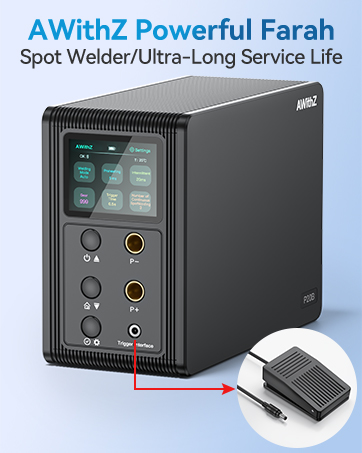
Image 3.2: An internal view highlighting the two high-quality 3000F energy storage capacitors, crucial for the welder's powerful performance.

Image 3.3: Illustration of the welder's capability to handle various materials, including aluminum (0.6mm max), copper (0.5mm max), and other hardware accessories.

Image 3.4: A visual representation of the six core adjustable elements for precision spot welding, including welding method, preheat, intermittence, gear position, trigger time, and number of connections.
4. Setup Instructions
Follow these steps to prepare your AWithZ P90C Spot Welder for operation:
- Charge and Activate: Connect the spot welder to a power source using the provided 15A charger. Allow it to charge for approximately 5 minutes until the display shows "OK" for spot welding. This activates the device.
- Connect Welding Pens: Firmly insert the welding pens into the designated P- and P+ ports on the front of the unit. Ensure a secure connection to prevent welding issues.
- Connect Foot Pedal (Optional): If using the foot pedal mode, connect the foot pedal cable to the "Trigger interface" port.
- Prepare Workpiece: Ensure the surfaces to be welded are clean and free of oxides or contaminants.

Image 4.1: A visual guide demonstrating the setup process: charging, connecting welding pens, setting gear/mode, and starting welding.
5. Operating Modes
The AWithZ P90C offers two distinct operating modes:
5.1 Automatic Mode
In Automatic Mode, the spot welder initiates a weld cycle automatically once the welding pens make contact with the material. This mode is suitable for repetitive tasks where precise timing is less critical.
- Set the desired gear level on the display.
- Place the welding pens firmly on the material. The welder will automatically detect contact and perform the weld.
5.2 Foot Pedal Mode
Foot Pedal Mode provides greater control over the welding process, allowing for precise positioning before initiating the weld. This is ideal for intricate work or when both hands are needed to hold the workpiece.
- Ensure the foot pedal is connected to the "Trigger interface" port.
- Set the desired gear level on the display.
- Position the welding pens precisely on the material.
- Gently press the foot pedal once to trigger a single weld output.

Image 5.1: An operator using the AWithZ P90C spot welder in foot pedal mode to precisely weld battery cells, demonstrating hands-free triggering.
6. Welding Guidelines
6.1 Material Compatibility and Gear Settings
The AWithZ P90C is versatile, supporting various materials and thicknesses. Optimal welding results depend on selecting the correct gear setting (000-999) for the specific material and thickness.
- Copper sheet: up to 0.2mm
- Pure nickel sheet: up to 0.3mm
- Nickel-plated sheet: up to 1.2mm
- Stainless steel sheet: up to 1.2mm
- Iron sheet: up to 1.2mm
Experiment with different gear settings on scrap material to find the ideal configuration for your specific welding task. Start with lower settings and gradually increase until a strong weld is achieved.
6.2 Welding Pen Tip Installation
Ensure welding pen tips are installed firmly. Loose tips can lead to inconsistent welds or prevent welding altogether.
7. Maintenance
7.1 Welding Pen Tip Care
Over time, welding pen tips can oxidize, leading to excessive sparking or poor weld quality. If you observe excessive sparks, use the provided file to gently friction the tips. This removes oxidation and restores conductivity.
7.2 Replacing Welding Pins
The welding pins are designed to be replaceable. If pins become worn or damaged, they can be easily swapped out with the included replacement pairs. Ensure new pins are installed firmly.
8. Troubleshooting
8.1 Excessive Sparking During Welding
If you experience excessive sparking, consider the following:
- Gear Setting Too High: Reduce the gear setting.
- Oxidized Welding Pen Tips: Use the provided file to clean the welding pen tips.
- Loose Welding Pen Tips: Ensure the tips are firmly installed.
8.2 Welder Stops Working / No Output
If the spot welder ceases operation, it may be due to overheating:
- The machine has a built-in high-temperature protection mechanism. If used continuously for extended periods, it may temporarily shut down.
- Allow the machine to cool down completely before attempting to restart.
8.3 Inconsistent or No Weld
- Ensure welding pen tips are firmly installed.
- Check that the material surfaces are clean and free of oxidation.
- Adjust the gear setting to a higher level if the weld is too weak.
9. Specifications
| Model | P90C |
| Manufacturer | AWithZ |
| Item Weight | 11.79 pounds (5.35 kg) |
| Package Dimensions | 10.12 x 9.88 x 6.18 inches (25.7 x 25.1 x 15.7 cm) |
| Power Source | AC (100-240V input) |
| Max Pulse Welding Power | 69.2KW |
| Adjustable Gears | 999 levels |
| Welding Pen Lead Length | 60 cm |

Image 9.1: Detailed dimensions and weight of the AWithZ P90C spot welder for reference.
10. Warranty and Support
AWithZ is committed to providing high-quality products and customer satisfaction.
10.1 Warranty Information
The AWithZ P90C Capacitor Battery Spot Welder comes with an exceptional 18-month warranty from the date of purchase. This warranty covers manufacturing defects and ensures reliable operation under normal use conditions.
10.2 Customer Support
For any questions, technical assistance, or warranty claims, please contact our user-centered customer support team. We are always here to help.
Email: slingkeji@163.com
Related documentsP90C


Ask a question about this manual
Ask about setup, troubleshooting, compatibility, parts, safety, or missing instructions. Manuals+ will review the question and use this page’s manual context to help answer it.