Product Overview
This remote control is a dedicated replacement for various Audio/Projector/TV and Air Conditioner units, specifically compatible with NOMA models 043-8610-8, 043-0936-2, and 043-6131-0. It is designed to provide essential control functions without requiring complex programming or setup.
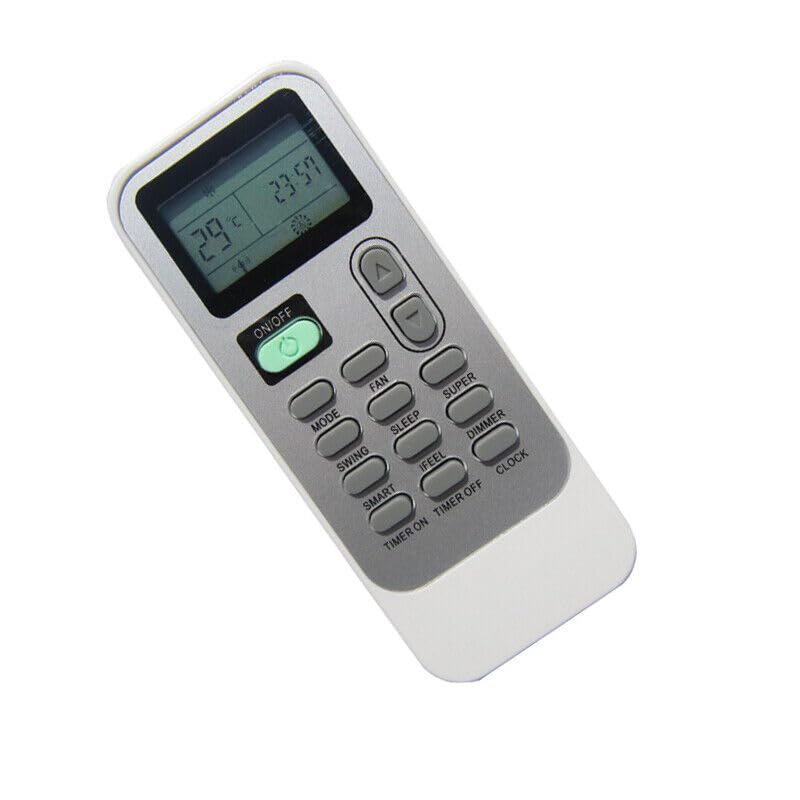
Figure 1: Front view of the replacement remote control, displaying its buttons and digital screen.
The remote features a compact design, made from durable ABS/Plastic material, ensuring comfortable handling and longevity. Its stable performance allows for a farther transmitting distance compared to some original remotes. Please note that as a replacement unit, some advanced functions of the original remote may not be supported.
Setup
Battery Installation
- Locate the battery compartment on the back of the remote control.
- Slide open the battery compartment cover.
- Insert two (2) AAA batteries (not included), ensuring the correct polarity (+ and -) as indicated inside the compartment.
- Close the battery compartment cover securely.
No programming or setup is required for this replacement remote. Once batteries are installed, it is ready for use with compatible devices.
Operating Instructions
This remote control is designed for straightforward operation. Point the remote directly at the infrared receiver of your device (Audio/Video Player, TV, AC, or Projector).
Key Functions
| Button | Function |
|---|---|
| ON/OFF | Powers the device on or off. |
| MODE | Cycles through operating modes (e.g., Cool, Heat, Fan, Dry for AC units). |
| FAN | Adjusts fan speed. |
| TEMP ▲/▼ | Increases or decreases temperature settings. |
| SWING | Controls the swing function of air vents (for AC units). |
| SLEEP | Activates sleep mode, often adjusting temperature for comfort during sleep. |
| TIMER ON/OFF | Sets a timer for the device to turn on or off. |
| CLOCK | Sets the current time on the remote's display. |
Note: Specific button functions may vary slightly depending on the original device's capabilities and the remote's compatibility. Not all buttons may be functional for every device.
Maintenance
- Cleaning: Wipe the remote control with a soft, dry cloth. Do not use liquid cleaners or abrasive materials.
- Battery Replacement: Replace batteries when the remote's range decreases or if the display becomes dim. Always replace both batteries at the same time.
- Storage: If the remote will not be used for an extended period, remove the batteries to prevent leakage and damage. Store in a cool, dry place.
Troubleshooting
- Remote not responding:
- Check if batteries are inserted correctly with the correct polarity.
- Replace old batteries with new ones.
- Ensure there are no obstructions between the remote and the device's infrared receiver.
- Confirm you are within the effective operating range.
- Some functions do not work:
- This is a replacement remote. It may not support all advanced or specific functions of the original remote control. This is not a defect.
- Verify that the function you are trying to use is supported by your specific device model.
- Display is dim or blank:
- Batteries are low. Replace them.
Specifications
| Feature | Detail |
|---|---|
| Product Type | Replacement Remote Control |
| Compatible Devices | Audio/Video Players, TVs, AC Units, Projectors (specifically NOMA models 043-8610-8, 043-0936-2, 043-6131-0) |
| Material | ABS/Plastic |
| Power Source | 2 x AAA Batteries (not included) |
| Color | Random (typically black or white) |
| Special Feature | Digital Display |
Warranty and Support
This product is a replacement remote control. For specific warranty information, please refer to the seller's policy at the point of purchase. As a generic replacement, direct manufacturer warranty may not apply.
If you encounter issues not covered in this manual or require further assistance, please contact the seller or retailer from whom you purchased the product. Providing your original remote part number or unit model can assist in resolving compatibility queries.


