
1. Introduction
Thank you for choosing the Haier H6 ID46G3HTB Oven. This manual provides essential information for the safe and efficient operation, maintenance, and troubleshooting of your new appliance. Please read this manual thoroughly before using the oven and keep it for future reference.
The Haier H6 ID46G3HTB is a high-capacity, energy-efficient oven designed for modern kitchens. It features a generous 78-liter net capacity, an A++ energy rating, and an advanced Graphic UX touch display for intuitive control. With 17 distinct cooking functions, including specialized options like Airfry, and full Wi-Fi and Bluetooth connectivity, this oven offers versatility and convenience. Its Aquativa/Hydrolytic self-cleaning system and SoftClose door enhance user experience and simplify maintenance.

Figure 1.1: Front view of the Haier H6 ID46G3HTB Oven.
This image shows the sleek black design of the Haier H6 ID46G3HTB oven. The front panel features a clear digital display at the top, indicating settings and temperature. Below the display is the large glass oven door, providing a view into the cooking cavity. The overall aesthetic is modern and minimalist, designed to integrate seamlessly into contemporary kitchen environments.
2. Safety Information
Always adhere to the following safety precautions to prevent injury or damage to the appliance.
- Electrical Safety: Ensure the oven is properly grounded. Do not use extension cords or adapters. Disconnect power before cleaning or servicing.
- Hot Surfaces: The oven and its accessories become very hot during operation. Always use oven mitts when handling hot items. Keep children and pets away from the oven during use.
- Ventilation: Ensure adequate ventilation around the oven. Do not block air vents.
- Cleaning: Allow the oven to cool completely before cleaning. Use only recommended cleaning agents.
- Supervision: Never leave the oven unattended during operation, especially when using high-temperature functions.
- Installation: Installation must be performed by a qualified technician in accordance with local regulations.
3. Setup and Installation
This section outlines the general steps for setting up your oven. For detailed installation instructions, refer to the separate installation guide provided with your appliance or consult a qualified technician.
3.1 Unpacking
- Carefully remove the oven from its packaging.
- Inspect the oven for any signs of damage during transit. Do not install a damaged appliance.
- Remove all packing materials, including any protective films or tapes from the oven's surfaces and accessories.
3.2 Placement and Connection
- Ensure the installation cavity meets the specified dimensions (595 x 595 x 568 mm).
- The oven must be connected to a suitable electrical supply by a qualified electrician.
- Ensure proper ventilation as per installation guidelines.
3.3 Initial Cleaning
Before first use, clean the interior of the oven and all accessories.
- Wipe the interior surfaces with a damp cloth and mild detergent.
- Wash all removable accessories (trays, racks) with warm soapy water.
- Run the oven empty for approximately 30 minutes at 200°C (392°F) to burn off any manufacturing residues. Ensure the kitchen is well-ventilated during this process.
4. Operating Instructions
This section details how to operate your Haier H6 ID46G3HTB Oven.
4.1 Control Panel and Display
The oven features a Graphic UX touch display for intuitive interaction. Use the touch controls to select functions, set temperature, and adjust cooking time.
Figure 4.1: Oven Control Panel.
The digital display at the top of the oven shows the current temperature, cooking mode, and time. Various touch icons around the display allow for selection of different cooking functions, timer settings, and other operational parameters. The interface is designed for ease of use and clear visibility of settings.
4.2 Cooking Functions
Your oven is equipped with 17 distinct cooking functions to cater to a wide range of culinary needs. Some specialized functions include:
- Pan Airfry: For healthier frying results with minimal oil.
- White Meat: Optimized settings for poultry and other white meats.
- Red Meat: Ideal for achieving perfect results with beef, lamb, and other red meats.
- Fish: Gentle cooking for delicate fish dishes.
- Vegetables: Specific settings for various vegetable preparations.
- Refer to the full function list in the digital interface for all available options.
4.3 Connectivity (Wi-Fi & Bluetooth)
The Haier H6 ID46G3HTB oven offers advanced connectivity features:
- Remote Control: Control your oven from anywhere using the hOn app on your smartphone or tablet.
- Interactive Recipes: Access over 300 interactive recipes directly through the hOn app, guiding you step-by-step.
- Voice Control: Utilize voice commands through compatible smart home assistants connected via the hOn app.
- For detailed instructions on connecting your oven to Wi-Fi and Bluetooth, please refer to the hOn app's user guide or the oven's digital manual.
4.4 SoftClose Door
The oven door is equipped with a SoftClose system, ensuring a smooth, quiet, and gentle closing action. This feature enhances safety and reduces wear on the door mechanism.
4.5 Using Accessories
Your oven comes with various accessories to enhance your cooking experience.
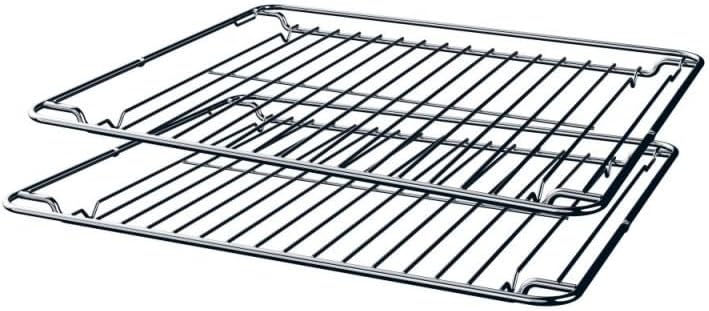
Figure 4.2: Oven Racks.
This image displays two standard metal oven racks. These racks are designed to slide into the oven's side supports, allowing for multi-level cooking. They are durable and suitable for supporting various bakeware and dishes.

Figure 4.3: Baking Tray.
This image shows a black enamel baking tray, designed for collecting drips or for roasting. It features integrated handles for easy insertion and removal from the oven. The smooth, non-stick surface facilitates cleaning.

Figure 4.4: Baking Tray Handle Detail.
A close-up view of the integrated handle on the black baking tray. The handle is ergonomically designed for a secure grip, making it easier to slide the tray in and out of the oven, even when hot (with oven mitts).
- Oven Racks: Insert racks into the desired level of the oven's side supports.
- Baking Trays: Place baking trays on the oven racks or directly on the telescopic guides for easier handling.
- Always ensure accessories are correctly positioned before starting a cooking cycle.
5. Maintenance and Cleaning
Regular cleaning and maintenance will ensure the longevity and optimal performance of your oven.
5.1 Aquativa/Hydrolytic Self-Cleaning System
The oven features an Aquativa/Hydrolytic cleaning system for easy maintenance. This system uses steam to loosen food residues, making them easier to wipe away.
- Ensure the oven is cool.
- Pour approximately 200-300 ml of water into the designated cavity at the bottom of the oven.
- Select the Aquativa/Hydrolytic cleaning function on the control panel.
- Allow the cycle to complete (duration varies by model, typically 20-30 minutes).
- Once the cycle is finished and the oven has cooled, wipe the interior surfaces with a soft cloth to remove loosened debris.
- For stubborn stains, a non-abrasive oven cleaner may be used after the hydrolytic cycle.
5.2 General Cleaning
- Exterior: Clean the exterior surfaces with a soft cloth and mild detergent. Avoid abrasive cleaners or scouring pads.
- Door Glass: Clean the oven door glass with a glass cleaner or warm soapy water. The three-pane glass design provides better insulation and is easier to clean.
- Accessories: Wash oven racks and trays with warm soapy water. They are generally not dishwasher safe unless specified.
- Always ensure the oven is disconnected from the power supply before performing any cleaning.
6. Troubleshooting
Before contacting customer service, please refer to the following common issues and their potential solutions.
| Problem | Possible Cause | Solution |
|---|---|---|
| Oven does not turn on. | No power supply; circuit breaker tripped; door not closed properly. | Check power connection; reset circuit breaker; ensure door is fully closed. |
| Oven not heating properly. | Incorrect temperature setting; faulty heating element; oven door seal damaged. | Verify temperature setting; contact service for element replacement; inspect and replace door seal if necessary. |
| Display shows an error code. | Internal malfunction. | Note the error code and consult the full user manual or contact customer support. |
| Excessive smoke during cooking. | Food spills; excessive fat; initial burn-off. | Clean oven interior; reduce fat in cooking; ensure proper ventilation during initial use. |
If the problem persists after attempting these solutions, please contact Haier customer support.
7. Specifications
Detailed technical specifications for the Haier H6 ID46G3HTB Oven.
- Model: ID46G3HTB
- Manufacturer Model Number: 33703809
- Brand: Haier
- Type: Built-in Electric Oven
- Net Capacity: 78 Liters
- Energy Efficiency Class: A++
- Functions: 17 cooking functions (e.g., Pan Airfry, White Meat, Red Meat, Fish, Vegetables)
- Control Interface: Graphic UX Touch Display
- Connectivity: Wi-Fi, Bluetooth (via hOn app)
- Cleaning System: Aquativa/Hydrolytic
- Door Type: SoftClose, 3-pane glass
- Color: Black
- Dimensions (H x W x D): 595 mm x 595 mm x 568 mm
- Net Weight: 36.1 kg
- Gross Weight (packaged): 35 kg (Note: discrepancy with net weight, using product description's 36.1kg for net)
- Package Dimensions: 65 x 65 x 65 cm
8. Warranty and Support
For warranty information, please refer to the warranty card included with your product or visit the official Haier website. Keep your proof of purchase for warranty claims.
For technical support, spare parts, or service requests, please contact Haier customer service. Contact details can typically be found on the Haier official website or in your product documentation.
Online Resources:
- Haier Official Website: www.haier-europe.com
- hOn App Support: Refer to your app store for the hOn app and its support section.


