
1. Introduction
This manual provides comprehensive instructions for the operation and maintenance of the Sper Scientific 850015 Graphic Display Sound Meter. This precision instrument is designed for accurate sound level measurements and complies with industry standards ANSI S1.4 Type 2 and IEC 61672-1 Class 2.
The device features a clear graphic display, selectable A and C decibel frequency weighting scales, minimum/maximum value tracking, and adjustable fast or slow response times. It also includes AC and DC output capabilities for external recording or analysis.

Figure 1: Sper Scientific 850015 Graphic Display Sound Meter. This image shows the front view of the sound meter, highlighting its display and control buttons.
2. Package Contents
Upon opening the package, verify that all items listed below are present and in good condition:
- Sper Scientific 850015 Graphic Display Sound Meter
- Windscreen
- 9V Battery
- Instruction Manual (this document)
- Foam-lined Hard Shell Carrying Case
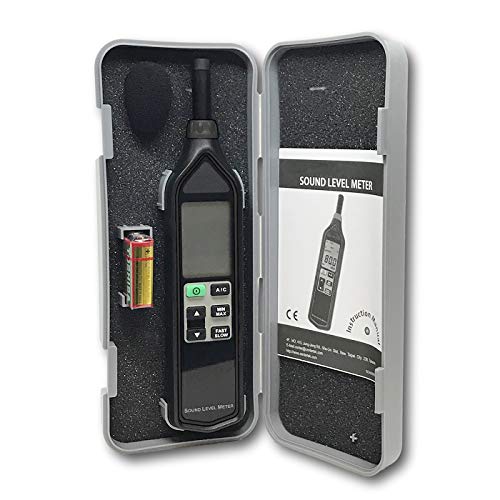
Figure 2: The Sper Scientific 850015 Sound Meter shown within its protective foam-lined hard shell carrying case, alongside the included 9V battery and instruction manual.
3. Setup and Battery Installation
The Sper Scientific 850015 comes with a 9V battery included. Follow these steps to install or replace the battery:
- Locate the battery compartment cover on the back of the device.
- Slide or unclip the cover to open the compartment.
- Connect the 9V battery to the battery clip, ensuring correct polarity.
- Place the battery into the compartment and replace the cover, securing it firmly.
- Attach the windscreen to the microphone at the top of the meter. This helps reduce wind noise during measurements.
4. Operating Instructions
Familiarize yourself with the device's controls and display before operation.
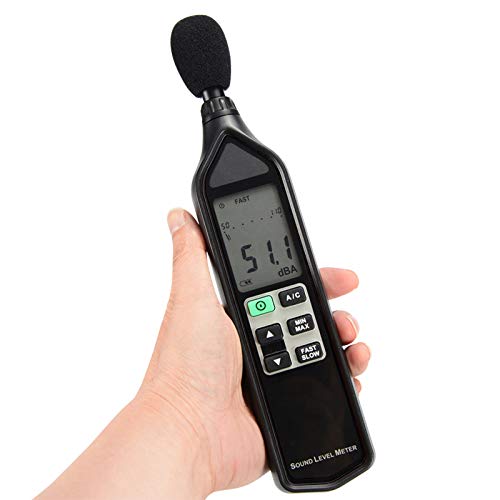
Figure 3: The Sper Scientific 850015 Sound Meter being held, demonstrating its ergonomic design and ease of use.
4.1. Power On/Off
- Press the Power button (usually marked with "I" or a power symbol) to turn the meter on.
- Press and hold the Power button for a few seconds to turn the meter off.
- The meter features an auto-power-off function to conserve battery life.
4.2. A/C Weighting Selection
- Press the A/C button to toggle between A-weighting and C-weighting.
- A-weighting (dBA) is commonly used for environmental noise measurements and approximates the human ear's response.
- C-weighting (dBC) provides a flatter response, suitable for measuring peak sound levels or noise from machinery.
4.3. Fast/Slow Response Time
- Press the FAST/SLOW button to select the desired response time.
- FAST response (125 ms) is suitable for capturing rapidly changing noise levels.
- SLOW response (1 second) provides an averaged reading for more stable noise sources.
4.4. MIN/MAX Function
- Press the MIN/MAX button to activate the minimum/maximum hold function.
- The display will show the highest (MAX) or lowest (MIN) sound level recorded since the function was activated.
- Press the button again to cycle through MAX, MIN, and normal measurement modes.
4.5. AC/DC Output
The meter provides AC and DC output jacks for connecting to external devices such as chart recorders, data loggers, or sound analysis equipment. Refer to the specifications section for output voltage details.
5. Maintenance and Calibration
5.1. Cleaning
To ensure optimal performance and longevity, keep the meter clean. Wipe the exterior with a soft, dry cloth. Do not use abrasive cleaners or solvents. Ensure the microphone is free from dust and debris.
5.2. Battery Replacement
When the low battery indicator appears on the display, replace the 9V battery as described in the "Setup and Battery Installation" section. Always dispose of used batteries responsibly.
5.3. Calibration
For applications requiring high accuracy or regulatory compliance, periodic calibration is recommended. The Sper Scientific 850015 can be calibrated in compliance with OSHA standards using an optional Acoustical Calibrator (Model 850016). A N.I.S.T. traceable certificate of calibration is also available from Sper Scientific.
6. Troubleshooting
If you encounter issues with your Sper Scientific 850015, refer to the following common problems and solutions:
| Problem | Possible Cause | Solution |
|---|---|---|
| Device does not power on. | Dead or improperly installed battery. | Check battery installation; replace with a fresh 9V battery. |
| Inaccurate or fluctuating readings. | Microphone obstructed, strong wind, or meter needs calibration. | Ensure windscreen is properly installed and microphone is clear. Avoid strong air currents. Consider calibration if readings remain inconsistent. |
| Display shows "LO BAT". | Battery is low. | Replace the 9V battery immediately. |
| No response from buttons. | Device frozen or battery issue. | Remove and reinsert the battery to reset the device. If problem persists, replace battery. |
7. Specifications
The following table details the technical specifications for the Sper Scientific 850015 Graphic Display Sound Meter:
| Parameter | Value |
|---|---|
| Measurement Range | 30 to 130 dB (A & C scales) |
| Resolution | 0.1 dB |
| Accuracy | ±1.4 dB (ref 94 dB @ 1KHz) |
| Frequency Weighting | A and C |
| Response Time | Fast (125 ms) / Slow (1 sec) |
| Output | AC and DC |
| Auto Power Off | Yes |
| Low Battery Indicator | Yes |
| Standards Compliance | ANSI S1.4 Type 2, IEC 61672-1 Class 2 |
| Dimensions | 10¼" × 2¼" × 1" (258 × 55 × 25 mm) |
| Weight | 6.5 oz (185 g) |
| Power Source | 1 x 9V battery (included) |

Figure 4: A visual representation of key specifications for the Sper Scientific 850015, including range, resolution, and accuracy.
8. Warranty and Support
For information regarding product warranty, technical support, or service, please contact Sper Scientific directly. Their official website or the contact information provided with your purchase documentation will have the most up-to-date details.
Manufacturer: Sper Scientific
Website: Sper Scientific Store on Amazon (for general product information)