
Portronics Radiant 2 (POR-2787)
Portronics Radiant 2 Portable Bluetooth Speaker
Model: POR-2787 | Brand: Portronics
Introduction
The Portronics Radiant 2 is a powerful 30W portable Bluetooth speaker designed to deliver a rich, immersive audio experience. Featuring multi-color RGB LED lights, TWS connectivity for stereo sound, and a built-in microphone for hands-free calling, it is perfect for various indoor and outdoor activities. This manual provides detailed instructions for setting up, operating, and maintaining your Radiant 2 speaker.
Key Features:
- Powerful 30W Audio: Engineered for rich, immersive sound.
- Multi-color RGB LED Lights: Dynamic lighting that syncs with your music.
- TWS Connectivity: Wirelessly pair two Radiant 2 speakers for 60W stereo sound.
- Hands-Free Calling: Built-in microphone for convenient call management.
- Long Playtime: Up to 6 hours of music playback on a single charge with an 1800 mAh battery.
- Durable Design: Features an aluminum alloy handle and IPX5 water resistance.
- Wireless Karaoke Mic: Included for karaoke nights and parties.
- Multiple Connectivity Options: Bluetooth 5.3, USB Drive, AUX-in, Type-C Fast Charging.
What's Included
Please check the package contents to ensure all items are present:
- 1 x Portronics Radiant 2 Portable Wireless Speaker
- 1 x Charging Cable (Type-C)
- 1 x Wireless Karaoke Mic
- 1 x Documentation (User Manual)
Product Overview
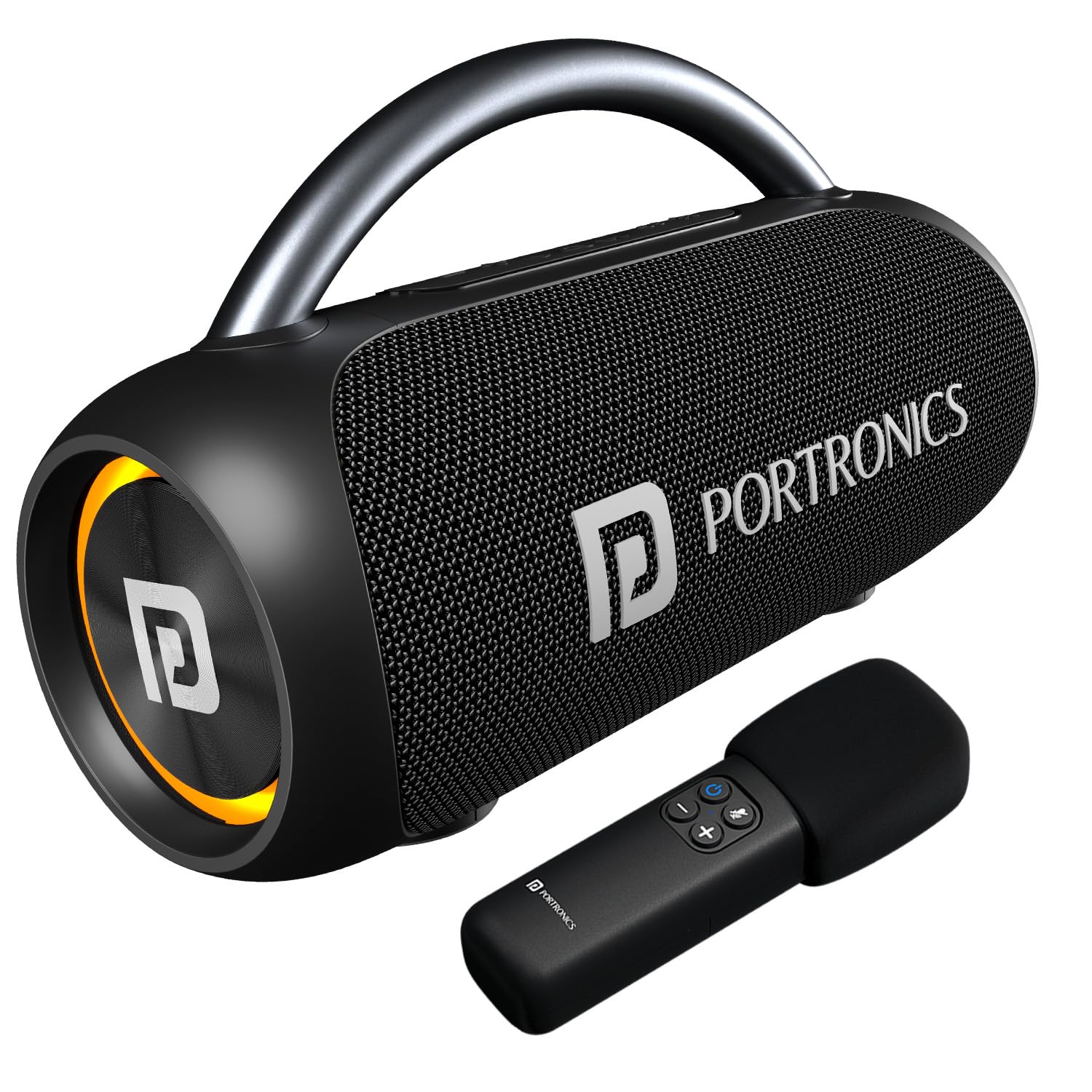
Figure 1: Portronics Radiant 2 Portable Bluetooth Speaker and Wireless Karaoke Mic.

Figure 2: Internal view highlighting the dual bass radiators for impactful 30W audio output.

Figure 3: Rear panel showing wide connectivity options including USB, AUX-in, DC 5V charging port, and a reset button.

Figure 4: Top panel with integrated controls for volume, play/pause, mode, TWS, and LED light control. Also depicts hands-free calling functionality.

Figure 5: Features an aluminum alloy handle for portability, LED light control, and IPX5 water resistance for outdoor use.
Setup
1. Charging the Speaker
- Connect the provided Type-C charging cable to the speaker's DC 5V port.
- Connect the other end of the cable to a USB power adapter (not included) or a computer's USB port.
- The LED indicator will show charging status. A full charge takes approximately 3-4 hours.
2. Powering On/Off
- To Power On: Press and hold the Power button (⏻) for 2-3 seconds until you hear an audible prompt and the LED lights illuminate.
- To Power Off: Press and hold the Power button (⏻) again for 2-3 seconds.
3. Bluetooth Pairing
- Ensure the speaker is powered on and in Bluetooth mode (indicated by a flashing blue LED). If not, press the 'M' (Mode) button to switch to Bluetooth mode.
- On your mobile device, enable Bluetooth and search for available devices.
- Select "Portronics Radiant 2" from the list.
- Once paired, the LED indicator will turn solid blue, and you will hear a confirmation sound.
4. TWS (True Wireless Stereo) Pairing
To achieve 60W stereo sound, you can pair two Portronics Radiant 2 speakers together:
- Ensure both Radiant 2 speakers are powered on and not connected to any Bluetooth device.
- On one of the speakers (this will be the primary speaker), press the TWS button (∞).
- The speaker will search for another Radiant 2 speaker. Once connected, you will hear a confirmation sound, and the LED indicators on both speakers will sync.
- Now, connect your mobile device to the primary speaker via Bluetooth as described in step 3. Both speakers will play audio in stereo.

Figure 6: TWS connectivity allows pairing two speakers for a combined 60W output.
5. Connecting the Wireless Karaoke Mic
The included wireless microphone automatically pairs with the speaker when both are powered on. No manual pairing is required.

Figure 7: The wireless karaoke mic provides high-definition harmony for singing.
Operating Instructions
Control Buttons Overview:
- Power Button (⏻): Press and hold to power on/off.
- Volume Down (-): Short press to decrease volume. Long press for previous track.
- Volume Up (+): Short press to increase volume. Long press for next track.
- Play/Pause (▷||): Short press to play/pause music. Short press to answer/end calls. Long press to reject calls.
- Mode Button (M): Short press to switch between Bluetooth, USB, and AUX modes.
- TWS Button (∞): Short press to initiate TWS pairing (when two speakers are available).
- LED Light Control Button (💡): Short press to cycle through different RGB LED light modes or turn them off.
Using Different Modes:
- Bluetooth Mode: After successful pairing, audio from your connected device will play through the speaker.
- USB Drive Mode: Insert a USB flash drive into the USB port. The speaker will automatically switch to USB mode and begin playing audio files.
- AUX-in Mode: Connect an audio device using a 3.5mm AUX cable (not included) to the AUX port. The speaker will automatically switch to AUX mode.
Hands-Free Calling:
- When a call comes in, the music will pause. Short press the Play/Pause button to answer the call.
- To end a call, short press the Play/Pause button again.
- To reject an incoming call, long press the Play/Pause button.
Maintenance
- Cleaning: Use a soft, dry cloth to clean the speaker's surface. Do not use abrasive cleaners or solvents.
- Battery Care: To prolong battery life, avoid fully discharging the speaker frequently. Charge it regularly, even if not in use for extended periods.
- Water Resistance (IPX5): The speaker is splash, rain, and spray resistant. Do not submerge the speaker in water or expose it to strong jets of water. Ensure the port cover is securely closed when near water.
- Storage: Store the speaker in a cool, dry place away from direct sunlight and extreme temperatures.
Troubleshooting
| Problem | Possible Cause | Solution |
|---|---|---|
| Speaker does not power on. | Low battery. | Charge the speaker fully using the provided Type-C cable. |
| No sound from speaker. | Volume too low; incorrect mode; device not connected. | Increase speaker and device volume. Ensure correct mode (Bluetooth, USB, AUX). Re-pair Bluetooth device. |
| Bluetooth connection unstable or fails. | Speaker too far from device; interference; device Bluetooth issue. | Move speaker closer to device. Avoid obstacles. Turn off other Bluetooth devices. Forget "Portronics Radiant 2" on your device and re-pair. |
| Karaoke Mic not working. | Mic battery low; mic not powered on; mic too far from speaker. | Ensure mic is charged and powered on. Keep mic within range of the speaker. |
| TWS pairing fails. | Speakers already connected to other devices; speakers too far apart. | Ensure both speakers are disconnected from all devices. Place them close to each other. Try re-initiating TWS pairing. |
Specifications
| Feature | Detail |
|---|---|
| Model Name | Radiant 2 |
| Item Model Number | POR-2787 |
| Speaker Type | Portable Speaker |
| Speaker Output Power | 30 Watts |
| Connectivity Technology | Bluetooth 5.3 |
| Audio Output Mode | Stereo |
| Battery Life | Up to 6 Hours |
| Battery Capacity | 1800 mAh |
| Charging Port | Type-C |
| Water Resistance | IPX5 |
| Material | ABS Plastic |
| Product Dimensions | 30.3D x 18.2W x 12.2H Centimeters |
| Item Weight | 2070 Grams (2 kg 70 g) |
| Included Components | Portable Wireless Speaker, Charging Cable, Documentation, Wireless Mic |
Warranty & Support
Warranty Information:
The Portronics Radiant 2 Portable Bluetooth Speaker comes with a 1 Year Warranty from the date of purchase. Please retain your purchase receipt for warranty claims. The warranty covers manufacturing defects but does not cover damage caused by misuse, accidents, or unauthorized modifications.
Customer Support:
For any queries, technical assistance, or warranty claims, please contact Portronics customer support:
- Email: help@portronics.com
- Phone: +91 9555-245-245
- Manufacturer Address: Portronics Digital Pvt ltd, First Floor Property No D 8 Upper Basement Sector 8 Noida Uttar Pradesh 201301, India.
Related documentsRadiant 2 (POR-2787)


Ask a question about this manual
Ask about setup, troubleshooting, compatibility, parts, safety, or missing instructions. Manuals+ will review the question and use this page’s manual context to help answer it.