Introduction
This manual provides essential information for the safe and effective use of your HOMCOM 6-Point Vibrating Massage Office Chair with Heat. Please read these instructions thoroughly before assembly and operation, and retain them for future reference. This executive office chair is designed to provide comfort and support with its adjustable features, massage, and heating functions.

Image: The HOMCOM 6-Point Vibrating Massage Office Chair in pink, shown in an office setting.
Safety Information
Always adhere to the following safety guidelines to prevent injury or damage:
- Follow all assembly instructions carefully.
- Do not use the massage or heat function while sleeping or if unsupervised.
- Ensure all connections are secure before use.
- Do not exceed the maximum weight capacity of 264 lbs (120 kg).
- Keep children and pets away from the chair during assembly and operation.
- Avoid placing the chair near heat sources or in direct sunlight for prolonged periods.
Package Contents
Verify that all components are present before beginning assembly. The package should contain:
- Chair components (backrest, seat, armrests, base, wheels, gas lift)
- Remote control for massage and heat functions
- Assembly hardware and tools
- Instruction manual

Image: A cardboard box indicating one package, representing the product's packaging.
Setup and Assembly
Assembly is required for this chair. Detailed, step-by-step instructions are included in the product packaging. Please follow these instructions carefully to ensure proper and safe assembly.
- Unpack all components and verify against the parts list in the included manual.
- Assemble the chair base, attaching the wheels and gas lift cylinder.
- Attach the armrests to the seat.
- Connect the backrest to the seat and armrests.
- Place the assembled seat and backrest onto the gas lift cylinder.
- Ensure all screws and bolts are tightened securely.
For visual guidance, refer to the assembly diagrams provided in your physical manual.
Operating Instructions
1. Massage and Heat Function
The chair features a six-point vibration massage system and lumbar heating, controlled by a remote.

Image: The remote control for the massage and heat functions, with visual indicators of vibration points on the chair.
- Power On/Off: Use the power button on the remote to activate or deactivate the massage and heat functions.
- Massage Modes: Select from various massage modes (e.g., pulse, press, wave) using the mode buttons.
- Intensity Levels: Adjust the vibration intensity to your preference.
- Timer: Set a duration for the massage session (e.g., 15, 30, 60 minutes).
- Heat Function: Activate the lumbar heating element for added comfort.
2. Height Adjustment
Adjust the seat height to match your desk and sitting preference.

Image: A close-up of the lever used to adjust the chair's height, with 'UP' and 'DOWN' arrows.
- Locate the lever under the right side of the seat.
- To raise the seat, lift the lever while taking your weight off the seat.
- To lower the seat, lift the lever while remaining seated.
- Release the lever to lock the height in position.
3. Reclining and Tilt Function
The chair offers a reclining backrest and a tilt function for relaxation.

Image: The chair shown in a reclined position, illustrating its 130-degree reclining capability.
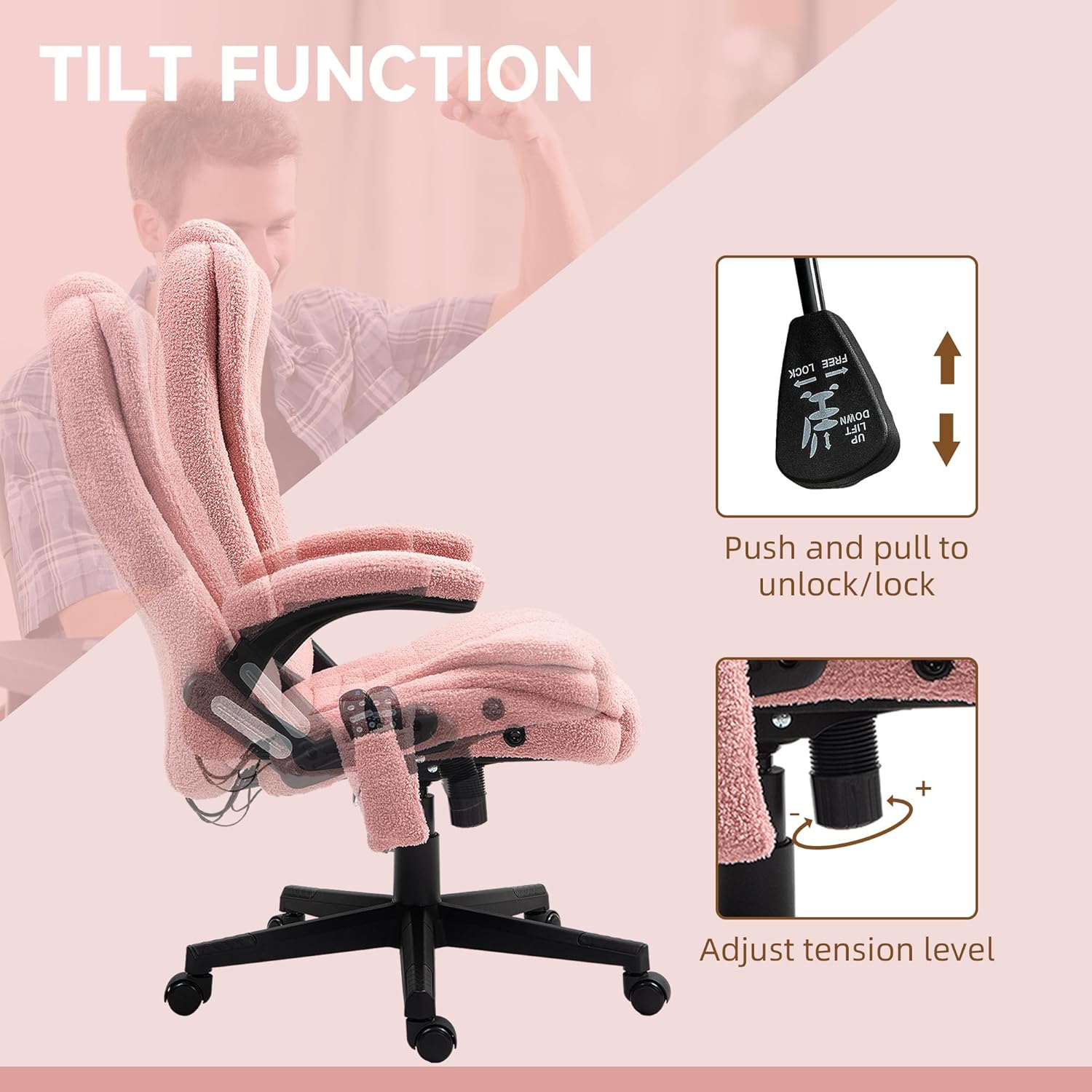
Image: A close-up of the tilt lock lever and the tension adjustment knob located beneath the seat.
- Reclining: The backrest can recline up to 125 degrees. Use the lever on the side to adjust the angle.
- Tilt Lock: Pull the lever outwards to enable the tilt function, allowing the chair to rock. Push the lever inwards to lock the chair in an upright position.
- Tilt Tension: Rotate the round knob located under the seat to adjust the tension of the tilt mechanism. Turn clockwise to increase tension (harder to tilt), counter-clockwise to decrease tension (easier to tilt).
4. Swivel Function
The chair features a 360-degree swivel for flexible movement.

Image: The chair with an arrow illustrating its 360-degree swivel capability.
- The chair seat and backrest assembly can rotate freely 360 degrees on its base.
Maintenance
Proper care will extend the life of your office chair:
- Cleaning: Wipe clean with a damp cloth. Avoid harsh chemicals or abrasive cleaners.
- Inspection: Periodically check all bolts and screws to ensure they remain tight. Re-tighten if necessary.
- Moving: When moving the chair, lift it rather than dragging it to prevent damage to the base or floor.
- Fabric Care: The teddy velvet-feel fabric is breathable and skin-friendly. Spot clean as needed.
Troubleshooting
If you encounter issues with your chair, refer to the following common problems and solutions:
| Problem | Possible Cause | Solution |
|---|---|---|
| Massage/Heat function not working | Power cable disconnected; remote battery low (if applicable); internal wiring issue. | Ensure power cable is securely plugged in. Check remote for power. If issue persists, contact customer support. |
| Chair feels unstable or wobbly | Loose assembly hardware; damaged base or gas lift. | Check and tighten all screws and bolts. Ensure the gas lift is properly seated in the base. If parts are damaged, contact customer support. |
| Height adjustment not working | Gas lift malfunction; lever mechanism issue. | Ensure the lever is fully engaged. If the gas lift is faulty, it may need replacement. Contact customer support. |
| Chair does not recline or tilt | Tilt lock engaged; tension too high; mechanism obstruction. | Disengage the tilt lock lever. Adjust the tilt tension knob. Check for any obstructions. |
Specifications
Key specifications for the HOMCOM 6-Point Vibrating Massage Office Chair:

Image: A diagram illustrating the various dimensions of the office chair.
- Model: 921-171V8APK
- Overall Dimensions: 25.5"W x 28"D x 43.25"-47.25"H
- Seat Size: 20.5"W x 19.75"D x 17.75"-21.75"H
- Backrest Height: 28 Inches
- Arm Height: 29.5 Inches
- Maximum Weight Capacity: 264 lbs (120 kg)
- Recline Angle: Up to 125 degrees
- Material: 100% Polyester (Teddy Velvet-Feel Fabric), Foam Fill
- Features: 6-point vibration massage, lumbar heat, adjustable height, reclining backrest, tilt function, 360° swivel, padded armrests.
- Included Components: Remote Control
Warranty Information
This product is covered by a standard manufacturer's warranty. Please refer to the warranty card included in your product packaging for specific terms, conditions, and duration. Retain your proof of purchase for any warranty claims.
Customer Support
For further assistance, missing parts, or warranty inquiries, please contact HOMCOM customer support. Contact information can typically be found on the product packaging, the included warranty card, or the official HOMCOM website.