
REIGY RG-BUC-133WTUUU
REIGY 5MP WiFi Outdoor Surveillance Kit User Manual
Model: RG-BUC-133WTUUU
Introduction
This manual provides detailed instructions for the installation, operation, and maintenance of your REIGY 5MP WiFi Outdoor Surveillance Kit. This system is designed to provide reliable and high-quality security monitoring for your home or business. Please read this manual thoroughly before use to ensure proper setup and functionality.
What's in the Box
Carefully unpack all components and check against the list below. If any items are missing or damaged, please contact customer support.
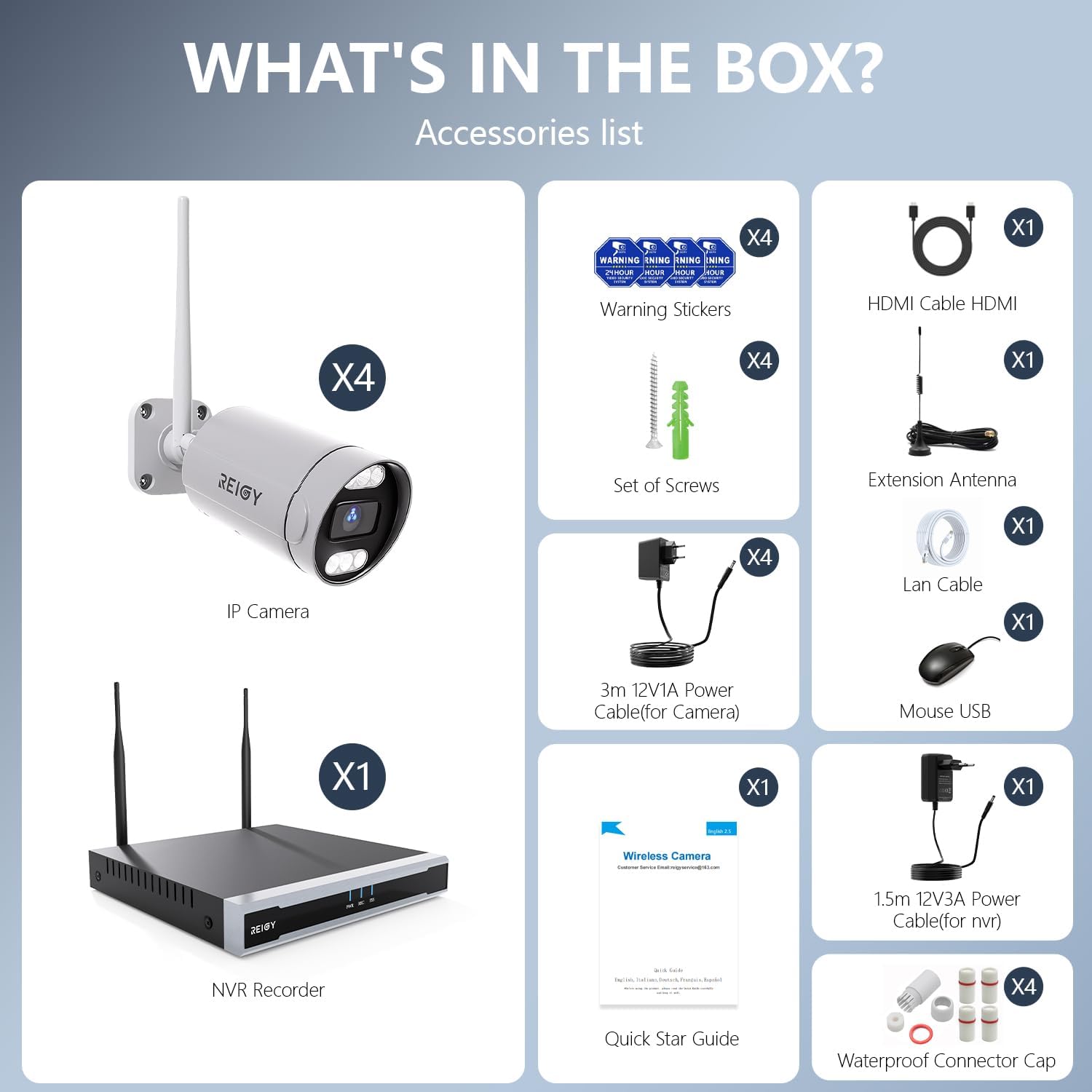
Image: All components included in the REIGY 5MP WiFi Outdoor Surveillance Kit.
- 1 x 16CH NVR (Network Video Recorder) with 1TB HDD pre-installed
- 4 x 5MP (1920P) WiFi Cameras
- 4 x 12V1A Power Adapters (for cameras)
- 1 x 12V3A Power Adapter (for NVR)
- 1 x HDMI Cable
- 1 x Ethernet Cable
- 1 x USB Mouse
- 1 x WiFi Extension Antenna
- 4 x Warning Stickers
- 1 x Set of Screws
- 1 x Quick Start Guide
- Waterproof Connector Caps
Setup Guide
The REIGY surveillance system is designed for easy plug-and-play installation. Follow these steps to set up your system.
1. Initial Connection

Image: Step-by-step guide for initial setup, showing power connection, network connection, and app viewing.
- Connect Power: Connect the 12V3A power adapter to the NVR and the 12V1A power adapters to each camera. The cameras will automatically pair with the NVR.
- Connect to Display: Connect the NVR to a monitor or TV using the provided HDMI cable or a VGA cable (not included).
- Network Connection: Connect the NVR to your router via Ethernet cable for initial setup and remote access. Alternatively, you can connect the NVR to your WiFi network through the NVR's interface.
- Install Mobile App: Download the official REIGY app (available for Android and iOS) on your smartphone. Scan the QR code displayed on the NVR screen or found in the quick start guide to add your system to the app.
2. Camera Placement and WiFi Coverage

Image: Illustration of a camera's power connection and its wireless link to the NVR for stable WiFi operation.
Position cameras strategically to cover desired areas. The system features long-range WiFi coverage with a 5dBi external antenna, enhancing transmission stability. If a camera is too far, the system can create a mesh network where cameras relay signals to each other, extending coverage.

Image: Depiction of the NVR's long-range WiFi coverage, showing cameras placed at various distances.
Operating Instructions
Once set up, your REIGY surveillance system offers a range of features for effective monitoring.
1. Live View and Multi-User Sharing

Image: Overview of 24/7 monitoring capabilities, showing multiple camera feeds on a large display and mobile app.
The NVR supports simultaneous live viewing of up to 16 cameras on a VGA/HDMI display. The mobile app allows simultaneous viewing of up to 4 cameras. You can share camera access with family members, enabling multiple users to view live feeds concurrently.

Image: Displaying multiple camera feeds on one screen, accessible via app or monitor.
2. Night Vision Modes

Image: Demonstrating the camera's super clear night vision with both infrared and color modes.
The cameras offer three night vision modes:
- Infrared Mode: Provides clear black and white images in low-light conditions, up to 50ft.
- Color Night Vision: Utilizes built-in spotlights (6pcs) to provide full-color video even in complete darkness.
- Smart Mode: Automatically switches from infrared to color night vision upon detection of motion, illuminating the area.
3. Two-Way Audio

Image: Illustrating the two-way audio function, allowing communication through the camera via the app.
Each camera is equipped with an integrated speaker and microphone, enabling two-way audio communication. You can listen to what's happening around the camera and speak through the camera using the mobile app, useful for interacting with visitors or deterring intruders.
4. Motion Detection and Notifications

Image: Smart detection notification on a smartphone, triggered by detected motion.
The system features advanced motion detection. When motion is detected, you will receive instant notifications via the mobile app and email. The system can also trigger a loud siren and flash the built-in LED spotlights to deter unwanted visitors.

Image: Activating the spotlight alarm and siren to deter intruders.

Image: Event notifications via app and email, with automatic video recording and photo capture.
5. Recording and Storage
The NVR comes with a pre-installed 1TB HDD, providing ample storage for recordings. You can configure the system for 24/7 continuous recording or motion-activated recording. The 1TB HDD can store approximately 45 days of loop recording, automatically overwriting the oldest footage when full. There are no monthly fees for local storage.

Image: Highlighting the 1TB pre-installed HDD for local storage with no monthly fees.
Even if your internet connection is lost, the NVR will continue to record and display live monitoring via HDMI or VGA. Remote viewing via the app will not be available without an internet connection.

Image: Demonstrating that the system functions without WiFi for local recording and display.
Maintenance
To ensure the longevity and optimal performance of your REIGY surveillance system, follow these maintenance guidelines:
1. Weather Resistance
Image: The camera's IP66 waterproof rating, showing its resilience to various weather conditions.
The cameras feature a robust metal casing with an IP66 waterproof rating, designed to withstand harsh weather conditions including sun, rain, and snow. They operate effectively in temperatures ranging from -20°C to +50°C (-4°F to 122°F).

Image: The camera's IP66 weather resistance, showing its ability to function in snow, rain, and sun.
2. Cleaning
Periodically clean the camera lenses with a soft, damp cloth to ensure clear image quality. Avoid using harsh chemicals or abrasive materials that could scratch the lens or casing.
Troubleshooting
If you encounter issues with your REIGY surveillance system, refer to the following common troubleshooting tips:
- No Image on Display: Ensure the NVR is powered on and the HDMI/VGA cable is securely connected to both the NVR and the monitor. Check the monitor's input source.
- Cameras Not Connecting: Verify that all cameras are powered on. Ensure they are within range of the NVR's WiFi signal. If the signal is weak, consider repositioning the camera or NVR, or utilizing the mesh network feature.
- No Remote Access via App: Confirm the NVR is connected to the internet (either via Ethernet or WiFi). Check your router's internet connection. Ensure the app is updated to the latest version and the system is correctly added to your account.
- False Motion Alarms: Adjust the motion detection sensitivity settings in the NVR or app. Consider setting up specific detection zones to avoid triggers from irrelevant movements (e.g., trees swaying).
- Poor Night Vision: Ensure the camera lens is clean and free from obstructions. Check if the IR lights or spotlights are active in the settings.
- No Recording: Verify the 1TB HDD is properly installed and recognized by the NVR. Check recording schedules and settings to ensure they are configured as desired.
For further assistance, please contact REIGY customer support.
Specifications

Image: Detailed diagram of camera and NVR components and ports.
| Feature | Specification |
|---|---|
| Brand | REIGY |
| Model Number | RG-BUC-133WTUUU |
| Color | White |
| Video Capture Resolution | 5MP (2560x1920P) FULL HD |
| Connectivity Technology | Wireless (WiFi) |
| NVR Channels | 16 Channels (supports up to 16 cameras) |
| Storage | 1TB HDD pre-installed |
| Special Features | Siren Alarm, Two-Way Audio, App Control, Video Recording, Color Night Vision, Motion Detection |
| Power Source | Corded Electric (Plug-in) |
| Operating Temperature | -20°C to +50°C (-4°F to 122°F) |
| Waterproof Rating | IP66 |
| Product Dimensions | 34 x 18 x 25 cm |
| Item Weight | 3.8 Kilograms |
Warranty and Support
REIGY products are manufactured to high-quality standards. The power supply included with this kit is CE, FCC, and RoHS certified, ensuring safety and energy efficiency. For any product-related inquiries, technical support, or warranty claims, please contact REIGY customer service directly. You can find more information and contact details on the official REIGY brand store: REIGY Brand Store.
Ask a question about this manual
Ask about setup, troubleshooting, compatibility, parts, safety, or missing instructions. Manuals+ will review the question and use this page’s manual context to help answer it.