
Introduction
Thank you for choosing the KUAIVO Digital Postal Scale, Model P10H. This high-precision scale is designed for accurate weighing of letters, parcels, and various items up to 30 kg, with a precision of 2 grams. Its versatile features, including hold and tare functions, along with a foldable platform, make it suitable for both office and home use. Please read this manual thoroughly before operating the device to ensure proper use and maintenance.
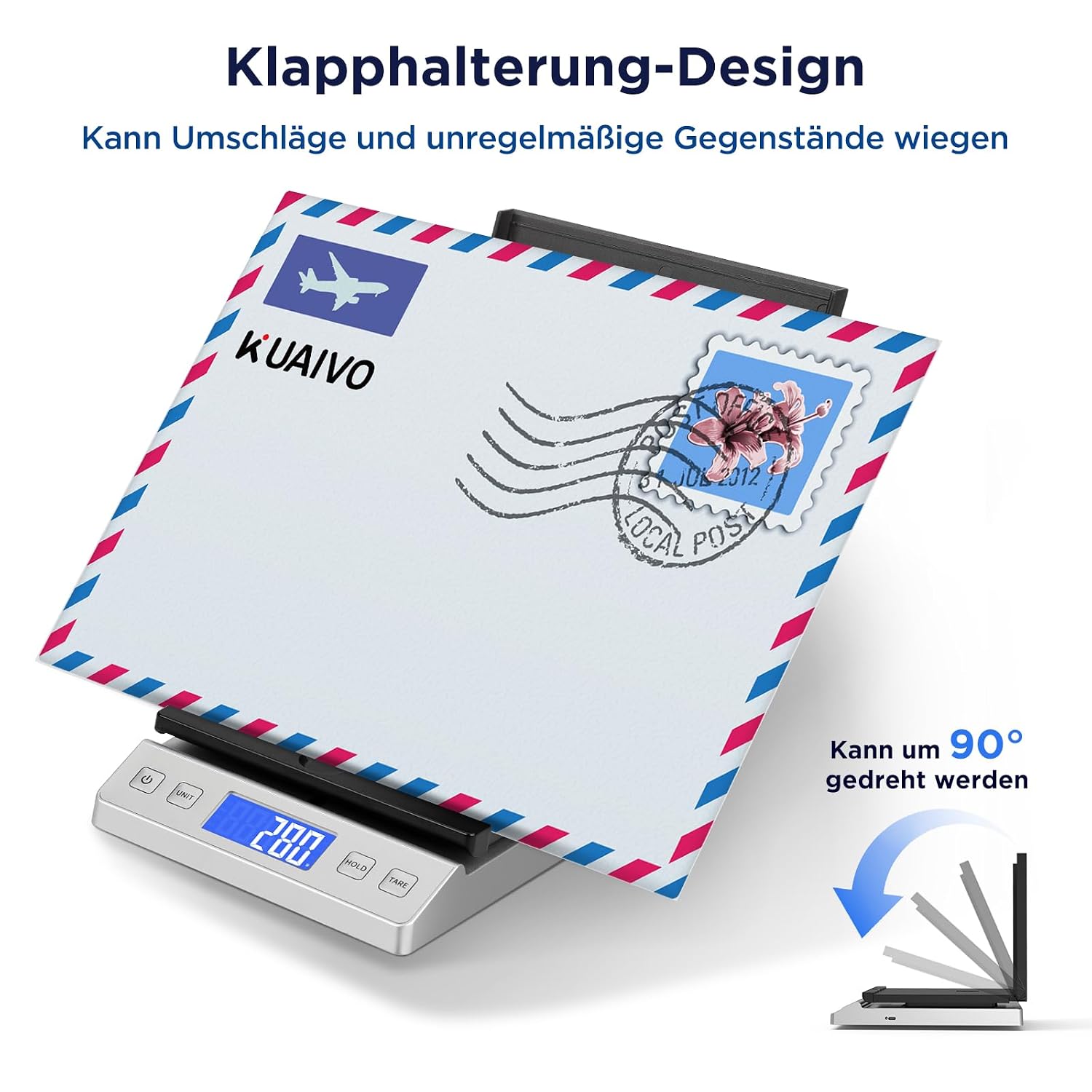
Image: KUAIVO Digital Postal Scale with a package, illustrating its compact size and design.
Safety Instructions
- Do not overload the scale beyond its maximum capacity of 30 kg.
- Avoid exposing the scale to extreme temperatures, humidity, or direct sunlight.
- Keep the scale away from strong electromagnetic fields.
- Clean the scale with a soft, damp cloth. Do not use abrasive cleaners or immerse it in water.
- Ensure the scale is placed on a stable, flat surface for accurate measurements.
Package Contents
Verify that all items are present in the package:
- 1 x KUAIVO Digital Postal Scale (Model P10H)
- 2 x AAA Batteries
- 1 x Type-C Charging Cable
- 1 x User Manual (this document)
Product Overview
The KUAIVO P10H scale features a foldable platform and a clear LED display for easy operation and readability.
Foldable Platform Design
Image: The scale's platform can be folded 90 degrees upwards, allowing for weighing of larger or irregularly shaped items like envelopes without obstructing the display.
The scale's platform can be folded 90 degrees upwards. This design prevents larger packages or envelopes from blocking the display and ensures stable weighing of irregular or round objects.
LED Display and Control Buttons

Image: Close-up of the LED display and control buttons (Power, Unit, Hold, Tare).
The bright LED display provides clear weight readings. Control buttons include Power (⏻), Unit, HOLD, and TARE.
Setup
Power Supply

Image: The scale supports dual power supply via AAA batteries or Type-C cable, showing indicators for automatic shutdown, overweight warning, and low battery.
The scale can be powered in two ways:
- AAA Batteries: Insert the two included AAA batteries into the battery compartment located on the underside of the scale. Ensure correct polarity.
- Type-C USB Cable: Connect the scale to a power source using the provided Type-C charging cable. This allows for continuous operation without batteries.
The scale features an automatic shutdown function after 2 minutes of inactivity to conserve energy. It also includes an overweight warning and a low battery indicator on the display.
Operating Instructions
Turning On/Off
- Press the ⏻ button to turn the scale on.
- Press and hold the ⏻ button for a few seconds to turn the scale off.
Unit Conversion
Image: The scale supports five different measurement units: kg, g, oz, lb:oz, and ml.
Press the UNIT button to cycle through the available measurement units: kg, g, oz, lb:oz, and ml. Select the unit appropriate for your needs.
Tare Function

Image: Step-by-step guide for using the Tare function to determine net weight.
The Tare function allows you to subtract the weight of a container or packaging, so you can measure only the net weight of its contents.
- Turn on the scale.
- Place the empty container on the weighing platform.
- Press the TARE button. The display will reset to zero.
- Place the item(s) to be weighed into the container. The display will show the net weight of the item(s).
Hold Function

Image: Step-by-step guide for using the Hold function to lock a weight reading.
The Hold function allows you to lock the weight reading on the display, even after the item has been removed from the scale. This is useful for weighing large or awkward items that might obscure the display.
- Place the item on the weighing platform.
- Once the weight stabilizes, press the HOLD button.
- The weight reading will be locked on the display, allowing you to remove the item and still view its weight.
Maintenance
- Cleaning: Wipe the scale surface with a soft, slightly damp cloth. Do not use harsh chemicals or abrasive materials.
- Storage: Store the scale in a dry, cool place when not in use. Avoid placing heavy objects on the scale during storage.
- Battery Replacement: If using batteries, replace them when the low battery indicator appears on the display to ensure accurate readings.
Troubleshooting
| Problem | Possible Cause | Solution |
|---|---|---|
| Scale does not turn on | Low or dead batteries; No power from Type-C cable. | Replace batteries or ensure Type-C cable is properly connected to a power source. |
| Inaccurate readings | Scale not on a flat surface; Overloaded; Drafts or vibrations. | Place scale on a stable, flat surface. Do not exceed 30 kg. Avoid windy areas. |
| Display shows "Err" or "O-Ld" | Overload. | Remove item immediately. Do not exceed 30 kg. |
| Display shows "Lo" | Low battery. | Replace batteries or connect Type-C power. |
Specifications

Image: Dimensions of the KUAIVO Digital Postal Scale.
- Model: P10H
- Brand: KUAIVO
- Weight Limit: 30 Kilograms
- Readout Precision: 2g
- Display Type: LED
- Measurement Units: kg, g, oz, lb:oz, ml
- Form Factor: Foldable
- Special Features: Backlit display, Automatic shutdown, Tare function, Portable
- Power Source: 2 x AAA Batteries or Type-C USB Cable
- Product Dimensions (approx.): 24 cm (Length) x 15 cm (Width) x 4 cm (Height) / 9.4 in (Length) x 5.9 in (Width) x 1.57 in (Height)
- Recommended Uses: Food, Mail, Parcels
Applications

Image: The KUAIVO Digital Postal Scale is suitable for weighing packages, mail, market produce, and kitchen ingredients.
The KUAIVO Digital Postal Scale is versatile and can be used for a variety of weighing tasks, including:
- Postal Services: Accurately weigh letters and parcels to determine correct postage.
- Office Use: Weigh documents, supplies, and other office items.
- Home Use: Ideal for kitchen ingredients, craft supplies, or other household items.
- Market/Retail: Weighing produce or small goods.
Warranty and Support
Information regarding specific warranty details and customer support contact information is not available in the provided product data. Please refer to the product packaging or the seller's website for warranty claims and technical assistance.