
Introduction
Welcome to your new LEKIA 100000LM Ultra Powerful Rechargeable Headlamp. This manual provides essential information for safe and effective use, setup, operation, and maintenance of your headlamp. Please read it thoroughly before use to ensure optimal performance and longevity of your device.
Package Contents
Please verify that all items listed below are included in your package:
- 1 Powerful Headlamp
- 3 Rechargeable Batteries
- 6 Helmet Clips
- 1 Type-C Charging Cable
- 1 User Manual
Product Features
- Ultra Powerful & Latest Luminescent Design: Equipped with an upgraded light chip and advanced LED beads, this headlamp delivers exceptionally high brightness for various activities.
- 9000mAh High-Capacity Battery: Features a high-capacity 9000mAh battery (3x 3000mAh cells) to ensure extended operating time, keeping the headlamp running for long periods.
- 3 Lighting Modes & Motion Sensor: Offers three operational modes: high brightness, low brightness, and strobe. A long press of the main button for 2.5 seconds activates the motion sensor mode, allowing you to turn the headlamp on or off with a simple hand wave.
- Zoom and 90° Adjustable Angle: The variable focus allows you to switch between a wide floodlight for broad area illumination and a long-range spotlight for distant viewing. The headlamp's light head can also be adjusted from 0 to 90 degrees to direct light precisely where needed, reducing neck strain.
- USB-C Rechargeable & Power Bank Function: The headlamp is quickly rechargeable via a Type-C port, achieving a full charge in approximately 3-4 hours. It provides 6-12 hours of continuous use. A side power indicator accurately displays the remaining battery level. Additionally, it can function as an emergency power bank to charge other devices via its USB output port.
- IPX6 Waterproof & Comfortable Design: Constructed from high-quality aluminum alloy and designed with a highly elastic, lightweight headband for comfortable wear. Its IPX6 water resistance ensures reliable operation in rainy conditions.

Figure 1: Exploded view of the headlamp showing internal components and suggested activities.

Figure 2: Brightness comparison illustrating the powerful 100000 lumens output.
Setup
Battery Installation
To install the batteries:
- Locate the battery compartment at the rear of the headlamp.
- Open the compartment cover.
- Insert the three rechargeable batteries, ensuring the correct polarity (+/-) as indicated inside the compartment.
- Close the compartment cover securely until it clicks into place.

Figure 3: Battery compartment showing installation of 3x 3000mAh batteries.
Adjusting the Headband
The elastic headband is designed for comfort and adjustability. Use the sliding buckles on the straps to tighten or loosen the headband until it fits snugly and comfortably around your head. Ensure the headlamp is stable and does not slip during movement.
Operating Instructions
Power On/Off and Mode Selection
Press the main power button located on the top of the headlamp to:
- Turn the headlamp ON.
- Cycle through the three lighting modes: High Brightness, Low Brightness, and Strobe.
- Turn the headlamp OFF after cycling through all modes.
Motion Sensor Mode
For hands-free operation:
- Long-press the main power button for approximately 2.5 seconds to activate the motion sensor mode.
- Once activated, you can wave your hand in front of the headlamp to turn the light ON or OFF without pressing the button.
- To exit motion sensor mode, long-press the main button again.

Figure 4: Illustration of lighting modes and motion sensor activation.
Zoom Function
The headlamp features an adjustable zoom:
- To achieve a wide floodlight for broad area illumination, gently pull the lamp head outwards.
- To focus the beam into a long-range spotlight for distant viewing, push the lamp head inwards.
Angle Adjustment
The light head can be tilted up to 90 degrees. Adjust the angle manually to direct the light beam precisely where you need it, enhancing visibility and comfort.

Figure 5: Demonstrating 90-degree angle adjustment and zoom capabilities.
Charging
Charging the Headlamp
To charge your headlamp:
- Connect the provided Type-C charging cable to the headlamp's charging port.
- Connect the other end of the cable to a compatible USB power source (e.g., wall adapter, power bank, computer USB port).
- The digital power display on the headlamp will show the charging progress. A full charge typically takes 3-4 hours.
Power Bank Function
Your headlamp can also serve as an emergency power bank:
- Connect your mobile device or other small electronic device to the headlamp's USB output port using an appropriate charging cable.
- The headlamp will begin charging your device. This feature is intended for emergency use to extend the battery life of your essential devices.
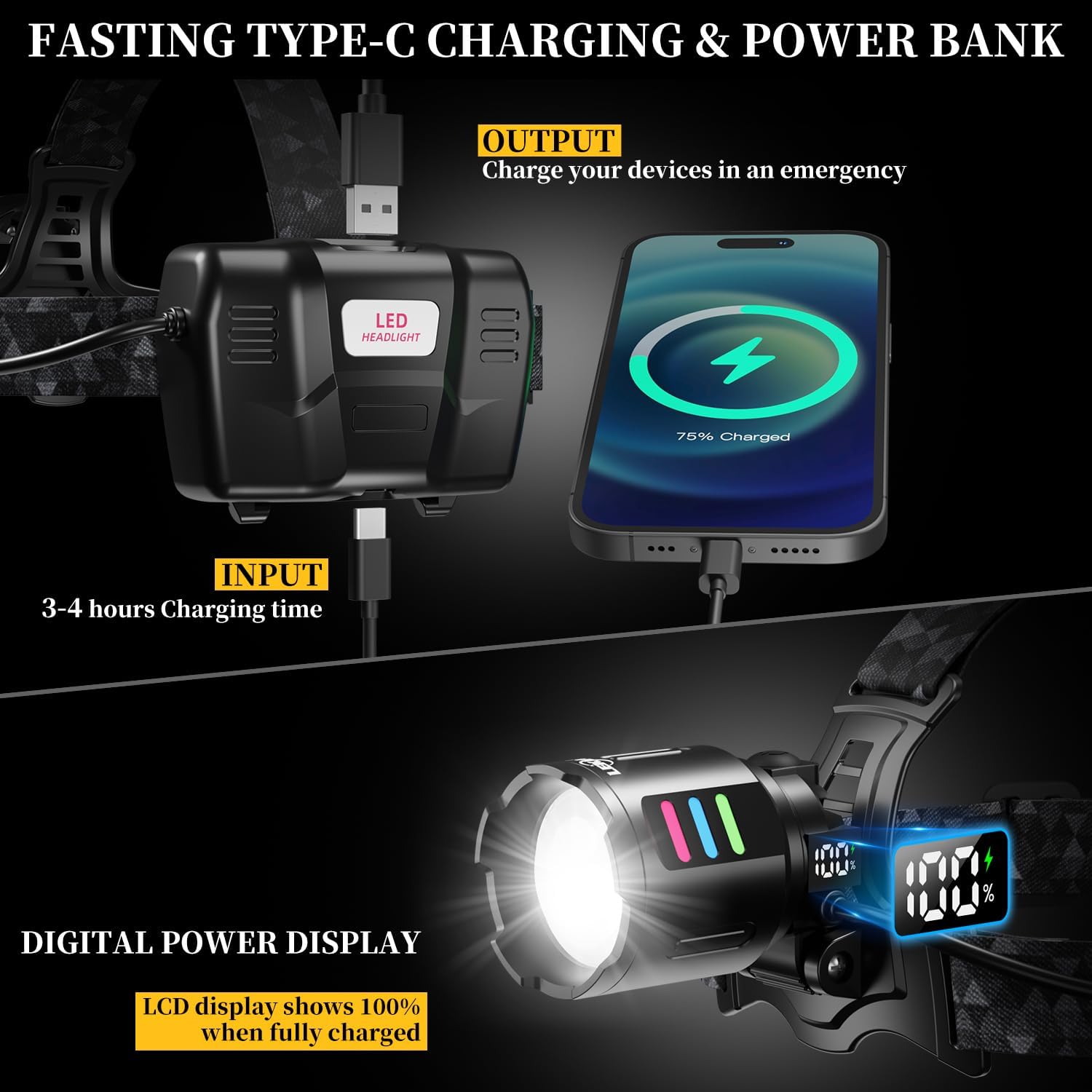
Figure 6: Headlamp charging and power bank functionality.
Maintenance
Cleaning
To maintain your headlamp:
- Wipe the exterior of the headlamp with a soft, damp cloth.
- Do not use abrasive cleaners, solvents, or harsh chemicals, as these can damage the finish or electronic components.
- Ensure the charging ports are clean and free of debris before charging.
Storage
When not in use for extended periods:
- Store the headlamp in a cool, dry place, away from direct sunlight and extreme temperatures.
- For long-term storage, it is recommended to remove the batteries to prevent potential leakage and damage to the device.
Troubleshooting
Headlamp Not Turning On
- Check the battery charge level using the power indicator. Recharge if necessary.
- Ensure the batteries are installed correctly with the proper polarity.
- If new, verify that any insulating seals have been removed from the battery terminals.
Dim Light Output
- Recharge the batteries fully. Dim light often indicates low battery power.
- Clean the lens if it appears dirty or smudged.
Motion Sensor Not Responding
- Ensure motion sensor mode is activated (long press the main button for 2.5 seconds).
- Check for any obstructions in front of the sensor that might be blocking detection.
Specifications
| Feature | Specification |
|---|---|
| Brand | LEKIA |
| Model Number | 5220 |
| Product Dimensions (L x W x H) | 5 x 20 x 25 cm |
| Weight | 460 grams |
| Batteries | 3 P76 Lithium-ion (3x 3000mAh, included) |
| Material | Aluminum |
| Number of Bulbs | 1 (main LED) |
| Special Features | Luminescent design, 9000mAh battery, 50W high power, 5-15h duration, adjustable brightness/focus, USB-C rechargeable, USB discharge, 1000m long range |
| Power Source | Battery powered |
| Bulb Type | LED |
| Luminous Flux | 100000 lm |
| Power | 50 Watts |
| Lighting Angle | 90 Degrees |
| Water Resistance | IPX6 |
Official Product Video
Video 1: Demonstration of the LEKIA Rechargeable Headlamp's various light modes, waterproofing, and practical applications.
Warranty and Support
LEKIA offers a 365-day new product replacement policy. If you encounter any issues with your headlamp, such as malfunction, missing accessories, or damaged packaging, please contact LEKIA customer service. We are committed to providing prompt assistance and will respond to your inquiry and resolve your problem within 24 hours.