
Introduction
This manual provides detailed instructions for the safe and effective operation of your TOOLTOP ET628 3-in-1 Network Scanner, Visual Fault Locator, and Multimeter. This versatile device combines cable length measurement, cable mapping, cable tracing, visual fault locating, and multimeter functions into a single unit, designed for professionals working with network cables, telephone lines, and other electrical systems.
Please read this manual thoroughly before using the device and keep it for future reference.
Safety Information
Always observe the following safety precautions to prevent injury and damage to the device:
- Do not use the device if it appears damaged or is not operating correctly.
- Ensure proper connection of cables before performing any tests.
- Avoid direct exposure to the visual fault locator's laser beam, as it can cause eye damage.
- Do not attempt to measure voltages exceeding the device's specified limits.
- Keep the device away from water and high humidity.
- Only use accessories and replacement parts specified by the manufacturer.
Package Contents
Verify that all items are present in your package:
- 1 x Transmitter (Main Unit)
- 1 x Receiver (Wire Tracker)
- 1 x RJ45 Cable
- 1 x Test Leads
- 1 x K-type Temperature Probe
- 7 x Remote ID Units
- 1 x Carrying Bag
- 1 x User Manual (this document)
- 1 x Gift Box (packaging)
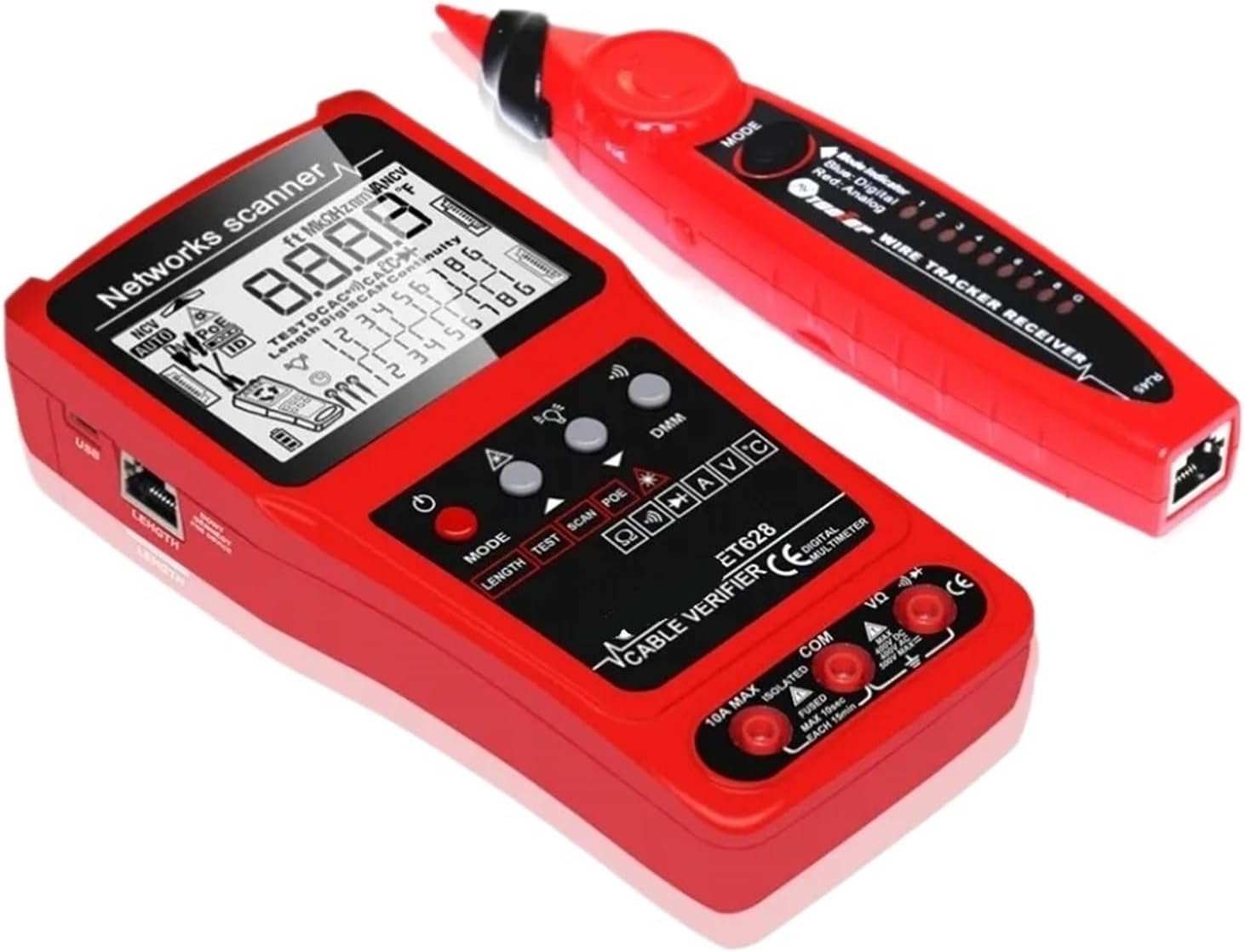
Image: The TOOLTOP ET628 main unit (transmitter), wire tracker (receiver), and various accessories including cables, test leads, remote IDs, and carrying bag.
Product Overview
The TOOLTOP ET628 is a multi-functional testing device designed for network and electrical professionals. It integrates several key functions to streamline cable installation, maintenance, and troubleshooting.

Image: Side view of the ET628 transmitter (left) and the wire tracker receiver (right), showing their ergonomic design and ports.
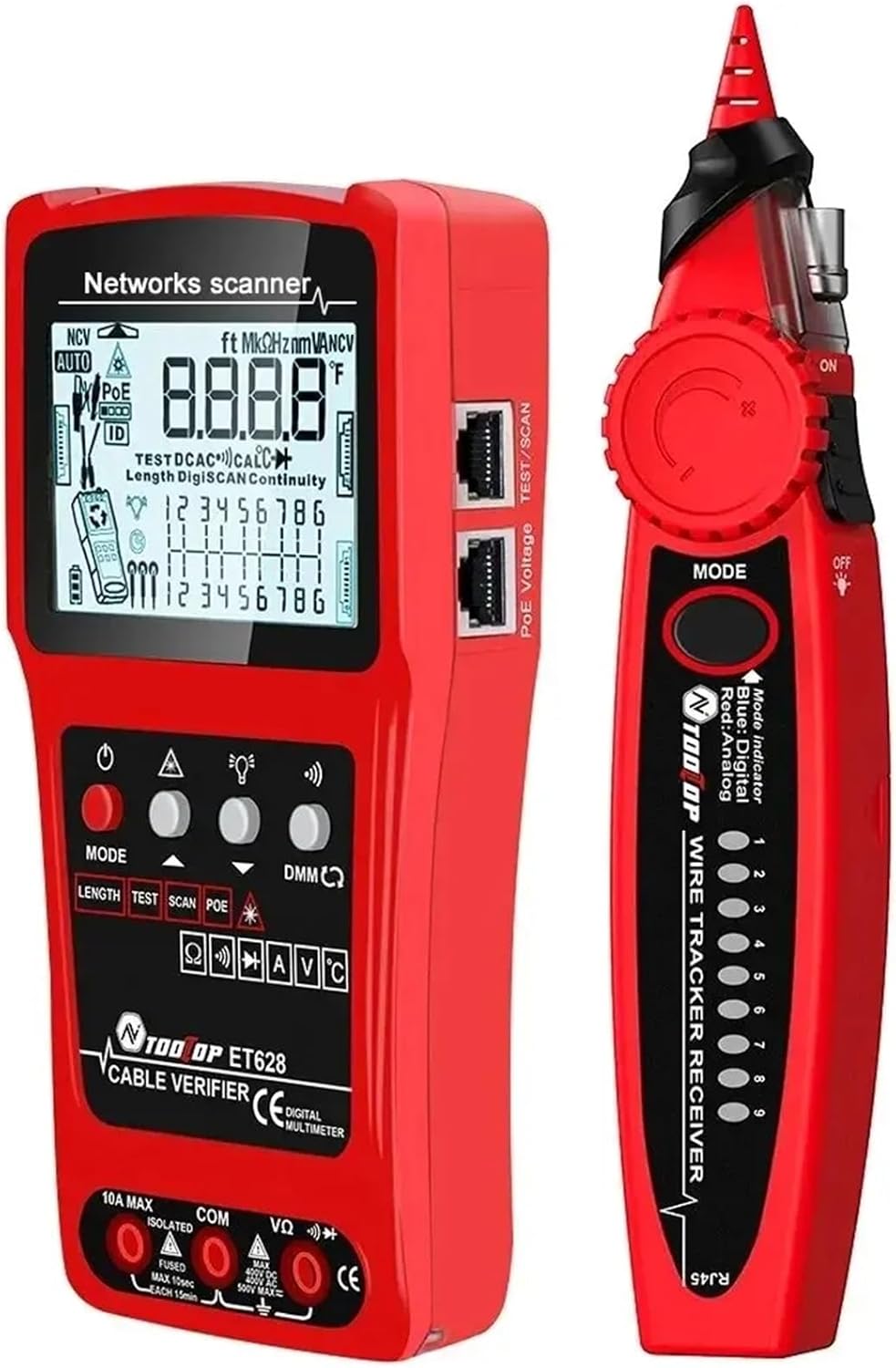
Image: A detailed view of the ET628 transmitter's control panel, including buttons for MODE, LENGTH, TEST, SCAN, POE, and the digital multimeter (DMM) selector.
Key Features:
- Cable Length Measurement: Measures and displays length and condition of network, telephone, coaxial, and other metal cables up to 600m (1968ft).
- Cable Mapping: Tests connection characteristics for open circuits, line sequence, short circuits, and crossovers.
- Cable Tracing (SCAN): Identifies target cables from bundles with noise-free digital technology.
- Visual Fault Locator (VFL): Locates problem areas in fiber optic cables using a red laser (10KM/10mW).
- Multimeter: Performs DC/AC current and voltage, resistance, continuity, diode, and temperature tests.
- PoE Test: Verifies PoE switch power, network cable sequence, polarity, and voltage.
- Built-in Rechargeable Lithium Battery: For extended use.
Setup
Before first use, ensure the device is fully charged. Connect the included charging cable to the transmitter's charging port and a suitable USB power adapter.
Basic Connections:
- Power On: Press and hold the power button on both the transmitter and receiver to turn them on.
- Cable Connection: For most cable tests, connect one end of the cable to the appropriate port on the transmitter (e.g., RJ45 for network cables). For remote ID tests, connect the other end to one of the 7 remote ID units.
- Test Leads: For multimeter functions, connect the red and black test leads to the VΩmA and COM ports respectively on the transmitter.
Operating Instructions
The ET628 offers multiple testing modes. Use the MODE button to cycle through the main functions.

Image: A close-up of the ET628's LCD screen, displaying network scanner information, including cable mapping results and length measurements.
1. Cable Length Measurement
- Connect the cable to be measured to the appropriate port on the transmitter.
- Press the LENGTH button or select the length measurement mode using the MODE button.
- The device will automatically measure and display the cable length in meters or feet.
- For accurate results, ensure the cable is disconnected from any active network devices.
2. Cable Mapping (Wiremap Test)
- Connect one end of the network cable to the RJ45 port on the transmitter.
- Connect the other end of the cable to one of the remote ID units (1-7).
- Select the TEST mode (often labeled "TEST" or "WIREMAP").
- The display will show the wiring sequence, indicating any open circuits, short circuits, or crossed pairs.

Image: The ET628 transmitter with various cable types connected, illustrating its versatility for different testing scenarios.
3. Cable Tracing (SCAN)
- Connect the cable to be traced to the transmitter's RJ45 port.
- Select the SCAN mode on the transmitter.
- Use the receiver (wire tracker) to trace the cable. The receiver will emit an audible tone, which will be strongest when near the target cable.
- Adjust the sensitivity and sound level on the receiver as needed.
4. Visual Fault Locator (VFL)
- Remove the protective cap from the VFL port on the transmitter.
- Connect the fiber optic cable to the VFL port.
- Activate the VFL function (refer to the display for VFL icon or specific button).
- Observe the fiber optic cable for red light leakage, which indicates breaks, bends, or faulty connectors.
- Caution: Avoid looking directly into the VFL output.
5. Multimeter Functions (DMM)
- Connect the red and black test leads to the VΩmA and COM ports respectively.
- Use the DMM selector or MODE button to select the desired measurement (e.g., DC/AC voltage, resistance, continuity, diode, temperature).
- Touch the test probes to the circuit or component to be measured.
- Read the measurement on the display.
- The NCV (Non-Contact Voltage) test function can be activated to detect AC voltage without direct contact.
6. PoE Test
- Connect the network cable from the PoE switch to the RJ45 port on the transmitter.
- Select the POE mode.
- The device will display information about the PoE power, including the network cable sequence number, positive and negative poles, and voltage value.
Maintenance
- Cleaning: Wipe the device with a soft, dry cloth. Do not use abrasive cleaners or solvents.
- Battery: The device features a built-in rechargeable lithium battery. Recharge when the battery indicator is low. Avoid fully discharging the battery for extended periods.
- Storage: Store the device in its carrying bag in a cool, dry place when not in use.
- Calibration: The cable length measurement function may require occasional calibration for optimal accuracy. Refer to the on-screen prompts or specific instructions for calibration procedures.
Troubleshooting
| Problem | Possible Cause | Solution |
|---|---|---|
| Device does not power on. | Low battery. | Charge the device using the provided charging cable. |
| Inaccurate cable length measurement. | Cable connected to active network; improper calibration. | Ensure cable is disconnected from all active devices. Perform calibration as per instructions. |
| No signal during cable tracing. | Transmitter not in SCAN mode; receiver sensitivity too low; cable not connected. | Verify transmitter is in SCAN mode. Increase receiver sensitivity. Ensure cable is properly connected to transmitter. |
| VFL laser not visible. | Protective cap still on; VFL function not activated; fiber cable severely damaged. | Remove cap. Activate VFL mode. Check fiber cable for severe damage. |
Specifications
- Model: ET628
- Brand: MDWXDOFP (TOOLTOP)
- Cable Length Measurement: Up to 600m / 1968ft
- Visual Fault Locator Output: 10KM / 10mW (Red Laser)
- Multimeter Functions: DC/AC Current, DC/AC Voltage, Resistance, Continuity, Diode, Temperature, NCV
- PoE Test: Yes
- Remote ID Units: 7 included
- Power Source: Built-in Rechargeable Lithium Battery
- Item Weight: Approximately 50 Grams (main unit, without accessories)
Warranty and Support
Specific warranty information for the TOOLTOP ET628 is not provided in this manual. Please refer to the product packaging or contact the retailer/manufacturer directly for warranty details and technical support.
For further assistance, you may visit the manufacturer's website or contact their customer service department using the information provided at the point of purchase.