1. Introduction
The ECOWELL Wet Dry Vacuum Cleaner is an innovative 3-in-1 cordless device designed to vacuum, mop, and wash hard floors simultaneously. It offers efficient cleaning with features like dual-sided edge cleaning, one-button self-cleaning, and a lightweight, portable design. This manual provides essential information for the safe and effective operation, maintenance, and troubleshooting of your ECOWELL Wet Dry Vacuum Cleaner.
Key Features:
- 3-in-1 Functionality: Vacuums, mops, and washes in one go.
- Cordless & Portable: Lightweight at 8.2 lbs with up to 30 minutes runtime, covering up to 1,600 sq ft.
- Dual-Sided Edge Cleaning: Reaches within 0.1 inches of baseboards and corners for thorough cleaning.
- One-Button Self-Cleaning: Automated cleaning cycle for the roller brush and internal pipes.
- Dual-Tank System: Separates clean and dirty water to ensure continuous cleaning with fresh water.
- Self-Propelled Design: Makes maneuvering the vacuum effortless.
2. What's Included
Before first use, please ensure all components are present and in good condition. Carefully unpack all items from the box.

Image: All components included in the ECOWELL Wet Dry Vacuum Cleaner package. This includes the main vacuum unit, a filter, a storage dock, a power adapter, an extra brush roller, a warranty card, and the user manual.
Package Contents:
- ECOWELL Wet Dry Vacuum Cleaner Main Unit
- Filter
- Storage Dock
- Power Adaptor
- Brush Roller (1 installed, 1 spare)
- Warranty Card
- User Manual
3. Setup and Assembly
Follow these steps to set up your ECOWELL Wet Dry Vacuum Cleaner for the first time.
- Unpack: Remove all components from the packaging.
- Assemble Handle: Insert the handle into the main body of the vacuum until it clicks securely into place.
- Charge Battery: Place the vacuum on the charging dock and connect the power adapter to a wall outlet. The battery indicator lights will show charging status. Fully charge the vacuum before first use (approximately 4-5 hours).
- Fill Clean Water Tank: Locate the clean water tank (usually the upper tank). Remove it, open the cap, and fill with clean tap water. For enhanced cleaning, you may add a small amount of ECOWELL approved cleaning solution (refer to solution instructions for dilution). Do not exceed the MAX fill line. Securely close the cap and reinsert the tank into the vacuum.
- Check Dirty Water Tank: Ensure the dirty water tank (lower tank) is empty and properly installed before operation.

Image: The ECOWELL Wet Dry Vacuum Cleaner fully assembled and standing upright, showcasing its sleek design and readiness for operation.
4. Operating Instructions
Learn how to effectively use your ECOWELL Wet Dry Vacuum Cleaner for various cleaning tasks.
4.1 Powering On/Off
- To turn on, press the Power button located on the handle.
- To turn off, press the Power button again.
4.2 Cleaning Hard Floors
The ECOWELL vacuum is designed for use on various sealed hard floor types, including tile, hardwood, laminate, and vinyl. It effectively cleans both wet and dry messes.

Image: Demonstrates the ECOWELL vacuum's versatility in cleaning different hard floor surfaces, such as tile, wood, and laminate, effectively removing various types of debris.
- Ensure the clean water tank is filled and the dirty water tank is empty.
- Tilt the vacuum back to engage the brush roller and start the cleaning process.
- Move the vacuum forward and backward over the soiled area. The self-propelled feature will assist in movement.
- For stubborn messes, hold the vacuum over the area for a few seconds to allow the brush and water to work.
4.3 Dual-Sided Edge Cleaning
The unique design allows for cleaning close to edges and corners, minimizing missed spots.
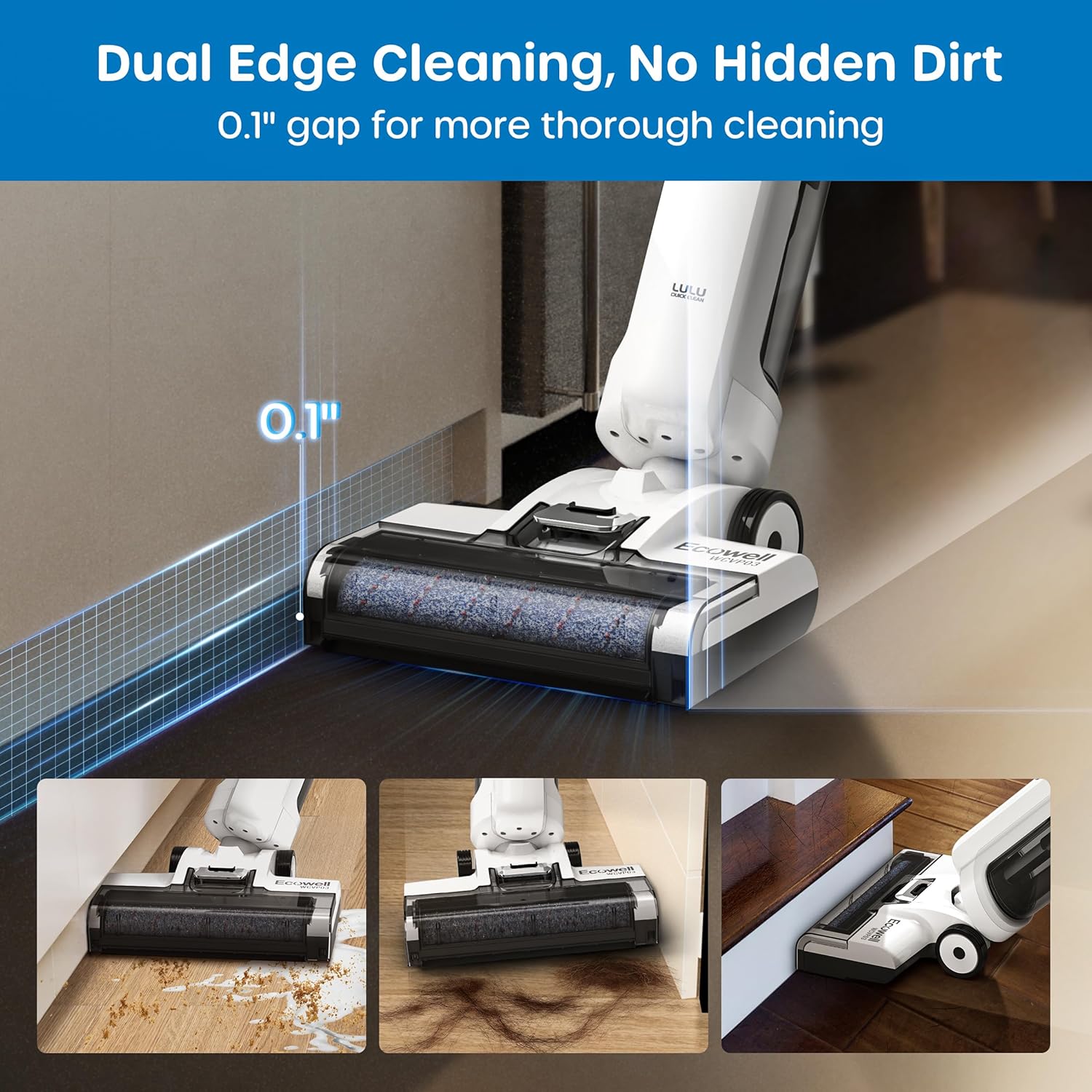
Image: Illustrates the dual-sided edge cleaning capability of the ECOWELL vacuum, showing how it cleans right up to baseboards with minimal gap, ensuring no hidden dirt is left behind.
- Position the vacuum head parallel to the wall or furniture edge.
- The brush roller extends to clean within 0.1 inches of the edge.
4.4 Handling Wet and Dry Waste
The ECOWELL vacuum is capable of cleaning various types of wet and dry debris, from liquids like milk and ketchup to solid particles like pet food and hair.

Image: A visual representation of different types of wet and dry waste, such as milk, butter, pet hair, ketchup, kitchen garbage, and pet food, demonstrating the vacuum's ability to clean them all effectively.
5. Maintenance
Regular maintenance ensures optimal performance and extends the lifespan of your ECOWELL Wet Dry Vacuum Cleaner.
5.1 One-Button Self-Cleaning
After each use, it is highly recommended to run the self-cleaning cycle.

Image: Illustrates the one-touch self-cleaning process, showing the vacuum on its dock, the clean and dirty water tanks, and the button to initiate the 2-minute cleaning cycle.
- Place the vacuum on its storage dock.
- Ensure there is sufficient clean water in the clean water tank.
- Press the Self-Cleaning button on the handle. The cycle will run for approximately 2 minutes, cleaning the brush roller and internal pipes.
- Once the cycle is complete, empty the dirty water tank immediately.
5.2 Emptying and Cleaning the Dirty Water Tank
- After each use or self-cleaning cycle, remove the dirty water tank.
- Open the tank and dispose of the dirty water and debris.
- Rinse the tank thoroughly with clean water.
- Allow the tank to air dry completely before reinserting it into the vacuum.
5.3 Cleaning the Brush Roller
- Even with self-cleaning, it's good practice to periodically remove and inspect the brush roller.
- Remove the brush roller cover and then the brush roller itself.
- Remove any tangled hair or debris from the brush roller. You can rinse it under running water.
- Allow the brush roller to air dry completely before reinserting.
5.4 Cleaning/Replacing the Filter
- The filter is located within the dirty water tank assembly.
- Remove the filter and tap out any loose debris.
- Rinse the filter under running water. Do not scrub.
- Allow the filter to air dry completely for at least 24 hours before reinserting. Using a wet filter can damage the motor.
- Replace the filter every 3-6 months, or more frequently depending on usage, to maintain suction performance.
6. Troubleshooting
If you encounter issues with your ECOWELL Wet Dry Vacuum Cleaner, refer to the following common problems and solutions.
| Problem | Possible Cause | Solution |
|---|---|---|
| Vacuum does not turn on | Battery is low or dead | Charge the vacuum fully. |
| No water dispensing | Clean water tank is empty or not installed correctly | Fill the clean water tank. Ensure it is securely in place. |
| Poor suction or cleaning performance | Dirty water tank is full; Filter is clogged; Brush roller is tangled or dirty; Airway is blocked | Empty dirty water tank. Clean or replace filter. Clean brush roller. Check for blockages in the suction path. |
| Vacuum leaks water | Tanks not properly sealed; Tank damaged; Too much water/solution | Ensure tanks are securely closed and installed. Inspect tanks for cracks. Do not overfill. |
| Self-cleaning not working | Insufficient clean water; Vacuum not on charging dock | Ensure clean water tank is filled. Place vacuum firmly on the charging dock. |
If the problem persists after trying these solutions, please contact ECOWELL customer support for further assistance.
7. Specifications
| Feature | Specification |
|---|---|
| Brand | ECOWELL |
| Model Name | USAWCVP03 (WCVP03) |
| Special Feature | Wet/Dry, Lightweight, Cordless, Rechargeable, Edge Cleaning, One-Button Self-Cleaning |
| Filter Type | Cartridge |
| Is Cordless? | Yes |
| Capacity (Cleaned Area) | Up to 1600 sq ft |
| Runtime | Up to 30 minutes |
| Form Factor | Upright |
| Color | White |
| Product Dimensions | 8"L x 8"W x 40"H |
| Item Weight | 8.2 lbs (product weight), 13 pounds (shipping weight) |
| Battery Type | Lithium Ion (1 required, included) |
| Indoor/Outdoor Usage | Indoor |
| Manufacturer | Alton Industries |
| Country of Origin | China |
8. Warranty and Support
Your ECOWELL Wet Dry Vacuum Cleaner comes with a manufacturer's warranty. Please refer to the included Warranty Card for specific terms and conditions, including warranty period and coverage details.
Customer Support:
For technical assistance, warranty claims, or any questions regarding your product, please contact ECOWELL customer support. Contact information can typically be found on the warranty card or the official ECOWELL website.
Please have your model number (WCVP03) and purchase information ready when contacting support.


