
FORGING MOUNT 9459
FORGING MOUNT Full Motion TV Wall Mount
Model: 9459
Instruction Manual
1. Introduction
This manual provides detailed instructions for the safe and proper installation, operation, and maintenance of your FORGING MOUNT Full Motion TV Wall Mount. Please read this manual thoroughly before installation and retain it for future reference. This mount is designed to provide a secure and flexible viewing experience for your television.
2. Safety Information
WARNING: Failure to read and follow all instructions may result in personal injury, property damage, or voiding of warranty. If you have any questions, please contact customer support.
- Do not mount on drywall alone. This mount requires installation into wood studs, solid concrete, or brick walls.
- Ensure the wall structure can safely support the combined weight of the mount and your television. The maximum load capacity for this mount is 132 lbs (60 kg).
- This mount is compatible with TVs ranging from 42 to 95 inches.
- Verify your TV's VESA pattern is within the supported range (200x100mm to 800x400mm) before installation.
- Always use appropriate safety gear, including eye protection, during installation.
- Two people are recommended for installation, especially when lifting the television.
3. Package Contents
Before beginning installation, ensure all parts are present and undamaged. Refer to the image below for a visual representation of the included components.

Figure 3.1: Included Components
| Component | Description | Quantity |
|---|---|---|
| Wall Plate Assembly | Pre-assembled articulating arm and wall plate | 1 |
| TV Brackets | Vertical bars that attach to the TV | 2 |
| Hardware Kit | Assorted M4, M6, M8 screws, washers, spacers, wall anchors, concrete anchors | 1 set |
| Bubble Level | For ensuring level installation | 1 |
| Cable Ties | For cable management | 3 |
| Allen Key | For adjustments | 1 |
4. Specifications
| Feature | Detail |
|---|---|
| Model Number | 9459 |
| Compatible TV Sizes | 42 - 95 inches |
| Maximum Load Capacity | 132 lbs (60 kg) |
| VESA Compatibility | 200x100mm to 800x400mm |
| Movement Type | Full Motion (Swivel, Articulating, Tilt) |
| Tilt Angle | +5° / -12° |
| Swivel Angle | +/-60° (depends on TV size) |
| Extension from Wall | 2.3 inches (retracted) to 20 inches (extended) |
| Post-Installation Leveling | +/-3° |
| Material | Alloy Steel |
| Product Dimensions | 35.83 x 16.95 x 20.2 inches |
| Item Weight | 15.1 pounds |
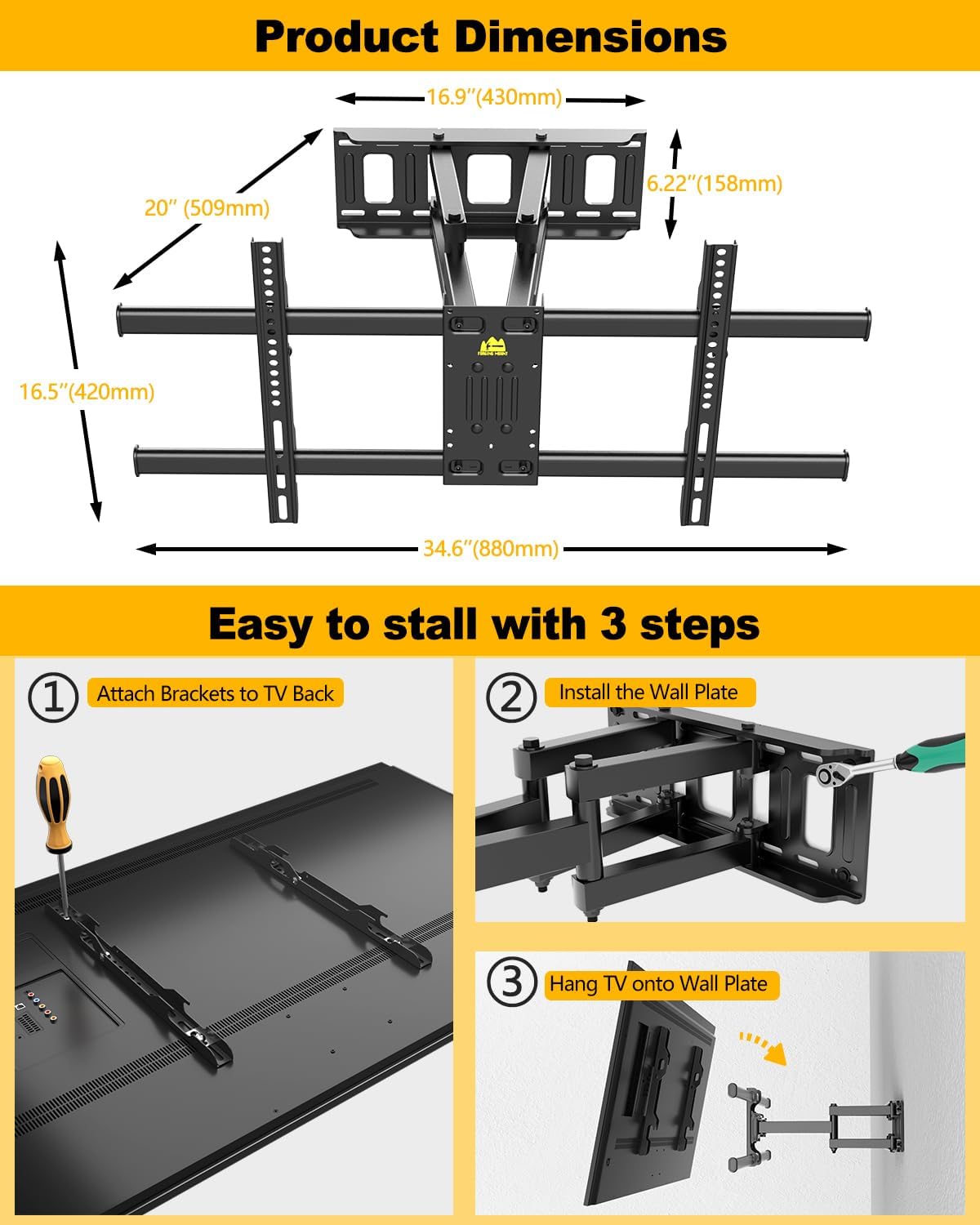
Figure 4.1: Product Dimensions
5. Setup and Installation
This FORGING MOUNT TV wall mount features a pre-assembled design to simplify installation. Follow these steps carefully for a secure setup.
5.1 Compatibility Check
Before starting, ensure your TV and wall are compatible with the mount.
- TV Size & Weight: Confirm your TV is between 42-95 inches and weighs no more than 132 lbs.
- VESA Pattern: Check the VESA mounting holes on the back of your TV. They should be between 200x100mm and 800x400mm.

Figure 5.1: Check VESA Pattern
- Wall Type: This mount is suitable for 12-inch or 16-inch wood studs, solid concrete walls, and brick walls. Do not install on drywall alone.

Figure 5.2: Compatible Wall Types
5.2 Installation Steps
The mount comes largely pre-assembled, reducing installation time.

Figure 5.3: Pre-Assembled Design
- Attach Brackets to TV Back: Secure the two TV brackets to the VESA mounting holes on the back of your television using the appropriate screws, washers, and spacers from the hardware kit. Ensure they are firmly tightened.
- Install the Wall Plate: Locate your desired mounting position on the wall. Use a stud finder to identify wood studs or ensure you are drilling into solid concrete/brick. Use the provided drilling template to mark pilot holes. Drill the holes and secure the wall plate assembly to the wall using the lag bolts and anchors (if applicable). Use the included bubble level to ensure the wall plate is perfectly horizontal.
- Hang TV onto Wall Plate: Carefully lift the television (with attached brackets) and hook the TV brackets onto the wall plate. Ensure the TV is securely seated. Tighten any safety screws or locking mechanisms to prevent accidental dislodgement.
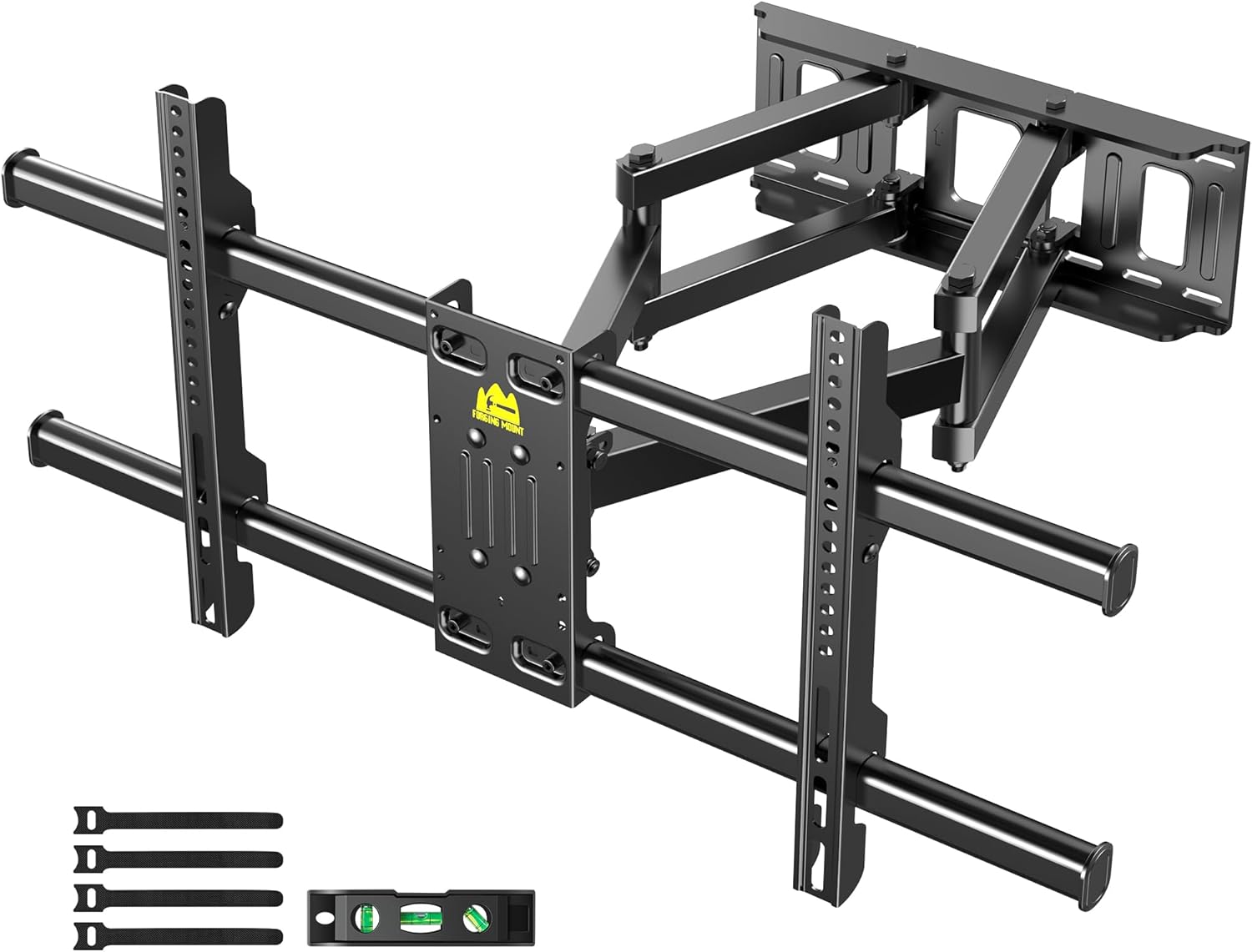
Figure 5.4: Easy 3-Step Installation
5.3 Installation Video Guide
For a visual guide on the installation process, please watch the official product video below.
Video 5.1: Full Motion TV Wall Mount 9459 Installation Guide
This video demonstrates the key steps for installing the FORGING MOUNT Full Motion TV Wall Mount, including attaching the TV brackets, mounting the wall plate, and securing the TV.
6. Operating Instructions (Adjustments)
Once installed, your FORGING MOUNT TV wall mount offers various adjustments for optimal viewing.
6.1 Swivel Adjustment
The mount allows for a swivel of up to +/-60 degrees, depending on your TV size, to achieve the best viewing angle from different positions in the room.

Figure 6.1: Swivel Adjustment
6.2 Tilt Adjustment
Adjust the tilt angle from +5 degrees to -12 degrees to reduce glare from lights or windows and optimize your viewing experience.

Figure 6.2: Tilt Adjustment in Living Room
6.3 Extension and Retraction
The articulating arms allow the TV to extend up to 20 inches from the wall for maximum flexibility and retract back to a slim 2.3 inches for a low-profile look.

Figure 6.3: Extension and Retraction
6.4 Post-Installation Leveling
After installation, you can fine-tune the TV's level by adjusting it +/-3 degrees to ensure it is perfectly horizontal.

Figure 6.4: Post-Installation Leveling
7. Maintenance
Regular maintenance ensures the longevity and safe operation of your TV wall mount.
- Cleaning: Wipe the mount with a soft, dry cloth to remove dust. Do not use abrasive cleaners or solvents.
- Check Connections: Periodically check all screws and bolts to ensure they remain tight and secure. Re-tighten if necessary.
- Lubrication: The articulating joints are designed for smooth movement. If you notice any stiffness over time, a small amount of silicone-based lubricant can be applied to the moving parts.
8. Troubleshooting
If you encounter any issues with your FORGING MOUNT TV wall mount, refer to the common problems and solutions below.
| Problem | Possible Cause | Solution |
|---|---|---|
| TV is not level after installation. | Minor misalignment during installation. | Use the post-installation leveling feature to adjust the TV +/-3 degrees. Refer to Section 6.4. |
| Difficulty swiveling or extending the TV. | Joints may be stiff or require lubrication. | Apply a small amount of silicone-based lubricant to the articulating joints. Ensure no cables are obstructing movement. |
| Mount feels unstable. | Loose bolts or improper wall installation. | Immediately remove the TV. Re-check all wall plate and TV bracket connections. Ensure the mount is securely fastened to appropriate wall studs or concrete/brick. Consult a professional if unsure. |
| Cables are messy or tangled. | No cable management applied. | Use the provided cable ties to neatly bundle and route cables along the mount arms. |
9. Quality and Manufacturing
FORGING MOUNT products are manufactured with precision and undergo rigorous testing to ensure durability and safety. Our TV mounts are built with sturdy alloy steel construction and have passed multiple load tests.
Figure 9.1: Sturdy and Strong Construction
Watch the video below to learn more about the manufacturing and quality assurance processes behind FORGING MOUNT products.
Video 9.1: FORGING MOUNT - Make Your Life Better
This video provides insight into the design, manufacturing, and testing processes that ensure the high quality and reliability of FORGING MOUNT products.
10. Warranty and Support
FORGING MOUNT is committed to providing high-quality products and excellent customer service. If you have any questions, concerns, or require assistance with your TV wall mount, please do not hesitate to contact our professional after-sale team. We are dedicated to offering total solutions and support every day.
Please refer to your purchase documentation or the FORGING MOUNT official website for specific warranty details and contact information.
Related documents9459


Ask a question about this manual
Ask about setup, troubleshooting, compatibility, parts, safety, or missing instructions. Manuals+ will review the question and use this page’s manual context to help answer it.