
Meatmeet Meatmeet Pro
Meatmeet Pro Smart WiFi Wireless Meat Thermometer User Manual
Model: Meatmeet Pro
Introduction
The Meatmeet Pro Smart WiFi Wireless Meat Thermometer is designed to provide precise and convenient temperature monitoring for various cooking applications, including grilling, roasting, and baking. Featuring both WiFi and Bluetooth connectivity, an ultra-thin probe, and a long-lasting rechargeable battery, this device ensures your food is cooked to perfection with ease and reliability.

Figure 1: Meatmeet Pro Thermometer, Booster, and App Interface
What's in the Box
Please verify that all components are present in the package:
- 1 x Booster
- 1 x Probe
- 1 x Type-C Charging Cable
- 1 x User Manual
- 1 x Quick Start Guide

Figure 2: Package Contents of Meatmeet Pro
Setup
1. Charging the Device
Before first use, fully charge the Meatmeet Pro. Connect the provided Type-C charging cable to the booster and a power source. A full charge provides over 50 hours of use. A quick 5-minute charge can provide up to 10 hours of use.

Figure 3: Charging the Meatmeet Pro Booster
2. App Installation
Download the Meatmeet app from your smartphone's app store. The app is compatible with Android 8.0 or iOS 13.0 and above. Follow the on-screen instructions to complete the installation.
3. Device Pairing
Open the Meatmeet app and follow the prompts to pair your device. The thermometer utilizes both WiFi and Bluetooth for stable and reliable connectivity. The blue light on the booster indicates charging or pairing status.

Figure 4: Wireless Connectivity Overview
Operating Instructions
1. Inserting the Probe
Carefully insert the ultra-thin 0.19-inch probe into the thickest part of the meat, ensuring that all parts of the probe below the safety line are fully embedded. Avoid inserting into bone or gristle for accurate readings. The probe is designed to minimize nutrient loss.

Figure 5: Probe Insertion for Accurate Readings
2. Monitoring Temperature
Once the probe is inserted, place the meat in your oven, grill, air fryer, or pan. Use the Meatmeet app to select your desired meat type and doneness. The app provides real-time temperature monitoring, estimated cook times, and alerts when your target temperature is reached. You can monitor your cook remotely from anywhere within range of your WiFi network.
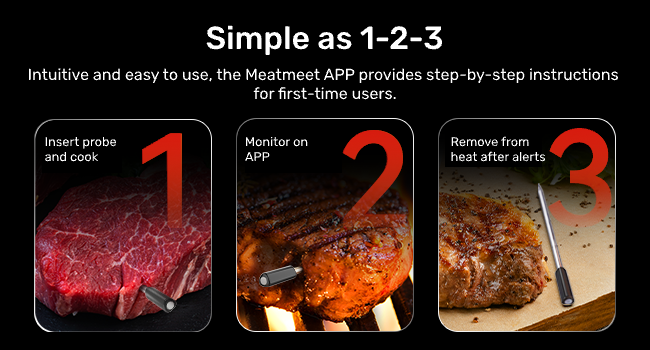
Figure 6: Simple 1-2-3 Cooking Process

Figure 7: Versatile Use Across Cooking Methods
3. High-Heat Resistance
The probe is designed to withstand temperatures up to 660°F (350°C), making it suitable for direct grilling and high-temperature baking. The app will alert you if the ambient temperature exceeds safe limits, enhancing safety during use. Minimize prolonged direct contact of the probe with open flames to avoid damage.

Figure 8: High-Heat Resistance Feature
Maintenance
Cleaning
The Meatmeet Pro probe is 100% IP67 waterproof and dishwasher safe, making cleaning simple. It is also oil-proof, suitable for deep frying and sous vide cooking. Ensure the probe has cooled sufficiently before cleaning. The booster unit should be wiped clean with a damp cloth and is not waterproof.

Figure 9: Probe Waterproofing

Figure 10: Dishwasher Safe Probe
Troubleshooting
| Problem | Possible Cause | Solution |
|---|---|---|
| No connection to app / Unstable signal | Out of range, Bluetooth interference, low battery. | Ensure the booster is within range of your WiFi network. If experiencing Bluetooth interference (e.g., in smoker confined environments), switch to WiFi for a more stable connection. Charge the booster and probe. |
| Inaccurate temperature readings | Probe not inserted correctly, probe damage. | Ensure the probe is inserted into the thickest part of the meat, avoiding bone. Verify the probe is not damaged. The industrial-grade sensor provides accuracy of ±0.9°F. |
| Device not charging | Cable issue, power source issue. | Check the Type-C charging cable for damage. Try a different USB power adapter or port. |
| App not responding | App crash, outdated app version, phone compatibility. | Restart the app. Check for app updates in your app store. Ensure your phone meets the minimum OS requirements (Android 8.0 / iOS 13.0 or above). |
Specifications
- Model: Meatmeet Pro
- Connectivity: Bluetooth, Wi-Fi
- Probe Material: Food Grade Stainless Steel, Food Grade Zirconia Ceramic Handle
- Probe Diameter: 0.19 inches
- Internal Temperature Range: 14°F - 212°F (-10°C to 100°C)
- Ambient Temperature Range: 14°F - 660°F (-10°C to 350°C)
- Accuracy: ±0.9°F (±0.5°C)
- Battery Life (Probe): 50+ hours (with booster)
- Battery Life (Booster): 25+ hours
- Charging: Type-C port, Rapid-charging (5 min charge = 10 hrs use)
- Waterproof Rating: IP67 (Probe)
- Special Features: Alarm, App Companion, High Accuracy, Waterproof, Wi-Fi Support, Oil Proof
- Included Components: Booster, Probe, Charging Cable, User Manual, Quick Start Guide
- Dimensions (Package): 7.52 x 2.2 x 2.05 inches
- Weight (Package): 8.47 ounces
- Certifications: CE, FCC, RoHS, WEEE
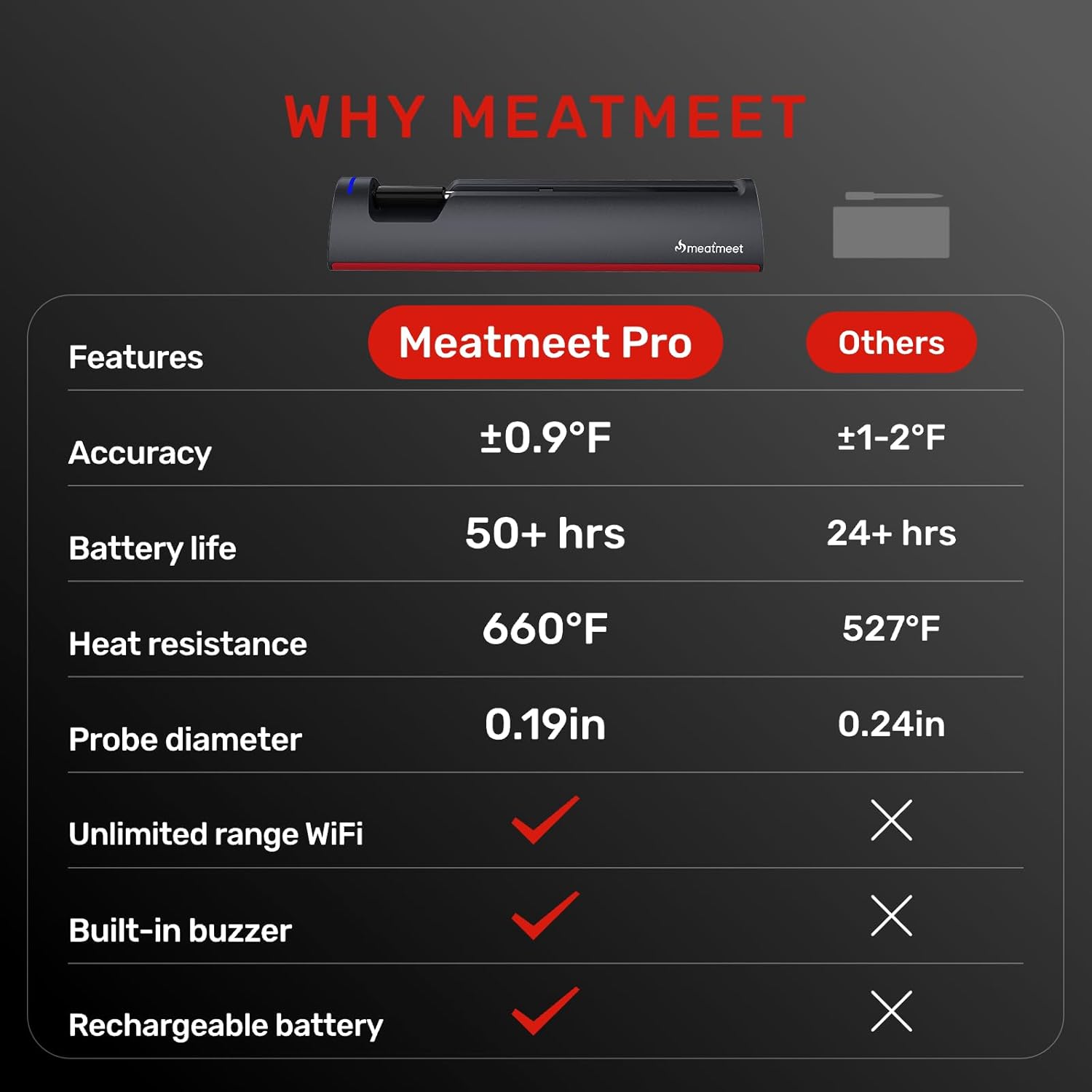
Figure 11: Meatmeet Pro Feature Comparison
Warranty and Support
Meatmeet is committed to providing reliable products and customer satisfaction.
- Warranty: 1 Year Care
- Returns/Replacements: 30 Days Replacement Policy
- Customer Service: 24/7 Hours Customer Service
- Email Support: customercare@meatmeet.com
- Online Store: Visit the official Meatmeet Store for more information and products.
Related documentsMeatmeet Pro


Ask a question about this manual
Ask about setup, troubleshooting, compatibility, parts, safety, or missing instructions. Manuals+ will review the question and use this page’s manual context to help answer it.