
1. Introduction
Thank you for purchasing the AODK L-Shaped Gaming Computer Desk. This manual provides detailed instructions for assembly, operation, maintenance, and troubleshooting to ensure safe and efficient use of your new desk. Please read this manual thoroughly before assembly and retain it for future reference.
2. Safety Information
- Always follow the assembly instructions carefully.
- Do not overload the desk. The tabletop has a maximum load capacity of 50 kg.
- Ensure all screws and fasteners are securely tightened before use. Periodically check and re-tighten as necessary.
- Keep small parts away from children to prevent choking hazards.
- Avoid placing hot items directly on the desk surface without protection.
- Do not stand or sit on the desk.
- Use the integrated power outlets and USB ports according to their specified voltage and current ratings.
3. Package Contents
Please verify that all components are present before beginning assembly. If any parts are missing or damaged, please contact customer support.
- Desk panels (tabletop, shelves)
- Steel frame components
- Fabric drawers (4 units)
- Integrated power strip with 2 AC outlets and 2 USB ports
- Adjustable feet
- Headphone hook
- PC tower stand
- Assembly hardware (screws, bolts, wrench)
- Instruction manual
4. Setup and Assembly
This desk requires customer assembly. A wrench is included, so no additional tools are needed. Clear instructions are provided to facilitate assembly.
4.1. Unpacking and Preparation
Carefully unpack all components and lay them out on a clean, soft surface to prevent scratches. Identify each part using the provided parts list in the instruction manual.
4.2. Assembling the Frame
Follow the step-by-step diagrams in the included manual to connect the steel frame components. Ensure all connections are firm but do not fully tighten screws until the entire frame is assembled.
4.3. Attaching Desk Panels
Place the melamine laminate desk panels onto the assembled frame. Secure them with the provided screws. The high-strength melamine laminate is resistant to dirt, scratches, heat, and moisture, ensuring durability.
4.4. Installing Drawers and Shelves
The integrated drawer unit can be installed on either the left or right side to suit your preference and room layout. Insert the four fabric drawers into the unit. The desk also features a rack for books and documents, and a dedicated PC tower stand.

Image: Assembly diagram illustrating the installation of the fabric drawers and their smooth sliding mechanism. The drawers can be configured for left or right-hand use.
4.5. Final Adjustments
Once all components are in place, fully tighten all screws. Use the adjustable feet to level the desk on uneven surfaces, ensuring a stable and wobble-free setup.
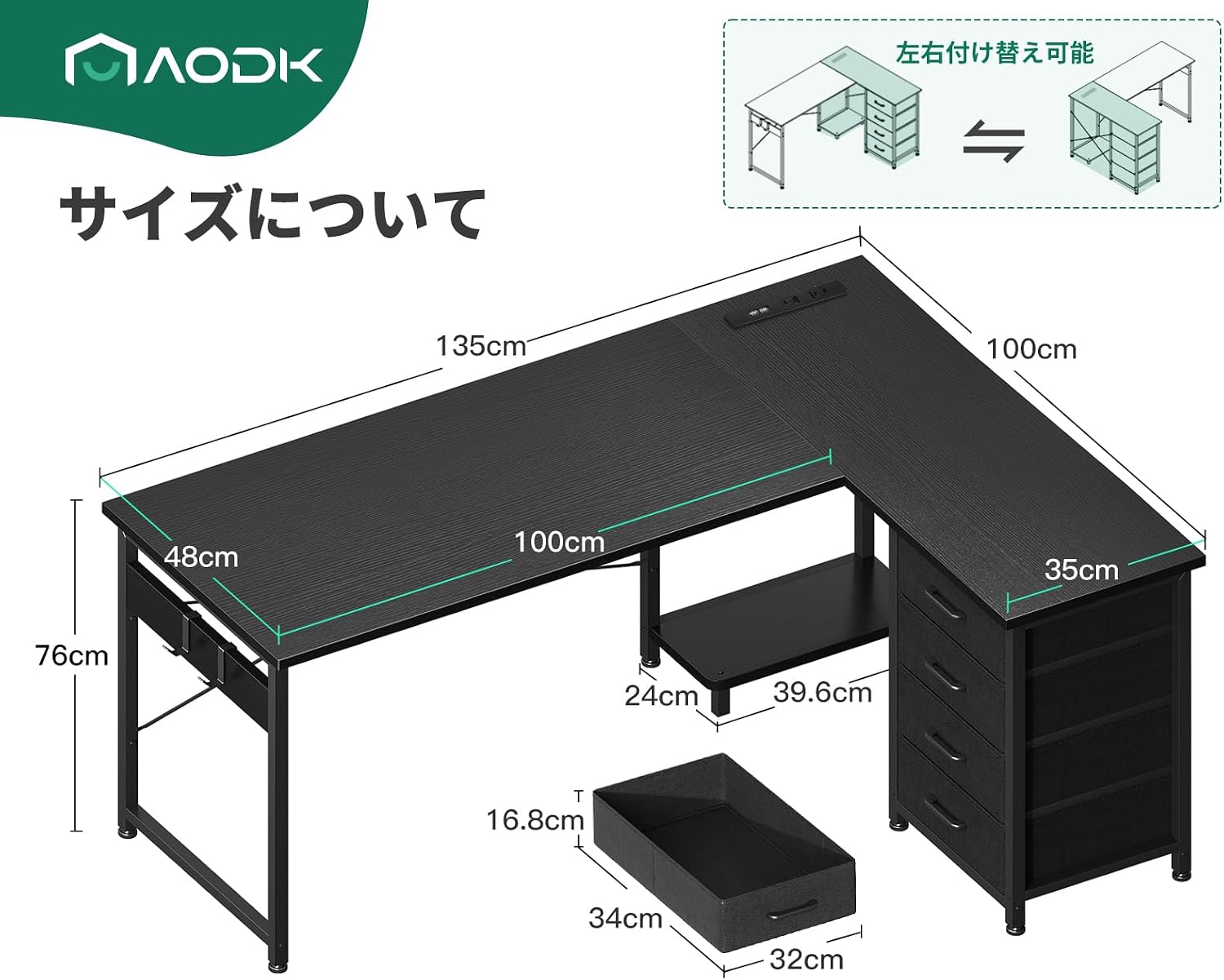
Image: Detailed dimensions of the AODK L-shaped desk, highlighting its 135x100x76 cm size and the reversible nature of the drawer unit.
5. Operating Instructions
5.1. Using the Integrated Power Outlets
The desk is equipped with a built-in power strip featuring two AC outlets and two USB ports. This allows for convenient charging of your computer, smartphone, and other electronic devices directly from your workspace.

Image: A close-up view of the desk's integrated power strip, showing two AC outlets and two USB ports in use for charging devices.
Video: Demonstration of the integrated power outlets and USB ports for charging devices on the desk.
5.2. Utilizing Storage Features
The desk includes four fabric drawers and an open rack for ample storage. These features help keep your desk area organized and comfortable by providing easy access to books, documents, and other items. A dedicated PC tower stand is also provided to keep your computer off the floor.

Image: The desk's fabric drawers are shown open, demonstrating their storage capacity for various office supplies and personal items.

Image: Close-up of the PC tower stand and the convenient headphone hook located under the desk.
Video: Overview of the L-shaped desk's storage features, including the drawers and shelves.
Video: A detailed look at the L-shaped desk's storage bag (fabric drawers) and its functionality.
6. Maintenance
To maintain the appearance and longevity of your AODK desk, follow these simple maintenance guidelines:
- Cleaning: Wipe the desk surface with a soft, damp cloth. Avoid abrasive cleaners or harsh chemicals, as the high-strength melamine laminate is easy to clean and resistant to most stains.
- Protection: While the surface is resistant to scratches, heat, and moisture, using coasters for drinks and pads for hot items is recommended to further protect the desk.
- Hardware: Periodically check all screws and bolts to ensure they remain tight. Re-tighten if necessary to maintain stability.
7. Troubleshooting
If you encounter any issues with your desk, please refer to the following common solutions:
- Wobbly Desk: Ensure all assembly screws are fully tightened. Adjust the leveling feet at the bottom of the desk legs to compensate for uneven floor surfaces.
- Power Outlets Not Working: Check if the desk's power cord is securely plugged into a functional wall outlet. Ensure the power strip itself is switched on, if applicable. If only the USB ports are not working, try a different USB cable or device.
- Drawers Not Sliding Smoothly: Ensure the fabric drawers are correctly inserted into their slots and are not overloaded. Check for any obstructions.
If problems persist, please contact customer support for assistance.
8. Specifications
| Feature | Description |
|---|---|
| Brand | AODK |
| Model Number | OKTB02021501004JP |
| Shape | L-shaped |
| Desk Type | Computer Desk, Shelf Desk |
| Product Dimensions (D x W x H) | 100 cm x 135 cm x 76 cm |
| Color | Black |
| Style | Modern |
| Base Material | Wood (Tabletop), Metal (Frame) |
| Finish Type | Powder Coated |
| Special Features | Built-in USB outlets, Reversible Drawer Unit |
| Number of Drawers | 4 |
| Recommended Uses | Gaming, Work, Study |
| Item Weight | Approx. 17.8 KG |
| Assembly Required | Yes |
| Max Recommended Weight | 50 Kilograms |
| Tabletop Thickness | 18 Millimeters |
9. Warranty and Support
This product comes with a limited warranty. For specific warranty details, please refer to the documentation included with your purchase or contact the seller directly. In case of any defects or issues with the desk, please feel free to contact us at any time. Our customer support team is ready to assist you.


