
1. Introduction
Thank you for choosing the Home Pilot Pure Connected Thermostat with Receiver. This device is designed to provide precise and efficient control over your home's heating or cooling system, enhancing comfort while helping to reduce energy consumption. By integrating with the Home Pilot smart home box, you can unlock advanced features such as remote control, voice commands, and personalized programming.
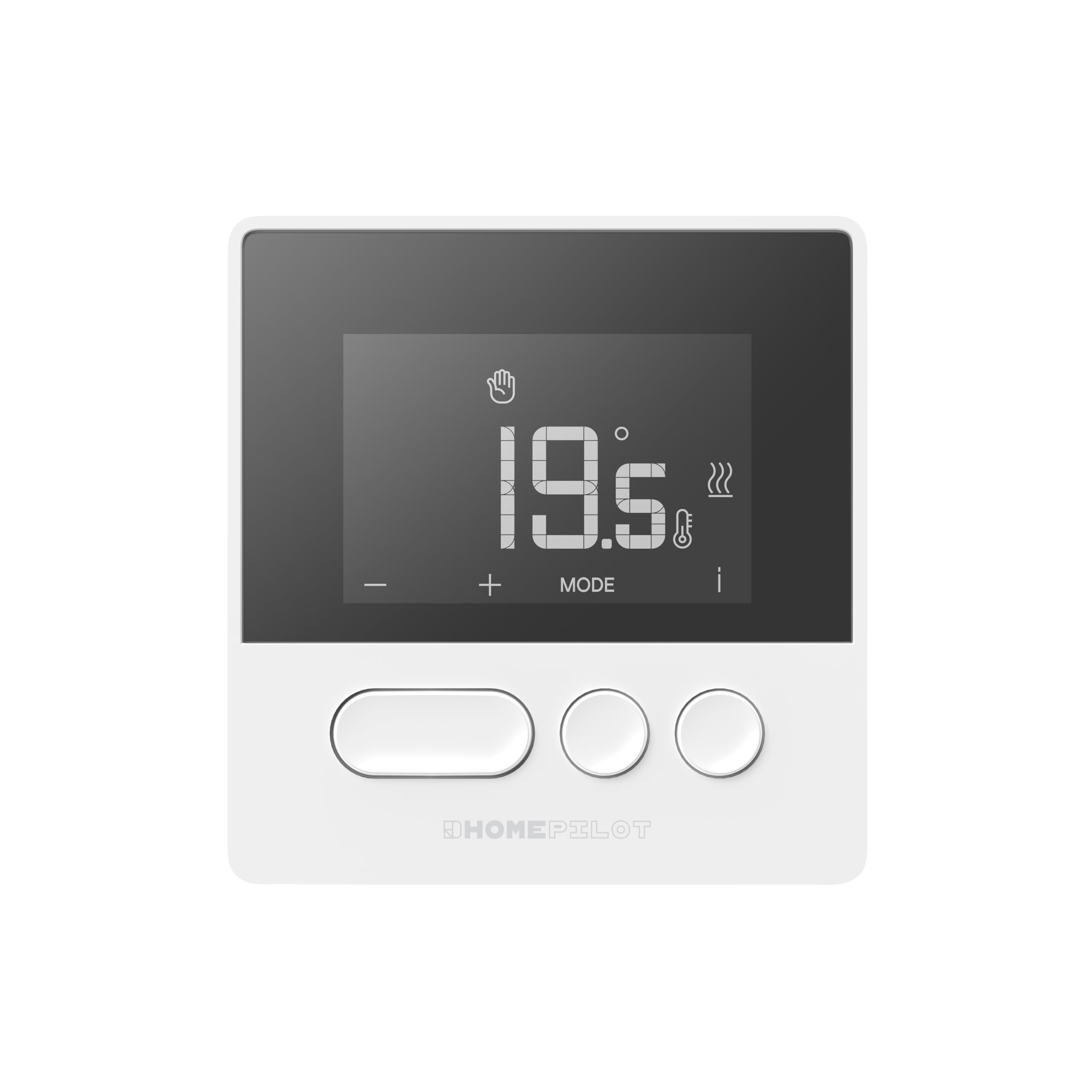
Figure 1: Home Pilot Pure Connected Thermostat. The display shows a temperature of 19.5 degrees Celsius, with control buttons for adjustment and mode selection below.
2. Setup
2.1. What's Included
Your Home Pilot Pure Connected Thermostat package includes:
- Home Pilot Pure Thermostat
- Receiver (pre-associated)
- Mounting accessories (screws, wall plugs)
- User Manual (this document)

Figure 2: The Home Pilot Pure Thermostat and its accompanying receiver unit, displayed on a coffee table alongside a smartphone, illustrating the complete system.
2.2. Thermostat Placement
For accurate temperature readings and optimal performance, place the thermostat in a central location within the room you wish to control. Avoid areas:
- Near direct sunlight or heat sources (e.g., radiators, lamps).
- Near drafts (e.g., windows, doors).
- On exterior walls.
- Behind curtains or furniture.
The wireless design allows flexible placement on a piece of furniture or wall mounting. Ensure it is at a height that represents the average room temperature, typically 1.5 meters (5 feet) from the floor.

Figure 3: The Home Pilot Pure Thermostat discreetly mounted on a wall in a contemporary living space, demonstrating a typical installation scenario.
2.3. Receiver Wiring
The receiver unit must be wired to your heating system. It is compatible with various systems, including boilers, heat pumps, and electric radiators. It is highly recommended to have a qualified electrician perform the wiring to ensure safety and correct functionality.
Refer to the detailed wiring diagram provided in the separate installation guide for your specific heating system type. Ensure the main power supply to your heating system is turned off before attempting any wiring.
2.4. Connecting to a Smart Home Box
To access advanced features such as remote control, programming, and voice commands, the thermostat needs to be connected to a Home Pilot Premium smart home box or a compatible Delta Dore box (e.g., Tydom / Tywell). Follow the instructions provided with your smart home box for the pairing process. The thermostat and receiver are pre-associated with each other.
3. Operating Instructions
3.1. Basic Controls
The thermostat features an intuitive screen and three main buttons:
- '+' Button: Increases the set temperature or navigates menu options.
- '-' Button: Decreases the set temperature or navigates menu options.
- 'MODE' Button: Cycles through operating modes or confirms selections.
- 'i' (Information) Icon: Provides additional status or error information on the display.
3.2. Adjusting Temperature
To manually adjust the temperature:
- Press the '+' or '-' button. The current set temperature will flash.
- Use the '+' or '-' buttons to set your desired temperature.
- The new temperature will be applied automatically after a few seconds, or you can press 'MODE' to confirm immediately.
3.3. Operating Modes
Press the 'MODE' button to cycle through available operating modes. Common modes may include:
- Manual Mode: Maintains a constant temperature set by the user.
- Programmed Mode: Follows a pre-set schedule (requires smart home box).
- Away Mode: Sets a lower, energy-saving temperature when the home is unoccupied.
- Frost Protection Mode: Maintains a minimum temperature to prevent freezing.
3.4. Programming Schedules (via Home Pilot App)
For weekly programming and advanced scheduling, use the Home Pilot mobile application after connecting your thermostat to a compatible smart home box. The app allows you to:
- Create custom heating/cooling schedules for different days and times.
- Adjust schedules remotely.
- Monitor energy consumption.
3.5. Remote and Voice Control
Once connected to a Home Pilot smart home box, you can control your thermostat remotely via the Home Pilot mobile application. Additionally, the system supports voice control through compatible voice assistants, allowing you to adjust settings with simple commands.
4. Maintenance
4.1. Cleaning
To maintain the appearance and functionality of your thermostat:
- Wipe the exterior with a soft, dry cloth.
- Do not use abrasive cleaners, solvents, or chemical sprays, as these can damage the surface or internal components.
4.2. Battery Replacement
The Home Pilot Pure Thermostat is typically powered by batteries. When the battery level is low, an indicator will appear on the display. To replace the batteries:
- Gently remove the thermostat from its mounting plate or open the battery compartment.
- Replace the old batteries with new ones of the specified type (refer to the device's back cover or a more detailed guide for battery type).
- Ensure correct polarity (+/-).
- Reattach the thermostat or close the compartment.
5. Troubleshooting
If you encounter issues with your Home Pilot Pure Thermostat, refer to the following common problems and solutions:
| Problem | Possible Cause | Solution |
|---|---|---|
| Thermostat display is blank. | No power or dead batteries. | Check battery installation and replace if necessary. Ensure the receiver has power. |
| Heating/Cooling system not responding. | No communication between thermostat and receiver, or receiver not wired correctly. | Ensure the receiver is powered. Check the wireless connection. Verify receiver wiring (consult an electrician if unsure). |
| Incorrect temperature reading. | Thermostat placed in an unsuitable location (drafts, direct sun). | Relocate the thermostat to a more central and stable environment. |
| Cannot connect to Home Pilot App. | Thermostat not paired with the smart home box, or network issues. | Ensure your Home Pilot smart home box is online. Re-attempt the pairing process as per the smart home box instructions. Check your home Wi-Fi connection. |
If the problem persists, please contact Home Pilot customer support or refer to the online resources available on the Home Pilot website.
6. Specifications
| Brand | HOMEPILOT |
| Model Number | 8130000 |
| Color | White |
| Product Dimensions (Thermostat) | (Not explicitly stated for thermostat only, using package dimensions as reference for overall size) Approximately 27.3 x 15.7 x 5 cm (Package) |
| Item Weight | 536 g |
| Special Features | Voice control, Programmable, Energy saving |
| Components Included | Thermostat, Receiver |
| Compatible Heating Systems | Boiler, Heat pump, Electric radiators |
| Country of Origin | France |
7. Warranty & Support
7.1. Warranty Information
The Home Pilot Pure Connected Thermostat is manufactured by Delta Dore, a reputable French group known for reliable smart home solutions. For specific warranty terms and conditions, please refer to the documentation provided with your purchase or visit the official Home Pilot / Delta Dore website. Keep your proof of purchase for warranty claims.
7.2. Customer Support
For technical assistance, product inquiries, or further support, please visit the official Home Pilot website or contact their customer service department. Online resources, FAQs, and detailed guides may be available to help you with installation and operation.
