
JEKCA ST19LZD05
JEKCA Chameleon 01S Instruction Manual
Model: ST19LZD05
1. Introduction
The JEKCA Chameleon 01S is a detailed 3D building block model designed for enthusiasts aged 14 and above. JEKCA products feature a unique, patented interlocking brick-through system that ensures the assembled sculptures are sturdy and do not require glue.
This kit contains over 1510 pieces and provides a rewarding building experience, resulting in a durable and impressive chameleon sculpture. The assembly process is straightforward, guided by the detailed step-by-step manual included in the package.
Key features include:
- Designed for individuals 14 years old or above.
- Utilizes a special Interlocking Brick-through System for enhanced stability.
- Results in a sturdy model that is not prone to breaking apart.
- Comprises more than 1510 individual pieces.

Figure 1: Fully assembled JEKCA Chameleon 01S model, showcasing its intricate design and vibrant colors.
2. Safety Information
WARNING: This product contains small parts. It is recommended for individuals aged 14 years or above. Keep out of reach of young children to prevent choking hazards.
3. What's in the Box
Upon opening your JEKCA Chameleon 01S package, please verify that all the following components are present:
- Instruction Manual
- Building Bricks (various shapes and colors)
- Pins (for interlocking)
- Pin Driver (tool for inserting pins)
- Quick Guide
4. Assembly Instructions (Setup)
The JEKCA building system utilizes a unique interlocking mechanism that ensures a strong and stable final model. Follow the detailed step-by-step instructions provided in the included instruction manual for precise assembly.
4.1 Key Assembly Principle: The Interlocking System
Unlike traditional building blocks, JEKCA models are secured using pins that pass through the bricks, locking them together. This method eliminates the need for glue and provides superior structural integrity.
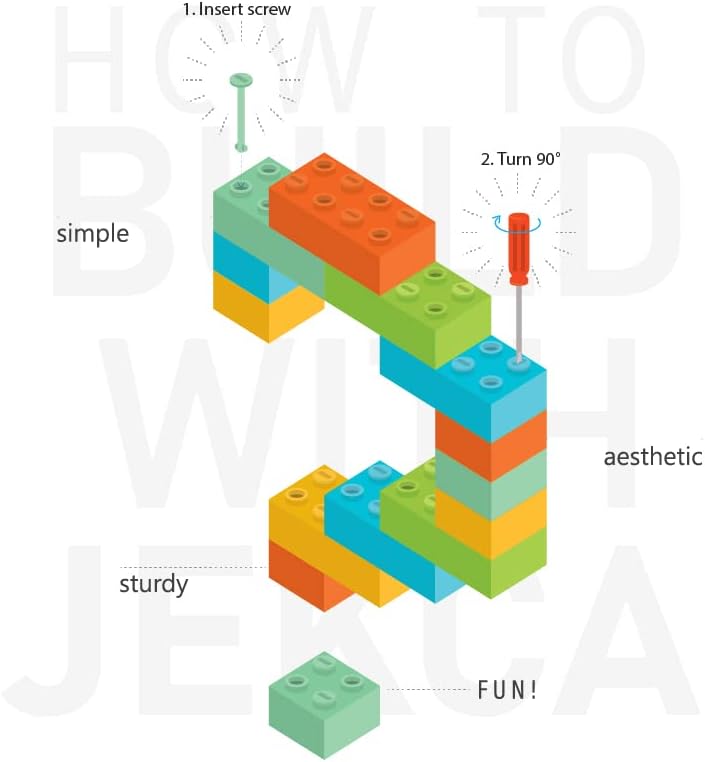
Figure 2: Illustration of the JEKCA interlocking system. Insert the pin (screw) and turn 90 degrees with the pin driver to secure the bricks.
4.2 Step-by-Step Assembly
- Preparation: Unpack all components and organize the bricks by color or shape as suggested in the instruction manual.
- Follow the Manual: Refer to the comprehensive instruction manual for the exact sequence of brick placement and pin insertion. Each step is illustrated to guide you.
- Insert Pins: When instructed, align the bricks and insert the provided pins through the designated holes.
- Secure with Pin Driver: Use the pin driver tool to turn the pins 90 degrees. This action locks the bricks firmly in place. Ensure each pin is fully turned for maximum stability.
- Layer by Layer: Continue building layer by layer, ensuring each section is securely interlocked before proceeding.
- Final Touches: Once the main structure is complete, attach any remaining decorative pieces as per the manual.

Figure 3: Side view of the assembled JEKCA Chameleon 01S, demonstrating the completed form.
5. Operating (Building Process)
The "operation" of your JEKCA Chameleon 01S involves the careful and precise assembly of its components. The unique interlocking system is central to this process, providing both structural integrity and a satisfying building experience.
Focus on aligning each brick correctly and ensuring that the pins are fully inserted and turned. This attention to detail during the building phase will result in a robust and aesthetically pleasing final model. The process is designed to be intuitive, with the included manual serving as your primary guide.

Figure 4: Frontal view of the assembled JEKCA Chameleon 01S, highlighting the head and facial features.
6. Maintenance
Once assembled, your JEKCA Chameleon 01S model requires minimal maintenance. Follow these guidelines to preserve its appearance and structural integrity:
- Cleaning: To remove dust, gently wipe the model with a soft, dry cloth. For more stubborn dirt, a slightly damp cloth can be used, but avoid excessive moisture. Do not use harsh chemicals or abrasive cleaners.
- Storage: Store the model in a stable location away from direct sunlight, extreme temperatures, and high humidity, which can affect the plastic over time.
- Handling: While the model is sturdy, avoid dropping it or applying excessive force, as this could dislodge bricks or pins.
7. Troubleshooting
Should you encounter any issues during assembly or with the completed model, consider the following:
- Bricks Not Fitting: Ensure you are using the correct bricks for each step as indicated in the manual. Sometimes, similar-looking bricks have subtle differences.
- Loose Connections: If a section feels loose, verify that all pins in that area are fully inserted and turned 90 degrees with the pin driver. A partially turned pin will not secure the bricks properly.
- Missing Pieces: Double-check the packaging and work area. If a piece is genuinely missing, refer to the support section for contact information.
- Difficulty with Pin Insertion: Ensure the holes in the bricks are perfectly aligned before attempting to insert a pin. Do not force pins; gentle pressure and correct alignment are key.
8. Specifications
The following table outlines the key specifications for the JEKCA Chameleon 01S building block set:
| Specification | Detail |
|---|---|
| Model Number | ST19LZD05 |
| Product Dimensions (L x W x H) | 10.59 x 5.16 x 9.02 inches (26.9 x 13.1 x 22.9 cm) |
| Item Weight | 2.12 pounds |
| Recommended Age | 14 years and up |
| Number of Pieces | >1510 pieces |
| Manufacturer | JEKCA |

Figure 5: The JEKCA Chameleon 01S model displayed alongside a 13-inch iPad Pro for a visual representation of its 1:1 scale dimensions.
9. Warranty and Support
JEKCA products are designed for durability and a satisfying building experience. While specific warranty details are not provided in this manual, JEKCA stands behind the quality of its products.
For any inquiries regarding missing parts, assembly assistance, or product support, please contact JEKCA directly through their official channels. You can often find support information on the JEKCA website or through the retailer where the product was purchased.
Visit the official JEKCA store for more information and support: JEKCA Store on Amazon
Ask a question about this manual
Ask about setup, troubleshooting, compatibility, parts, safety, or missing instructions. Manuals+ will review the question and use this page’s manual context to help answer it.