
Introduction
Thank you for choosing the Yard Force 60V Cordless String Trimmer. This powerful and versatile tool is designed to provide efficient grass and weed trimming performance with its advanced brushless motor system and three-speed settings. Its ergonomic design ensures comfortable handling and precise control for all your yard maintenance needs.

Figure 1: Yard Force 60V Cordless String Trimmer, battery, and charger.
Safety Information
Always read and understand all safety warnings and instructions before operating this product. Failure to follow the warnings and instructions may result in electric shock, fire, and/or serious injury. Keep this manual for future reference.
- Wear appropriate personal protective equipment (PPE), including eye protection, long pants, and sturdy footwear, when operating the trimmer.
- Ensure the work area is clear of debris, rocks, and other objects that could be thrown by the trimmer line.
- Keep bystanders, children, and pets at a safe distance (at least 50 feet/15 meters) from the operating area.
- Do not operate the trimmer in wet conditions or rain.
- Always remove the battery pack when cleaning, servicing, or storing the trimmer.
Package Contents
Verify that all items are included in your package:
- Yard Force 60V Cordless String Trimmer
- 1x 2.5Ah 60V Lithium-Ion Battery Pack
- 2.5A Battery Charger
- Trimmer Guard
- Auxiliary Handle
- Owner's Manual
Setup
1. Charging the Battery
Before first use, fully charge the battery pack. Insert the battery pack into the charger, ensuring it clicks into place. The indicator lights on the charger will show the charging status. A full charge typically takes approximately 60 minutes.
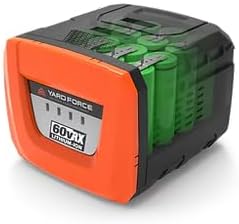
Figure 2: The 60V Lithium-Ion Battery Pack.
2. Installing the Battery
Once charged, slide the battery pack into the battery compartment on the trimmer until it locks securely. Ensure the battery is fully seated to prevent accidental dislodgement during operation.

Figure 3: Battery compartment on the trimmer.
3. Attaching the Auxiliary Handle
Attach the auxiliary handle to the trimmer shaft. Adjust its position for comfortable and balanced operation. Tighten the handle securely using the provided hardware.
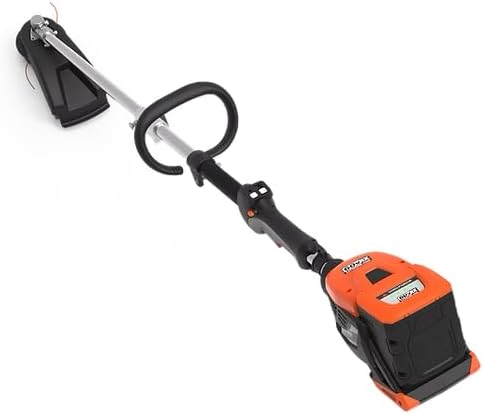
Figure 4: Auxiliary handle for improved control.
4. Installing the Trimmer Guard
Securely attach the trimmer guard to the trimmer head assembly. The guard helps protect the user from thrown debris and ensures proper cutting line length. Refer to the diagram for correct orientation.
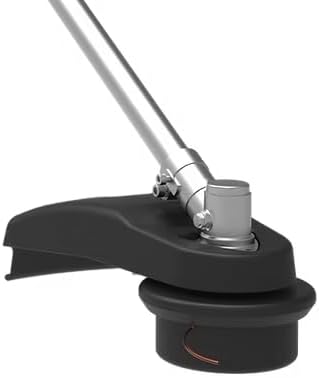
Figure 5: Trimmer head with protective guard.
Operating Instructions
1. Powering On and Speed Selection
To start the trimmer, press the safety lock-off button and then squeeze the trigger. The trimmer features three speed settings (4500 / 5000 / 5500 rpm) for various trimming tasks. Use the speed selection button on the handle to cycle through the available speeds.

Figure 6: Control panel with speed selection.
2. Trimming and Edging
Hold the trimmer firmly with both hands. For general trimming, hold the trimmer head parallel to the ground and move it in a sweeping motion. For edging, rotate the trimmer head to a vertical position and guide it along the edge of sidewalks or driveways.
Video 1: Demonstrates the Yard Force 60vRX Line Trimmer in use for various trimming and edging tasks, including battery installation and speed selection.
The 16-inch cutting width allows for efficient coverage. The bump feed mechanism provides seamless line advancement; simply tap the trimmer head on the ground while operating to extend the line.

Figure 7: General grass trimming with the Yard Force trimmer.

Figure 8: Edging along a paved surface.
3. Attachment Compatibility
This trimmer is designed with universal attachment acceptance, allowing it to be transformed into other garden tools with compatible attachments (sold separately). This enhances the tool's versatility for various yard care tasks.
Maintenance
1. Replacing Trimmer Line
The trimmer uses a 0.095" x 10' string spool. When the line runs out, refer to the detailed instructions in the full owner's manual for proper replacement. Always use the recommended line type and size to ensure optimal performance and prevent damage.
2. Cleaning and Storage
After each use, disconnect the battery pack and clean the trimmer head and guard to remove any grass clippings or debris. Use a damp cloth for cleaning. Store the trimmer in a dry, secure location, out of reach of children and away from direct sunlight or extreme temperatures.
Troubleshooting
| Problem | Possible Cause | Solution |
|---|---|---|
| Trimmer does not start | Battery not charged or not properly inserted | Ensure battery is fully charged and securely inserted. |
| Trimmer line does not extend | Line is tangled or too short; spool is empty | Tap trimmer head on ground while running; replace trimmer line spool if empty. |
| Reduced cutting performance | Trimmer line is worn or incorrect speed setting | Replace trimmer line; select a higher speed setting for tougher vegetation. |
Specifications
- Brand: Yard Force
- Model: YF60VRX18-LT
- Power Source: DC 60V Lithium-Ion Battery
- Cutting Width: 16 Inches
- Trimmer Line Diameter: 0.095 Inches
- Speed Settings: 3 (4500 / 5000 / 5500 rpm)
- Battery: 1x 2.5Ah
- Charger: 2.5A
- Approximate Runtime (Max Speed): Up to 20 minutes
- Item Weight: 20 Pounds
- Product Dimensions: 42.5"L x 8"W
- UPC: 846325004091
Warranty and Support
The Yard Force 60V Cordless String Trimmer is backed by a 5-year warranty, ensuring peace of mind and long-term reliability. For detailed warranty information, product registration, or technical support, please visit the official Yard Force website or contact their customer service department. Keep your purchase receipt as proof of purchase for warranty claims.
Online Support: Visit Yard Force Store on Amazon for more information and resources.


