
1. Introduction
This manual provides detailed instructions for the assembly, operation, and maintenance of your Tilta Pyxis 6K/12K Camera Cage Pro Kit. Please read this manual thoroughly before using the product to ensure proper function and longevity. Keep this manual for future reference.
2. Product Overview
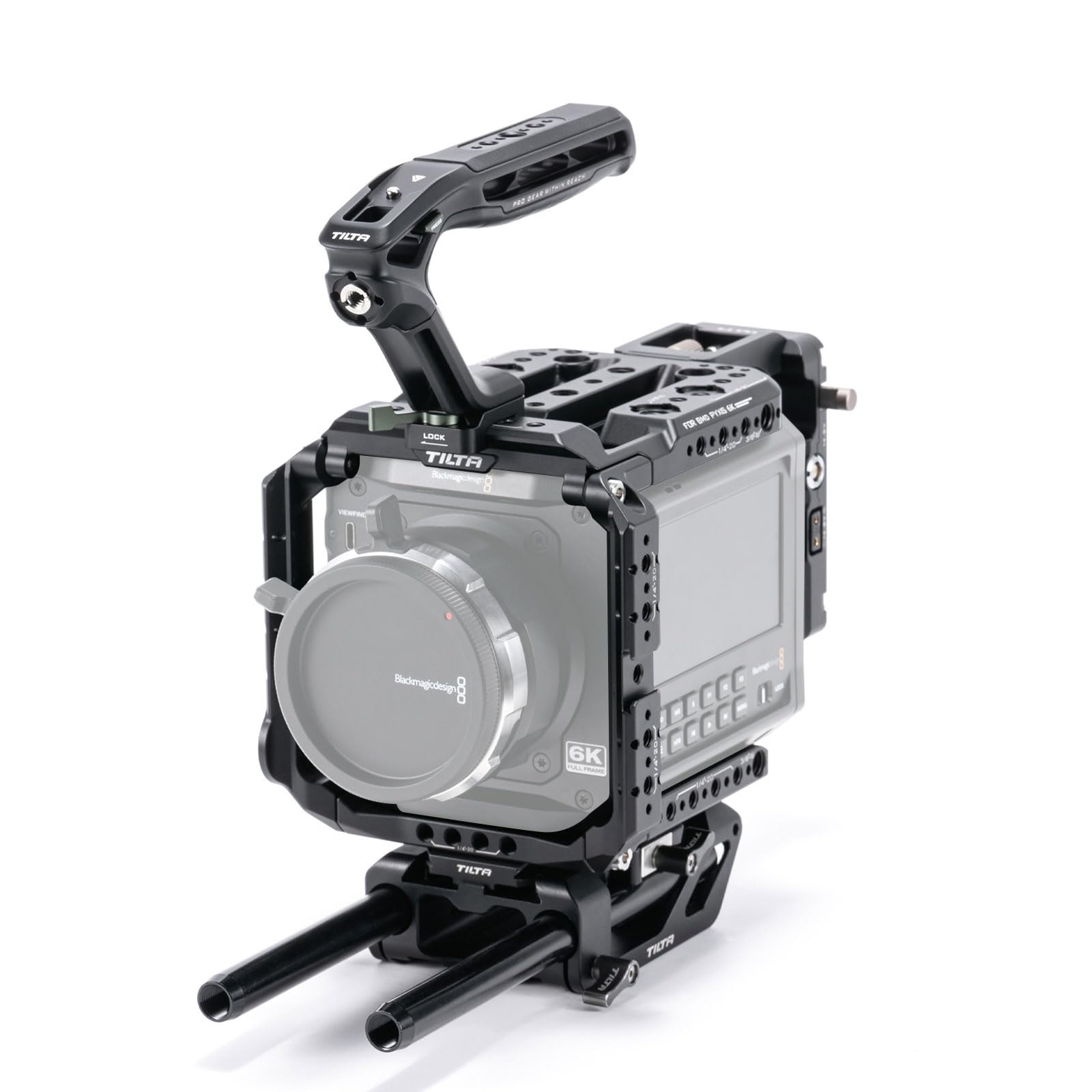
The Tilta Pyxis 6K/12K Camera Cage Pro Kit is custom-designed to enhance the functionality and protection of your Blackmagic Design PYXIS 6K/12K camera. It offers multiple mounting points for accessories and supports various shooting configurations.
- Custom Design: Specifically tailored for the BMD PYXIS 6K/12K camera body.
- Versatile Mounting: Features NATO rails, Arri Rosette, Cold Shoe, 1/4"-20, and 3/8"-16 threads with locating pins for extensive accessory attachment.
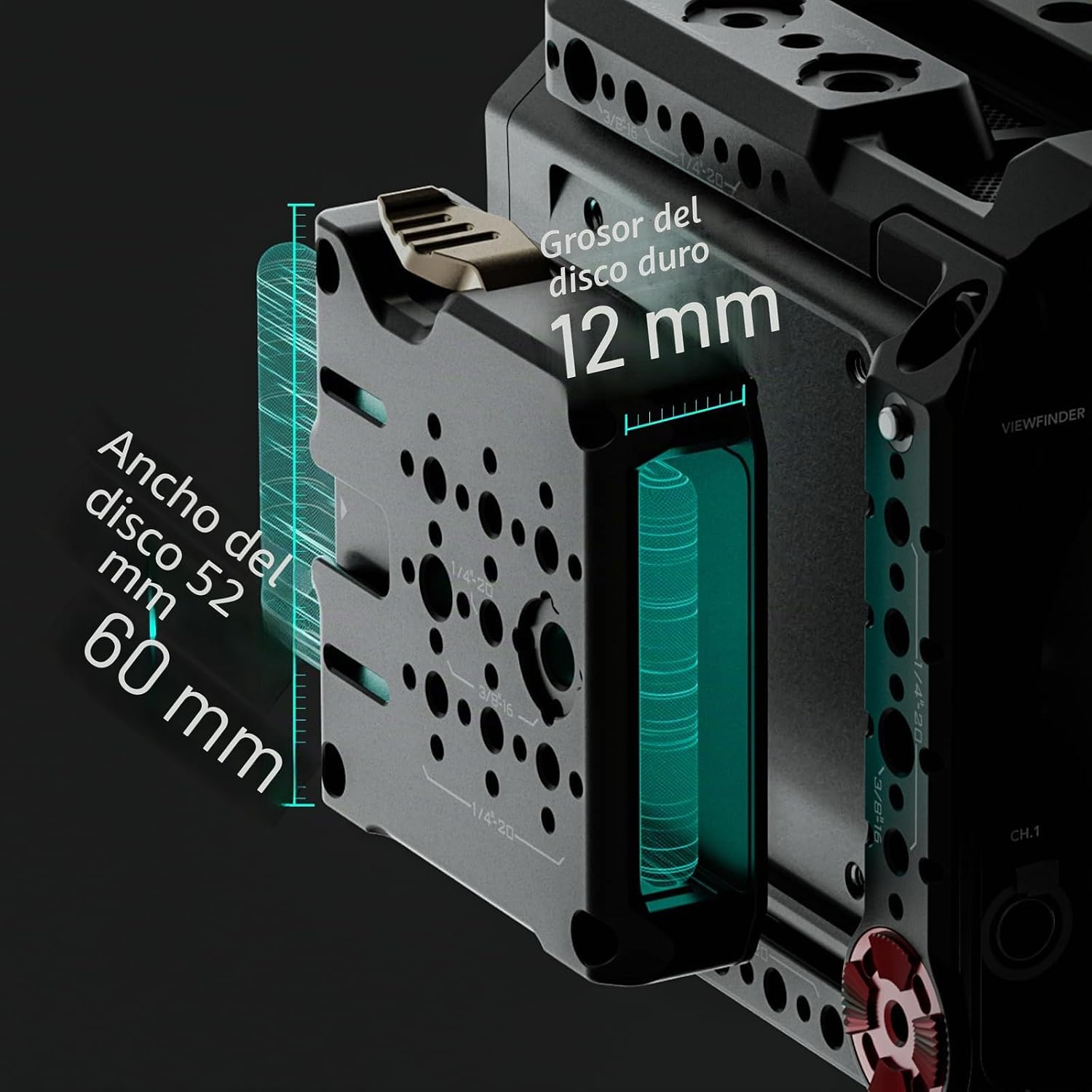
- Side Plate Functionality: Supports vertical shooting configurations and includes an integrated SSD mounting slot. Compatible with hard drives 52mm to 60mm wide and less than 12mm thick.
- LWS Base Plate: Accommodates 15mm rods and mounts to standard Tilta dovetails for expanded rigging options.
- NATO Top Handle: Provides enhanced flexibility and stability during camera operation and transport.

3. What's in the Box
The Tilta Pyxis 6K/12K Camera Cage Pro Kit (ES-T21-B-V TX) includes the following components:
- Full Camera Cage for PYXIS 6K (ES-T21-FCC)
- Battery Plate for PYXIS 6K - V-Mount (ES-T21-BP-V) x 1
- Tilta Xeno Top Handle (NATO) - Black (TA-XTH3-B) x 1
- Tilta Universal 15mm LWS Manfrotto Baseplate - Black (ESR-T08-BSP) x 1
- 15 x 200mm Aluminum Rod, 2 pieces - Black (R15-200-B)

4. Setup Instructions
Follow these steps to assemble your Tilta Pyxis 6K/12K Camera Cage Pro Kit:
4.1. Attaching the Full Camera Cage
- Carefully place your Blackmagic Design PYXIS 6K/12K camera into the Full Camera Cage (ES-T21-FCC).
- Secure the camera using the designated screws on the bottom and sides of the cage. Ensure all connections are firm but do not overtighten.

4.2. Installing the V-Mount Battery Plate
- Attach the V-Mount Battery Plate (ES-T21-BP-V) to the designated mounting points on the rear of the camera cage.
- Secure it with the provided screws. This plate allows for external power solutions.

4.3. Mounting the Tilta Xeno Top Handle
- Slide the Tilta Xeno Top Handle (TA-XTH3-B) onto the NATO rail located on the top of the camera cage.
- Tighten the locking mechanism to secure the handle in place.
4.4. Attaching the 15mm LWS Manfrotto Baseplate and Rods
- Connect the Tilta Universal 15mm LWS Manfrotto Baseplate (ESR-T08-BSP) to the bottom of the camera cage.
- Insert the two 15 x 200mm Aluminum Rods (R15-200-B) into the rod clamps on the baseplate. Adjust their position as needed and tighten the clamps.
5. Operating Instructions
5.1. Accessory Mounting
Utilize the various mounting points on the cage to attach accessories such as monitors, microphones, and wireless video transmitters:
- NATO Rails: For quick-release accessories like top handles, side handles, and monitor mounts.
- ARRI Rosette: Provides a secure connection for handles or extension arms.
- Cold Shoe Mounts: Ideal for attaching small accessories like microphones or LED lights.
- 1/4"-20 and 3/8"-16 Threads: Standard mounting points for a wide range of camera accessories.


5.2. SSD Mounting
The multi-functional side plate includes a dedicated slot for SSD drives. To install an SSD:
- Open the SSD unlock lever on the side plate.
- Slide your compatible SSD (52mm-60mm width, <12mm thickness) into the slot.
- Close the unlock lever to secure the SSD.
5.3. Horizontal and Vertical Shooting
The cage design supports both horizontal and vertical camera orientations. For vertical shooting, the side plate can be reconfigured to act as a bottom plate, providing ample space for rods and accessories.


6. Maintenance
To ensure the longevity and optimal performance of your Tilta Pyxis 6K/12K Camera Cage Pro Kit, follow these maintenance guidelines:
- Cleaning: Use a soft, dry cloth to wipe down the cage and its components. For stubborn dirt, a slightly damp cloth can be used, followed by immediate drying. Avoid abrasive cleaners or solvents.
- Inspection: Regularly check all screws and mounting points for tightness. Re-tighten any loose connections to prevent accidental detachment of equipment.
- Storage: Store the camera cage in a clean, dry environment away from extreme temperatures and humidity when not in use.
- Avoid Over-tightening: While securing components, ensure they are firm but do not overtighten screws, as this can strip threads or damage the equipment.
7. Troubleshooting
If you encounter any issues with your Tilta Pyxis 6K/12K Camera Cage Pro Kit, consider the following common solutions:
- Loose Components: If any part of your rig feels unstable, check all connection points and ensure screws are properly tightened.
- Accessory Compatibility: Verify that any third-party accessories you are attempting to mount are compatible with the cage's mounting standards (NATO, Arri Rosette, Cold Shoe, 1/4"-20, 3/8"-16).
- SSD Not Fitting: Ensure your SSD meets the specified dimensions (52mm-60mm width, <12mm thickness) for the side plate slot.
- Difficulty Assembling: Refer back to the 'Setup Instructions' section and the provided diagrams to ensure all components are being assembled in the correct order and orientation.
For persistent issues not covered here, please contact Tilta customer support.
8. Specifications
| Feature | Detail |
|---|---|
| Model Name | ES-T21-B-V TX |
| Compatible Camera Models | Blackmagic Design Pocket Cinema Camera 6K Pro, PYXIS 6K/12K |
| Product Dimensions | 34.93 x 26.67 x 13.97 cm |
| Product Weight | 2.34 kg (5.15 lbs) |
| Material | Aluminum Alloy, SUS304 |
| Color | Black |
| Mounting Points | NATO, Arri Rosette, Cold Shoe, 1/4"-20, 3/8"-16 with locating pins |
| SSD Compatibility | 52mm to 60mm width, <12mm thickness |
| Rod Support | 15mm LWS |
| GTIN | 810153172604 |
9. Warranty & Support
This Tilta product comes with a 2-year manufacturer's warranty. Please retain your proof of purchase for warranty claims.
For technical support, warranty service, or additional product information, please visit the official Tilta store or contact their customer service department.
Official Tilta Store: Tilta on Amazon.es


