Introduction and Overview
The DoukAudio M1 MAX is a high-performance 2-channel Bluetooth amplifier designed to deliver powerful and clear audio for your home stereo system. Featuring a TPA3255 amp chip, it provides up to 300W per channel, ensuring robust sound delivery to your speakers. With Bluetooth 5.1 and aptX HD support, it offers high-fidelity wireless audio streaming. Its versatile input options, including RCA and USB, along with adjustable bass and treble controls, allow for a customized listening experience. The compact and durable design, crafted from aluminum alloy with gold-plated terminals, ensures both longevity and superior sound transmission.

Image: Front view of the DoukAudio M1 MAX Amplifier, showcasing its compact black aluminum chassis, control knobs, and antenna.

Image: Diagram illustrating the TPA3255 amplifier chip, highlighting its capability to deliver up to 300W per channel with efficient heat dissipation through side and bottom vents.
What's in the Box
Upon unboxing your DoukAudio M1 MAX Amplifier, please verify that all the following components are included:
- 1 x M1 MAX Amplifier
- 1 x DC 32V/5A Power Adapter
- 1 x Bluetooth Antenna
- 1 x User Manual

Image: Visual representation of the M1 MAX amplifier and its included accessories: power adapter, Bluetooth antenna, and user manual.
Setup Guide
Follow these steps to set up your DoukAudio M1 MAX Amplifier:
- Connect Speakers: Connect your passive stereo speakers to the speaker output terminals on the rear of the amplifier. Ensure correct polarity (positive to positive, negative to negative).
- Connect Audio Source:
- RCA Input: Connect your audio source (e.g., CD player, TV, pre-amplifier) to the RCA input jacks on the rear panel using RCA cables.
- USB Input: Insert a USB flash drive containing audio files into the USB port on the front panel.
- Bluetooth: Ensure the Bluetooth antenna is securely attached to the rear panel.
- Connect Power: Connect the provided DC 32V/5A power adapter to the DC 24V-48V IN port on the rear of the amplifier, then plug the adapter into a wall outlet.
- Optional Subwoofer/Amp Connection: If you wish to connect an active subwoofer or another amplifier for a 2.1-channel system, use the 3.5mm AUX output on the rear panel.

Image: Detailed diagram of the amplifier's front and rear panels, labeling all inputs, outputs, and controls for easy connection and operation.

Image: Close-up view of the 3.5mm AUX output on the amplifier's rear panel, indicating its use for connecting to a 2.1 or multi-channel audio system.
Operating Instructions
Learn how to operate your M1 MAX amplifier for optimal audio performance:
- Power On/Off and Volume Control: The power switch is integrated with the volume knob. Rotate the volume knob clockwise to turn on the amplifier and increase volume. Rotate counter-clockwise to decrease volume and turn off.
- Input Selection: Use the input select switch on the front panel to cycle between BT (Bluetooth), USB, and RCA inputs. The corresponding input indicator LED will illuminate.
- Bluetooth Pairing:
- Switch the input to BT. The Bluetooth indicator will blink, indicating it's in pairing mode.
- On your device (smartphone, tablet, computer), search for Bluetooth devices and select "DoukAudio M1 MAX".
- Once paired, the Bluetooth indicator will remain solid.
- To reset Bluetooth connection, press and hold the Bluetooth reset button (if available, or cycle power).
- USB Playback: When a USB flash drive is inserted and USB input is selected, the amplifier will automatically play supported audio files. Use the "PREV", "P/P" (Play/Pause), and "NEXT" buttons for media control.
- Tone Controls:
- Bass Knob: Adjusts the low-frequency output. Rotate clockwise to increase bass, counter-clockwise to decrease.
- Treble Knob: Adjusts the high-frequency output. Rotate clockwise to increase treble, counter-clockwise to decrease.
- Both bass and treble knobs allow for ±6dB adjustment.

Image: Illustration of the QCC304X Bluetooth chip and the Bluetooth reset function, emphasizing stable and optimized wireless audio.

Image: Depiction of the amplifier's multiple input options (Bluetooth 5.1, RCA, U-disk) and the adjustable bass and treble knobs for sound customization.
Maintenance
Proper maintenance ensures the longevity and optimal performance of your amplifier:
- Cleaning: Use a soft, dry cloth to clean the exterior of the amplifier. Avoid using liquid cleaners or abrasive materials.
- Ventilation: Ensure the amplifier is placed in a well-ventilated area. Do not block the side and bottom vents, as these are crucial for heat dissipation.
- Storage: When not in use for extended periods, store the amplifier in a cool, dry place away from direct sunlight and extreme temperatures.
- Cable Connections: Periodically check all cable connections to ensure they are secure and free from corrosion.
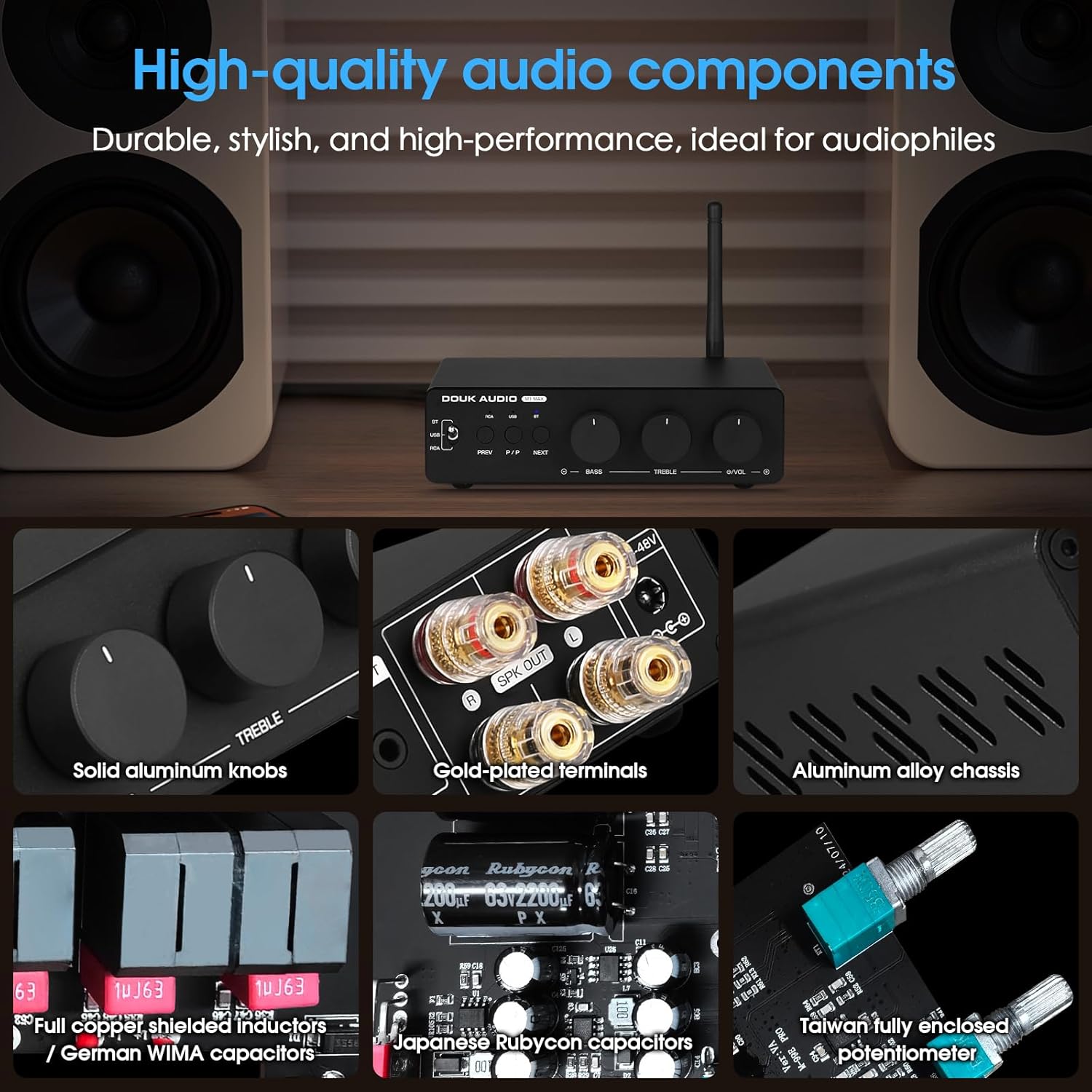
Image: Close-up views of the amplifier's internal and external components, including solid aluminum knobs, gold-plated terminals, aluminum alloy chassis, full copper shielded inductors, Japanese Rubycon capacitors, and a Taiwan fully enclosed potentiometer, indicating durable and high-quality construction.
Troubleshooting
If you encounter issues with your M1 MAX amplifier, refer to the following common problems and solutions:
| Problem | Possible Cause | Solution |
|---|---|---|
| No Sound Output |
|
|
| Bluetooth Disconnection or Pairing Issues |
|
|
| Distorted Sound |
|
|
Specifications
Detailed technical specifications for the DoukAudio M1 MAX Amplifier:
- Product Dimensions: 4.92 x 6.1 x 1.65 inches
- Item Weight: 1.76 Pounds
- Model Number: M1 MAX
- Manufacturer: Douk Audio
- Country of Origin: China
- Voltage: 32 Volts (DC)
- Maximum Supply Voltage: 48 Volts (DC)
- Minimum Supply Voltage: 24 Volts (DC)
- Amplifier Chip: TPA3255
- Bluetooth Version: 5.1 with QCC304X chip
- Bluetooth Codecs: aptX/aptX HD supported
- Audio Inputs: Bluetooth, RCA, USB (U-disk)
- Audio Outputs: Speaker output (2-channel), 3.5mm AUX output (for active subwoofer/amp)
- Tone Control: Bass and Treble (±6dB adjustment)
Rated Output Power Table
| Power Supply | Speaker Impedance | Rated Output Power |
|---|---|---|
| 32V/5A | 4Ω | 78W+78W |
| 32V/5A | 6Ω | 71W+71W |
| 32V/5A | 8Ω | 65W+65W |
| 36V/6A | 4Ω | 107W+107W |
| 36V/6A | 6Ω | 100W+100W |
| 36V/6A | 8Ω | 94W+94W |
| 48V/5A | 4Ω | 120W+120W |
| 48V/5A | 6Ω | 110W+110W |
| 48V/5A | 8Ω | 102W+102W |
| 48V/10A | 4Ω | 250W+250W |
| 48V/10A | 6Ω | 210W+210W |
| 48V/10A | 8Ω | 185W+185W |
Warranty and Support
Douk Audio products are designed for reliability and performance. For warranty information and technical support, please refer to the official Douk Audio website or contact their customer service directly. Keep your purchase receipt as proof of purchase for any warranty claims.
Manufacturer: Douk Audio
Website: www.doukaudio.com (Please note: This is a placeholder URL as the exact support URL was not provided in the input. Refer to your product packaging or official documentation for precise contact information.)


