Introduction
Thank you for choosing the MAHANCRIS Queen Size Metal Headboard. This manual provides detailed instructions for assembly, operation, maintenance, and troubleshooting to ensure safe and efficient use of your new headboard. Please read this manual thoroughly before beginning assembly and retain it for future reference.
Important Safety Information
WARNING: Failure to follow these safety instructions could result in injury or damage to the product.
- Always follow the assembly instructions strictly.
- The headboard includes an anti-tip kit and two types of expansion screws for different wall types. Install the anti-tip kit before use to prevent tipping.
- Children should not play or climb on or around the headboard to avoid potential injuries from tipping over.
- Ensure all connections for the power strips are secure and correctly plugged into a suitable power outlet. Do not overload the power strips.
- Keep liquids away from the power strips to prevent electrical shock.
- Regularly check all bolts and screws to ensure they remain tight. Retighten as necessary.
Package Contents
Before assembly, please verify that all components listed below are present and undamaged. If any parts are missing or damaged, contact customer support.

This image shows an exploded view of the headboard components, illustrating each part with a number for easy identification during assembly.
- 1 x Headboard Frame
- 1 x Accessory Kit (includes screws, bolts, and tools)
- 1 x Anti-Tip Kit
- 1 x Bed Frame Adapter Set
- 2 x Charging Stations (integrated power strips)
- 1 x Instruction Manual (this document)
Assembly Instructions
Follow these steps carefully to assemble your MAHANCRIS headboard. It is recommended to have two people for assembly.
- Unpack and Identify Parts: Carefully remove all components from the packaging. Lay them out on a clean, soft surface to prevent scratches. Refer to the "Package Contents" section and the provided parts diagram to identify each piece.
- Assemble the Main Headboard Frame: Connect the horizontal and vertical metal bars according to the diagram. Ensure all bolts are finger-tightened initially.
- Install Power Strips: Attach the two charging stations (power strips) to the designated locations on the headboard frame using the provided screws. Ensure they are securely fastened.
- Attach Bed Frame Adapters: Secure the bed frame adapters to the lower vertical supports of the headboard. These adapters allow for height and width adjustments to fit various bed frames. Do not fully tighten yet.

This image illustrates the adjustable bed frame adapter, showing how it can be moved up or down to align with your bed frame.
- Connect to Bed Frame: Position the assembled headboard against your bed frame. Align the bed frame adapters with the mounting points on your bed frame. Adjust the height and width of the adapters as needed. Secure the headboard to your bed frame using the appropriate bolts and nuts.
- Final Tightening: Once the headboard is properly aligned and connected to the bed frame, fully tighten all bolts and screws using the provided tools. Do not overtighten.
- Install Anti-Tip Kit: For added safety, install the anti-tip kit to secure the headboard to the wall. Follow the specific instructions provided with the anti-tip kit, selecting the correct expansion screws for your wall type.
For a visual guide on assembly and features, please refer to the official product videos below.
Setup and Connection
Connecting to Power
The MAHANCRIS headboard features two integrated power strips, one on each side, for convenient charging.
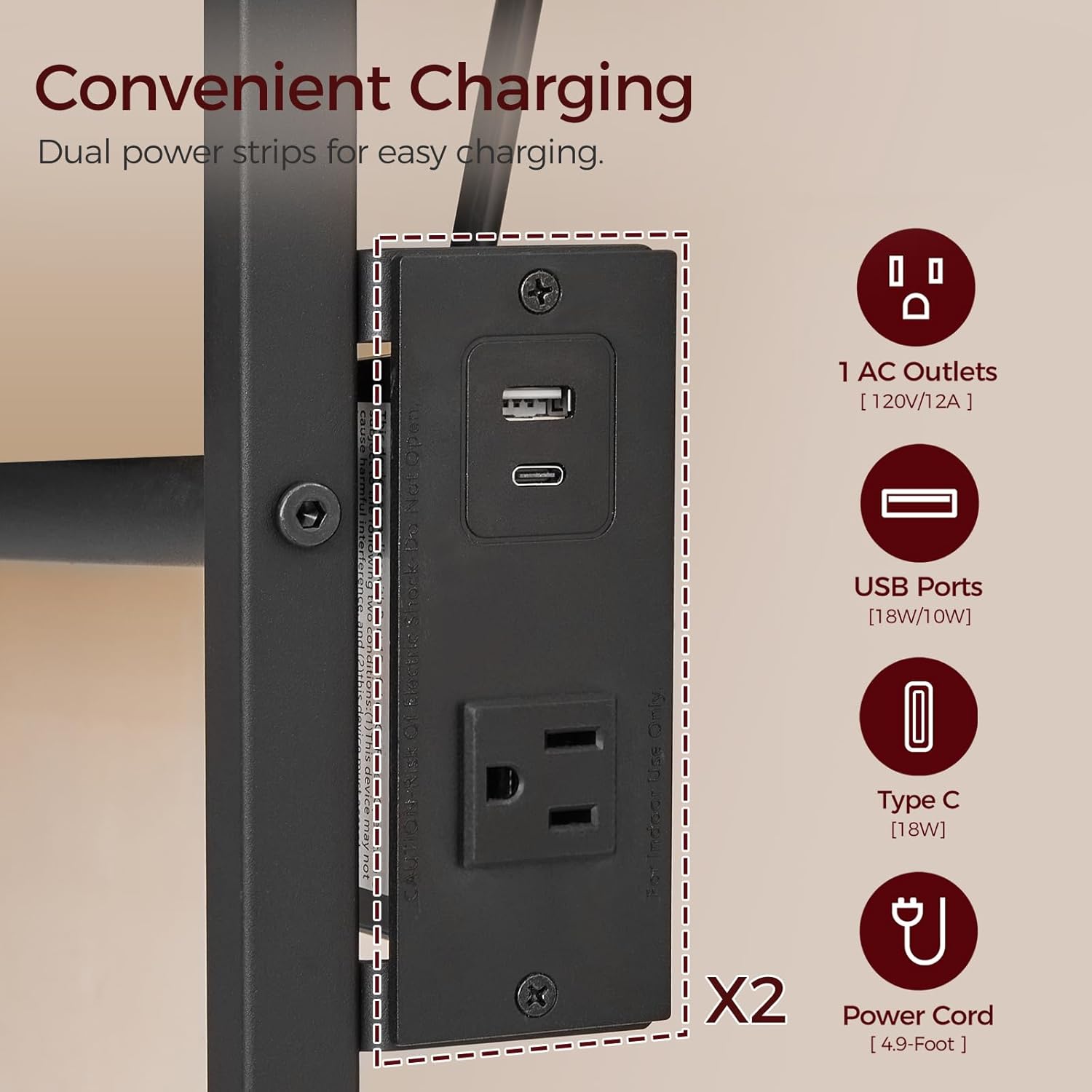
This image displays a detailed view of one of the integrated power strips, highlighting the AC outlet, USB-A port, and USB-C port.
- Locate the power cords extending from the bottom of each power strip.
- Plug each power cord into a standard 120V AC wall outlet.
- Ensure the cables are routed safely to avoid tripping hazards or damage.
Adjusting Feet for Stability
The headboard includes adjustable feet to enhance stability and protect your floor.
- Turn the adjustable feet at the bottom of the headboard legs clockwise or counter-clockwise to raise or lower the headboard slightly.
- Adjust until the headboard is stable and does not wobble.
Operating Instructions
Using the Power Strips
Each power strip provides 1 AC outlet, 1 USB-A port, and 1 Type-C port, allowing you to charge up to 6 devices simultaneously (3 per side).
- Plug your devices directly into the available AC outlets, USB-A ports, or Type-C ports.
- Ensure devices are compatible with the power output (AC: 120V/12A; USB-A: 18W/10W; Type-C: 18W).
- Avoid plugging in high-power appliances that exceed the strip's maximum load.
Utilizing the Reclining Backrest
The headboard features an ergonomically designed 95-degree reclining backrest for enhanced comfort.

This image highlights the 95-degree reclining angle of the headboard, designed to provide ergonomic support for sitting up in bed.
- The backrest is fixed at a 95-degree angle, providing optimal support for reading, watching TV, or relaxing in bed.
- Lean back gently to experience the contoured comfort.
Maintenance and Care
- Cleaning: Wipe the metal surfaces with a soft, damp cloth. Avoid using harsh chemicals or abrasive cleaners, as these can damage the finish.
- Inspection: Periodically inspect all connections, bolts, and screws to ensure they are tight. Retighten any loose fasteners to maintain stability and safety.
- Power Strips: Keep the power strips clean and dry. Do not attempt to disassemble or repair the power strips yourself. If they malfunction, contact customer support.
Troubleshooting
| Problem | Possible Cause | Solution |
|---|---|---|
| Headboard is wobbly or unstable. | Loose bolts or uneven floor. | Ensure all assembly bolts are securely tightened. Adjust the leveling feet at the bottom of the headboard legs to stabilize. |
| Power strips are not working. | Not plugged in, wall outlet issue, or overloaded circuit. | Check if the power cords are securely plugged into a working wall outlet. Test the wall outlet with another device. Ensure the power strip is not overloaded with too many high-power devices. |
| Headboard does not align with bed frame. | Bed frame adapters not adjusted correctly. | Loosen the bed frame adapter bolts, adjust the adapters to match your bed frame's height and width, then re-tighten. |
Specifications
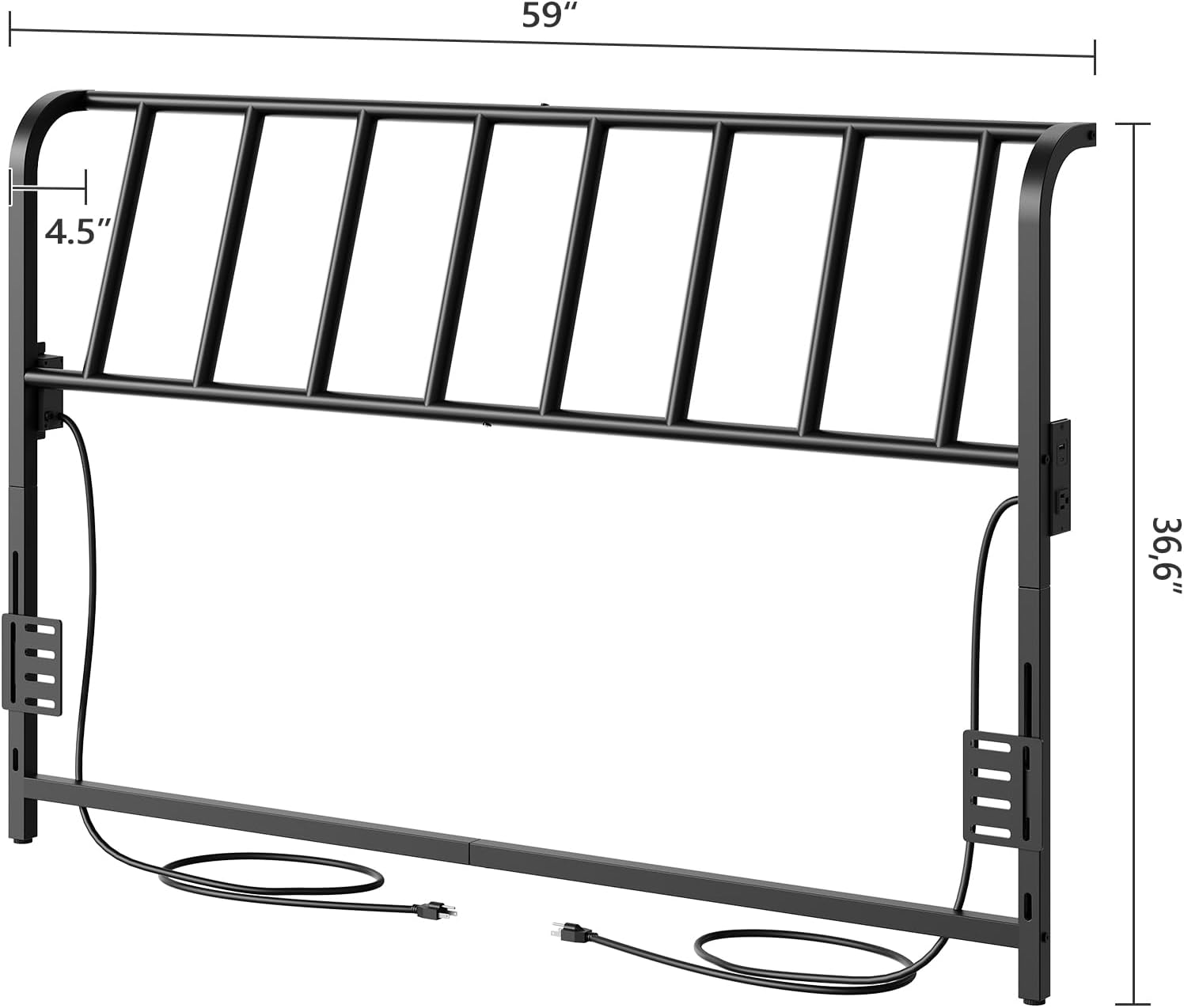
This image provides a detailed diagram of the headboard's dimensions, including width and height measurements.
- Brand: MAHANCRIS
- Model: B0DP4KXD98
- Material: Metal
- Size: Queen
- Color: Black
- Item Dimensions (L x W x H): 59"L x 4.5"W x 36.6"H
- Item Weight: 9.9 Pounds
- Special Features: 95-degree Reclining Backrest, USB Charging Station (2 AC outlets, 2 USB-A ports, 2 Type-C ports total), Adjustable Bed Frame Adapters, Anti-Tip Kit
- Mounting Type: Manual Installation
- Required Assembly: Yes
Product Videos
MAHANCRIS 95 Degrees Reclining Backrest Headboard
This video provides an overview of the MAHANCRIS headboard, focusing on its 95-degree reclining backrest feature and overall design. It showcases the headboard installed in a bedroom setting.
MAHANCRIS Metal Headboard, 95 Degrees Reclining Backrest
This video offers another perspective on the MAHANCRIS metal headboard, emphasizing its construction and the comfort provided by the reclining backrest. It includes close-ups of the headboard's features.
MAHANCRIS Queen Size Headboard Only
This video focuses on the MAHANCRIS Queen Size Headboard, showcasing its design and how it integrates with a bed frame. It provides a general view of the product's aesthetic and functionality.
Warranty and Support
Warranty Information
This product comes with No warranty as per manufacturer specifications. However, Amazon's return policy allows for returns or replacements within 90 days of purchase.
Customer Support
For any questions, missing parts, or assistance with assembly, please contact MAHANCRIS customer support through the retailer's platform or visit the official MAHANCRIS store page on Amazon for contact options.
You can visit the MAHANCRIS store at: MAHANCRIS Amazon Store


