
ULTRAFIRE UF3+ W66
ULTRAFIRE Tactical Flashlight User Manual
Model: UF3+ W66
Introduction
Thank you for choosing the ULTRAFIRE Tactical Flashlight. This high-performance LED flashlight is designed for durability and reliability, featuring 1200 lumens of brightness, multiple light modes, and a robust aluminum alloy construction. It comes with an adjustable tactical holster for convenient, hands-free operation. This manual provides essential information for the safe and effective use, maintenance, and troubleshooting of your new flashlight.
Safety Information
Please read all safety instructions carefully before using the flashlight. Failure to follow these instructions may result in injury or damage to the product.
- Do Not Stare Directly into Light: The high-intensity beam can cause temporary vision impairment or eye damage.
- Keep Out of Reach of Children: This product is not a toy.
- Battery Safety:
- Use only the specified battery type (1 P76 Lithium Ion battery).
- Do not attempt to disassemble, puncture, or short-circuit the battery.
- Do not expose the battery to extreme temperatures or fire.
- Dispose of batteries properly according to local regulations.
- Water Resistance: The flashlight has an IP67 waterproof rating, meaning it is protected from dust and can withstand immersion in water up to 1 meter for 30 minutes. It is not designed for prolonged underwater use. Ensure the USB-C port cover is securely closed before exposure to water.
- Cleaning: Use a soft, damp cloth for cleaning. Do not use abrasive cleaners or solvents.
Package Contents
Verify that all items listed below are present in your package:
- ULTRAFIRE UF3 Tactical Flashlight
- Adjustable Tactical Holster (W66 holder)
- USB-C Charging Cable
- User Manual (this document)
- Premium Gift Box
- Lanyard

Figure 1: Included Components. This image displays all items typically found in the product package: the UF3 LED flashlight, its lanyard, the W66 flashlight holder, a USB-C charging cable, the instruction manual, and the premium gift box.
Product Overview
Familiarize yourself with the main parts of your ULTRAFIRE Tactical Flashlight and its holster.

Figure 2: Flashlight and Holster Components. This image shows the main UF3 tactical flashlight, featuring its LED lens, power button with indicator, and textured body. Also displayed is the W66 tactical holster, both as a standalone unit and with the flashlight inserted, demonstrating its design for duty belt attachment.
Flashlight Features:
- LED Emitter: High-intensity LED bulb providing 1200 lumens.
- Power Button/Indicator: Located on the side, controls power and mode selection, and displays battery status (red for charging, green for fully charged).
- USB-C Charging Port: For convenient and fast recharging.
- Durable Construction: Crafted from aerospace-grade aluminum alloy.
- Non-slip Body: Ensures a secure grip.
- Lanyard Hole: For attaching the included lanyard.
Holster Features:
- 360-Degree Rotatable Base: Allows adjustment to any angle for optimal positioning on a duty belt.
- Quick-Draw Design: Enables instant activation and access to the flashlight without removal.
- High-Strength Engineering Plastic: Ensures durability and secure retention.
Setup
Initial Charging:
Before first use, fully charge the flashlight battery.
- Locate the USB-C charging port on the flashlight body.
- Open the protective rubber cover of the USB-C port.
- Connect the included USB-C cable to the flashlight and plug the other end into a USB power adapter (not included) or a computer USB port.
- The indicator light on the power button will glow red during charging.
- Once fully charged, the indicator light will turn green.
- Disconnect the charging cable and securely close the rubber cover to maintain water resistance.
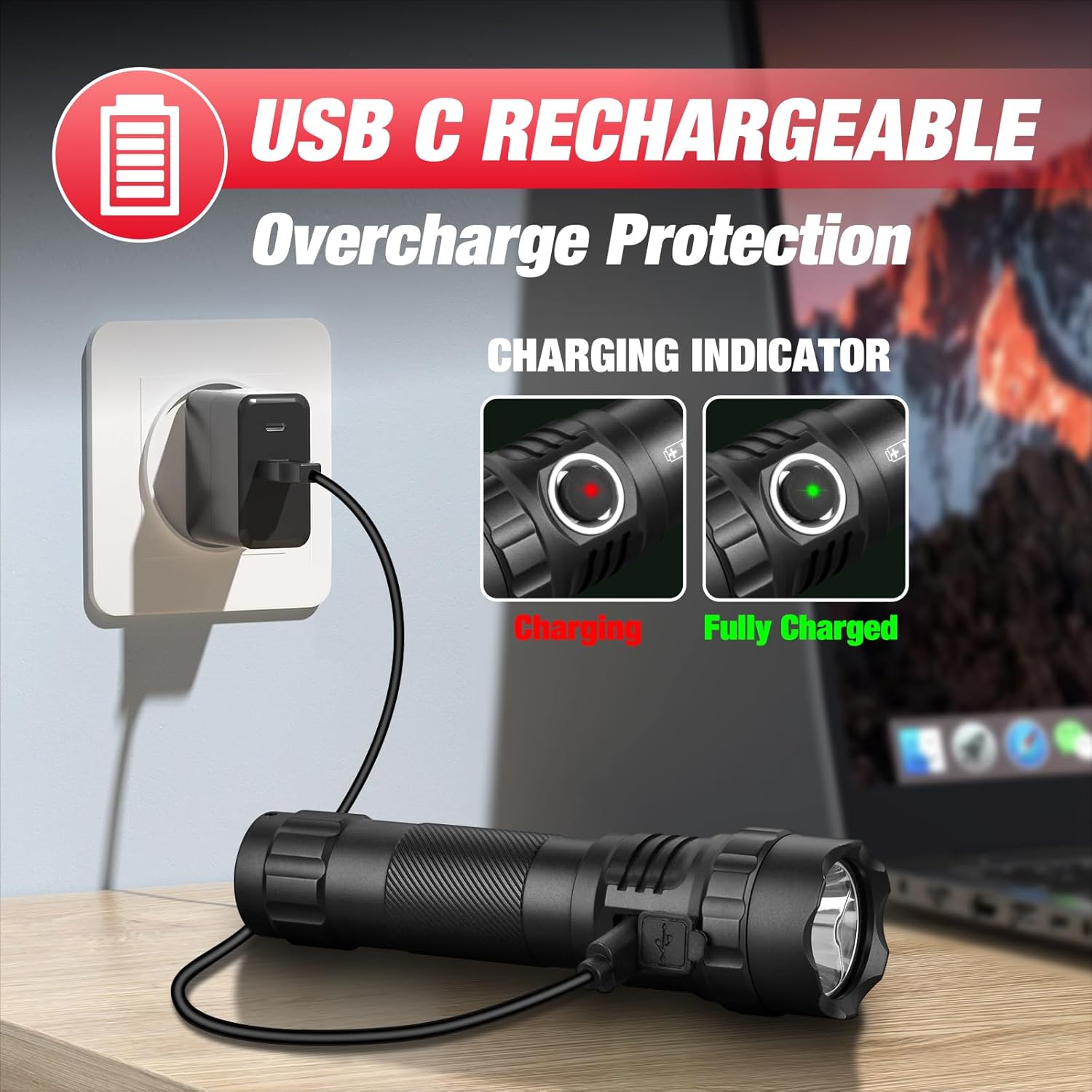
Figure 3: USB-C Charging. This image illustrates the flashlight being charged via its USB-C port, connected to a wall adapter. Insets show the power button indicator glowing red when charging and green when fully charged, indicating the battery status.
Attaching the Holster:
The W66 holder is designed for easy attachment to a duty belt.
- Slide the holster onto your duty belt.
- Insert the flashlight into the holster, ensuring it clicks securely into place.
- The holster's 360-degree rotatable base allows you to adjust the flashlight's angle as needed. Simply rotate the flashlight within the holster to your desired position.

Figure 4: Attaching Flashlight to Holster. This image demonstrates how to insert the flashlight into the belt holster, showing the secure fit and ease of access.

Figure 5: Holster 360-Degree Rotation. This image shows the flashlight mounted in its holster on a belt, with arrows indicating the 360-degree rotational capability of the holster, allowing for adjustable angles.
Operating Instructions
Power On/Off:
- To turn the flashlight ON, press the power button once.
- To turn the flashlight OFF, press the power button once again.
Changing Light Modes:
The flashlight features three essential light modes: High, Low, and Hidden Strobe.
- When the flashlight is ON, press the power button repeatedly to cycle through the modes: High → Low.
- To activate the Hidden Strobe mode, quickly double-click the power button from any mode (ON or OFF). Double-click again to return to the previous mode or turn off.

Figure 6: 1200 Lumens and 3 Modes. This image depicts the flashlight in use, casting a bright beam, highlighting its 1200-lumen output and the availability of three distinct light modes.
Battery Indicator:
The power button also serves as a battery level indicator:
- Green Light: Sufficient battery level.
- Red Light: Low battery, requires charging.
- Red Light (during charging): Battery is currently charging.
- Green Light (during charging): Battery is fully charged.
Maintenance
Cleaning:
- Wipe the flashlight body with a soft, damp cloth.
- Do not use harsh chemicals, abrasive cleaners, or solvents, as these can damage the finish or internal components.
- Clean the lens gently with a microfiber cloth to avoid scratches and maintain optimal light output.
Battery Care:
- Recharge the battery when the indicator light turns red to prolong battery life.
- If storing the flashlight for an extended period, charge the battery to approximately 50% and recharge every 3-6 months to prevent deep discharge.
- Store in a cool, dry place away from direct sunlight and extreme temperatures.
Water Resistance:
The flashlight is IP67 rated. To maintain this rating:
- Always ensure the USB-C port's rubber cover is fully and securely sealed before exposing the flashlight to water or humid environments.
- Avoid prolonged immersion beyond the specified depth and time (1 meter for 30 minutes).

Figure 7: IP67 Water Resistance. This image shows the flashlight on a wet rock with water splashing around it, emphasizing its IP67 waterproof rating and durable aircraft-grade aluminum alloy construction.
Troubleshooting
If you encounter issues with your ULTRAFIRE Tactical Flashlight, refer to the following common problems and solutions:
| Problem | Possible Cause | Solution |
|---|---|---|
| Flashlight does not turn on. | Battery is depleted. | Charge the flashlight using the USB-C cable until the indicator turns green. |
| Loose battery connection. | Ensure the battery is properly inserted and the tail cap is securely tightened. | |
| Light output is dim. | Low battery level. | Recharge the battery. |
| Dirty lens. | Clean the flashlight lens with a soft, clean cloth. | |
| Flashlight does not charge. | USB-C cable or power adapter issue. | Try a different USB-C cable or power adapter. Ensure connections are secure. |
| Charging port obstruction. | Check the USB-C port for debris and gently clean if necessary. | |
| Holster does not rotate smoothly. | Dirt or debris in the rotation mechanism. | Clean the holster's rotating mechanism. Avoid using lubricants that may attract more dirt. |
If the problem persists after trying these solutions, please contact ULTRAFIRE customer support for assistance.
Specifications
| Feature | Detail |
|---|---|
| Model | UF3+ W66 |
| Brightness | 1200 Lumens (Max) |
| Beam Distance | Up to 656 feet (200 meters) |
| Light Modes | High, Low, Hidden Strobe |
| Light Source Type | LED |
| Color Temperature | 6300 Kelvin |
| Power Source | Battery Powered |
| Battery Type | 1 P76 Lithium Ion (included) |
| Charging Port | USB-C |
| Material | Aerospace-grade Aluminum Alloy |
| Water Resistance | IP67 (Protected from dust, immersion up to 1m for 30 min) |
| Impact Resistance | 1.5 meters |
| Product Dimensions | 0.9"D x 1.4"W x 5.4"H |
| Item Weight | 11.7 ounces |
| Runtime | 100,000 hours (LED lifespan) |

Figure 8: Key Features Overview. This image summarizes the main specifications of the ULTRAFIRE UF3 Tactical Flashlight, including Type-C charging, IP67 water resistance, 1.5m impact resistance, 4500mAh battery capacity, 1200 lumens max output, and 200 meters max throw distance.
Warranty and Support
Warranty Information:
The ULTRAFIRE Tactical Flashlight is backed by a 3-year warranty from the date of purchase. This warranty covers manufacturing defects and workmanship under normal use. It does not cover damage caused by misuse, accidents, unauthorized modifications, or normal wear and tear.
Please retain your proof of purchase for warranty claims.
Customer Support:
For any questions, technical assistance, or warranty claims, please contact ULTRAFIRE customer support. Our team is available 24/7 to provide friendly support.
Refer to the contact information provided on the product packaging or the official ULTRAFIRE website for the most up-to-date support channels.
Related documentsUF3+ W66


Ask a question about this manual
Ask about setup, troubleshooting, compatibility, parts, safety, or missing instructions. Manuals+ will review the question and use this page’s manual context to help answer it.