
1. Introduction
This manual provides essential information for the safe and effective installation, operation, and maintenance of the Banner Engineering TL70ALQ Tower Light. The TL70ALQ is designed as an audible indicator for industrial applications, featuring a robust IP65-rated black housing and bimodal input for versatile control.
2. Safety Information
- Read all instructions thoroughly before installation and operation.
- Ensure power is disconnected from the circuit before performing any wiring or servicing.
- Installation should be performed by qualified personnel in accordance with local electrical codes and regulations.
- Do not exceed the specified voltage ratings (12-30 VDC).
- The device produces a loud audible signal (92 dB at 1m). Use appropriate hearing protection if working in close proximity to the device during operation.
3. Product Overview
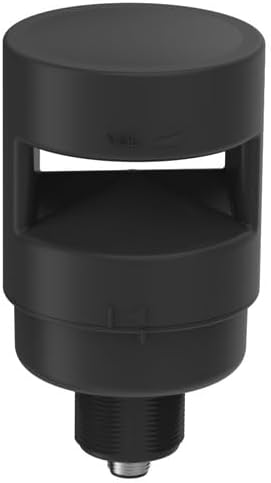
This image displays the Banner Engineering TL70ALQ Tower Light. It features a cylindrical black housing with an opening for sound emission from the audible indicator. The base includes a threaded section for mounting and a 5-pin M12 integral quick disconnect.
The TL70ALQ is a 70 mm diameter tower light designed for industrial signaling. Its primary function is to provide a loud audible indication. Key features include:
- Black Polycarbonate (PC) Housing
- Loud Audible Indicator (92 dB at 1m)
- Voltage: 12-30 VDC
- Environmental Rating: IP65
- Input: Bimodal
- Termination: 5-pin M12 Integral Quick Disconnect
- Mounting: Chassis Mount
4. Setup
4.1 Unpacking
Carefully remove the TL70ALQ Tower Light from its packaging. Verify that the unit is free from damage.
4.2 Mounting
The TL70ALQ is designed for chassis mounting. Secure the threaded base of the unit into a suitable opening on the chassis. Ensure a tight and stable fit to maintain the IP65 environmental rating and prevent vibration.
4.3 Wiring
The device utilizes a 5-pin M12 integral quick disconnect for electrical connection. Follow these guidelines for wiring:
- Power Supply: Connect a 12-30 VDC power supply to the appropriate pins on the M12 connector. Ensure correct polarity.
- Bimodal Input: The TL70ALQ features a bimodal input, meaning it can accept both NPN (sinking) and PNP (sourcing) control signals. Connect your control signal to the designated input pin. The device will activate when the input signal is present.
- Refer to the specific wiring diagram provided with your M12 cable or consult Banner Engineering documentation for pin assignments.
5. Operating
The TL70ALQ functions as an audible indicator. When a valid control signal is applied to the bimodal input, the device will emit a loud audible tone. The audible output is rated at 92 dB at 1 meter.
The bimodal input allows for flexible integration with various industrial control systems, accepting either a sinking (NPN) or sourcing (PNP) signal to activate the audible alarm.
6. Maintenance
6.1 Cleaning
Periodically clean the exterior of the TL70ALQ with a soft, damp cloth. Do not use abrasive cleaners, solvents, or harsh chemicals, as these may damage the polycarbonate housing. While the IP65 rating protects against dust and low-pressure water jets, avoid direct high-pressure washing.
6.2 Inspection
Regularly inspect the M12 quick disconnect for a secure connection and any signs of wear or damage. Check the mounting for stability and ensure all connections remain tight.
7. Troubleshooting
7.1 No Audible Output
- Verify that the power supply (12-30 VDC) is connected and active.
- Check the M12 connector for secure and correct wiring, ensuring proper polarity.
- Ensure the control signal is correctly applied to the bimodal input and is within the specified voltage range.
- Confirm that the control system is functioning and sending the appropriate signal to the TL70ALQ.
7.2 Intermittent Audible Output
- Check for loose wiring connections at the M12 quick disconnect or the power source.
- Inspect the control signal for stability and proper voltage levels. Fluctuations in the control signal can cause intermittent operation.
8. Specifications
| Brand | Banner Engineering |
| Model Number | TL70ALQ |
| Mounting Style | Chassis Mount |
| Termination Style | 5-pin M12 Integral Quick Disconnect |
| Input Type | Bimodal |
| Voltage Rating | 12 VDC to 30 VDC |
| IP Rating | IP65 |
| Audible Output | 92 dB at 1 m |
| Housing Color | Black |
| Housing Material | Polycarbonate (PC) |
| Diameter | 70 mm |
9. Warranty Information
This product is covered by the manufacturer's standard warranty. For specific warranty terms and conditions, please refer to the documentation provided with your purchase or contact Banner Engineering directly. Keep your proof of purchase for warranty claims.
10. Support
For technical assistance, troubleshooting, or product inquiries, please contact Banner Engineering customer support. Visit the official Banner Engineering website for additional resources, contact information, and the latest product documentation.


