
1. Introduction
The Schlage Arrive WiFi Deadbolt Smart Lock offers advanced security and convenient keyless access for your home. This smart deadbolt features a push-button keypad, built-in WiFi for remote control via the Schlage Home app, and compatibility with smart home systems like Alexa and Google Home. This manual provides detailed instructions for the installation, setup, operation, and maintenance of your Schlage Arrive Smart Lock.

Image: Schlage Arrive Smart WiFi Deadbolt highlighting its key features including push-button keypad, app control, built-in WiFi, remote access, smart home readiness, voice control, 250 schedule codes, and battery operation.
2. Safety Information
Please read all instructions carefully before installation and use. Keep this manual for future reference.
- Do not use harsh chemicals or abrasive cleaners on the lock.
- Ensure all components are installed correctly and securely.
- Keep fingers clear of moving parts during operation.
- Only use specified battery types (4 AA alkaline batteries).
- Do not attempt to disassemble or modify the lock beyond the instructions provided.
- Protect your access codes and change them regularly.
3. Package Contents
Verify that all parts are present before beginning installation:
- Exterior Keypad Assembly
- Interior Assembly
- Deadbolt Latch
- Strike Plate
- Reinforcement Plate
- Mounting Screws
- 4 AA Alkaline Batteries
- Backup Key
- Installation Guide

Image: All components included in the Schlage Arrive Smart WiFi Deadbolt package.
4. Installation
4.1 Pre-Installation Checks
Before you begin, ensure your door is compatible with the Schlage Arrive Deadbolt:
- Door Thickness: 1-3/8 inches to 1-3/4 inches (35mm to 44mm)
- Backset: 2-3/8 inches (60mm) or 2-3/4 inches (70mm)
- Cross Bore Hole Diameter: 2-1/8 inches (54mm)
- Latch Bore Diameter: 1 inch (25mm)
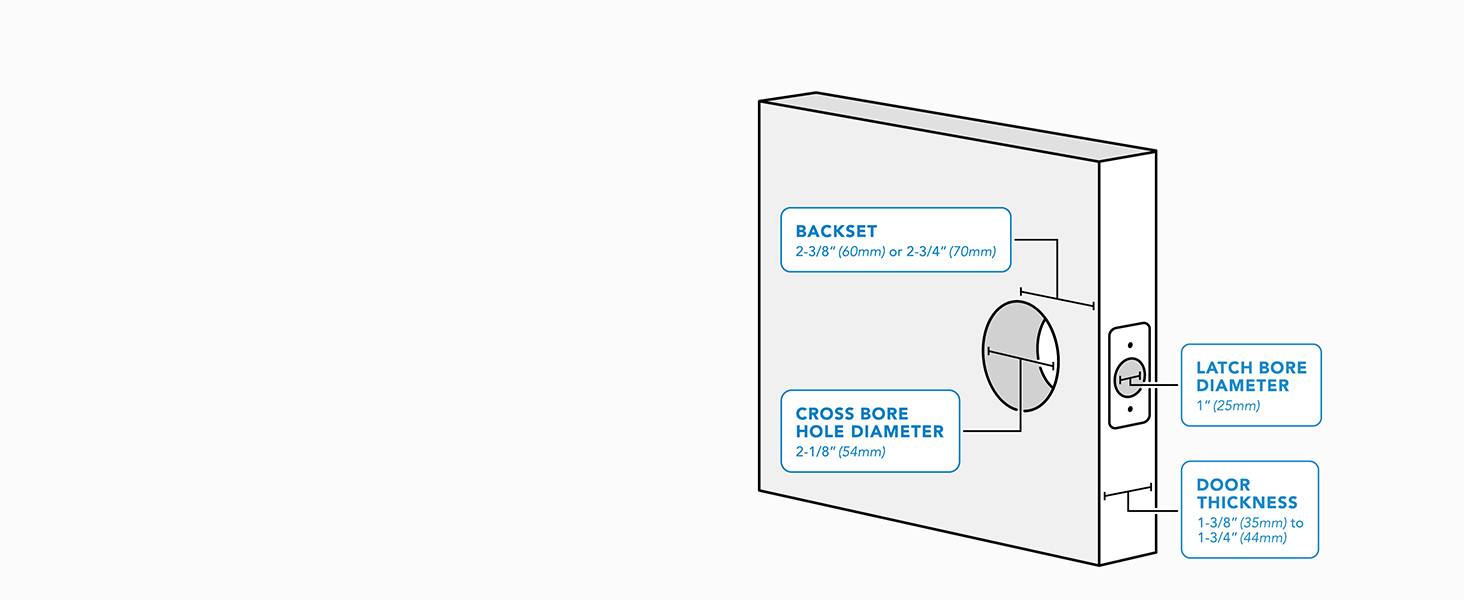
Image: Diagram illustrating required door dimensions for proper deadbolt fit.
4.2 Installation Steps
Follow these steps to install your deadbolt. A screwdriver is the only tool required.
- Prepare the Door: If replacing an existing deadbolt, remove it. Ensure the door frame is clear.
- Install the Latch: Insert the deadbolt latch into the door edge. Ensure the 'UP' arrow is facing upwards.
- Install the Exterior Keypad: Feed the cable through the cross bore hole and position the keypad on the exterior side of the door.
- Install the Interior Assembly: Connect the cable from the exterior keypad to the interior assembly. Secure the interior assembly to the door using the provided screws.
- Install Batteries: Insert the 4 AA alkaline batteries into the interior assembly.
- Perform Handing Process: The lock will automatically detect door handing. Follow any prompts from the lock.

Image: A person using a screwdriver to install the Schlage Arrive Smart WiFi Deadbolt, highlighting the ease of installation.
Video: Schlage Arrive Overview. This video provides a general overview of the product, including aspects of its installation and features.
5. Setup
5.1 App Pairing and WiFi Connection
To unlock the full potential of your Schlage Arrive Smart Lock, download the Schlage Home app and connect it to your home's WiFi network.
- Download the Schlage Home app from your device's app store.
- Create an account or log in.
- Follow the in-app instructions to add your new Schlage Arrive lock. This typically involves scanning a QR code on the lock or entering a pairing code.
- Connect the lock to your home's 2.4 GHz WiFi network through the app.

Image: A smartphone displaying the Schlage Home app interface, demonstrating remote control and monitoring capabilities.
Video: Schlage Home App. This video demonstrates the features and functionality of the Schlage Home mobile application.
5.2 Programming Access Codes
You can program up to 250 unique access codes for keyless entry using the Schlage Home app.
- Open the Schlage Home app and select your lock.
- Navigate to the 'Access Codes' or 'Manage Access' section.
- Follow the prompts to create a new access code. You can set permanent, recurring, or temporary codes.
- Assign a name to each code for easy identification.

Image: A hand interacting with the backlit push-button keypad to enter an access code.
6. Operating the Lock
6.1 Locking the Door
- From the Exterior: Press the 'Lock' button on the keypad.
- From the Interior: Rotate the thumbturn to the locked position.
- Via Schlage Home App: Use the app to remotely lock the deadbolt.

Image: A finger pressing the dedicated lock button on the keypad for quick locking.
6.2 Unlocking the Door
- From the Exterior: Enter a valid 4-8 digit access code on the keypad, then press the 'Schlage' button.
- From the Interior: Rotate the thumbturn to the unlocked position.
- Via Schlage Home App: Use the app to remotely unlock the deadbolt.
- With Key: Use the physical backup key in the keyhole.
6.3 Auto-Lock Feature
The auto-lock feature automatically relocks the door after a set period. This can be configured in the Schlage Home app with various time delay options or turned off completely.
7. Maintenance
7.1 Battery Replacement
The lock operates on 4 AA alkaline batteries. The Schlage Home app will notify you when battery levels are low. To replace:
- Remove the cover from the interior assembly.
- Remove the old batteries.
- Insert four new AA alkaline batteries, ensuring correct polarity.
- Replace the cover.

Image: A woman replacing the batteries in the interior unit of the smart lock.
7.2 Cleaning
Clean the lock with a soft, damp cloth. Avoid using abrasive cleaners or solvents, as these can damage the finish and electronic components.
8. Troubleshooting
Refer to the table below for common issues and their solutions.
| Problem | Possible Cause | Solution |
|---|---|---|
| Lock does not respond to keypad entry. | Low batteries; incorrect code; keypad malfunction. | Replace batteries; re-enter code; perform a factory reset if necessary. |
| Cannot connect to WiFi. | Incorrect WiFi password; router too far; 5GHz network selected. | Verify WiFi password; move router closer or install extender; ensure 2.4GHz network is used. |
| Auto-lock not engaging. | Feature disabled; incorrect time delay setting. | Check settings in the Schlage Home app; ensure door is fully closed. |
| Lock makes unusual noises. | Misalignment; obstruction. | Check door alignment and ensure no obstructions in the door frame or latch path. |
9. Specifications
Key technical specifications for the Schlage Arrive WiFi Deadbolt Smart Lock:
| Feature | Detail |
|---|---|
| Brand | SCHLAGE |
| Model Number | BE459WBCEN622 |
| Lock Type | Keypad Deadbolt |
| Connectivity | Bluetooth, Wi-Fi |
| Power Source | 4 AA Alkaline Batteries |
| Material | Zinc |
| Color | Matte Black |
| Trim Style | Century |
| Item Dimensions (L x W x H) | 0.83 x 2.5 x 4.49 inches (Exterior Keypad) |
| Item Weight | 2.4 Pounds |
| Special Features | Back-Lit Keypad, Battery Indicator, Remote Access, Voice Control |
| Compatibility | Alexa, Google Home |
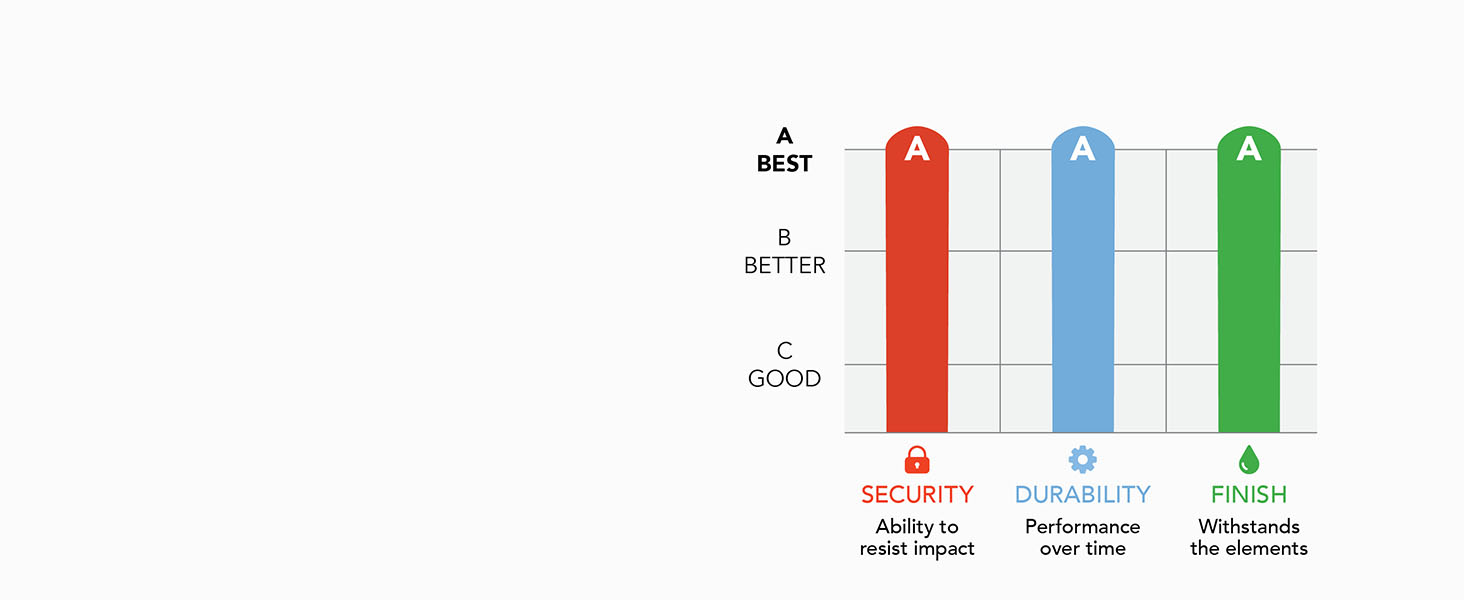
Image: BHMA certification ratings for Security, Durability, and Finish, indicating the product's high standards.
10. Warranty and Support
Schlage products are backed by a limited lifetime mechanical and finish warranty and a 3-year limited electronics warranty. For specific warranty details, please refer to the official Schlage website or contact customer support.
For technical assistance, troubleshooting, or warranty claims, please visit the official Schlage support website or contact their customer service department. Contact information can typically be found on the product packaging or the Schlage website.


