
Lepro E1 & ZB1 Bundle
Lepro Bundle AI Smart Outdoor Lights User Manual
Models: E1 Permanent Outdoor Lights & ZB1 Outdoor String Lights
Brand: Lepro
1. Introduction
This user manual provides detailed instructions for the Lepro Bundle, which includes two distinct smart outdoor lighting systems: the 50ft E1 RGB+IC AI Smart Permanent Outdoor Lights and the 100ft ZB1 RGB+IC AI Smart Outdoor String Lights. This guide will assist you with installation, operation, maintenance, and troubleshooting to ensure optimal performance and enjoyment of your new lighting solutions.

Image 1.1: Overview of the Lepro Bundle, showcasing both the permanent outdoor lights and the string lights.
2. Package Contents
Please verify that all components are present and in good condition upon unpacking.
- 1 x Lepro 50ft E1 RGB+IC AI Smart Permanent Outdoor Lights Kit (includes light strands, power adapter, mounting accessories)
- 1 x Lepro 100ft ZB1 RGB+IC AI Smart Outdoor String Lights Kit (includes light strand with bulbs, power adapter)
- 1 x User Manual (this document)
3. Important Safety Information
Read all safety instructions before installation and use. Failure to follow these instructions may result in electric shock, fire, or other hazards.
- Ensure the power supply is disconnected before installation or maintenance.
- Use only the provided power adapters.
- Do not submerge the lights or power adapters in water.
- Avoid installing lights near heat sources or in extremely high-temperature environments.
- Keep out of reach of children.
- Do not attempt to repair or modify the lights yourself. Contact customer support for assistance.
4. Setup and Installation
4.1. Lepro E1 Permanent Outdoor Lights Installation
These lights are designed for permanent installation on eaves, walls, or other outdoor structures.
- Plan Your Layout: Determine the desired path for your lights. Ensure the power adapter can reach a suitable outdoor power outlet.
- Mounting: Use the provided mounting clips and screws to secure the light strands. Ensure lights are evenly spaced and securely attached to prevent sagging.
- Connect Power: Connect the light strand to the power adapter, then plug the adapter into a weather-protected outdoor outlet.
- App Pairing: Download the Lepro app from your device's app store. Follow the in-app instructions to add your E1 Permanent Outdoor Lights. Ensure your Wi-Fi network is 2.4GHz.

Image 4.1: The Lepro E1 Permanent Outdoor Lights packaging and a view of the mobile application interface for control.
4.2. Lepro ZB1 Outdoor String Lights Installation
These string lights are versatile and can be hung across patios, pergolas, or fences.
- Choose Location: Select a suitable outdoor area for hanging the string lights. Consider the length and available hanging points.
- Secure Hanging: Use hooks, zip ties, or guide wires (not included) to securely hang the string lights. Ensure the bulbs are not directly resting on surfaces that could cause damage.
- Connect Power: Connect the string light strand to its power adapter, then plug the adapter into a weather-protected outdoor outlet.
- App Pairing: Open the Lepro app and follow the instructions to add your ZB1 Outdoor String Lights. Ensure your Wi-Fi network is 2.4GHz.

Image 4.2: The Lepro ZB1 Outdoor String Lights packaging and a view of the mobile application interface for control.
5. Operating Your Lepro Smart Lights
5.1. Lepro App Control
The Lepro app is the primary interface for controlling your lights. It allows for extensive customization and smart features.
- Power On/Off: Toggle the lights on or off directly from the app.
- Color Selection: Choose from a wide spectrum of RGB colors. For E1 Permanent Lights, you can also adjust white light from 2200K (warm) to 6500K (cool). ZB1 String Lights offer 2700K warm white in addition to RGB.
- Dynamic Effects: Select from pre-set scenes or create custom dynamic lighting effects, including chasing, fading, and flashing.
- Individual Bulb Control (E1 Only): The E1 Permanent Lights feature individually addressable LEDs, allowing you to assign unique colors to specific bulbs for intricate designs.
- Scheduling: Set timers and schedules for your lights to turn on/off or change modes automatically.
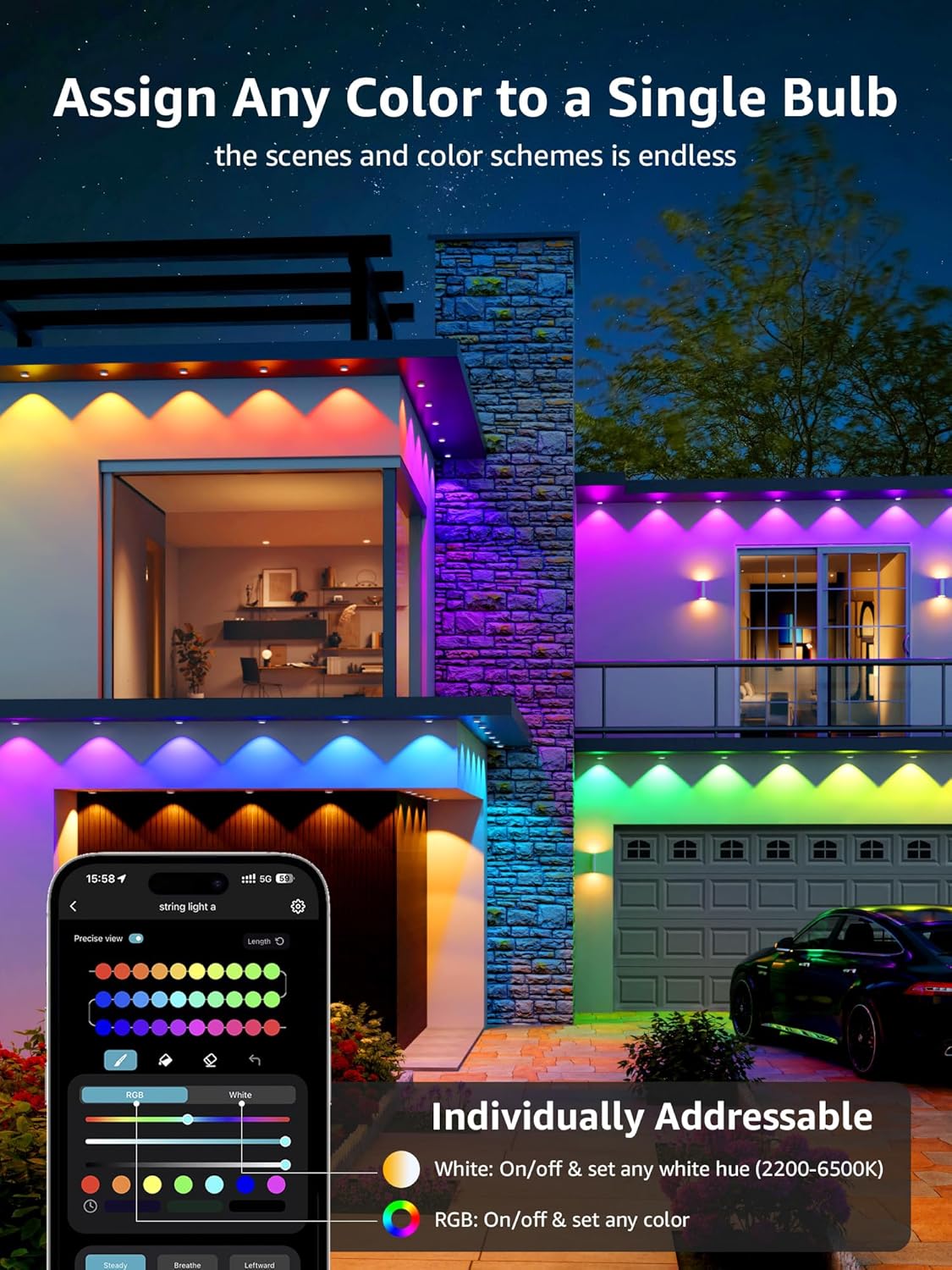
Image 5.1: The Lepro app demonstrating the ability to assign any color to individual bulbs on the E1 Permanent Outdoor Lights.
5.2. AI Voice Control (In-App)
The Lepro app integrates an AI voice assistant, allowing you to control your lights using natural language commands without needing external smart assistants.
- Activate AI: Tap the microphone icon within the Lepro app.
- Speak Commands: State your desired activity or mood (e.g., "Christmas party," "I am happy," "turn on the lights"). The AI will recommend and apply suitable lighting effects.

Image 5.2: Illustration of the voice-to-AI-to-output process for the permanent lights, showing examples for Christmas, Halloween, accent, and security lighting.

Image 5.3: Illustration of the voice-to-AI-to-output process for the string lights, showing examples for Christmas, Halloween, daily, and party lighting.

Image 5.4: Examples of AI-generated lighting effects based on voice prompts like "I am happy," "christmas party," and "turn on the lights."
5.3. Alexa / Google Assistant Integration
Both E1 and ZB1 lights can be controlled via Amazon Alexa or Google Assistant for seamless smart home integration.
- Enable Skill/Action: In the Alexa or Google Home app, search for and enable the "Lepro" skill or action.
- Link Account: Follow the prompts to link your Lepro account with your Alexa or Google account.
- Discover Devices: Once linked, ask your smart assistant to discover new devices. Your Lepro lights should appear.
- Voice Commands: You can now use voice commands such as "Alexa, turn on the permanent lights" or "Hey Google, set string lights to red."
6. Maintenance and Care
Proper maintenance ensures the longevity and performance of your Lepro outdoor lights.
- Cleaning: Periodically wipe the lights and bulbs with a soft, damp cloth. Do not use harsh chemicals or abrasive cleaners. Ensure power is disconnected before cleaning.
- Weather Resistance: Both E1 and ZB1 lights are IP65 rated, meaning they are weatherproof and shatterproof, designed to withstand snow, rain, sun, and wind. However, avoid prolonged submersion.
- Storage: If storing the lights for an extended period, clean them thoroughly, coil them neatly, and store them in a cool, dry place away from direct sunlight.

Image 6.1: Visual representation of the IP65 rating, highlighting snow-proof, waterproof, sun-proof, and windproof features.
7. Troubleshooting
If you encounter issues with your Lepro lights, refer to the following common problems and solutions.
| Problem | Possible Cause | Solution |
|---|---|---|
| Lights not turning on. | No power, loose connection, power adapter failure. | Check power outlet, ensure all connections are secure. Try a different outlet. |
| Cannot connect to Wi-Fi/App. | Incorrect Wi-Fi password, 5GHz Wi-Fi, too far from router, network interference. | Ensure 2.4GHz Wi-Fi, re-enter password, move lights closer to router, restart router. |
| Lights flicker or display incorrect colors. | Loose connection, software glitch, power fluctuation. | Check connections, restart lights by unplugging for 10 seconds, update app firmware. |
| Voice control not working. | Microphone issues, incorrect commands, app not linked to smart assistant. | Ensure microphone access, use clear commands, verify Lepro skill/action is enabled and linked. |
If the problem persists, please contact Lepro customer support for further assistance.
8. Product Specifications
8.1. Lepro E1 RGB+IC AI Smart Permanent Outdoor Lights
- Length: 50 feet
- LEDs: RGB+IC (Individually Addressable)
- White Light: 2200K (warm) to 6500K (cool) adjustable
- Connectivity: Wi-Fi (2.4GHz)
- Weather Rating: IP65 (Weatherproof & Shatterproof)
- Control: Lepro App, In-App AI Voice, Alexa, Google Assistant
8.2. Lepro ZB1 RGB+IC AI Smart Outdoor String Lights
- Length: 100 feet
- Bulbs: 30 Warm LED Bulbs (RGB+IC)
- White Light: 2700K (warm white only)
- Connectivity: Wi-Fi (2.4GHz)
- Weather Rating: IP65 (Weatherproof & Shatterproof)
- Control: Lepro App, In-App AI Voice, Alexa, Google Assistant
9. Warranty and Customer Support
Lepro products are designed for quality and durability. For warranty information, technical support, or any questions regarding your product, please refer to the warranty card included in your package or visit the official Lepro website. You can also contact Lepro customer service directly through the contact information provided on their website or within the Lepro app.
Ask a question about this manual
Ask about setup, troubleshooting, compatibility, parts, safety, or missing instructions. Manuals+ will review the question and use this page’s manual context to help answer it.