
Ejoyous H806
Portable Wi-Fi Router H806 User Manual
Model: H806 | Brand: Ejoyous
Introduction
This manual provides detailed instructions for setting up and using your Ejoyous H806 Portable 4G Wi-Fi Router. This device is designed to offer high-speed 3G/4G internet access, making it ideal for car users, business travelers, and outdoor enthusiasts. It supports up to 10 users simultaneously and features a long-lasting battery and an intuitive LED display.
Package Contents
- 1 x 4G Wi-Fi Router
- 1 x Charging Cable
- 1 x Manual
Product Overview
The H806 Portable Wi-Fi Router is a compact and lightweight device, designed for easy portability and efficient mobile internet access.

Figure 1: Ejoyous H806 Portable Wi-Fi Router and included USB charging cable.
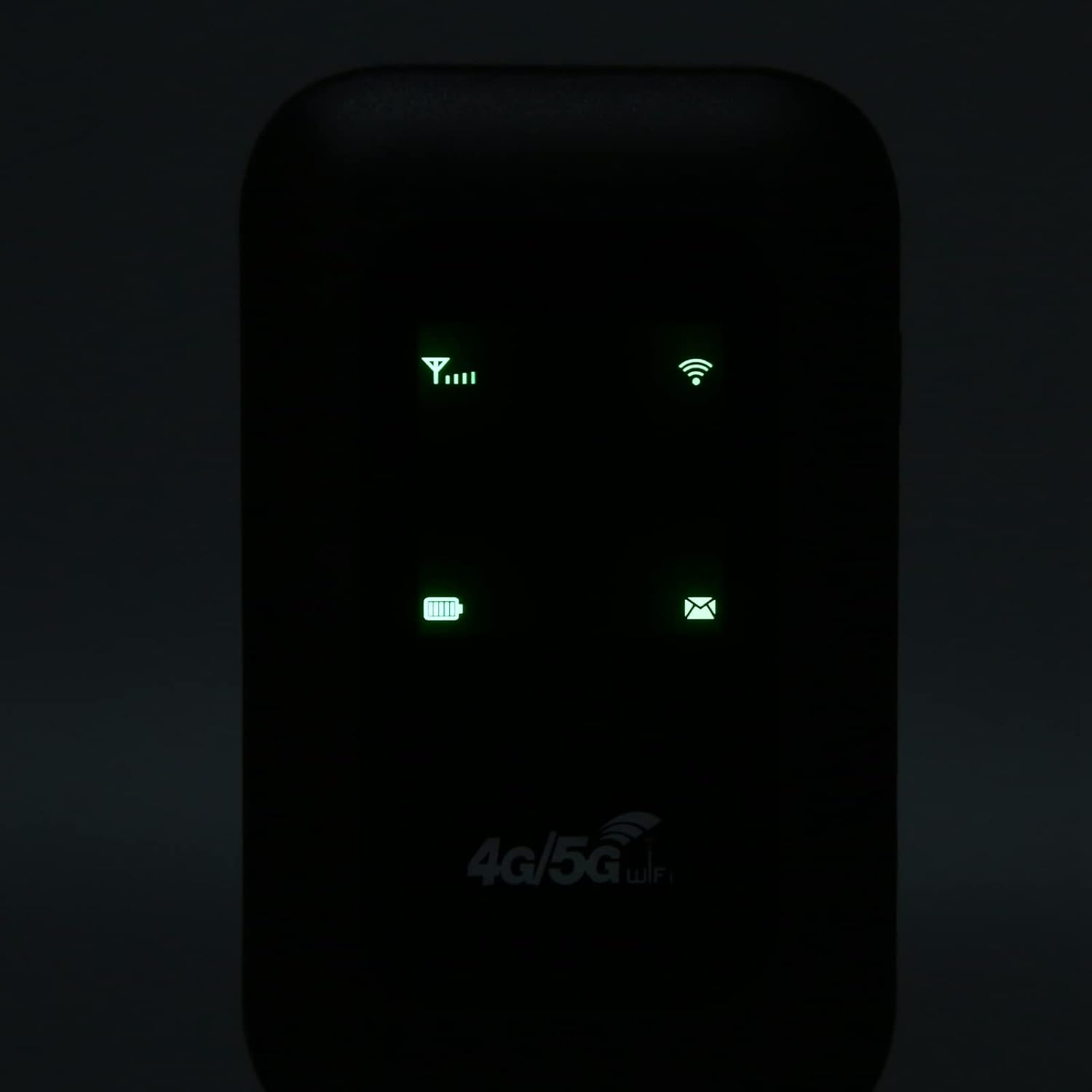
Figure 2: The Wi-Fi LED smart display provides clear indicators for signal strength, Wi-Fi status, battery level, and message notifications.

Figure 3: The included USB charging cable for powering the device.
Setup
- Insert Micro SIM Card: Open the back cover of the router. Locate the micro card slot. Carefully insert a standard micro SIM card (not included) into the designated slot. Ensure the card is inserted correctly according to the diagram inside the device.
- Battery Activation: Before powering on, check for any partition sticker at the built-in battery interface. If present, gently tear it off. This sticker prevents battery contact during shipping.
- Power On: Press and hold the power button until the LED indicators illuminate. The device will begin searching for a network.

Figure 4: The H806 router provides 4G LTE high-speed internet access.
Operating Instructions
Connecting to Wi-Fi
Once the router is powered on and has established a network connection (indicated by the signal strength LEDs), you can connect your devices.
- On your Wi-Fi enabled device (e.g., cell phone, laptop, tablet), search for available Wi-Fi networks.
- Select the network name (SSID) corresponding to your H806 router. The default SSID and password are usually found on a sticker inside the battery compartment or on the device packaging.
- Enter the Wi-Fi password when prompted.
- Your device should now be connected to the internet via the H806 router.
Key Features
- High-Speed Internet: Supports 3G/4G main bands for fast internet access globally. Peak rates of 150Mbps download and 50Mbps upload.
- Multi-User Support: Connects up to 10 users simultaneously, perfect for sharing internet with family or colleagues.
- Long Standby Time: Equipped with a 2100mAh built-in lithium battery, offering up to 72 hours of standby time.
- Portability: Slim and compact design makes it easy to carry for travel and outdoor use.

Figure 5: Ideal for car users, business travelers, and outdoor enthusiasts, supporting up to 10 users.

Figure 6: Features a 2100mAh high-capacity battery for up to 72 hours of standby time and an easy-to-operate Wi-Fi LED smart display.

Figure 7: Its lightweight and slim design makes it exceptionally easy to carry.

Figure 8: Offers wide compatibility with cell phones, laptops, desktops, and tablets.
Maintenance
- Keep the device dry and clean. Avoid exposure to extreme temperatures or humidity.
- Do not attempt to disassemble or repair the device yourself. Refer to qualified service personnel for any issues.
- Use only the provided charging cable or a compatible charger to prevent damage.
Troubleshooting
No Power
- Ensure the battery is charged. Connect the router to a power source using the charging cable.
- Check if the partition sticker at the built-in battery interface has been removed. If not, remove it and try powering on again.
No Internet Connection
- Verify that a valid micro SIM card is correctly inserted and activated with a data plan.
- Check the signal strength indicator on the router. If there is no signal, move to an area with better network coverage.
- Restart the router and your connected device.
Cannot Connect to Wi-Fi
- Ensure the router's Wi-Fi function is enabled (check LED indicators).
- Double-check the Wi-Fi password.
- Move closer to the router to ensure you are within Wi-Fi range.
- Restart both the router and your device.
Specifications
| Feature | Specification |
|---|---|
| Model | H806 |
| Material | ABS |
| Color | Black |
| Card Slot | Micro Card |
| Battery Type | Built-in 2100mAh Lithium Battery |
| 4G LTE Band | B1 B3 B5 B40 |
| 3G UMTS WCDMA | B1 |
| Peak Download Rate | 150Mbps |
| Peak Upload Rate | 50Mbps |
| Wi-Fi Standard | 802.11 b/g/n |
| Sharing Users | 10 Users |
| Item Weight | 3.84 ounces |
| Package Dimensions | 4.33 x 2.91 x 1.34 inches |
Warranty and Support
For warranty information or technical support, please refer to the contact details provided by Ejoyous at the point of purchase or visit the official Ejoyous store on Amazon: Ejoyous Amazon Store.
Ask a question about this manual
Ask about setup, troubleshooting, compatibility, parts, safety, or missing instructions. Manuals+ will review the question and use this page’s manual context to help answer it.