
1. Introduction
This manual provides essential information for the installation, operation, and maintenance of your new Vetroo 850W 80 Plus Gold Full Modular ATX 3.1 Power Supply. Please read this manual thoroughly before installation and keep it for future reference.

Figure 1: Vetroo 850W Power Supply (White)
2. Product Features
- PCIe Gen 5.1 Ready: Meets the latest PCIE 5.1 standards for improved performance and efficiency. Backward compatible with both PCIE 4.0 and 3.0.
- Fully ATX 3.1 Compliant: Designed to meet the newest, most advanced power supply standards.
- Premium 105°C Capacitors: High-quality materials and construction ensure stable, low-temperature operation.
- 80 Plus Gold Certified: Meets high standards for quality and efficiency, ensuring reliable performance and energy savings.
- Fully Modular Design: Allows for easy cable management and customization, reducing cable clutter by only installing necessary cables.
- Quiet Operation: Features a 120mm FDB (Fluid Dynamic Bearing) fan for quiet cooling.
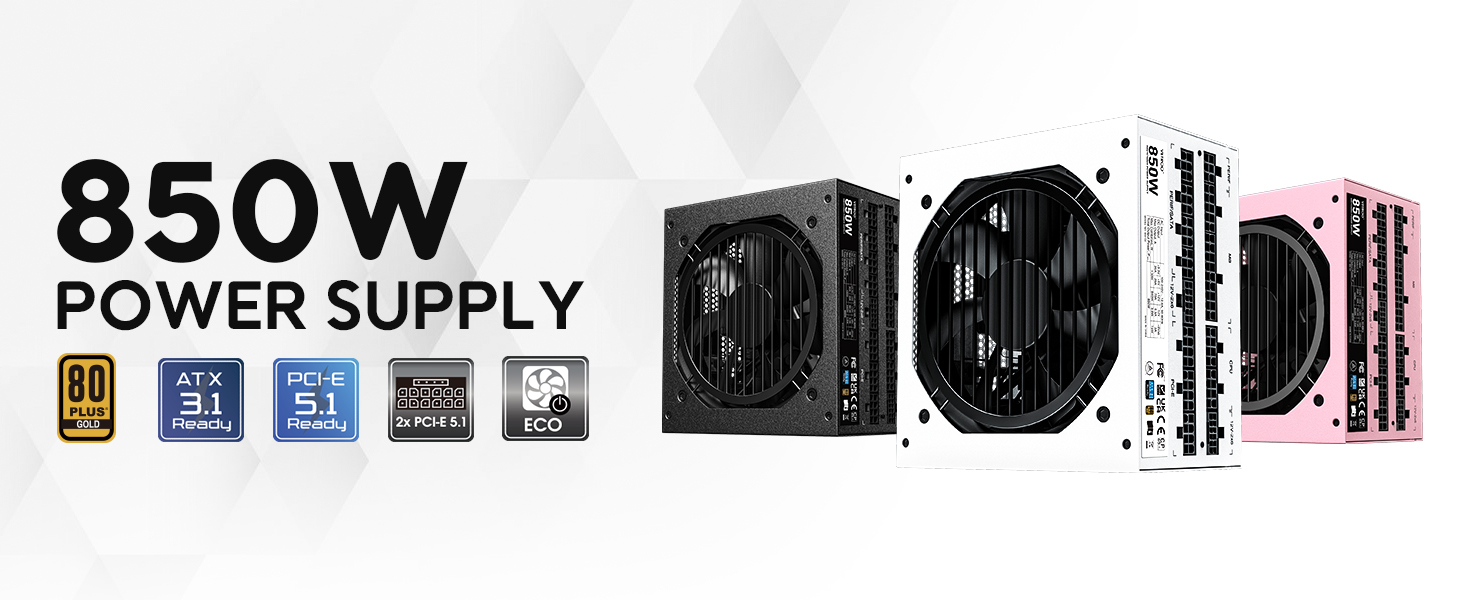
Figure 2: Overview of Vetroo 850W Power Supply features
3. Package Contents
Verify that all components are present in the package:
- Vetroo 850W Power Supply Unit
- Modular Cable Set (including 24-pin ATX, CPU, PCIe, SATA, Molex, FDD connectors)
- AC Power Cord
- Mounting Screws
- Cable Management Ties
- Storage Bag for Unused Cables
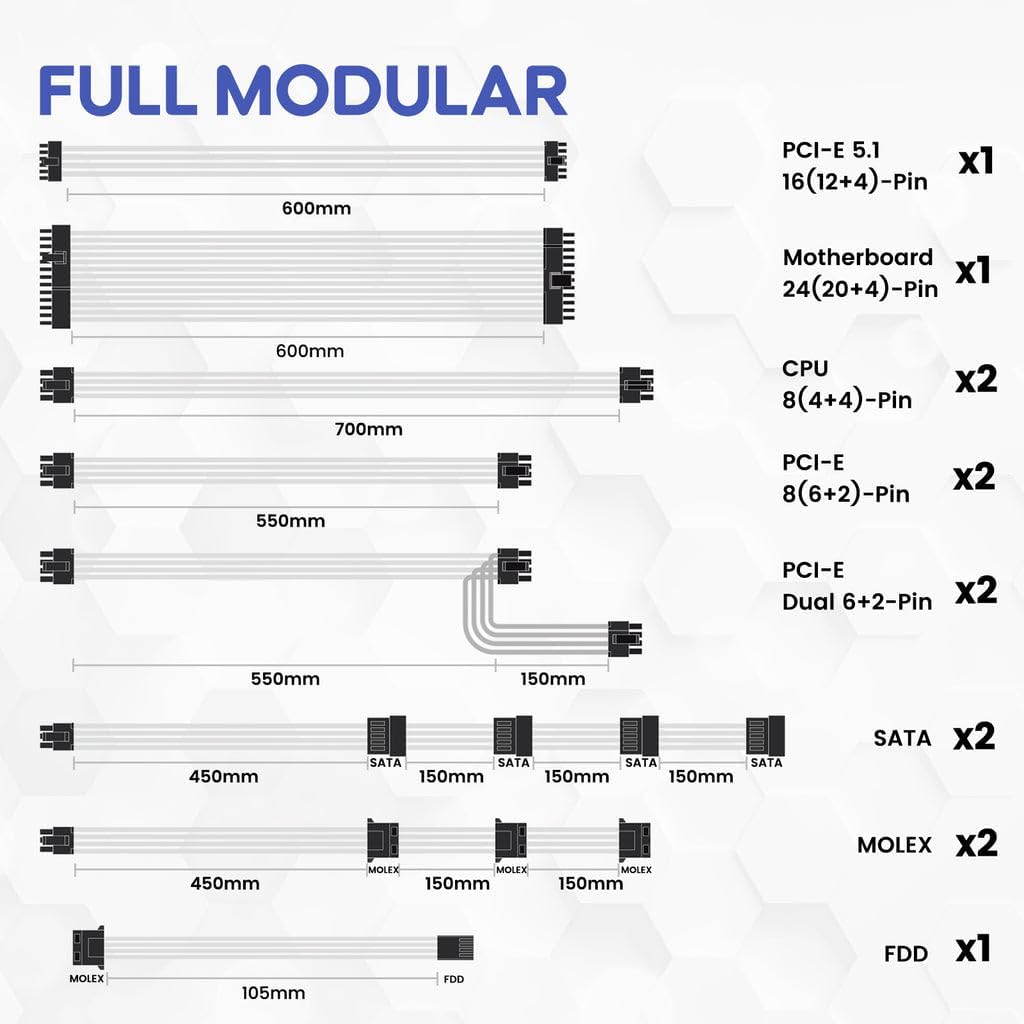
Figure 3: Included Modular Cables
4. Safety Information
WARNING: Improper installation or use can result in serious injury or damage to your system.
- Always disconnect the AC power cord from the wall outlet before installing or removing the power supply.
- Do not open the power supply unit. High voltages are present inside, even when disconnected.
- Ensure all cables are securely plugged into their respective ports. Loose connections can cause damage.
- Use only the modular cables provided with this power supply. Third-party cables may not be compatible and could cause serious damage.
- Install the power supply in a well-ventilated area, away from high humidity and extreme temperatures.
5. Setup and Installation
Follow these general steps for installing your power supply. Refer to your PC case and motherboard manuals for specific instructions.
- Prepare Your System: Ensure your computer is powered off and unplugged from the wall outlet.
- Mount the Power Supply: Secure the power supply unit into the designated bay in your PC case using the provided mounting screws.
- Connect Main Power Cables: Connect the 24-pin ATX cable to your motherboard.
- Connect CPU Power Cables: Connect the 8-pin (4+4) CPU power cable(s) to your motherboard.
- Connect PCIe Power Cables: Connect the necessary PCIe power cables (e.g., 12V-2x6 for PCIe 5.1 GPUs, or 8-pin (6+2) for older GPUs) to your graphics card(s).

Figure 4: Dual PCIe 5.1 Connectors
- Connect Peripheral Cables: Connect SATA, Molex, and FDD cables to your storage drives and other peripherals as needed.
- Cable Management: Utilize the fully modular design and included cable ties to route cables neatly, improving airflow and aesthetics.
- Final Check: Double-check all connections to ensure they are secure before closing your PC case.
Video 1: Vetroo Power Supply Installation Guide. This video demonstrates the process of installing a Vetroo power supply into a PC case, including cable connections.
6. Operating Instructions
After successful installation, you can power on your system.
- Power On: Connect the AC power cord to the power supply and a wall outlet. Flip the main power switch on the power supply to the 'ON' position.
- ECO Mode: The power supply features an ECO mode switch. When 'ON', the fan will stop spinning unless the load is above approximately 50% of the rated capacity, ensuring silent operation at low loads. When 'OFF', the fan will spin continuously.

Figure 5: Power Switch and ECO Mode
7. Maintenance
Proper maintenance ensures the longevity and optimal performance of your power supply.
- Cleaning: Periodically clean the exterior of the power supply and the fan grille to prevent dust buildup, which can impede airflow and cooling. Use compressed air or a soft brush. Ensure the power supply is off and unplugged before cleaning.
- Fan Operation: The 120mm Fluid Dynamic Bearing fan is designed for durability and quiet operation. In ECO mode, the fan may not spin at low loads; this is normal.
8. Troubleshooting
If you encounter issues with your power supply, consider the following:
- No Power: Ensure the AC power cord is securely connected to both the power supply and the wall outlet. Verify the main power switch on the power supply is in the 'ON' position. Check your wall outlet with another device.
- System Instability/Shutdowns: This power supply includes multiple protection features (OVP, OCP, OPP, SCP, UVP, OTP) to safeguard your components. If your system is unstable or shuts down unexpectedly, it could indicate an issue with power delivery or another component. Ensure all power connections are firm.
- Fan Not Spinning: If the ECO mode is enabled, the fan will not spin until the power supply reaches approximately 50% load. This is normal operation for quiet performance. If the fan does not spin under heavy load, contact support.
- Unusual Noises: If you hear unusual noises (e.g., coil whine, grinding), power down your system immediately and contact support.
9. Specifications
| Feature | Detail |
|---|---|
| Model Name | 850 G5 |
| Output Wattage | 850 Watts |
| Efficiency Certification | 80 Plus Gold |
| ATX Standard | ATX 3.1 Compliant |
| PCIe Standard | PCIe Gen 5.1 Ready |
| Form Factor | ATX |
| Cooling Method | Air (120mm FDB Fan) |
| Modular Type | Full Modular |
| Capacitors | Premium 105°C |
| Product Dimensions (L x W x H) | 5.9 x 5.5 x 3.4 inches |
| Item Weight | 5.7 pounds (2.59 Kilograms) |
| Compatible Devices | Personal Computer |
| Protection Features | OVP (Over Voltage Protection), OCP (Over Current Protection), OPP (Over Power Protection), SCP (Short Circuit Protection), UVP (Under Voltage Protection), OTP (Over Temperature Protection) |
10. Warranty and Support
The Vetroo 850W Power Supply comes with a 10-Year Warranty, ensuring long-term reliability and peace of mind. For technical support, warranty claims, or any questions regarding your product, please visit the official Vetroo website or contact their customer service department.
Video 2: Vetroo 850W Power Supply - White Product Overview. This video provides a visual overview of the white Vetroo 850W Power Supply.


