
HARDELL LF12-12inch
HARDELL Digital Caliper User Manual
Model: LF12-12inch
1. Introduction
Thank you for choosing the HARDELL Digital Caliper. This precision measuring instrument is designed for accurate and versatile measurements in various applications, including mechanics, woodworking, jewelry making, and 3D printing. Made from durable stainless steel, it offers a large LCD screen for clear readings and multiple measurement modes. Please read this manual carefully before use to ensure proper operation and maintenance.
2. Package Contents
Upon opening your HARDELL Digital Caliper package, please verify that all items listed below are present and in good condition:
- 1 x HARDELL Digital Caliper (LF12-12inch)
- 2 x 1.5V LR44 Batteries (one pre-installed, one spare)
- 1 x Small Screwdriver (for battery compartment)
- 1 x Metal Ruler
- 1 x Sturdy Storage Case

Image: All components included in the HARDELL Digital Caliper package.
3. Key Features
- Large Measuring Range: 0-12 inches (0-300 mm) for diverse applications.
- High Accuracy: Precision of ±0.02 mm / 0.001 inches.
- Unit Conversion: Easily switch between inches, millimeters, and fractions with a single button.
- Four Measurement Types: Capable of measuring outer diameter, inner diameter, depth, and step.
- Durable Construction: Made from selected stainless steel for enhanced strength and longevity.
- Large LCD Display: Provides clear, easy-to-read digital measurements.
- Auto-Off Function: Automatically powers off after a few minutes of inactivity to conserve battery life.
- Smooth Operation: Features knurled thumb rollers and locking screws for smooth sliding and accurate positioning.

Image: Overview of the HARDELL Digital Caliper and its key components.
4. Setup
4.1 Battery Installation
The digital caliper comes with one 1.5V LR44 battery pre-installed. If the display does not turn on or shows a low battery indicator, you may need to replace the battery.
- Locate the battery compartment cover on the back of the digital display unit.
- Use the provided small screwdriver to unscrew the battery cover.
- Carefully remove the old battery, if present.
- Insert a new 1.5V LR44 battery with the positive (+) side facing upwards.
- Replace the battery cover and secure it with the screw.
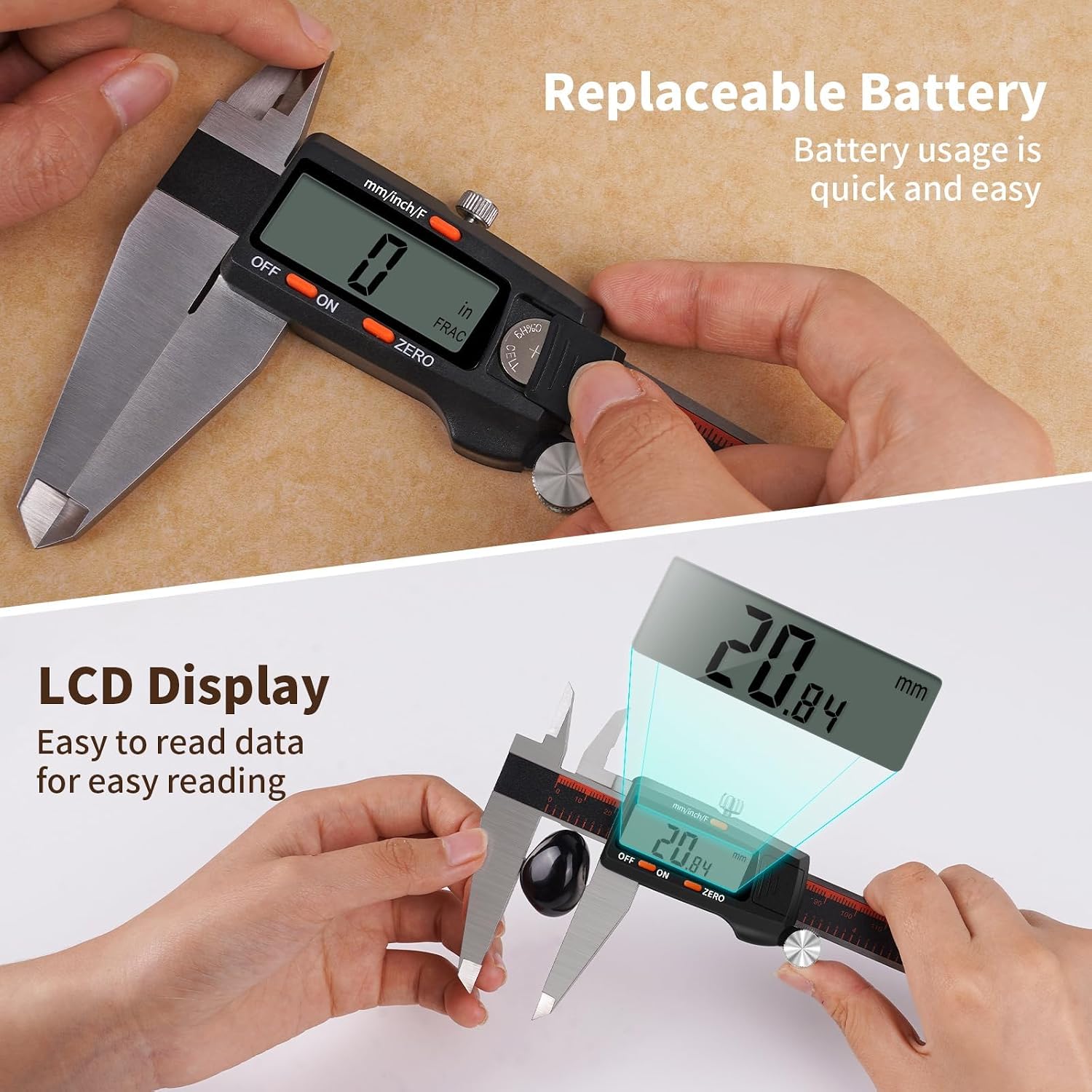
Image: The digital display and battery compartment of the caliper.
5. Operating Instructions
5.1 Power On/Off
- To turn on the caliper, press the ON button or simply slide the measuring jaw.
- To turn off the caliper, press the OFF button. The caliper will also automatically shut off after approximately 5 minutes of inactivity to save battery life.
5.2 Unit Conversion (Inch/MM/Fraction)
The caliper supports three measurement units: inches, millimeters, and fractions.
- Press the mm/inch/F button to cycle through the units: millimeters (mm), inches (in), and fractions (FRAC).
- The selected unit will be displayed on the LCD screen.

Image: Demonstrating the unit conversion feature on the caliper's display.
5.3 Zeroing the Caliper
Before taking a measurement, it is crucial to zero the caliper to ensure accuracy.
- Close the measuring jaws completely, ensuring they are clean and free of debris.
- Press the ZERO button. The display should now read 0.00 mm or 0.00 in.
- The caliper is now ready for accurate measurement.
5.4 Measurement Methods
The HARDELL Digital Caliper can perform four types of measurements:
- External Measurement (Outer Diameter): Use the large jaws to measure the external dimensions of an object. Position the object between the jaws and slide them until they firmly contact the object. Read the measurement on the LCD.
- Internal Measurement (Inner Diameter): Use the small jaws at the top of the caliper to measure internal dimensions. Insert the small jaws into the opening and expand them until they firmly contact the inner walls. Read the measurement on the LCD.
- Depth Measurement: Use the depth rod located at the end of the sliding jaw. Place the end of the main beam on the top surface of the object and extend the depth rod into the hole or recess until it touches the bottom. Read the measurement on the LCD.
- Step Measurement: Use the step measurement face at the end of the main beam. Place the main beam's end on the higher surface and extend the sliding jaw until its step face rests on the lower surface. Read the measurement on the LCD.

Image: The caliper being used for external measurement of an object.
For consistent results, ensure the caliper is held perpendicular to the object being measured and apply gentle, consistent pressure.
6. Maintenance
Proper care and maintenance will extend the life and accuracy of your HARDELL Digital Caliper.
- Cleaning: Wipe the caliper clean with a dry, soft cloth after each use. Avoid using solvents or harsh chemicals, as they may damage the electronic components or the finish.
- Storage: Store the caliper in its provided sturdy case when not in use. Keep it in a dry, cool place, away from direct sunlight, dust, and excessive humidity.
- Lubrication: Occasionally, a small amount of light machine oil can be applied to the sliding surfaces to ensure smooth movement.
- Battery: If the caliper will not be used for an extended period, it is recommended to remove the battery to prevent leakage and potential damage.
- Avoid Impact: Do not drop or subject the caliper to strong impacts, as this can affect its accuracy and functionality.
7. Troubleshooting
If you encounter issues with your HARDELL Digital Caliper, refer to the following common problems and solutions:
| Problem | Possible Cause | Solution |
|---|---|---|
| Display does not turn on. | Dead or incorrectly installed battery. | Replace the battery (1.5V LR44) and ensure it is inserted with the correct polarity. |
| Inaccurate readings or fluctuating display. |
|
|
| Jaws do not slide smoothly. | Dust or debris on the sliding beam. | Clean the beam and apply a small amount of light machine oil if necessary. |
| Caliper turns off too quickly. | Low battery. | Replace the battery. |
8. Specifications
| Feature | Specification |
|---|---|
| Model Number | LF12-12inch |
| Measuring Range | 0-12 inches (0-300 mm) |
| Accuracy | ±0.02 mm / 0.001 inches |
| Resolution | 0.01 mm / 0.0005 inches / 1/128 inch |
| Display | Large LCD Screen |
| Power Source | 1.5V LR44 Button Cell Battery |
| Material | Stainless Steel |
| Auto-Off Time | Approx. 5 minutes of inactivity |
| Operating Temperature | 0°C to 40°C (32°F to 104°F) |
9. Warranty and Support
HARDELL provides a lifetime warranty for this product. For any questions, technical support, or warranty claims, please contact HARDELL customer service through the retailer's platform or visit the official HARDELL store online. Please retain your purchase receipt as proof of purchase for warranty purposes.
Thank you for choosing HARDELL.
Related documentsLF12-12inch


Ask a question about this manual
Ask about setup, troubleshooting, compatibility, parts, safety, or missing instructions. Manuals+ will review the question and use this page’s manual context to help answer it.