
IMILAB EC6 Dual 3K+3K
IMILAB EC6 Dual 3K+3K Home Security Camera User Manual
Model: EC6 Dual 3K+3K
Introduction
This manual provides comprehensive instructions for the installation, operation, and maintenance of your IMILAB EC6 Dual 3K+3K Home Security Camera. Please read this manual thoroughly before using the product to ensure proper functionality and safety.
Product Overview
The IMILAB EC6 Dual 3K+3K is an advanced outdoor PTZ camera featuring dual lenses for comprehensive surveillance. It offers 3K+3K resolution, 360-degree pan and tilt capabilities, and smart deterrence features. This package includes a 128GB SD card for local storage.

Image: The IMILAB EC6 Dual 3K+3K camera, a white cylindrical device with two distinct camera lenses, is shown alongside a 128GB microSD card. The camera features a mounting bracket at the top.
Key Features:
- Dual Angle Surveillance: Simultaneous monitoring from two perspectives.
- 3K+3K Live View & Chat: High-resolution live streaming with two-way audio.
- Smart Deterrence: Motion-triggered siren, flash, and custom voice alarms.
- App Connection: Real-time notifications and remote control via the Mi Home app.
- Versatile Installation: Supports wall, ceiling, and column mounting.
- Flexible Footage Storage: Includes a 128GB SD card for local storage.
- Voice Assistants: Compatibility with popular voice assistant platforms.
- Broad Compatibility: Works with WiFi 6 and 2.4GHz networks.

Image: An outdoor shot of the IMILAB EC6 camera mounted on a wall at dusk, surrounded by icons representing its key features: Dual Angle Surveillance, 3K+3K Live View & Chat, Smart Deterrence, App Connection, Versatile Installation, Flexible Footage Storage, Voice Assistants, and Broad Compatibility.
Setup
1. Unboxing and Initial Inspection
- Carefully remove all components from the packaging.
- Verify that all items listed in the package contents are present and undamaged.
- Locate the included 128GB microSD card.

Image: A close-up of the IMILAB 128GB microSDXC memory card, displaying its capacity and class ratings.
2. App Installation and Account Creation
- Download the "Mi Home" or "IMILAB Home" app from your device's app store (iOS App Store or Google Play Store).
- Open the app and follow the on-screen instructions to create a new account or log in if you already have one.
3. Camera Power-On and Pairing
- Connect the camera to a power source using the provided power adapter.
- Wait for the camera's indicator light to flash, indicating it's ready for pairing.
- In the app, tap the "+" icon to add a new device.
- Select the IMILAB EC6 Dual 3K+3K from the list of available devices.
- Follow the app's instructions to connect the camera to your 2.4GHz Wi-Fi network. Ensure your Wi-Fi signal is strong at the installation location.
4. Installation Location and Mounting
Choose a suitable outdoor location that provides optimal coverage and a stable Wi-Fi connection. The camera is IP65 weather-resistant, suitable for various conditions.
- Mark the drilling points on the wall, ceiling, or column using the mounting template (if provided).
- Drill holes and insert wall plugs if necessary.
- Secure the mounting bracket to the surface using screws.
- Attach the camera to the mounting bracket, ensuring it is firmly locked in place.
- Adjust the camera's angle to cover the desired surveillance area.
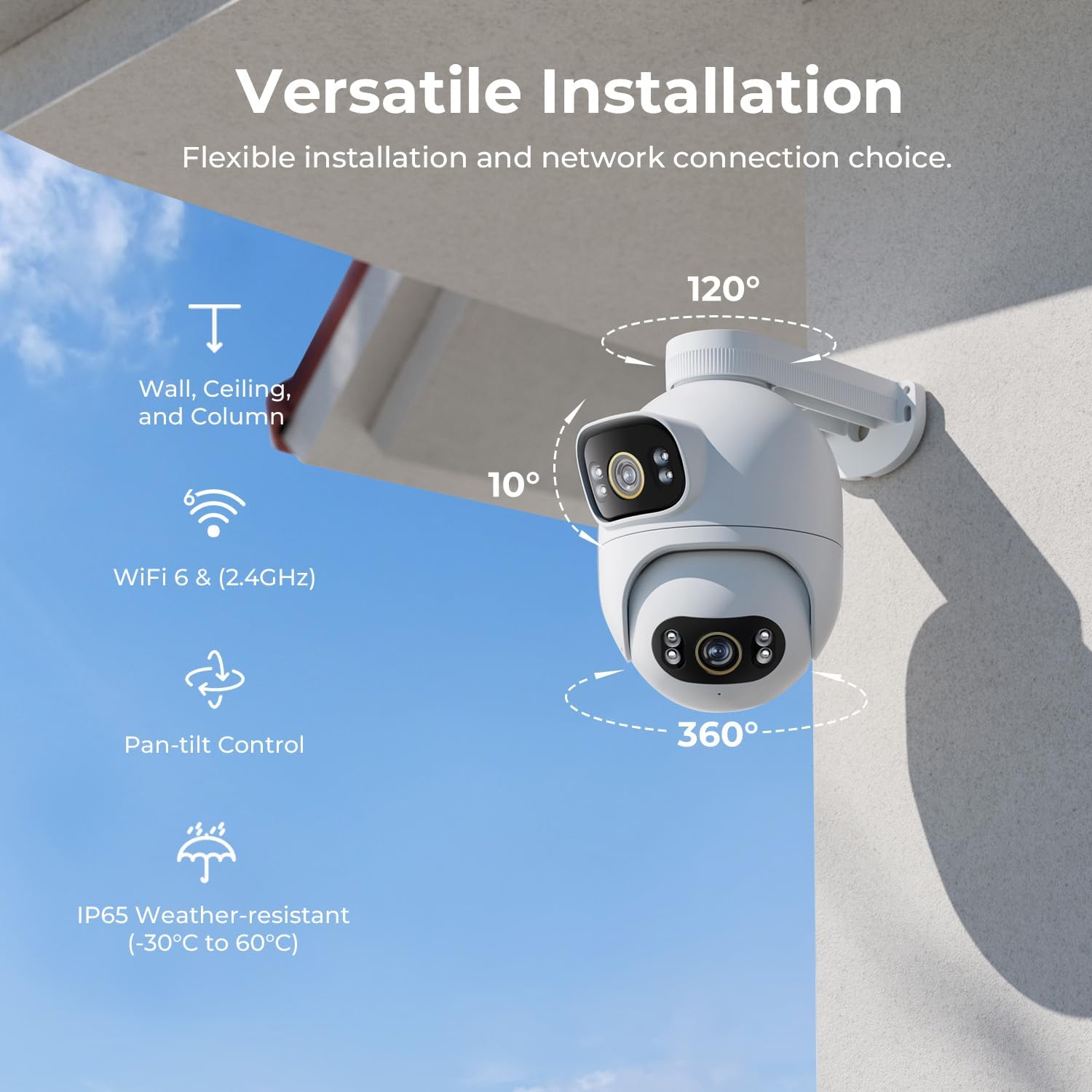
Image: An illustration demonstrating the versatile installation options for the IMILAB EC6 camera, including wall, ceiling, and column mounting. It also highlights Wi-Fi 6 & 2.4GHz compatibility, pan-tilt control, and IP65 weather resistance.
Operating the Camera
1. Live View and Dual Angle Monitoring
Open the Mi Home app to access the live feed from your camera. The dual lenses provide two simultaneous views within the app.

Image: The IMILAB EC6 camera positioned next to a smartphone displaying the Mi Home app interface. The app shows two live video feeds from the camera's dual lenses, labeled "3K+3K", along with surveillance and playback options.

Image: An illustration demonstrating the Dual Angle Surveillance capability of the IMILAB EC6 camera, showing two distinct fields of view from its dual lenses. It highlights the 360-degree pan and 90-degree tilt functionality.
2. Pan-Tilt-Zoom (PTZ) Control
- In the live view, use the on-screen joystick or swipe gestures to remotely control the camera's pan (horizontal) and tilt (vertical) movements.
- The lower lens can rotate to track detected movement, providing up to 360° coverage.
3. Two-Way Audio
The camera supports two-way audio communication. Tap the microphone icon in the app to speak through the camera's speaker, and listen to audio from the camera's microphone.

Image: A scene depicting a person receiving a package, with an overlay showing the IMILAB EC6 camera's 3K+3K live view and chat features. Icons indicate 3K+3K Resolution, Two-way Audio, and Smart Color Night Vision capabilities.
4. Smart Deterrence Features
Configure smart deterrence settings in the app to automatically react to detected motion.
- Siren: Activates an audible alarm upon motion detection.
- Flash: Triggers the camera's spotlight to flash.
- Custom Voice Alarm: Record and play a custom voice message when motion is detected.

Image: A visual representation of the IMILAB EC6's Smart Deterrence features, showing a person attempting to break in, with icons for motion-triggered Siren, Flash, and Custom Voice Alarm.
5. Motion Detection and Notifications
The camera can detect people and vehicles using AI. Configure motion detection zones and sensitivity settings in the app to receive push notifications for important events.
- Two Motion Zones: Define specific areas for motion detection.
- Push Notifications: Receive alerts directly on your smartphone.
- Remote Control: Manage camera settings and view footage from anywhere.

Image: A smartphone displaying the Mi Home app interface, illustrating the app connection features of the IMILAB EC6 camera. It shows options for setting two motion zones, receiving push notifications, remote control, and integration with Xiaomi/Mi Home.
6. Playback and Storage
Recorded footage is stored on the included 128GB SD card. Access playback through the Mi Home app to review past events.
- Navigate to the "Playback" section in the app.
- Select the date and time to view recorded events.
- Footage can be downloaded to your device if needed.
Maintenance
- Cleaning: Regularly wipe the camera lenses and exterior with a soft, damp cloth to remove dust and dirt. Do not use harsh chemicals or abrasive materials.
- Firmware Updates: Check the Mi Home app periodically for firmware updates. Keeping the firmware updated ensures optimal performance and security.
- SD Card Management: The 128GB SD card will automatically overwrite older footage when full. If you experience issues, consider formatting the SD card via the app (this will erase all data).
- Power Cycle: If the camera becomes unresponsive, disconnect it from power for a few seconds and then reconnect it.
Troubleshooting
| Problem | Possible Cause | Solution |
|---|---|---|
| Camera offline | No power, Wi-Fi disconnected, poor Wi-Fi signal. | Check power connection. Restart router and camera. Ensure camera is within Wi-Fi range. |
| Cannot pair camera | Incorrect Wi-Fi password, wrong Wi-Fi band (not 2.4GHz), camera not in pairing mode. | Verify Wi-Fi password. Ensure your router is broadcasting a 2.4GHz network. Reset camera to factory settings and try pairing again. |
| Poor video quality | Insufficient network bandwidth, dirty lens. | Ensure stable internet connection. Clean camera lenses. |
| No motion detection alerts | Motion detection disabled, incorrect sensitivity, app notifications blocked. | Enable motion detection in app. Adjust sensitivity. Check phone notification settings for the Mi Home app. |
| SD card not recording | SD card full, corrupted, or not inserted correctly. | Check SD card status in app. Format SD card if necessary (backup data first). Reinsert SD card. |
Specifications
- Model: IMILAB EC6 Dual 3K+3K
- Resolution: Dual 3K+3K
- Field of View: 360° Pan, 90° Tilt (lower lens tracking)
- Storage: 128GB MicroSD Card (included), Cloud Storage (subscription may be required)
- Connectivity: Wi-Fi 6, 2.4GHz Wi-Fi
- Weather Resistance: IP65 (-30°C to 60°C)
- Audio: Two-Way Audio
- Night Vision: Smart Color Night Vision
- Deterrence: Siren, Flash, Custom Voice Alarm
- AI Features: Human and Vehicle Detection, AI Tracking
- ASIN: B0DP27PRZX
- First Available: January 8, 2025
Warranty and Support
For warranty information and technical support, please refer to the official IMILAB website or contact IMILAB customer service directly. Keep your purchase receipt as proof of purchase for warranty claims.
IMILAB Official Website: www.imilab.com
For further assistance, you may also refer to the support section within the Mi Home application.
Ask a question about this manual
Ask about setup, troubleshooting, compatibility, parts, safety, or missing instructions. Manuals+ will review the question and use this page’s manual context to help answer it.