
CORBOBO SM809
SOLAKAKA SM809 MMO Gaming Mouse User Manual
Model: SM809 | Brand: CORBOBO
Introduction
The SOLAKAKA SM809 MMO Gaming Mouse is a high-precision wired mouse designed for both gaming and productivity. Featuring a PAW3311 optical sensor, customizable DPI settings up to 22800, 16 programmable buttons, interchangeable side plates, and dynamic RGB lighting, it offers a versatile and ergonomic experience for PC users.
What's in the Box
- MMO wired mouse x 1
- Right side plate x 1
- Left side plate x 1
- Product manual x 1
Setup Guide
Connecting Your Mouse
The SM809 wired mouse features an integrated 1.8-meter braided cable with a USB interface. Simply plug the USB connector into an available USB port on your computer. The mouse is plug-and-play, meaning it should be recognized by your system automatically without additional drivers for basic functionality.

Image: The SOLAKAKA SM809 MMO Gaming Mouse, showcasing its wired USB connection and ergonomic design.
Software Installation (Windows Only)
For full customization of programmable buttons, DPI settings, and RGB lighting effects, you need to install the dedicated software driver. This software is compatible only with Windows operating systems.
- Download the software from the official URL: bit.ly/m/corbobo
- Select "SM809 MMO GAMING MOUSE" from the options.
- Before installation, it is recommended to temporarily turn off your computer's anti-virus software to prevent conflicts.
- Follow the on-screen instructions to complete the installation.

Image: Screenshot illustrating the user interface of the SM809 mouse customization software.
Operating Your Mouse
DPI Adjustment
The SM809 features a high-precision PAW3311 optical sensor. The DPI (Dots Per Inch) can be adjusted from 100 to 24000 DPI via the software, with 8 adjustable DPI levels pre-set (1000/1600/2400/3200/4800/6400/12000/22800). This allows for precise control in various applications, from fine operations to high-speed movements.

Image: Visual representation of the 8 adjustable DPI levels available on the SM809 mouse.
Programmable Buttons and Macros
The mouse features 16 programmable buttons, allowing for extensive customization. Each button can be remapped and assigned complex macro functions through the software. This is ideal for both gaming (e.g., executing complex combos with a single button) and daily office tasks (e.g., assigning common shortcuts).

Image: Detailed diagram highlighting the 16 programmable buttons and their default functions on the SM809 mouse.
Video: Demonstrates how the MMO mouse can be programmed for custom functions and macro commands, enhancing gameplay and productivity.
Video: Illustrates the gaming mouse software, showing how users can create and customize macros for various actions.
RGB Lighting Effects
The SM809 features customizable RGB lighting with 16.8 million color combinations. The LOGO and Scroll/Middle Button can cycle through 8 RGB breath light effects. Additionally, pressing the Backwards Key + (DPI-) allows adjustment of 11 RGB light effects for the side keys, supporting various dynamic lighting modes to personalize your setup.
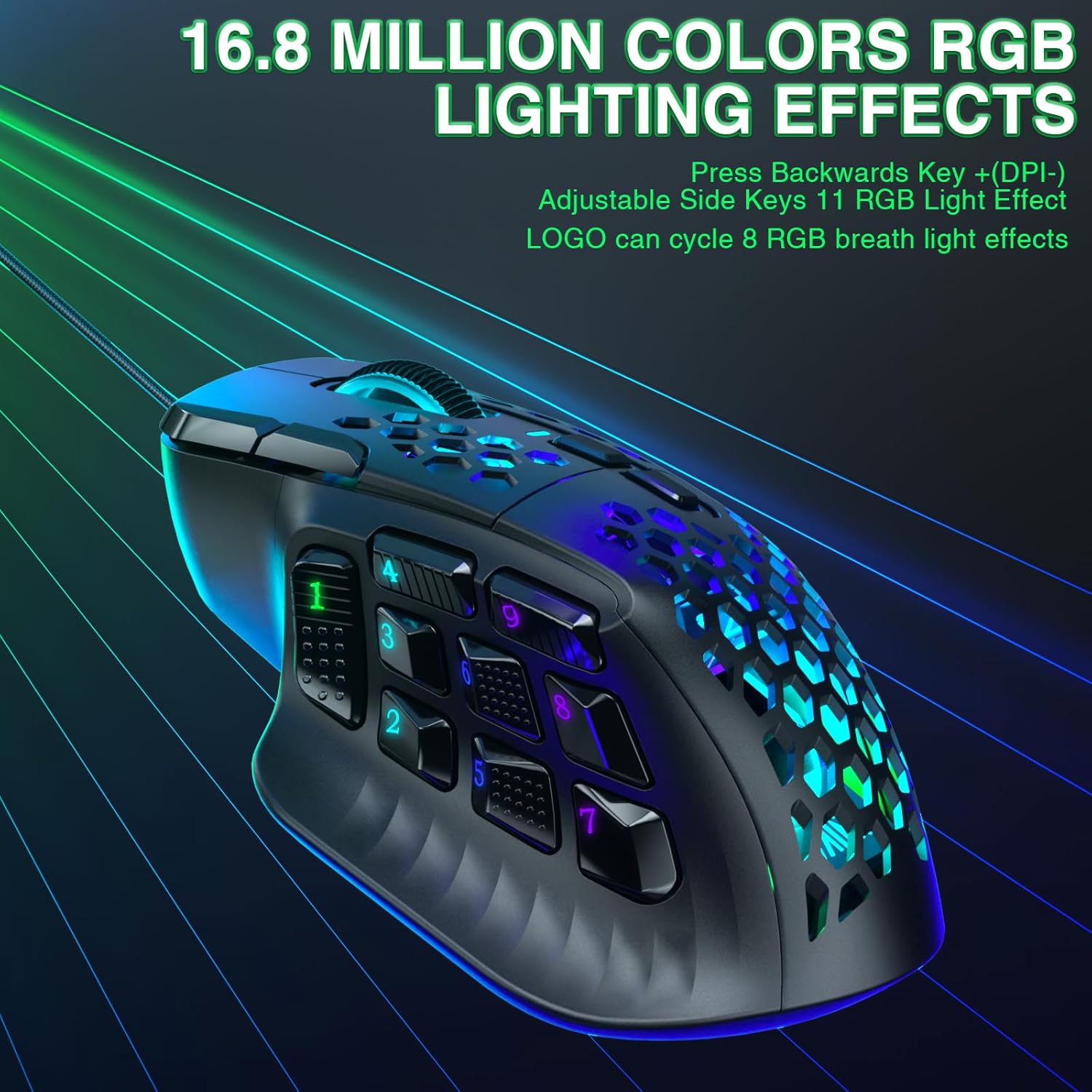
Image: The SM809 mouse displaying its 16.8 million color RGB lighting effects, highlighting the customizable zones.
Customization
Interchangeable Modular Side Plates
The SM809 MMO gaming mouse offers a unique modular magnetic design, allowing users to easily swap between a 9-side button plate and a 3-side button plate. This flexibility enables you to adapt the mouse to different game genres or daily tasks, providing a more personalized and efficient experience.

Image: The SM809 mouse with its interchangeable modular side plates, demonstrating the magnetic attachment mechanism.
Ergonomic Design
The mouse features a lightweight honeycomb design and an ergonomic shape that accommodates both palm and claw grip styles, particularly suitable for larger hands. This design aims to reduce wrist strain during extended use, ensuring comfort and durability with reinforced internal structure and smooth Teflon feet pads.

Image: Illustration of the ergonomic design of the SM809 gaming mouse, highlighting its comfortable fit for various grip styles.
Maintenance
To ensure the longevity and optimal performance of your SOLAKAKA SM809 mouse, follow these maintenance guidelines:
- Cleaning: Regularly clean the mouse surface with a soft, dry cloth. For stubborn dirt, slightly dampen the cloth with water or a mild cleaning solution. Avoid harsh chemicals or abrasive materials.
- Sensor Care: Keep the optical sensor on the bottom of the mouse clean and free of dust or debris to maintain tracking accuracy. Use a cotton swab or compressed air if necessary.
- Cable Management: Avoid sharp bends or excessive pulling on the braided USB cable to prevent internal damage. Use cable ties or clips to manage excess cable length and keep your desk tidy.
- Storage: When not in use for extended periods, store the mouse in a clean, dry place away from direct sunlight and extreme temperatures.
Troubleshooting
If you encounter issues with your SM809 mouse, refer to the following common troubleshooting steps:
- Mouse Not Responding:
- Ensure the USB cable is securely plugged into a working USB port on your computer.
- Try plugging the mouse into a different USB port.
- Restart your computer.
- Tracking Issues / Erratic Cursor Movement:
- Clean the optical sensor on the bottom of the mouse.
- Ensure you are using the mouse on a suitable surface (e.g., a mouse pad). Avoid highly reflective or transparent surfaces.
- Software Not Installing / Functioning Correctly:
- Temporarily disable your anti-virus software before attempting to install the mouse driver.
- Ensure your Windows operating system is up to date.
- Download the latest software version from the official website.
- Programmable Buttons Not Working:
- Verify that the mouse software is running and that your custom profiles are active.
- Ensure that the button assignments are correctly configured and saved within the software.
Specifications
| Product Dimensions | 4.72 x 3.07 x 0.1 inches |
| Item Weight | 3.04 ounces |
| Item Model Number | SM809 |
| Connectivity Technology | USB, Wired Gaming Mouse |
| Movement Detection Technology | High Precision Sensor, Optical (PAW3311) |
| DPI Range | 100 - 24000 DPI (Adjustable) |
| Polling Rate | 1000Hz Max |
| Tracking Speed | 300 IPS |
| Acceleration | 35g |
| Programmable Buttons | 16 |
| RGB Lighting | 16.8 Million Colors, Multiple Effects |
| Interchangeable Side Plates | 9-button and 3-button options |
| Manufacturer | SOLAKAKA |
| Country of Origin | China |
Warranty and Support
The SOLAKAKA SM809 MMO Gaming Mouse is sold by CORBOBO Direct. For any questions, technical assistance, or warranty claims, please contact CORBOBO Direct through the platform where you purchased the product. The product typically comes with a 30-day return/replacement policy.
For further assistance, refer to the contact information provided on the product packaging or the seller's page.
Ask a question about this manual
Ask about setup, troubleshooting, compatibility, parts, safety, or missing instructions. Manuals+ will review the question and use this page’s manual context to help answer it.