
Introduction
Thank you for purchasing the AODK Electric Height Adjustable Standing Desk. This manual provides essential information for the safe and efficient assembly, operation, and maintenance of your new desk. Please read these instructions carefully before use and retain them for future reference.
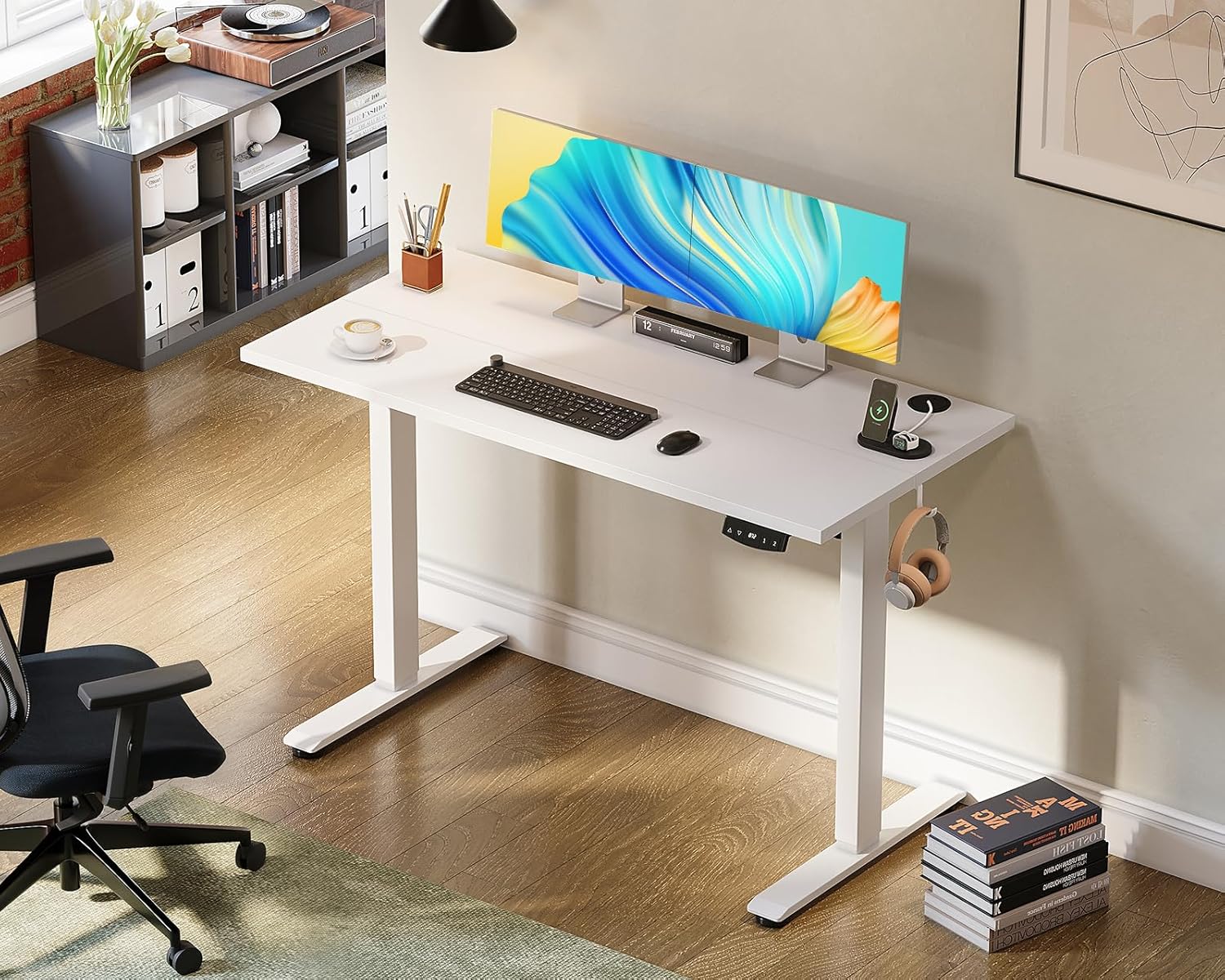
Image: AODK Electric Standing Desk in a modern office setup with a monitor, keyboard, and headphones.
Safety Information
- Ensure all components are securely fastened before use.
- Keep children and pets away from the desk during operation to prevent injury.
- Do not overload the desk. The maximum dynamic load capacity is 80kg.
- The desk is equipped with an anti-collision function. If the desk encounters an obstacle during height adjustment, it will automatically stop to prevent damage or injury. However, always be aware of your surroundings.
- Do not attempt to disassemble or repair the motor or control unit yourself. Contact customer support for assistance.
- Ensure the power cord is not pinched or damaged.

Image: Diagram illustrating the anti-collision feature of the AODK Electric Standing Desk, showing automatic stop upon encountering an obstacle and a detailed view of the quiet motor.
Product Specifications
| Feature | Specification |
|---|---|
| Dimensions (W x D x H) | 120 cm x 54 cm x 72-118 cm |
| Height Adjustment Range | 72 cm to 118 cm (stepless) |
| Body Weight | Approx. 20 kg |
| Static Load Capacity | 120 kg |
| Dynamic Load Capacity | 80 kg |
| Lifting Speed | 20 mm/s |
| Noise Level | < 55 dB |
| Material (Top Plate) | High-strength Melamine Laminated Board |
| Material (Frame) | High-quality Carbon Steel |
| Color | White |
| Special Features | Electric height adjustment, Memory function (2 presets), Anti-collision function, Quiet operation, Storage hook, Cable management hole, Adjustable feet |
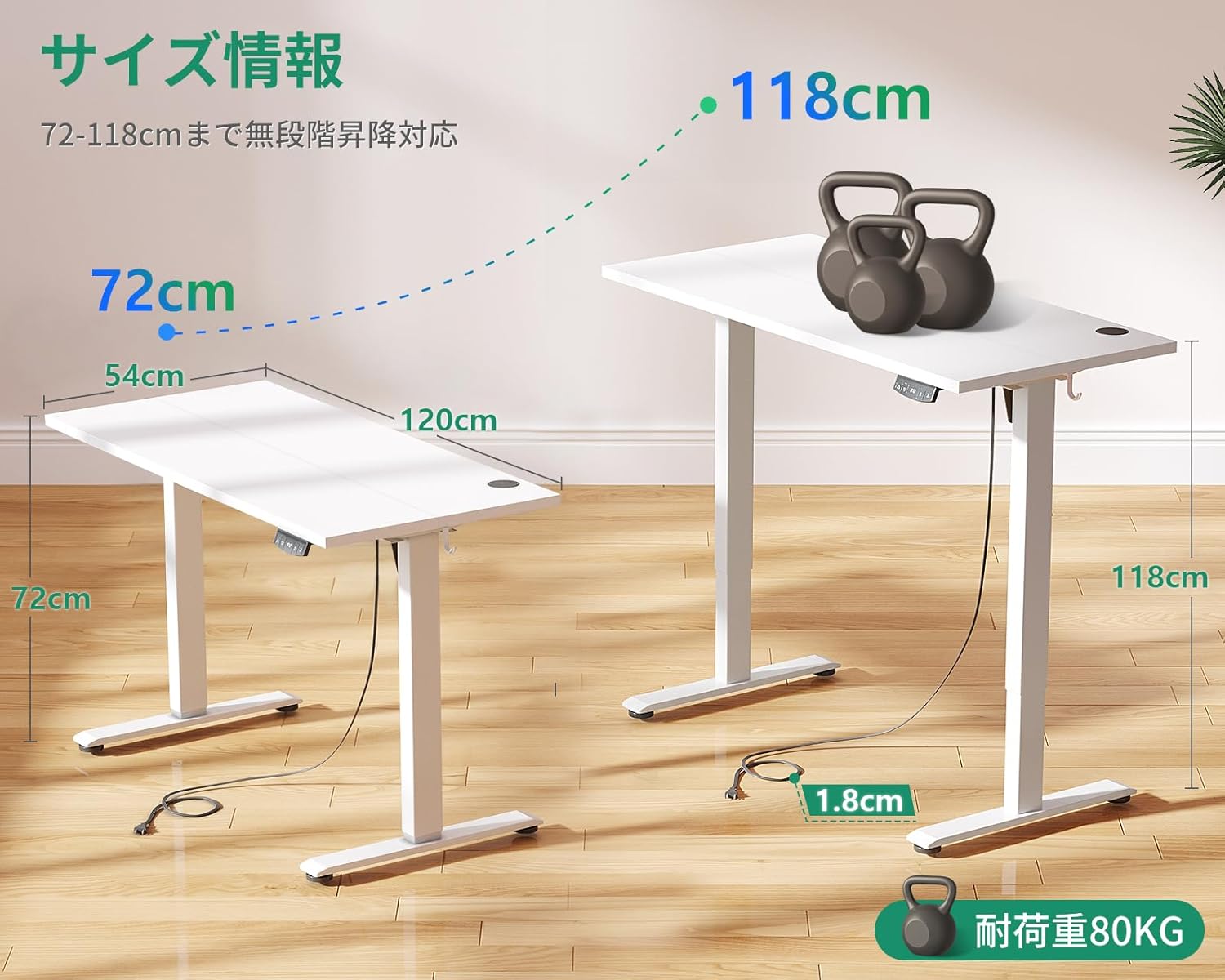
Image: Diagram showing AODK Electric Standing Desk dimensions and load capacity.
Package Contents
Please check that all parts are present before beginning assembly. If any parts are missing or damaged, please contact customer support.
- Desk Top
- Desk Legs and Frame Components
- Control Panel
- Power Adapter and Cable
- Assembly Hardware (screws, bolts, etc.)
- Wrench
- Instruction Manual
Assembly Instructions
The AODK Electric Standing Desk is designed for easy customer assembly. A wrench is included for your convenience. A detailed, easy-to-understand instruction manual is provided within the package to guide you through each step. Follow the diagrams and instructions carefully to ensure proper and safe assembly.
- Unpack all components and verify against the package contents list.
- Assemble the desk frame according to the provided diagrams, ensuring all screws are tightened.
- Attach the desk top to the assembled frame.
- Install the control panel and connect all necessary cables to the motor and power adapter.
- Plug the power adapter into a suitable power outlet.
- Adjust the feet levelers to ensure the desk is stable on your floor surface.
Operating Instructions
Height Adjustment
To adjust the desk height, simply press and hold the up (▲) or down (▼) buttons on the control panel. The desk will move smoothly to your desired height within the range of 72 cm to 118 cm. Release the button when the desk reaches the preferred height.

Image: Demonstrating the height adjustment feature for sitting (72cm) and standing (118cm) positions.
Memory Presets
The desk features two memory preset buttons (1 and 2) to save your preferred sitting and standing heights. This allows for quick and easy switching between positions.
- Adjust the desk to your desired height using the up/down buttons.
- Press and hold one of the memory buttons (1 or 2) until you hear a beep or see a confirmation on the display (if available). The height is now saved.
- To recall a saved height, simply press the corresponding memory button (1 or 2). The desk will automatically move to the saved position.

Image: Close-up of the control panel with memory preset buttons.
Anti-Collision Function
The desk is equipped with an advanced anti-collision system. If the desk encounters an obstruction during upward or downward movement, it will automatically detect the obstacle, stop, and slightly reverse direction to prevent damage or injury. This feature enhances safety, especially in households with children or pets.
Features & Design Details
- Storage Hook: A convenient hook is located on the underside of the desk top. It can be installed on either the left or right side to suit your preference and is ideal for hanging headphones, bags, or other accessories.
- Cable Management Hole: The desk top includes a cable management hole to help organize wires from multiple devices, keeping your workspace tidy and clutter-free.
- Adjustable Feet: The desk feet are equipped with adjusters, allowing for fine-tuning to ensure stability and prevent wobbling, even on slightly uneven floor surfaces.
- Robust Construction: The desk features a high-strength melamine laminated board for the top, resistant to dirt, scratches, heat, and moisture. The frame is constructed from high-quality carbon steel, providing superior durability and resistance to deformation compared to standard steel. Upgraded robust legs further enhance the desk's stability, ensuring it remains steady even at its maximum height.

Image: Detailed view of the storage hook, cable management hole, and adjustable feet.
Maintenance
- Cleaning: Wipe the desk surface with a soft, damp cloth. Avoid abrasive cleaners or harsh chemicals that may damage the finish.
- Regular Checks: Periodically check all screws and bolts to ensure they remain tight. Retighten if necessary.
- Adjustable Feet: Ensure the adjustable feet are properly set to maintain desk stability. Readjust if the desk feels wobbly.
- Cable Management: Regularly check power and data cables to ensure they are not pinched or damaged, especially during height adjustments.
Troubleshooting
| Problem | Possible Cause | Solution |
|---|---|---|
| Desk does not move | Power cable disconnected; Motor error; Overload. | Check power connections. Unplug and replug the power cable. Reduce weight on the desk. If the issue persists, contact support. |
| Desk moves unevenly or makes unusual noise | Uneven load; Loose connections; Obstruction. | Distribute weight evenly. Check all assembly screws. Ensure no objects are obstructing the legs. |
| Anti-collision activates frequently | Obstruction in path; Sensitivity setting (if applicable). | Clear any objects from the desk's path. Ensure nothing is touching the desk legs or frame during movement. |
| Memory function not working | Height not properly saved. | Re-save the desired height by holding the memory button until confirmation. |
If you encounter any issues not listed here or if the suggested solutions do not resolve the problem, please contact customer support.
Warranty and Support
AODK is committed to providing high-quality products. If you experience any defects or malfunctions with your desk, please do not hesitate to contact us. Our customer support team is available to assist you with any inquiries or issues you may have.
For support, please refer to the contact information provided with your purchase or visit the official AODK store on Amazon.