
Armitron Connect Matrix
Armitron Connect Matrix Smartwatch User Manual
Model: Connect Matrix
1. Introduction
Welcome to the Armitron Connect Matrix Smartwatch user manual. This guide provides detailed instructions on how to set up, operate, and maintain your new smartwatch. Please read this manual thoroughly to ensure optimal performance and longevity of your device.
2. Product Overview
The Armitron Connect Matrix Smartwatch is a versatile health and fitness tracker designed to keep you connected and informed. It features a vibrant AMOLED display, various sport modes, and comprehensive health monitoring capabilities.
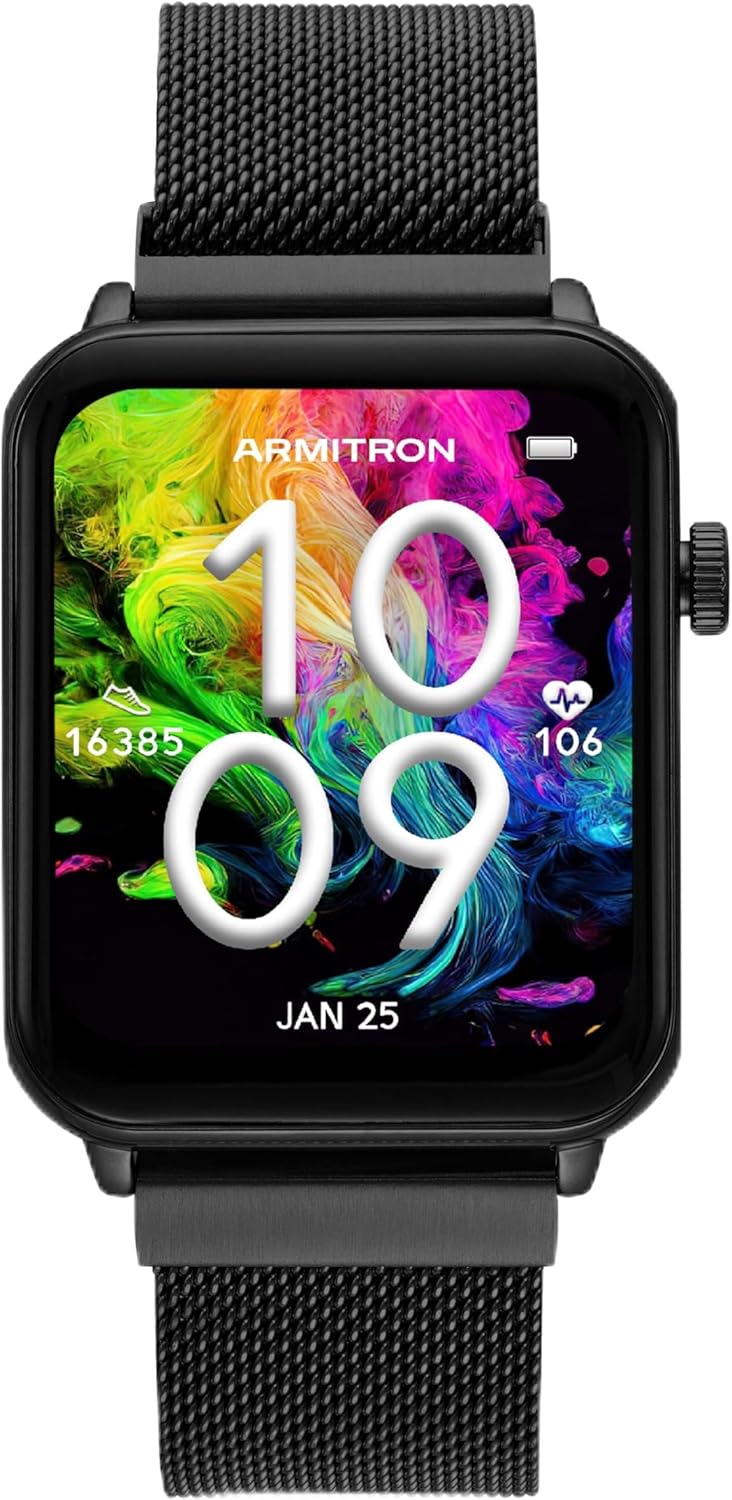
Figure 2.1: Front view of the Armitron Connect Matrix Smartwatch, showcasing its AMOLED high-definition touchscreen display and black mesh band.

Figure 2.2: Back view of the smartwatch, highlighting the health sensors and the IP68 water resistance rating.
3. Setup
3.1 Charging the Smartwatch
Before initial use, fully charge your Armitron Connect Matrix Smartwatch. Use the included charger to connect the watch to a power source. A full charge typically lasts up to four days, depending on usage.
3.2 App Installation and Device Pairing
To unlock the full functionality of your smartwatch, download the free Armitron Connect app from your device's app store. The app is compatible with Android 5.0+ and iOS 9.0+.
- Download and install the Armitron Connect app on your smartphone.
- Ensure Bluetooth is enabled on your smartphone.
- Open the Armitron Connect app and follow the on-screen instructions to pair your smartwatch.
- Once paired, you can customize watch face designs and access detailed health and activity data.
4. Operating Your Smartwatch
4.1 Navigation
The smartwatch features a touchscreen display and a side dial for navigation.
- Touchscreen: Swipe left, right, up, or down to navigate through menus and features. Tap to select.
- Side Dial: Rotate the dial to scroll through options. Press the dial to select or return to the main screen.
4.2 Watch Faces
Customize your watch face directly from the smartwatch or through the Armitron Connect app. The watch supports an always-on display feature, showing a faint analog time when the main screen is off.
4.3 Health Monitoring
The smartwatch provides comprehensive health tracking features:
- Heart Rate: Monitor your heart rate throughout the day.
- Blood Oxygen: Track your blood oxygen levels.
- Sleep Tracking: Analyze your sleep patterns, including awake, light, REM, and restful sleep stages.
- Menstrual Cycle: Track and monitor your menstrual cycle.
4.4 Activity Tracking
Achieve your fitness goals with built-in activity tracking:
- Step Counter: Records your daily steps.
- Calorie Tracking: Estimates calories burned based on activity.
- Sport Modes: Offers various sport modes for specific exercise tracking.
- Reminders: Set reminders to move and stay hydrated.
4.5 Communication Features
Stay connected directly from your wrist:
- Calls: Make and receive calls directly from the smartwatch when connected to your phone via Bluetooth.
- Message Notifications: Receive notifications for messages and other alerts.
- Contact Saving: Save your favorite contacts for quick access.
4.6 Additional Features
Explore other convenient functions:

Figure 4.1: Visual representation of the Armitron Connect Matrix Smartwatch's additional features.
- Voice Assistant: Utilize voice commands for various tasks.
- GPS Connection: Connects to your phone's GPS for route tracking.
- Camera Control: Remotely control your smartphone's camera.
- Music Control: Manage music playback on your connected device.
- Weather Updates: Get real-time weather information.
- Alarms: Set and manage alarms.
5. Maintenance
5.1 Water Resistance
The Armitron Connect Matrix Smartwatch is IP68 water resistant. This means it is protected against immersion in water up to 1.5 meters for up to 30 minutes. It is suitable for everyday use, including splashes, rain, and brief immersion. Avoid prolonged exposure to water, hot water, or steam.
5.2 Cleaning
To clean your smartwatch, gently wipe the screen and band with a soft, damp cloth. Avoid using harsh chemicals or abrasive materials that could damage the device.
5.3 Battery Life
When fully charged, the battery life lasts up to four days. Battery performance may vary based on usage, features enabled (e.g., always-on display), and environmental factors.
6. Troubleshooting
| Problem | Possible Cause | Solution |
|---|---|---|
| Smartwatch not pairing with phone. | Bluetooth is off; app not installed; watch not in pairing mode. | Ensure Bluetooth is on. Download the Armitron Connect app. Restart both devices and try pairing again. |
| Inaccurate step count. | Watch not worn correctly; inconsistent arm movements. | Ensure the watch is snug on your wrist. Calibrate the step counter in the app if available. |
| Notifications not received. | App permissions not granted; notifications disabled in app/phone settings. | Check app permissions for notifications on your phone. Ensure notifications are enabled within the Armitron Connect app. |
| Short battery life. | Frequent use of features; high screen brightness; always-on display enabled. | Reduce screen brightness. Limit continuous use of power-intensive features. Adjust always-on display settings. |
7. Specifications
- Model: Armitron Connect Matrix
- Display: AMOLED High Definition Touchscreen
- Connectivity: Bluetooth
- Compatibility: Android 5.0+ / iOS 9.0+
- Water Resistance: IP68
- Battery Life: Up to 4 days (typical usage)
- Sensors: Heart Rate, Blood Oxygen
- Features: Health monitoring, fitness tracking, call/message notifications, voice assistant, GPS connection, camera/music control, weather, alarms.
8. Warranty and Support
For warranty information and customer support, please refer to the documentation included with your purchase or visit the official Armitron website. Protection plans are available for extended coverage.
- Manufacturer: Armitron
- Date First Available: March 10, 2025
- Protection Plans: 2-Year and 3-Year plans available (details on product page).
Related documentsConnect Matrix


Ask a question about this manual
Ask about setup, troubleshooting, compatibility, parts, safety, or missing instructions. Manuals+ will review the question and use this page’s manual context to help answer it.