
1. Introduction
This manual provides essential instructions for the safe and efficient operation of your SINGER C5980Q Patchwork Plus Computerized Sewing Machine. Please read all instructions before using the machine to ensure proper function and to prevent injury.
The SINGER C5980Q is designed for sewists and quilters, offering precision, versatility, and comfort. It features 417 stitch applications, including built-in letters, an extension table for large projects, programmable needle up/down, speed control, an LCD screen, LED lighting, and a heavy-duty metal frame.
For a complete, downloadable PDF manual, please refer to the official SINGER website or scan the QR code below:
Download Full User Manual (PDF)

Image: SINGER C5980Q Sewing Machine with a QR code for downloading the user manual.
2. Getting Started
2.1 Machine Overview and Power Connection
Familiarize yourself with the main parts of your sewing machine. Connect the power cord to the machine and then to a suitable electrical outlet. Insert the foot control plug into its designated port. Ensure the power switch is in the 'Off' position before connecting.
Video: SINGER C5200 Series - Introduction and Machine Tour. This video demonstrates basic machine setup, including power and foot control connections, which are similar for the C5980Q model.
3. Threading Your Machine
Proper threading is crucial for optimal stitch quality. Follow these steps for both the bobbin and upper thread.
3.1 Winding and Inserting the Bobbin
- Place a spool of thread on the spool pin.
- Guide the thread through the bobbin winding tension disc.
- Place the empty bobbin onto the bobbin winding spindle and push the spindle to the right to engage.
- Press the foot control or start/stop button to wind the bobbin. Stop when the bobbin is full.
- Open the bobbin cover plate. Insert the wound bobbin into the bobbin case, ensuring the thread unwinds counter-clockwise.
- Guide the thread through the tension slot and pull it out a few inches. Replace the bobbin cover plate.

Image: Close-up view of the Drop Sew Bobbin System, showing the transparent cover and the red bobbin in place.
3.2 Threading the Upper Thread
- Raise the presser foot lifter.
- Place the thread spool on the main spool pin.
- Guide the thread through the upper thread guide.
- Follow the numbered threading path down to the needle.
- Use the automatic needle threader for effortless threading of the needle eye.
Video: SINGER Heavy Duty 6800C Computerized Sewing Machine. This video demonstrates threading, speed control, stitch tie-off, stitch mirror, stitch elongation, one-step buttonhole, lettering fonts, and presser feet, which are applicable to the C5980Q model.
4. Operating Features
4.1 Stitch Selection and Adjustment
The SINGER C5980Q offers 417 stitch applications. Use the LCD screen and navigation buttons to select your desired stitch, and adjust its width and length.
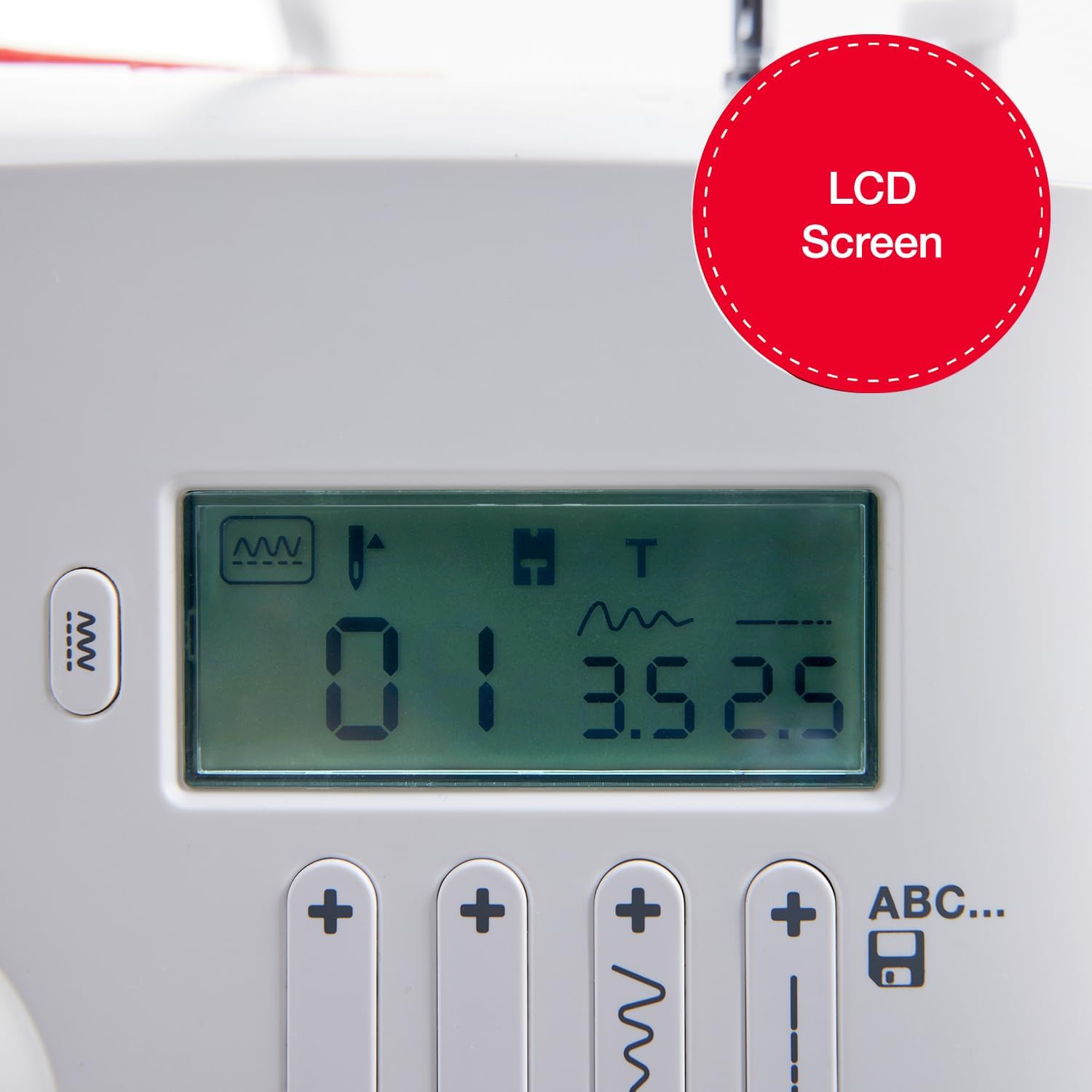
Image: Close-up of the LCD Screen, showing stitch selection and settings.
4.2 Speed Control and Programmable Needle
Adjust the sewing speed using the speed control slider for precise stitching. Utilize the programmable needle up/down feature to stop the needle in the desired position, beneficial for pivoting fabric or precise cornering.

Image: Speed Control with Start Stop button, allowing adjustment of sewing speed.
4.3 Reverse Stitching and Thread Cutter
Press the reverse button to sew in reverse, securing the beginning and end of seams. Use the built-in thread cutter for convenience.
4.4 Built-In Lettering and Buttonholes
The machine includes built-in lettering fonts and various buttonhole styles for personalized projects. Refer to the stitch chart on the machine's front panel for available options.
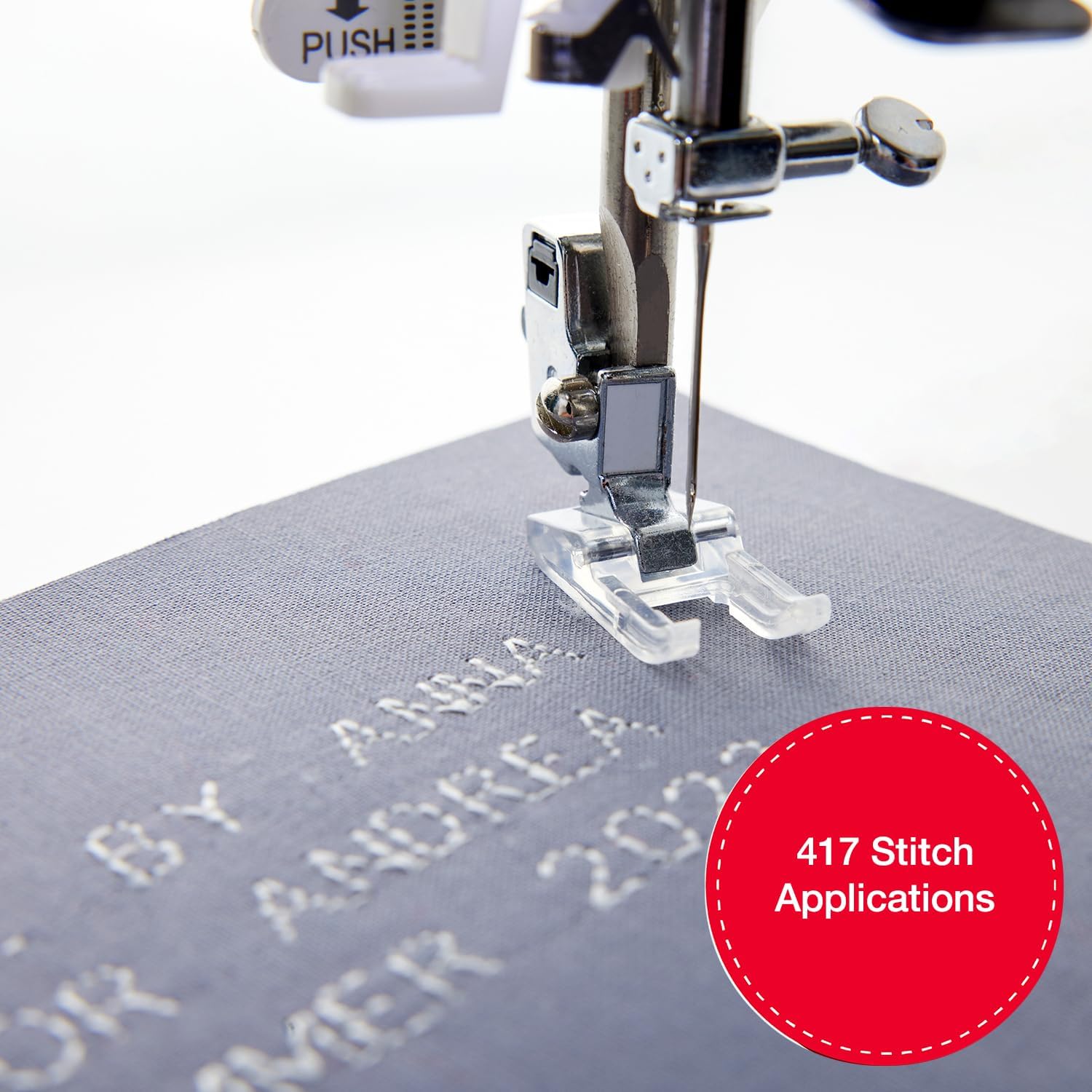
Image: Built-In Lettering feature, demonstrating how to stitch words and phrases.

Image: 8 Buttonhole Styles, showing a one-step buttonhole being created.
Video: SINGER C7290Q Computerized Sewing. This short video highlights key features like speed control, drop-in bobbin, and stitch selection, relevant to the C5980Q.
5. Enhanced Capabilities
5.1 Extension Table
The included extension table provides a larger workspace, ideal for quilting and handling large fabric projects with greater ease and support.

Image: Large C Space provided by the extension table, facilitating work on bigger projects.
5.2 Presser Feet
The machine comes with 12 specialized presser feet to accommodate various sewing techniques and fabric types.

Image: 12 Presser Feet Included, showcasing the variety of feet for different sewing tasks.
5.3 Heavy-Duty Metal Frame
The internal heavy-duty metal frame ensures stability and durability, contributing to consistent, skip-free sewing and long-lasting performance.

Image: Durable Metal Frame illustration, highlighting the robust internal structure.
6. Maintenance
Regular maintenance ensures the longevity and optimal performance of your sewing machine. Always disconnect the power cord before performing any maintenance.
6.1 Cleaning
- Use a soft brush to remove lint and dust from the bobbin area and feed dogs.
- Wipe the machine's exterior with a soft, dry cloth.
- Do not use harsh chemicals or abrasive cleaners.
6.2 Needle Replacement
Replace the needle regularly (after 8-10 hours of sewing or when it becomes dull/bent) to prevent skipped stitches and fabric damage. Use the needle clamp screw to loosen and tighten the needle.
6.3 Presser Foot Replacement
To change the presser foot, raise the presser foot lifter, press the release button on the back of the foot holder, and snap the new foot into place.
7. Troubleshooting
If you encounter issues with your SINGER C5980Q, refer to the following common troubleshooting tips. For more detailed solutions, consult the full user manual.
- Skipped Stitches: Ensure the needle is inserted correctly, is not bent, and is the appropriate type for your fabric. Re-thread the machine completely.
- Thread Breaking: Check for proper threading, correct tension settings, and ensure the thread is not snagging anywhere. Use good quality thread.
- Fabric Puckering: Adjust tension, use the correct needle size for the fabric, and ensure the presser foot pressure is appropriate.
- Machine Not Starting: Verify the power cord and foot control are securely plugged in. Check the power switch.
8. Specifications
- Product Dimensions: 6.25 x 15.5 x 12 inches
- Item Weight: 7.62 pounds
- Manufacturer: SINGER
- Item Model Number: C5980Q
- Stitch Applications: 417
- Included Components: All Purpose Foot, Zipper Foot, Buttonhole Foot, Button Sewing Foot, Edge/Quilting Guide, Pack of Needles, Bobbins, Spool Caps, Auxiliary Spool Pin, Spool Pin Felt, Screwdriver, Seam Ripper/Lint Brush and Soft Dust Cover.
- Power Source: Corded Electric
- Material: Metal, Plastic
9. Warranty and Support
For warranty information, product registration, and additional support, please visit the official SINGER website or contact SINGER customer service. Keep your proof of purchase for warranty claims.


