
1. Product Overview
The NANU SHOP SIGMA-MT241 is a 23.8-inch Full HD LED touchscreen monitor designed for versatile use in various environments, including offices, point-of-sale systems, and kiosks. It features intuitive touch interaction, vibrant visuals, and flexible connectivity options.

Image 1.1: Front view of the NANU SHOP SIGMA-MT241 monitor, highlighting its touchscreen capability and showing an overview of its ports.
Key Features:
- Precise and fluid touchscreen interaction for enhanced agility in tasks, navigation, and professional or educational applications.
- 23.8-inch Full HD display (1920x1080) delivering impressive clarity, vivid colors, and an excellent viewing area for productivity and entertainment.
- Versatile connectivity with HDMI, VGA, and USB inputs, allowing integration with computers, commercial systems, and various devices.
- 75Hz refresh rate and 5ms response time for a smooth visual experience, ideal for videos, management software, and multitasking.
- Slim and elegant design that easily complements modern environments, occupying minimal space and providing an organized aesthetic.
2. Safety Information
Please read all safety instructions carefully before using the monitor. Keep this manual for future reference.
- Do not expose the monitor to rain or moisture to prevent fire or electric shock.
- Do not open the monitor casing. There are no user-serviceable parts inside. Refer all servicing to qualified service personnel.
- Place the monitor on a stable, flat surface to prevent it from falling.
- Ensure proper ventilation around the monitor. Do not block ventilation openings.
- Use only the power adapter supplied with the monitor.
- Disconnect the power plug from the wall outlet if the monitor will not be used for a long period.
- Avoid placing heavy objects on the power cord.
- Clean the screen with a soft, lint-free cloth. Do not use liquid cleaners or aerosol cleaners directly on the screen.
3. Package Contents
Verify that all items listed below are included in your package. If any items are missing or damaged, please contact customer support.
- 1x NANU SHOP SIGMA-MT241 Touchscreen Monitor
- 1x HDMI Cable
- 1x USB Cable
- 1x Power Adapter
- 1x Power Cord
- 1x Instruction Manual (this document)
- 1x Touch Stylus (specialized pen)
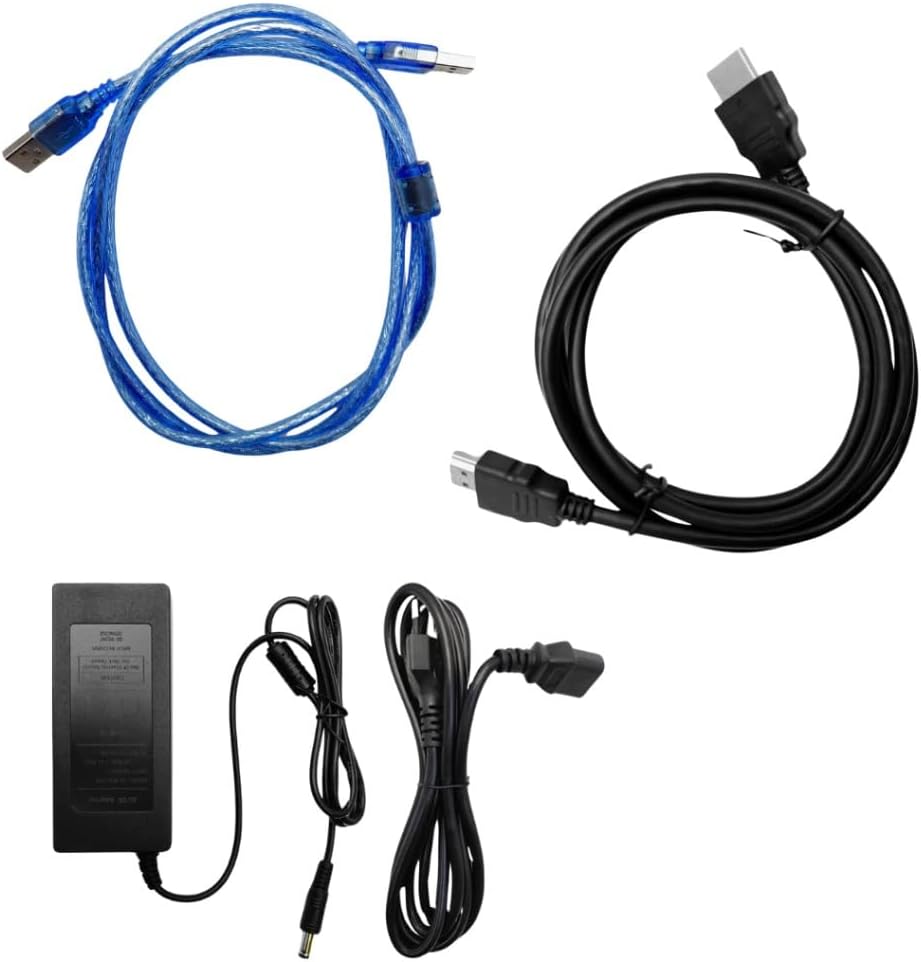
Image 3.1: The HDMI cable, USB cable, and power adapter included with the monitor.
4. Setup
4.1 Assembling the Stand
The monitor comes with a pre-attached stand. Ensure it is securely fastened. If adjustments are needed, refer to the diagram below for proper orientation and tightening.

Image 4.1: Rear view of the monitor showing the integrated stand and VESA mounting points.
4.2 Connecting the Monitor
- Power Connection: Connect the power adapter to the monitor's DC input port and then plug the power cord into a wall outlet.
- Video Connection:
- For HDMI: Connect one end of the HDMI cable to the HDMI port on the monitor and the other end to the HDMI output port on your computer or device.
- For VGA: Connect one end of the VGA cable to the VGA port on the monitor and the other end to the VGA output port on your computer or device.
- USB Touch Connection: Connect the USB cable from the monitor's USB port to an available USB port on your computer. This connection is essential for the touchscreen functionality.
- Audio Connection (Optional): If you wish to use external speakers or headphones, connect them to the 3.5mm audio output port on the monitor.

Image 4.2: Detailed view of the monitor's input/output ports: HDMI, VGA, DC power input, and USB.
After connecting all necessary cables, press the Power button on the monitor to turn it on.
5. Operating Instructions
5.1 Control Buttons
The control buttons are located on the bottom right side of the monitor. These buttons allow you to navigate the On-Screen Display (OSD) menu and adjust various settings.

Image 5.1: The control buttons on the monitor's bezel for power, menu navigation, and auto-adjustment.
- POWER: Turns the monitor on or off.
- MENU: Opens the OSD menu or confirms a selection.
- +: Navigates up or increases a value in the OSD menu.
- -: Navigates down or decreases a value in the OSD menu.
- AUTO: Automatically adjusts image settings (e.g., position, phase, clock) for VGA input.
5.2 On-Screen Display (OSD) Menu
Press the MENU button to access the OSD menu. Use the '+' and '-' buttons to navigate through the options and adjust settings such as brightness, contrast, color temperature, and input source. Press MENU again to confirm changes or exit a submenu.
5.3 Touchscreen Functionality
The monitor supports 10-point multi-touch input. Ensure the USB cable is connected to your computer for touchscreen functionality. The touchscreen is compatible with Windows, Mac, and Android operating systems (driver may be required for some older OS versions or specific features).
- Touch Method: Use your finger or the specialized touch stylus provided.
- Calibration: If touch accuracy is an issue, refer to your operating system's display settings for touchscreen calibration options.
6. Maintenance
6.1 Cleaning the Monitor
- Always turn off the monitor and unplug the power cord before cleaning.
- Screen: Gently wipe the screen with a soft, lint-free cloth. For stubborn marks, lightly dampen the cloth with water or a non-abrasive, ammonia-free screen cleaner. Do not spray liquid directly onto the screen.
- Casing: Use a soft, dry cloth to wipe the monitor casing. Avoid using strong detergents or abrasive cleaners.
6.2 Storage
If storing the monitor for an extended period, ensure it is clean, dry, and stored within the recommended temperature and humidity ranges (see Specifications).
7. Troubleshooting
| Problem | Possible Cause | Solution |
|---|---|---|
| No image on screen |
|
|
| Touchscreen not responding |
|
|
| Image is blurry or distorted (VGA only) |
|
|
| No audio |
|
|
8. Technical Specifications
| Feature | Specification |
|---|---|
| Model Number | SIGMA-MT241 |
| Screen Size | 23.8 inches |
| Display Type | LED |
| Resolution | 1920x1080 (Full HD) |
| Aspect Ratio | 16:9 |
| Refresh Rate | 75Hz |
| Response Time | 5ms |
| Brightness | 300 cd/m² |
| Dynamic Contrast Ratio | 1000:1 |
| Touch Method | Finger or specialized stylus |
| Touch Points | 10 points |
| Driver | Plug and Play |
| Inputs | VGA, HDMI, USB, 3.5mm Audio In |
| Audio Output | 3.5mm Headphone Jack |
| Input Voltage | AC 110–240V |
| Total Power | 36W |
| Operating Temperature | -10°C to 60°C (14°F to 140°F) |
| Operating Humidity | 80% RH |
| Storage Temperature | 0°C to 40°C (32°F to 104°F) |
| Storage Humidity | 10% to 90% RH |
| Dimensions with Stand (L x H x W) | 54 cm x 40 cm x 20 cm (approx. 21.3 in x 15.7 in x 7.9 in) |
| Product Weight | 7.05 kg (approx. 15.5 lbs) |
| Composition | Plastic, glass, and electronic components |

Image 8.1: Product label on the rear of the monitor, detailing model number and power specifications.
9. Warranty and Support
9.1 Warranty Information
This product comes with a standard manufacturer's warranty against defects in materials and workmanship. Please refer to your purchase documentation for specific warranty terms and duration. Keep your proof of purchase for warranty claims.
9.2 Customer Support
For technical assistance, troubleshooting, or warranty inquiries, please contact NANU SHOP customer support through the retailer where you purchased the product or visit the official NANU SHOP website for contact information.
Online Resources: For additional support and FAQs, please visit the NANU SHOP brand store: NANU SHOP Brand Store
10. Product Video Overview
Watch this short video for a visual overview of the NANU SHOP SIGMA-MT241 Touchscreen LED Monitor's features and design.
Video 10.1: A brief product overview of the NANU SHOP SIGMA-MT241 monitor, showcasing its touchscreen and connectivity.