
1. Introduction
This user manual provides comprehensive instructions for the setup, operation, and maintenance of your Ryoko Portable WiFi Hotspot (Model: DFGV324). This device offers high-speed, portable internet access, designed for global coverage via satellite technology, allowing you to stay connected wherever you are.
2. Product Overview
2.1 Package Contents
Upon unboxing, please verify that all the following items are included in your package:
- 1 x Ryoko Portable WiFi Hotspot device
- 1 x USB Charging Cable
- 1 x Lithium Battery (2400 mAh)
- 1 x User Guide (this manual)
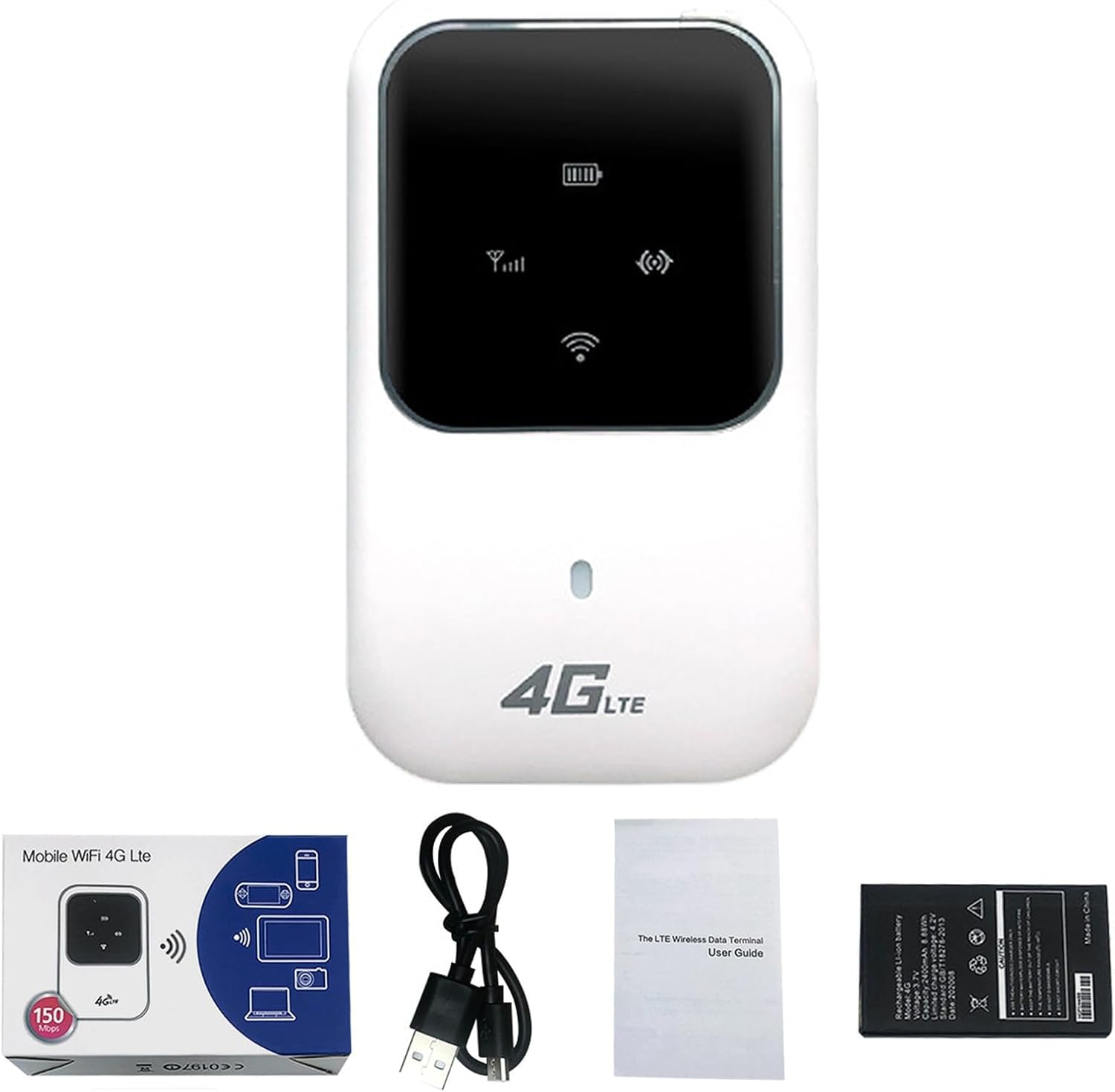
Figure 2.1: Ryoko Portable WiFi Hotspot and included accessories.
2.2 Device Features
- Global Coverage: Connects via satellite for internet access anywhere.
- High-Speed Connectivity: Supports up to 100Mbps download and 50Mbps upload speeds.
- Multi-Device Support: Connects up to 10 users simultaneously.
- Long Battery Life: 2400 mAh lithium battery provides over 4-6 hours of continuous operation and over 30 hours of standby time.
- Compact and Portable: Lightweight design for easy travel.
- Easy Setup: Plug-and-play functionality.
3. Setup Guide
3.1 Inserting the SIM Card and Battery
- Gently remove the back cover of the Ryoko Portable WiFi Hotspot.
- Locate the SIM card slot. Insert your active SIM card into the designated slot, ensuring it is correctly oriented.
- Insert the 2400 mAh lithium battery into its compartment.
- Replace the back cover securely.

Figure 3.1: SIM card and battery installation area.
3.2 Powering On the Device
Press and hold the power button (usually located on the side or front of the device) for a few seconds until the indicator lights illuminate. The device will begin searching for a network signal.
4. Operating Instructions
4.1 Connecting to the WiFi Network
- Ensure your Ryoko Portable WiFi Hotspot is powered on and has established a network connection (indicated by the signal strength icon on the device screen).
- On your smartphone, tablet, laptop, or other Wi-Fi enabled device, open the Wi-Fi settings.
- Scan for available Wi-Fi networks. You will find the network name (SSID) and password printed on a sticker inside the device (often under the battery) or on the device itself. Each device has a unique SSID and password.
- Select the Ryoko network name (SSID) from the list and enter the password when prompted.
- Once connected, your device will have internet access.

Figure 4.1: Device in operation, showing connectivity.

Figure 4.2: The Ryoko Portable WiFi Hotspot in a typical usage environment.
4.2 Internet Speed and Sharing
The Ryoko Portable WiFi Hotspot supports download speeds of up to 100Mbps and upload speeds of up to 50Mbps, depending on network conditions and signal strength. It can support up to 10 connected users simultaneously, making it suitable for personal use or small group sharing.
5. Maintenance
5.1 Charging the Battery
When the battery indicator shows low power, connect the device to a power source using the provided USB charging cable. A full charge typically takes a few hours.
5.2 General Care
- Keep the device dry and away from extreme temperatures.
- Avoid dropping or subjecting the device to strong impacts.
- Clean the device with a soft, dry cloth. Do not use liquid cleaners.
6. Troubleshooting
6.1 Common Issues and Solutions
| Problem | Possible Cause | Solution |
|---|---|---|
| No network signal | SIM card not inserted correctly or inactive; out of service area. | Ensure SIM card is properly inserted and active. Move to an area with better signal coverage. |
| Cannot connect to WiFi | Incorrect Wi-Fi password; device too far from hotspot. | Verify the Wi-Fi password (found inside the device). Move closer to the hotspot. Restart both devices. |
| Slow internet speed | Weak signal; too many connected devices; network congestion. | Relocate the hotspot for better signal. Disconnect unnecessary devices. Try again later during off-peak hours. |
| Device not powering on | Battery drained or not inserted correctly. | Charge the device. Ensure the battery is properly seated. |
If you encounter issues not listed here or if the solutions do not resolve your problem, please refer to the support section.
7. Specifications
| Feature | Detail |
|---|---|
| Model Number | DFGV324 |
| Brand | Generic |
| Connectivity Technology | Wi-Fi |
| Download Speed | Up to 100Mbps |
| Upload Speed | Up to 50Mbps |
| Sharing Capacity | Supports up to 10 users |
| Battery Type | 2400 mAh Lithium Battery |
| Standby Time | Over 30 hours |
| Continuous Operation | Over 4-6 hours |
| Antenna | Integrated |
| Input Voltage | 100V ~ 240V, 50Hz ~ 60Hz |
| Output Voltage | 5V DC ± 10% |
| Output Current | 1.0 A |
| Dimensions (L x W x H) | 59 x 93.3 x 14.4 mm |
| Weight | 110 g |
8. Warranty and Support
As this product is listed under a "Generic" brand, specific warranty details may vary. Please refer to the purchase documentation or contact your retailer directly for information regarding warranty coverage and support services.
For technical assistance or further inquiries, please reach out to the seller or the platform where the product was purchased.
