
T-SUN TS-F0410-RGBCW-BT-US-2P
T-SUN RGBCW Wall Washer Lights 50W (2-Pack) Instruction Manual
Model: TS-F0410-RGBCW-BT-US-2P
1. Introduction
This manual provides detailed instructions for the safe and efficient operation of your T-SUN RGBCW Wall Washer Lights. Please read this manual thoroughly before installation and use, and retain it for future reference.
2. Package Contents
Verify that all items listed below are included in your package:
- 2 x LED Strip Lights
- 4 x Mounting Brackets
- 8 x Expansion Screws
- 2 x Wrenches
- 2 x Remote Controls
- 1 x User Manual
3. Safety Information
- Ensure the power supply voltage matches the product's requirements (120 Volts).
- Do not attempt to disassemble or modify the product. This may cause damage and void the warranty.
- Keep the product away from flammable materials.
- Disconnect power before any installation, maintenance, or cleaning.
- Although the product is IP66 water-resistant, avoid submerging it in water.
- Ensure proper grounding for electrical safety.
4. Setup
4.1 Mounting the Lights
The T-SUN Wall Washer Lights feature a 180° adjustable bracket, allowing for flexible installation on floors, walls, or ceilings. Use the provided mounting brackets and expansion screws to secure the lights in your desired location.
- Choose a suitable mounting surface that can support the weight of the light fixture.
- Position the mounting brackets and mark the drilling points.
- Drill holes and insert the expansion screws.
- Attach the light fixture to the brackets using the wrenches provided, ensuring it is securely fastened.
- Adjust the angle of the light as needed using the 180° adjustable bracket.

Image: T-SUN RGBCW Wall Washer Lights installed on a house exterior, showcasing various color options.

Image: Diagram illustrating multiple installation types for the T-SUN Wall Washer Lights, including wall, ceiling, and ground mounting.
4.2 Power Connection
Connect the power cable of the light fixture to a standard 120V AC power outlet. Ensure the connection is secure.
5. Operating Instructions
5.1 Smart APP Control
The lights can be controlled via the "Superlife" APP using Bluetooth connectivity.
- Download the APP: Scan the QR code provided in the physical instruction manual or search for "Superlife" in your device's app store.
- Enable Bluetooth: Turn on Bluetooth on your smartphone or tablet.
- Add Devices: Open the "Superlife" APP and follow the on-screen instructions to add your T-SUN Wall Washer Lights.
- Control Functions:
- Color Selection: Choose from 16 million colors.
- Color Temperature: Adjust from warm white (2700K) to cool white (6500K).
- Brightness: Adjust brightness from 1% to 100%.
- Lighting Modes: Select from 20 pre-set dynamic modes.
- Music Sync: The lights can change color according to the rhythm of music played through the APP or detected by your device's microphone.
- Timing Function: Set schedules for the lights to turn on and off automatically.
- Memory Function: The lights will remember your last settings when turned off and on.
- Group/Individual Control: Control multiple lights simultaneously as a group or manage them individually.

Image: Smartphone displaying the 'Superlife' app interface for light control, alongside the physical remote control.
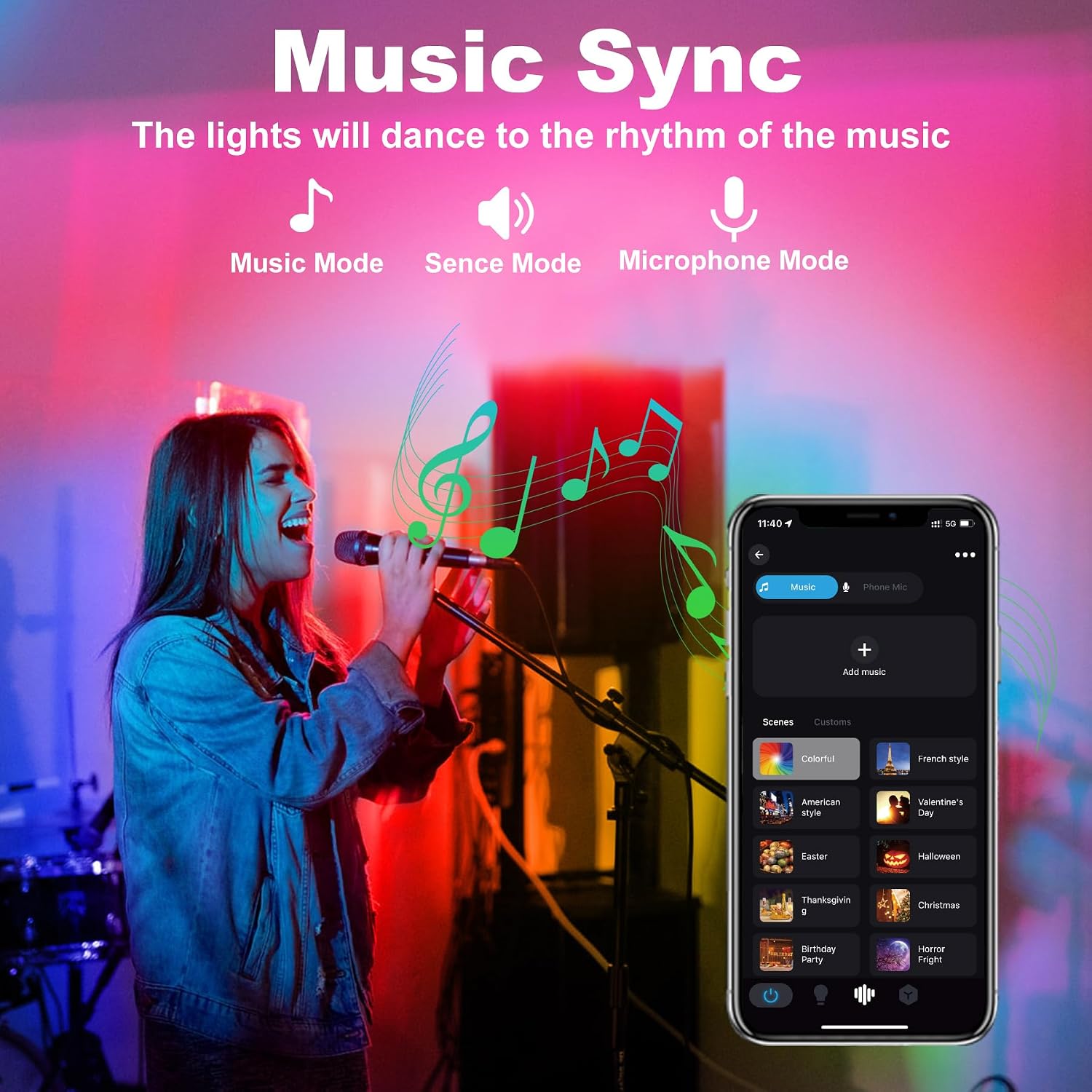
Image: Person singing into a microphone with colorful stage lighting, illustrating the music sync feature.

Image: Two houses illuminated with different colors, demonstrating 16 million colors and timing functions.

Image: Diagram showing multiple lights controlled individually and as groups via the app.
5.2 Remote Control
The included remote control provides convenient access to key functions from up to 98 feet (30 meters) away.
- Power On/Off: Turn the lights on or off.
- Color Selection: Directly select various colors.
- Brightness Adjustment: Increase or decrease light intensity.
- Mode Switching: Cycle through different lighting modes.
- Timer Function: Activate or deactivate pre-set timers.
- Memory Function: The remote also retains the last used settings.
6. Maintenance
6.1 Cleaning
To maintain optimal performance and appearance, clean the light fixtures periodically.
- Ensure the lights are powered off and unplugged before cleaning.
- Wipe the aluminum housing and glass with a soft, damp cloth.
- Do not use abrasive cleaners or solvents, as these may damage the finish or components.
6.2 Durability
The T-SUN Wall Washer Lights are designed for durability with a strong aluminum housing and an IP66 water-resistant rating, making them suitable for both indoor and outdoor use in various weather conditions.

Image: T-SUN Wall Washer Light operating outdoors in the rain, demonstrating its IP66 waterproof, heat-resistant, and cold-resistant features.
7. Troubleshooting
If you encounter issues with your T-SUN Wall Washer Lights, refer to the following common problems and solutions:
| Problem | Possible Cause | Solution |
|---|---|---|
| Light does not turn on. | No power, loose connection, remote battery dead. | Check power outlet, ensure cable is securely plugged in. Replace remote battery if applicable. |
| Remote control not working. | Obstruction, out of range, battery dead. | Ensure clear line of sight to the light. Move closer to the light (within 98ft/30m). Replace remote battery. |
| APP cannot connect to lights. | Bluetooth off, lights not in pairing mode, APP issue. | Ensure Bluetooth is enabled on your device. Restart the APP and try pairing again. Power cycle the lights. |
| Colors or modes not changing. | Incorrect setting, temporary glitch. | Verify settings in APP or on remote. Power cycle the lights to reset. |
8. Specifications
| Feature | Detail |
|---|---|
| Brand | T-SUN |
| Model Number | TS-F0410-RGBCW-BT-US-2P |
| Material | Aluminum, Glass |
| Product Dimensions | 8"L x 5.5"W x 0.98"H |
| Item Weight | 2.5 Pounds (per light) |
| Wattage | 50 Watts (per light) |
| Voltage | 120 Volts |
| Light Source Type | LED |
| Light Color | RGB, Warm White, Cold White (RGBCW) |
| Color Temperature Range | 2700K - 6500K |
| Control Method | APP (Bluetooth), Remote Control |
| Water Resistance Level | IP66 |
| Beam Angle | 120° |
| Cable Length | 1.5M |
| Indoor/Outdoor Usage | Indoor, Outdoor |
9. Warranty and Support
T-SUN provides a 2-year service for this wall washer light bar. If you have any questions, concerns, or require technical assistance, please refer to the contact information provided with your purchase or visit the official T-SUN website for support.
Ask a question about this manual
Ask about setup, troubleshooting, compatibility, parts, safety, or missing instructions. Manuals+ will review the question and use this page’s manual context to help answer it.