
1. Introduction
Thank you for choosing the LeadsaiL FA98 Wireless Mechanical Keyboard and Mouse Combo. This manual provides essential information for setting up, operating, and maintaining your new device. Please read it thoroughly to ensure optimal performance and longevity of your product.
2. Package Contents
The package should contain the following items:
- LeadsaiL FA98 Wireless Mechanical Keyboard
- LeadsaiL Wireless Mouse
- USB Nano Receiver (stored in the mouse battery compartment)
- User Manual (this document)

Image: The LeadsaiL FA98 Wireless Mechanical Keyboard and Mouse Combo, showcasing the keyboard and mouse together.
3. Setup Guide
3.1. Battery Installation
The keyboard and mouse require batteries for operation. Batteries are not included in the package.
- For the Mouse: Open the battery compartment cover on the underside of the mouse. Insert 1 AA battery, ensuring correct polarity. The USB Nano Receiver is stored in this compartment.
- For the Keyboard: Open the battery compartment cover on the underside of the keyboard. Insert 2 AAA batteries, ensuring correct polarity.

Image: Diagram showing battery compartments for the keyboard (2 AAA) and mouse (1 AA), and the location of the USB receiver within the mouse.
3.2. Connecting the Device
The keyboard and mouse connect wirelessly via a single 2.4GHz USB Nano Receiver.
- Remove the USB Nano Receiver from the battery compartment of the mouse.
- Plug the USB Nano Receiver into an available USB port on your computer (Windows PC, macOS Laptop, etc.).
- Turn on the keyboard and mouse using their respective power switches (located on the underside of each device).
- The devices should automatically connect to your computer. No additional drivers are required.
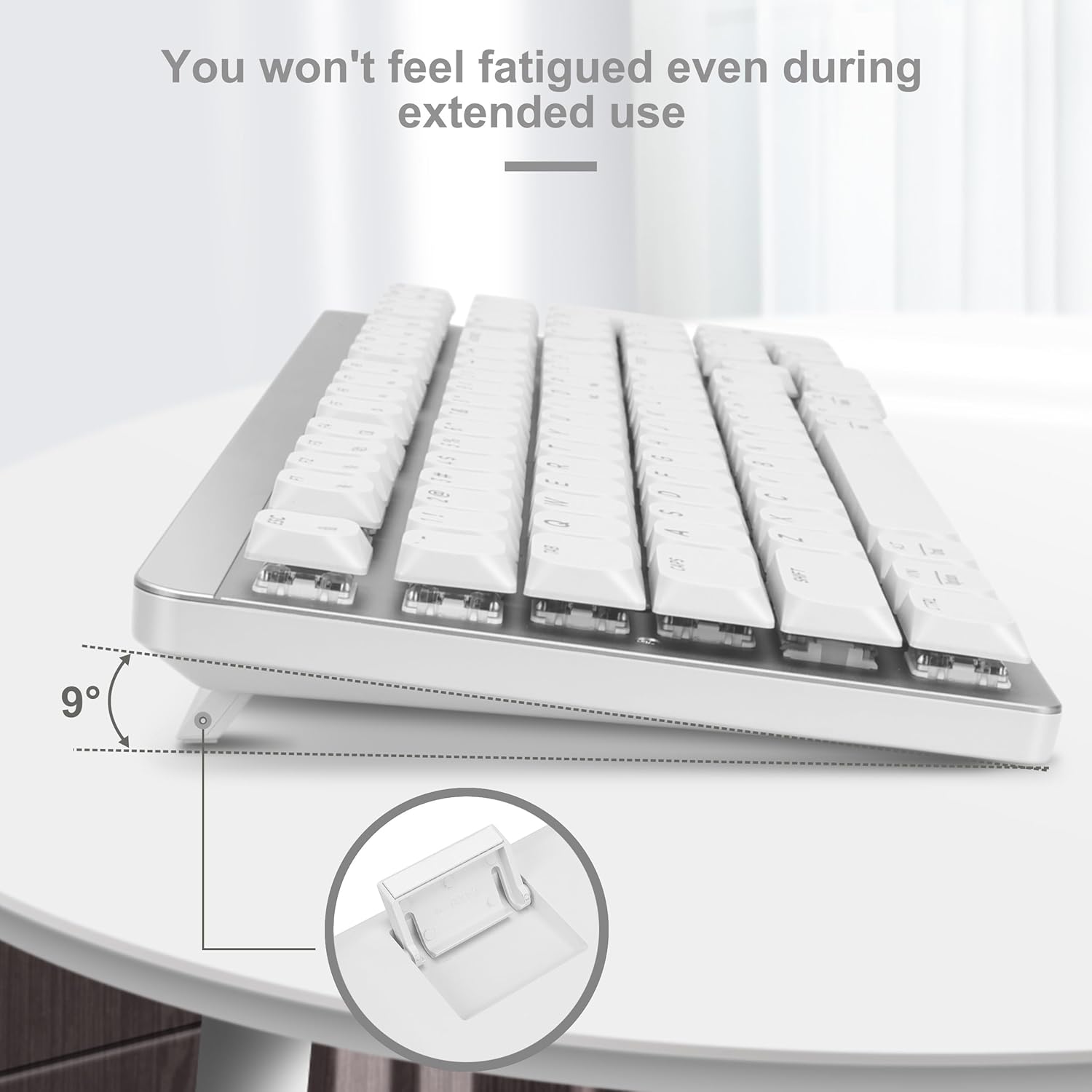
Image: Close-up of the USB Nano Receiver and its function in connecting both the keyboard and mouse wirelessly.
Video: Official product video demonstrating the features and setup of the LeadsaiL FA98 Wireless Mechanical Keyboard, including the USB receiver connection.
4. Operating Instructions
4.1. Keyboard Usage
The LeadsaiL FA98 keyboard features a 98-key compact layout with low-profile mechanical red switches. It includes dedicated function keys and a numeric keypad.
- Function Keys (F1-F12): These keys often have secondary functions (e.g., media control, volume adjustment) when pressed in combination with the Fn key. Refer to the keycap legends for specific functions.
- Operating System Mode Switch: The keyboard supports both Windows and macOS. Use the Fn + MAC or Fn + WIN keys to switch between modes.
- Indicator Lights: The keyboard has indicator lights for Number Lock, Caps Lock, and Low Battery.

Image: Illustration of the keyboard layout highlighting FN+ shortcuts and hot keys for various functions.

Image: Close-up of the keyboard's upper right corner showing the Number Lock, Caps Lock, and Low Battery indicator lights.
4.2. Mouse Usage
The LeadsaiL wireless mouse offers silent clicks and adjustable DPI settings.
- DPI Adjustment: Press the DPI button (usually located near the scroll wheel) to cycle through different cursor speeds (e.g., 800, 1200, 1600 DPI). This allows you to adjust sensitivity to your preference.
- Silent Clicks: The mouse is designed for quiet operation, minimizing click noise.

Image: Diagram illustrating the DPI adjustment feature of the LeadsaiL wireless mouse, showing different DPI levels.
5. Key Features
- 2.4GHz Stable Wireless Connection: Provides a reliable connection up to 33 feet (10 meters) with a single USB Nano Receiver.
- Low-Profile Red Mechanical Switches: Tuned for optimal feedback and comfort, offering smooth and quiet typing with satisfying tactile feedback. Keys rebound quickly, reducing finger fatigue.
- Double-shot Injection Keycaps: Ensures clear and vivid legends that will not fade over time, providing durability and a comfortable typing experience.
- Compact and Sleek Design: The 98-key layout saves desktop space and is convenient for portability. Features a slim profile and sturdy construction.
- Multi-platform Compatibility: Compatible with Windows, macOS, and Linux operating systems, functioning with laptops, desktops, PCs, and notebooks with USB ports.
- Ergonomic Design: The keyboard features a foldable stand to achieve a 9° typing angle, reducing fatigue during extended use. The mouse has an ergonomic shape for a comfortable grip.
- Smart Energy Saving: The keyboard enters auto-standby after 5 seconds of inactivity, and the mouse after 3 seconds. Click any key or button to wake them up.

Image: Detailed view of the low-profile mechanical red switches, showing their design and comparison to standard switches.
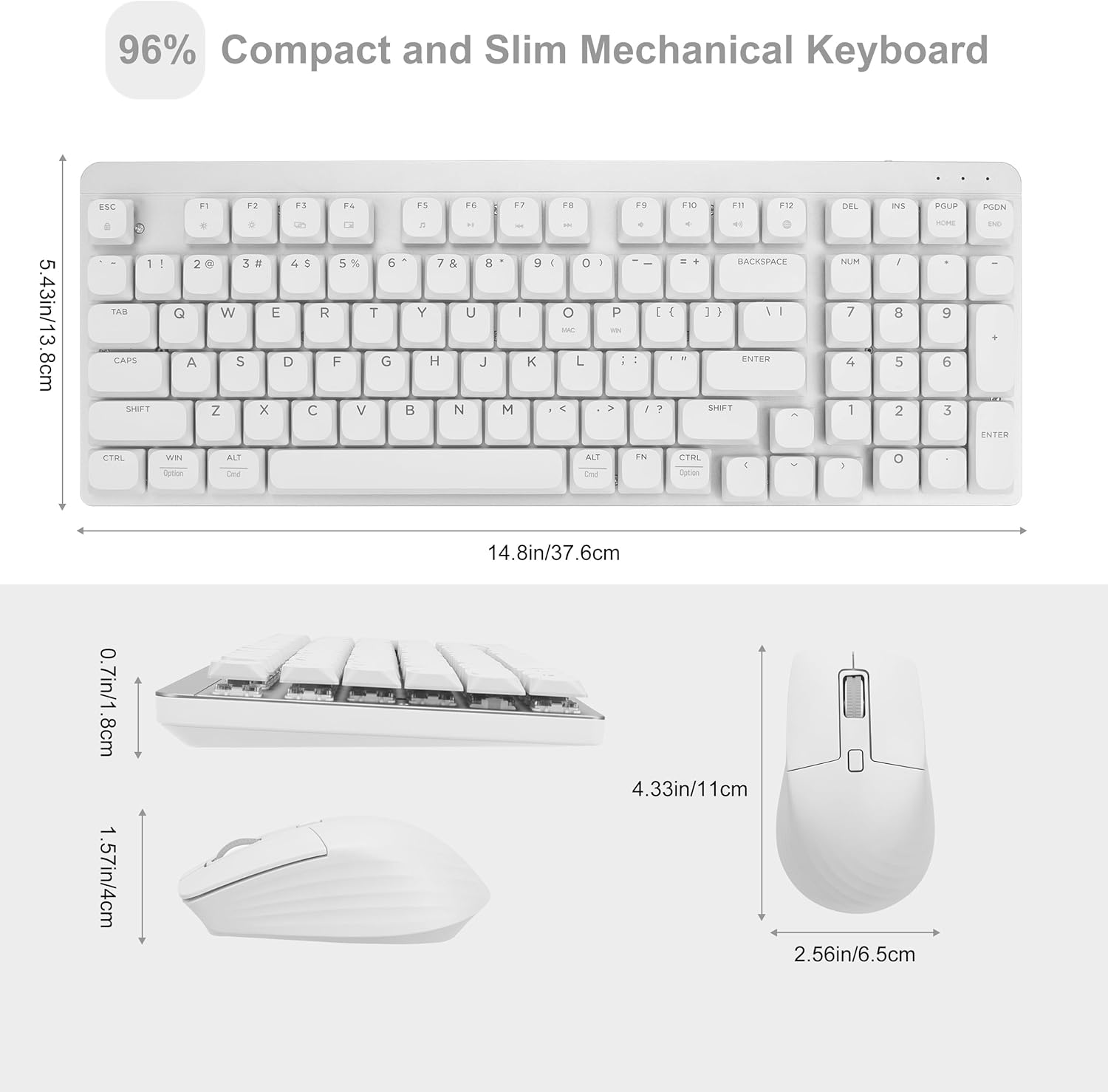
Image: Dimensions of the compact LeadsaiL FA98 mechanical keyboard and mouse, highlighting their space-saving design.

Image: The LeadsaiL FA98 keyboard and mouse combo displayed with a laptop and tablet, indicating multi-system compatibility for macOS and Windows.

Image: Side view of the LeadsaiL FA98 keyboard showing the 9-degree ergonomic tilt provided by its foldable stand.
6. Maintenance
6.1. Cleaning
To maintain the appearance and functionality of your keyboard and mouse:
- Use a soft, dry cloth to wipe down the surfaces.
- For stubborn dirt, slightly dampen the cloth with water or a mild cleaning solution. Avoid harsh chemicals.
- Use compressed air to remove dust and debris from between the keycaps.
6.2. Battery Replacement
Replace batteries when the low battery indicator light illuminates or when performance degrades.
- Follow the battery installation steps in Section 3.1.
- Dispose of used batteries responsibly according to local regulations.
7. Troubleshooting
| Problem | Possible Solution |
|---|---|
| Keyboard/Mouse not responding |
|
| Lag or intermittent connection |
|
| Mouse cursor moves erratically |
|
8. Specifications
| Feature | Detail |
|---|---|
| Model Number | FA98 |
| Connectivity | 2.4GHz Wireless (USB Nano Receiver) |
| Keyboard Type | 98-Key Low-Profile Mechanical |
| Switch Type | Red Switches |
| Keycap Type | Double-shot Injection |
| Keyboard Batteries | 2 x AAA (not included) |
| Mouse Batteries | 1 x AA (not included) |
| Mouse DPI Settings | 800 / 1200 / 1600 DPI |
| Compatibility | Windows, macOS, Linux |
| Product Dimensions (Keyboard) | 14.84 x 5.39 x 1.06 inches (37.7 x 13.7 x 2.7 cm) |
| Item Weight (Keyboard) | 1.94 pounds (0.88 kg) |
9. Warranty and Support
LeadsaiL products are designed for reliability and performance. For specific warranty information and customer support, please refer to the warranty card included with your product or visit the official LeadsaiL website. Keep your purchase receipt as proof of purchase.

