
Introduction
This manual provides detailed instructions for the installation, operation, and maintenance of your Suacopzar AK-3116 HiFi Stereo Audio Amplifier. The AK-3116 is a 2.0 channel Class D digital amplifier designed for home audio systems, featuring dual TPA3116 chips, 100W per channel output, and multiple input options including Bluetooth 5.3, USB, AUX, Optical, and RCA. Please read this manual thoroughly before using the product to ensure proper function and longevity.
Package Contents
Verify that all items listed below are included in your package. If any items are missing or damaged, please contact customer support.
- 1x AK-3116 HiFi Digital Amplifier Receiver
- 1x 24V DC Power Adapter
- 1x Remote Control (Note: Batteries for the remote control are not included)
- 1x Bluetooth Antenna
- 1x User Manual (This document)
Product Features
- High-Fidelity Audio: Dual Texas Instruments TPA3116 chips deliver 100W RMS per channel at 4 ohms with 0.04% THD for clear sound.
- Versatile Connectivity: Supports Bluetooth 5.3, USB, AUX (3.5mm), Optical (OPT), and RCA inputs.
- Bluetooth 5.3: Provides stable wireless audio streaming with an extended range of up to 60 feet.
- Tone Control: Independent bass and treble adjustment knobs for sound customization.
- Remote Control: Allows convenient adjustment of settings from a distance.
- 2.1 Channel Ready: RCA OUT jacks enable connection to an active subwoofer for a 2.1 channel setup.
- Compact Design: Small footprint suitable for various home audio setups.
Controls and Connections
Front Panel

Image: Detailed diagram showing the front and rear panels of the AK-3116 amplifier with labels for each control and port.
- Power Switch: Toggles the amplifier on/off.
- Panel Indicators: LEDs indicating selected input (BT, USB, OPT, AUX) and power status.
- Input Function Selection: Button to cycle through available audio inputs.
- Treble Adjustment: Knob to increase or decrease high-frequency audio output.
- Bass Adjustment: Knob to increase or decrease low-frequency audio output.
- Volume Adjustment Knob: Controls the overall audio output level.
- AUX Input (3.5mm): For connecting devices with a 3.5mm audio output.
Rear Panel
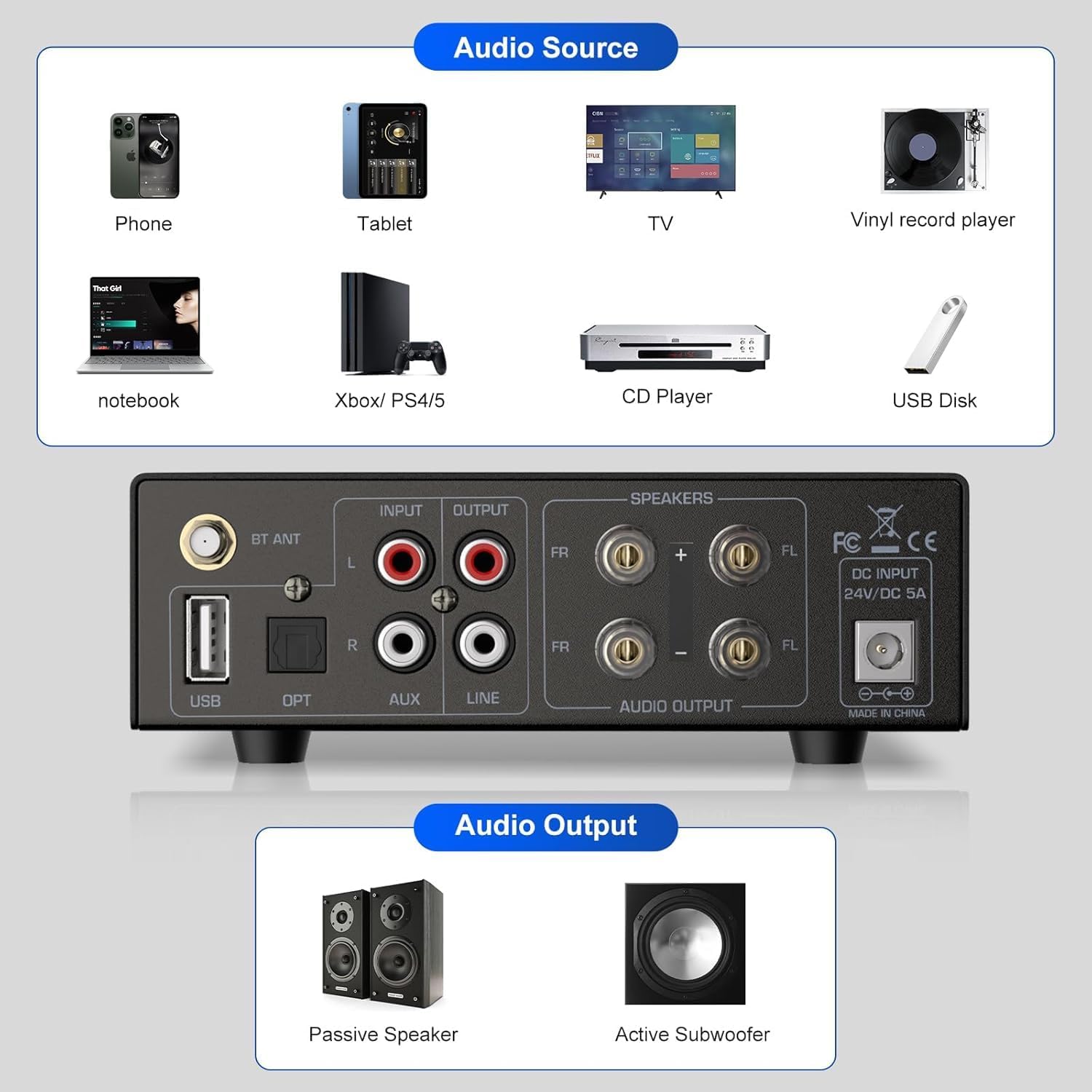
Image: Diagram illustrating the rear panel connections of the AK-3116 amplifier, including various audio input options and speaker/subwoofer outputs. It also shows examples of compatible audio sources and output devices.
- Bluetooth Signal Receiving Antenna: Connect the included antenna for Bluetooth functionality.
- USB Flash Drive Jack: For playing audio files directly from a USB drive.
- Optical Fiber Signal Input Jack (OPT): For connecting devices with optical audio output.
- RCA Input (L/R): For connecting devices with RCA audio output (e.g., CD players, turntables with preamps).
- AUX Input (RCA L/R): Additional RCA input.
- RCA Output (L/R): For connecting to an active subwoofer or another amplifier.
- Speaker Output (FR/FL): Connect passive speakers using banana plugs or bare wire.
- DC Input 24V/5A: Connect the provided 24V DC power adapter here.
Setup Instructions
- Connect Speakers: Connect your passive speakers to the "Speaker Output" terminals on the rear panel. Ensure correct polarity (+ to + and - to -) for each speaker (Front Right and Front Left).
- Connect Bluetooth Antenna: Screw the included Bluetooth antenna into the "BT ANT" connector on the rear panel.
- Connect Audio Source:
- Bluetooth: No physical connection needed initially.
- USB: Insert a USB flash drive into the "USB Flash Drive Jack".
- Optical: Connect an optical cable from your source device to the "Optical Fiber Signal Input Jack (OPT)".
- AUX (3.5mm): Connect a 3.5mm audio cable from your source device to the "AUX Input" on the front panel.
- RCA: Connect RCA cables from your source device to the "RCA Input" or "AUX Input (RCA L/R)" on the rear panel.
- Connect Power: Insert the 24V DC power adapter into the "DC Input 24V/5A" jack on the rear panel, then plug the adapter into a wall outlet.
- Power On: Flip the "Power Switch" on the front panel to the ON position. The power indicator LED will illuminate.
Operating Instructions
- Select Input Source: Press the "Input Function Selection" button on the front panel or use the remote control to cycle through BT, USB, OPT, and AUX inputs until the desired input LED illuminates.
- Adjust Volume: Rotate the "Volume Adjustment Knob" on the front panel or use the volume buttons on the remote control to set the desired listening level. Start with a low volume and gradually increase it.
- Adjust Tone: Use the "Treble Adjustment" and "Bass Adjustment" knobs on the front panel to fine-tune the high and low frequencies according to your preference.
- Bluetooth Pairing:
- Select "BT" input. The Bluetooth indicator LED will flash, indicating it's in pairing mode.
- On your device (smartphone, tablet, computer), enable Bluetooth and search for available devices.
- Select "AK-3116" from the list. Once paired, the Bluetooth indicator LED will stop flashing and remain solid.
- You can now play audio from your device through the amplifier.
- USB Playback:
- Insert a USB flash drive containing audio files (e.g., MP3, WAV) into the USB port.
- Select "USB" input. The amplifier will automatically begin playing audio from the USB drive.
- Use the remote control for playback functions (play/pause, next/previous track).
- 2.1 Channel Setup (Optional): If connecting an active subwoofer, use an RCA cable to connect the "RCA Output" jacks on the amplifier's rear panel to the input of your active subwoofer. Adjust the subwoofer's volume and crossover settings as needed.
Maintenance
- Cleaning: Use a soft, dry cloth to clean the amplifier's exterior. Do not use liquid cleaners or solvents.
- Ventilation: Ensure adequate ventilation around the amplifier to prevent overheating. Do not block ventilation openings.
- Placement: Place the amplifier on a stable, flat surface away from direct sunlight, heat sources, and moisture.
- Power Off: Always power off the amplifier and disconnect it from the power outlet before cleaning or if it will be unused for an extended period.
Troubleshooting
| Problem | Possible Cause | Solution |
|---|---|---|
| No power | Power adapter not connected; Power switch off; Outlet malfunction. | Ensure power adapter is securely connected and plugged into a working outlet. Turn the power switch ON. |
| No sound output | Incorrect input selected; Volume too low; Speakers not connected; Source device issue. | Select the correct input source. Increase volume. Check speaker connections. Verify audio output from the source device. |
| Bluetooth not pairing | Amplifier not in pairing mode; Device too far; Interference; Already paired to another device. | Ensure "BT" input is selected and LED is flashing. Move device closer. Disconnect from other Bluetooth devices. |
| Distorted sound | Volume too high; Incorrect tone settings; Poor cable connection; Source audio quality. | Reduce volume. Adjust bass/treble. Check all cable connections. Test with a different audio source. |
| Remote control not working | No batteries; Dead batteries; Obstruction; Remote out of range. | Install or replace batteries. Remove obstructions between remote and amplifier. Ensure remote is within operating range. |
Specifications
| Model Number | AK-3116 |
| Output Power | 100W + 100W (RMS at 4 ohms) |
| Chipset | 2x TPA3116 |
| Input Options | Bluetooth 5.3, USB, AUX (3.5mm & RCA), Optical (OPT) |
| Output Options | Speaker Output (Passive Speakers), RCA Output (Active Subwoofer) |
| Rated Voltage | 24V DC (Adapter included) |
| Frequency Response | 20Hz - 20KHz |
| Total Harmonic Distortion (THD) | 0.04% |
| Signal-to-Noise Ratio | 75dB |
| Impedance | 4-8Ω |
| Dimensions (L x W x H) | 16cm x 14.8cm x 4.6cm (6.3in x 5.8in x 1.8in) |
| Weight | 1.6 kg (3.5 lbs) |
| Material | Aluminum Alloy, Iron |

Image: Visual representation of the AK-3116 amplifier's dimensions and a table summarizing its production specifications.
Warranty and Support
The Suacopzar AK-3116 amplifier comes with a comprehensive one-year warranty from the date of purchase, covering manufacturing defects. For warranty claims or technical assistance, please contact Suacopzar customer services. Our support team is available to provide online email assistance for any questions or issues you may encounter.
For further assistance, please refer to the contact information provided with your product or visit the official Suacopzar support website.

Image: An illustration demonstrating the versatility of the amplifier by showing various audio sources such as phones, tablets, TVs, vinyl players, notebooks, gaming consoles, CD players, and USB disks connecting to the unit.