
OKD RPC52FP36V2
OKD 52-inch Farmhouse Electric Fireplace with Mantel and TV Stand
Model: RPC52FP36V2
Brand: OKD
1. Introduction
Thank you for choosing the OKD 52-inch Farmhouse Electric Fireplace with Mantel and TV Stand. This manual provides essential information for the safe assembly, operation, and maintenance of your new electric fireplace. Please read all instructions carefully before use and retain this manual for future reference.
Important Safety Information
- Always unplug the fireplace before cleaning or performing any maintenance.
- Do not block air vents. Ensure proper clearance around the unit for adequate ventilation.
- Keep flammable materials at least 3 feet (0.9 meters) away from the front of the fireplace.
- This appliance is hot when in use. To avoid burns, do not let bare skin touch hot surfaces.
- Do not operate any fireplace with a damaged cord or plug, or if the heater malfunctions or has been dropped or damaged in any manner.
2. Setup and Assembly
The OKD Electric Fireplace is designed for straightforward assembly. It is recommended that two people assist with the assembly process, which typically takes about one hour. All parts are clearly labeled, and detailed instructions are included in the packaging.
Package Contents
Verify that all components are present before beginning assembly. Refer to the included parts list in your packaging.
Assembly Steps
- Unpack all components and lay them out on a clean, soft surface to prevent scratches.
- Follow the step-by-step diagrams provided in the separate assembly guide.
- Ensure all fasteners are securely tightened. Do not overtighten.
- Carefully insert the electric fireplace insert into the assembled mantel structure.
Placement
Place the assembled unit on a stable, level surface. Ensure the unit is positioned away from drapes, furniture, and other flammable materials. The dimensions of the unit are 52 inches (W) x 15.6 inches (D) x 36 inches (H).
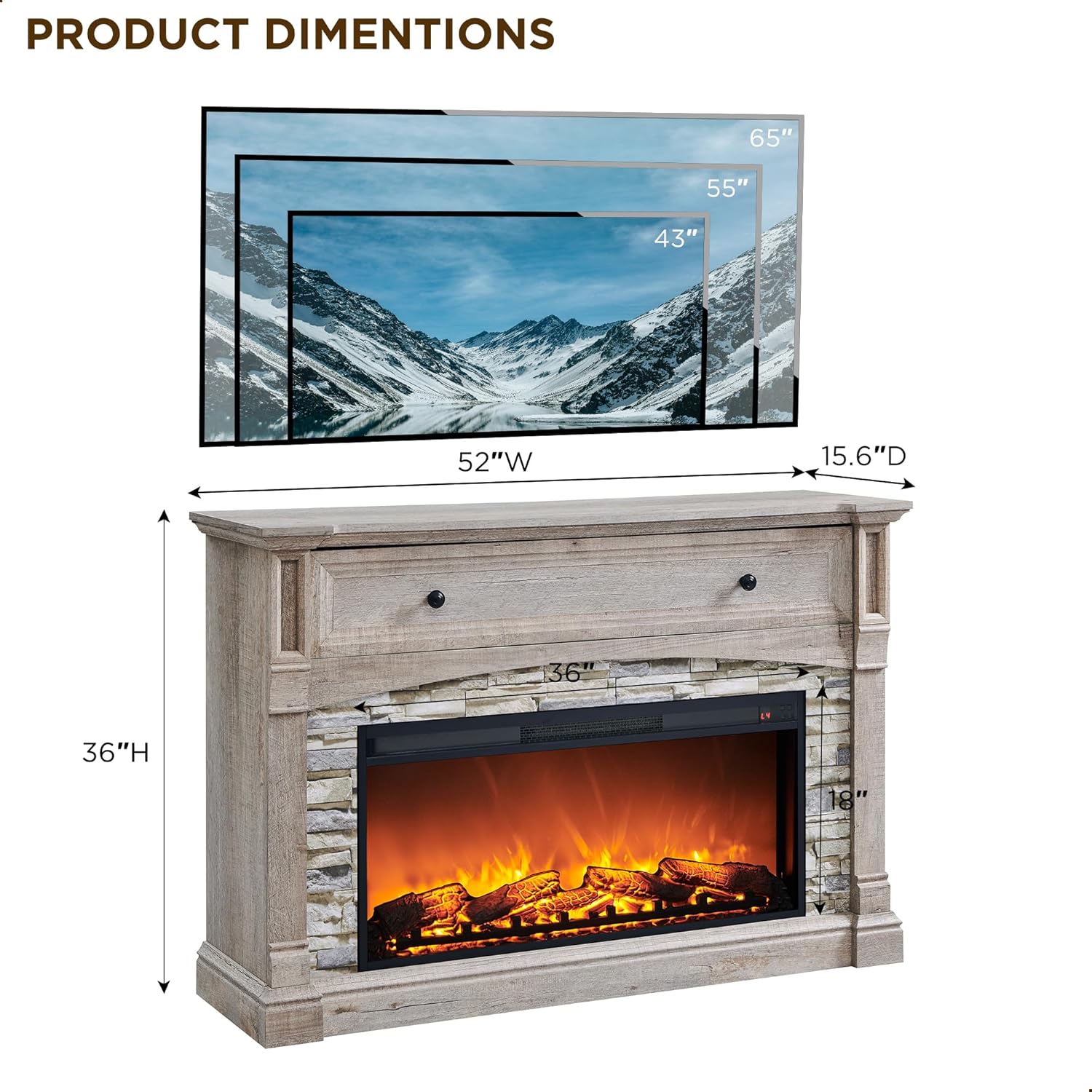
Figure 2.1: Product Dimensions. The fireplace measures 52 inches in width, 15.6 inches in depth, and 36 inches in height. This image helps in planning the placement of the unit.

Figure 2.2: Assembled Fireplace Unit. This image shows the complete OKD electric fireplace with mantel in a typical room setting, highlighting its aesthetic integration.
3. Operating Instructions
Your OKD electric fireplace features a user-friendly control panel and a remote control for convenient operation.
Control Panel and Remote Control
The electric fireplace insert includes a control panel, typically located on the unit, and a remote control for adjusting settings.

Figure 3.1: Fireplace Insert and Remote. This image displays the electric fireplace insert, its integrated control panel, and the accompanying remote control for easy adjustments.
Flame Effects
The fireplace offers 3 stunning 3D flame effects to create a realistic ambiance. Use the remote control or the control panel to cycle through the different flame settings and adjust brightness levels.
Heating Function
- Temperature Control: The heater provides 22 adjustable temperature levels, ranging from 62°F to 82°F. Adjust the temperature to your comfort level using the remote or control panel.
- Timer Function: Set a timer for the heater to operate for up to 6 hours. This feature allows for automatic shut-off, conserving energy.
- Overheat Protection: The unit is equipped with an overheat protection system that automatically shuts off the heater if it reaches an unsafe temperature.
Sime-Open Cubby for Storage
The mantel features a concealed flip-top cubby with high-quality hinges, allowing for effortless and quiet opening. This space is ideal for storing magazines, gamepads, remote controls, and other small items.

Figure 3.2: Sime-Open Cubby. This image demonstrates the hidden storage compartment within the mantel, providing convenient access for organizing entertainment devices and other small items.
4. Maintenance
Regular maintenance ensures the longevity and optimal performance of your electric fireplace.
Cleaning
- Always unplug the unit from the power outlet before cleaning.
- Use a soft, damp cloth to clean the exterior surfaces. Do not use abrasive cleaners or solvents.
- Gently wipe the glass panel with a soft cloth. Avoid harsh chemicals that may damage the finish.
- Ensure the air intake and exhaust vents are free from dust and debris. Use a vacuum cleaner with a brush attachment if necessary.
Storage
If storing the fireplace for an extended period, unplug it and store it in a dry, dust-free location. It is recommended to cover the unit to protect it from dust.
5. Troubleshooting
If you encounter issues with your electric fireplace, refer to the following common problems and solutions:
- No Power:
- Ensure the power cord is securely plugged into a working electrical outlet.
- Check the circuit breaker or fuse box in your home.
- Verify the power switch on the unit is in the 'ON' position.
- No Heat:
- Confirm the heater function is activated via the control panel or remote.
- Check the temperature setting; ensure it is set above the current room temperature.
- The overheat protection may have been activated. Unplug the unit, wait 10-15 minutes, and plug it back in.
- Flame Effect Not Working:
- Ensure the flame effect button has been pressed.
- Check if the light bulb for the flame effect needs replacement (refer to manufacturer for specific instructions).
- Remote Control Not Working:
- Replace the batteries in the remote control.
- Ensure there are no obstructions between the remote and the fireplace sensor.
If problems persist after attempting these solutions, please contact customer support.
6. Specifications
| Feature | Detail |
|---|---|
| Brand | OKD |
| Model Name | RPC52FP36V2-LRO |
| Item Model Number | RPC52FP36V2 |
| Product Dimensions | 15.6"D x 52"W x 36"H |
| Item Weight | 131 Pounds |
| Material | Engineered Wood |
| Finish Type | Textured |
| Color | Light Rustic Oak |
| Power Source | Corded Electric |
| Installation Type | Freestanding |
| Special Features | Flame Effect, Overheat Protection, Timer, TV Stand |
| Included Components | Remote Control, Storage Compartment |
| Heating Range | 62°F - 82°F (22 levels) |
| Timer | Up to 6 hours |

Figure 6.1: Tabletop and Stone Design. This image highlights the woodgrain finish of the 52-inch tabletop and the realistic stacked stone detailing of the fireplace frame.
7. Warranty Information
This OKD Electric Fireplace comes with a Limited Warranty. For specific details regarding warranty coverage, terms, and conditions, please refer to the warranty card included with your product or contact OKD customer support.
8. Customer Support
Should you have any questions, require assistance with assembly, or need troubleshooting support, our friendly customer service team is available 24 hours to assist you.
Please refer to the contact information provided in your product packaging or visit the official OKD website for the most up-to-date support options.
Ask a question about this manual
Ask about setup, troubleshooting, compatibility, parts, safety, or missing instructions. Manuals+ will review the question and use this page’s manual context to help answer it.