
1. Product Overview
The OMANA KF-JN-02 is a versatile 3-in-1 portable coffee machine designed for convenience on the go. It supports brewing with ground coffee, small capsules, and large capsules. Featuring an electric self-heating function, it allows for both hot and cold coffee extraction, making it suitable for various environments such as cars, homes, offices, camping, and travel.
Key features include up to 18 bars of pressure for optimal espresso extraction, automatic shut-off after dispensing 60ml, an indicator light for status, and USB-C charging compatibility. The machine is constructed with food-grade materials for safety and durability.
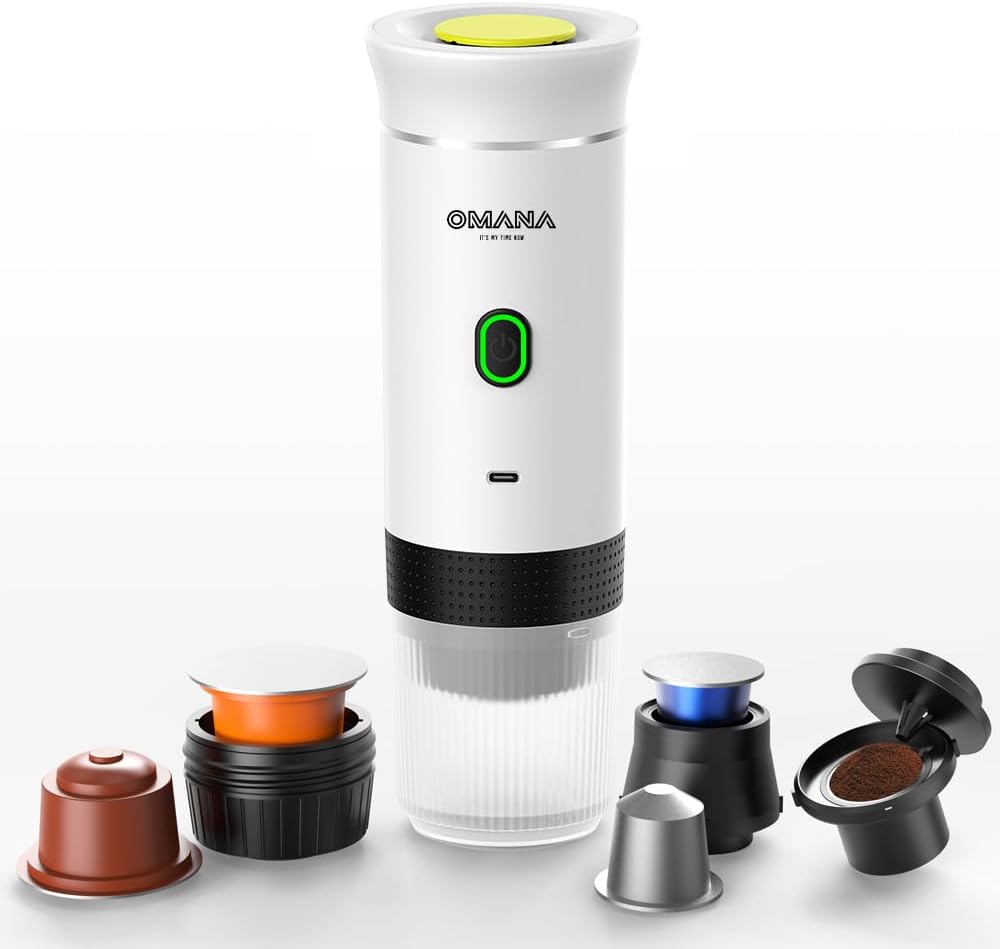
Image 1.1: OMANA KF-JN-02 Portable Coffee Machine with its compatible coffee adapters.
2. Product Components
Familiarize yourself with the different parts of your OMANA KF-JN-02 coffee machine:

Image 2.1: Exploded view showing the main components of the coffee machine.
- Water Tank Cover: Top cover for the water reservoir.
- Water Storage: The main reservoir for water.
- Fuselage: The main body of the machine.
- Activation Button: Power and operation button, located on the fuselage.
- Status Indicator: Light near the activation button, indicating machine status.
- Powder Bin Lid: Cover for the ground coffee adapter.
- Powder Bin: Adapter for ground coffee.
- Capsule Compartment (Small Cup): Adapter for small coffee capsules.
- Capsule Bin (Large Cup)/Pressure Locking Compartment: Adapter for large coffee capsules.
- Coffee Warehouse (Cup): The transparent cup where the brewed coffee collects.
3. Setup and First Use
3.1 Initial Charging
Before first use, fully charge the coffee machine. Connect the provided USB-C charging cable to the machine and a compatible power source (e.g., car charger, wall adapter, power bank). The indicator light will show charging status.
3.2 First Use Cleaning
For hygiene, perform a cleaning cycle before brewing coffee for the first time:
- Ensure the machine is fully charged.
- Fill the water tank with clean water (do not add coffee).
- Assemble the machine without any coffee adapter or capsule.
- Press and hold the power button for 2 seconds to initiate a direct extraction cycle, allowing hot water to pass through the system.
- Discard the water. Repeat if desired.
3.3 Assembling Coffee Adapters
The OMANA KF-JN-02 is compatible with ground coffee, small capsules, and large capsules. Select the appropriate adapter for your preferred coffee type:

Image 3.1: Assembly configurations for different coffee types.
- For Ground Coffee: Use the Powder Bin and Powder Bin Lid. Fill the powder bin with your desired amount of ground coffee, then secure the lid.
- For Small Capsules: Insert the small capsule into the Capsule Compartment (Small Cup).
- For Large Capsules: Insert the large capsule into the Capsule Bin (Large Cup)/Pressure Locking Compartment.
Ensure the chosen adapter is securely attached to the main body of the machine before adding water.
4. Operating Instructions
The OMANA KF-JN-02 offers both hot and cold extraction options.

Image 4.1: Hot and cold extraction modes.
4.1 General Brewing Steps
- Prepare Coffee: Insert your chosen coffee capsule or fill the ground coffee adapter.
- Add Water: Open the water tank cover and fill the water storage with the desired amount of water (up to 150ml). Close the cover securely.
- Select Mode: Choose between hot or cold extraction as described below.
- Extract Coffee: Follow the specific instructions for your chosen mode. The machine will automatically stop after dispensing approximately 60ml of coffee.
- Enjoy: Carefully remove the coffee cup and enjoy your freshly brewed coffee.
4.2 Hot Extraction (with heating)
This mode heats cold water and extracts coffee automatically.
- Prepare coffee and add cold water as per general steps.
- Double-click the activation button. The indicator light will blink orange, signifying the heating process.
- Once the water reaches the optimal temperature (approx. 86°C), the machine will automatically extract the coffee. The indicator light will turn green during extraction.
4.3 Cold Extraction (without heating)
This mode extracts coffee using the temperature of the water you add.
- Prepare coffee and add water (cold or pre-heated hot water) as per general steps.
- Press and hold the activation button for 2 seconds. The indicator light will blink green, and extraction will begin immediately.
4.4 Indicator Light Meanings
- Green Light Blinking: Direct extraction mode (cold or pre-heated water).
- Orange Light Blinking: Water heating in progress (for hot extraction).
- Solid Green Light: Fully charged / Ready for operation.
- Red Light: Low battery or error.
4.5 Usage Scenarios
The portable design allows for use in various settings:

Image 4.2: Examples of where the portable coffee machine can be used.
- Business Premises: Quick coffee breaks at work.
- Home: Convenient brewing without a large machine.
- Mountaineering/Camping: Enjoy fresh coffee outdoors.
- Automotive: Brew coffee directly in your car using a compatible power source.
5. Maintenance and Cleaning
Regular cleaning ensures optimal performance and longevity of your coffee machine.

Image 5.1: The coffee machine and its removable parts are easy to clean.
5.1 Daily Cleaning
- After each use, remove the coffee cup and any coffee adapter.
- Rinse the coffee cup and adapter thoroughly with clean water.
- Wipe the exterior of the main machine body with a damp cloth. Do not immerse the main body in water.
5.2 Deep Cleaning (Recommended Weekly)
- Disassemble all removable parts: water tank cover, water storage, coffee adapters (powder bin, capsule compartments), and the coffee cup.
- Wash all removable parts with warm, soapy water. Use a soft brush if necessary to remove any coffee residue.
- Rinse all parts thoroughly with clean water and allow them to air dry completely before reassembling.
- To clean the internal system, fill the water tank with fresh water and run a hot extraction cycle without any coffee. This helps flush out any internal residue.
5.3 Descaling (Recommended Monthly or Bi-Monthly)
Depending on water hardness, mineral deposits can build up. Descaling helps maintain performance:
- Mix a descaling solution (e.g., citric acid or a commercial descaler) with water according to the descaler's instructions.
- Fill the water tank with the descaling solution.
- Run a hot extraction cycle without coffee. Repeat this process until the water tank is empty.
- Rinse the water tank and run several cycles with fresh, clean water to flush out any remaining descaling solution.
6. Troubleshooting
If you encounter issues with your OMANA KF-JN-02, refer to the following common problems and solutions:
| Problem | Possible Cause | Solution |
|---|---|---|
| Machine does not turn on or operate. | Low battery; machine not charged. | Charge the machine fully using the USB-C cable. |
| Coffee is not dispensing. | No water in tank; coffee adapter clogged; incorrect assembly. | Ensure water tank is filled. Clean coffee adapter. Reassemble parts correctly. |
| Coffee tastes weak or watery. | Insufficient coffee grounds/capsule; too much water; grounds too coarse. | Use appropriate amount of coffee. Ensure water level is correct. Use finer grounds for espresso. |
| Water is not heating in hot extraction mode. | Incorrect operation mode selected; low battery. | Double-click the activation button for heating mode. Ensure machine is charged. |
| Indicator light shows red. | Low battery. | Charge the machine. |
7. Specifications
Technical details for the OMANA KF-JN-02 coffee machine:

Image 7.1: Key product parameters and dimensions.
| Feature | Detail |
|---|---|
| Model Number | KF-JN-02 |
| Compatibility | Ground coffee, small capsules, large capsules |
| Pressure | Up to 18 bars (Extraction), 40 PSI (Pump) |
| Water Tank Capacity | 60 ml (reservoir), Max 150 ml (transparent cup) |
| Battery Type / Capacity | 18650 / 2500 mAh * 3 |
| Charging Voltage / Current | 12 V / 1.5 A (USB-C) |
| Operating Voltage | 12 V |
| Power | 72 W |
| Water Heating Temperature | 86 ℃ (186.8 ℉) |
| Water Heating Time | Approx. 5 minutes |
| Operating Time (Extraction) | Approx. 60 seconds |
| Dimensions (L x W x H) | 83.5 x 83.5 x 245.5 mm |
| Weight | 600 g |
| Material | ABS + 304 Stainless Steel + PC |
| Certifications | RoHS, CE |
8. Warranty and Support
8.1 Quality Guarantee
The OMANA KF-JN-02 coffee machine comes with a one-year quality guarantee from the date of purchase. This warranty covers manufacturing defects under normal use. It does not cover damage caused by misuse, accidents, unauthorized modifications, or failure to follow the instructions in this manual.
8.2 Customer Support
For technical assistance, warranty claims, or any questions regarding your OMANA KF-JN-02 coffee machine, please contact Omana customer support through your retailer or the official Omana website. Please have your purchase receipt and model number (KF-JN-02) ready when contacting support.
