
1. Introduction
This user manual provides essential information for the safe and effective use of your onerbl AC-DC Adapter. This adapter is specifically designed as a replacement power supply for the FLYLINKTECH BD10 Jump Starter, including models with an integrated air compressor and lithium polymer battery. Please read this manual thoroughly before using the product.
2. Product Overview
The onerbl AC-DC Adapter converts standard AC wall power into the DC power required to charge your compatible device. It features a robust design with built-in short circuit protection to ensure safe operation.
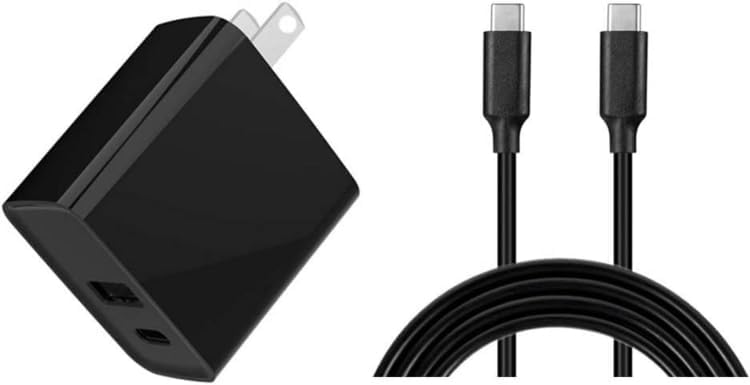
Figure 1: onerbl AC-DC Adapter and included USB-C to USB-C charging cable. The adapter features a standard US plug and USB-C output ports.
Package Contents:
- 1 x onerbl AC-DC Adapter
- 1 x USB-C to USB-C Charging Cable
3. Specifications
| Brand | onerbl |
| Model | AC-DC Adapter (B0DNZ5CKDJ) |
| Input Voltage | AC 100-240V, 50/61Hz (Worldwide Auto Input) |
| Output | PD18W + USB-C |
| Compatible Devices | FLYLINKTECH BD10 Jump Starter Portable Car Jump Starter with Air Compressor Lithium Polymer Battery |
| Special Features | Short Circuit Protection |
| Color | Black |
| Manufacturer | Shenzhen Waweis Technology Co., Ltd |
4. Setup
- Unpack the Adapter: Carefully remove the onerbl AC-DC Adapter and the USB-C charging cable from its packaging.
- Inspect for Damage: Before use, visually inspect the adapter and cable for any signs of damage. Do not use if damaged.
- Connect to Power Outlet: Plug the AC-DC adapter into a standard wall power outlet (AC 100-240V).
- Connect to Device: Use the provided USB-C to USB-C cable to connect the adapter's USB-C output port to the charging input port of your FLYLINKTECH BD10 Jump Starter.
Important Safety Note: Ensure the power outlet is easily accessible for quick disconnection if needed. Do not force the connector into the device's port.
5. Operation
Charging Your FLYLINKTECH BD10 Jump Starter:
- Ensure the onerbl AC-DC Adapter is securely plugged into a wall outlet and connected to your FLYLINKTECH BD10 Jump Starter via the USB-C cable.
- The jump starter's charging indicator (refer to your FLYLINKTECH BD10 manual for details) should activate, indicating that charging has begun.
- Allow the jump starter to charge until its battery indicator shows a full charge.
- Once fully charged, disconnect the USB-C cable from the jump starter, then unplug the adapter from the wall outlet.
Note on Battery Life: Rechargeable batteries have a finite lifespan, typically 1 to 3 years. If your FLYLINKTECH BD10 Jump Starter's battery is damaged or has reached the end of its life, it may not accept a charge, and this is not an indication of a fault with the onerbl AC-DC Adapter.
6. Maintenance
- Cleaning: Disconnect the adapter from all power sources before cleaning. Use a soft, dry cloth to wipe the adapter. Do not use liquid cleaners or solvents.
- Storage: Store the adapter and cable in a cool, dry place away from direct sunlight and extreme temperatures when not in use.
- Cable Care: Avoid bending or kinking the charging cable excessively. Do not place heavy objects on the cable.
- Inspection: Periodically inspect the adapter and cable for any signs of wear, fraying, or damage. Replace immediately if any damage is found.
7. Troubleshooting
| Problem | Possible Cause | Solution |
|---|---|---|
| Device not charging. |
|
|
| Adapter feels warm during use. | Normal operation. | A slight warmth is normal during charging. If it becomes excessively hot or emits smoke/odor, immediately unplug and discontinue use. |
8. Warranty and Support
For information regarding warranty coverage or technical support for your onerbl AC-DC Adapter, please refer to the documentation provided at the time of purchase or contact your retailer. For issues related to the FLYLINKTECH BD10 Jump Starter itself, please consult its specific user manual or contact FLYLINKTECH customer support.