
Important Safety Information
Please read and understand all instructions before assembling, operating, or installing this electric fireplace. Failure to follow these instructions may result in electric shock, fire, property damage, or personal injury.
- Do not operate the fireplace if the power cord is damaged or frayed.
- Ensure the fireplace is connected to a properly grounded outlet.
- Keep combustible materials at least 3 feet (0.9 meters) away from the front of the fireplace.
- Do not block air vents.
- Unplug the fireplace before performing any maintenance or cleaning.
- This appliance is for indoor use only.
Package Contents
Verify that all components are present and undamaged before assembly. If any parts are missing or damaged, contact customer service.
- Fireplace Mantel Assembly Components
- Electric Fireplace Insert
- Remote Control
- Hardware Pack
- Instruction Manual
Setup and Assembly
Assembly typically requires 1-2 people and approximately one hour. Follow the detailed diagrams provided in the separate assembly guide for specific steps.
- Unpack all components and lay them out on a soft, clean surface to prevent scratches.
- Identify all parts and hardware using the provided list.
- Assemble the mantel structure according to the step-by-step instructions.
- Carefully insert the electric fireplace unit into the designated opening in the mantel.
- Secure the fireplace unit and any remaining mantel components.
- Place the assembled unit in its desired location, ensuring it is on a stable, level surface.

Image: Product dimensions (52"W x 15.6"D x 36"H) and compatible TV sizes (43", 55", 65").
Operating Instructions
The electric fireplace can be operated using the control panel on the unit or the included remote control.
Powering On/Off
- Plug the power cord into a 120V AC grounded outlet.
- Press the power button on the control panel or remote to turn the unit on or off.
Flame Effects
The fireplace features 3D realistic flame effects with adjustable brightness.
- Use the flame button on the remote or control panel to cycle through different flame brightness levels (L1-L4).

Image: The 36-inch electric fireplace insert with its control panel and remote, highlighting flame and heating functions.
Heating Control
The heater provides supplemental warmth and can be adjusted.
- Press the temperature button to adjust the heat output between 62°F and 82°F (22 temperature levels).
- Use the timer function to set the heater to automatically turn off after a period of up to 6 hours.
Sime-Open Cubby for Storage
The mantel features a concealed flip-top cubby for convenient storage of magazines, gamepads, remote controls, and other items.
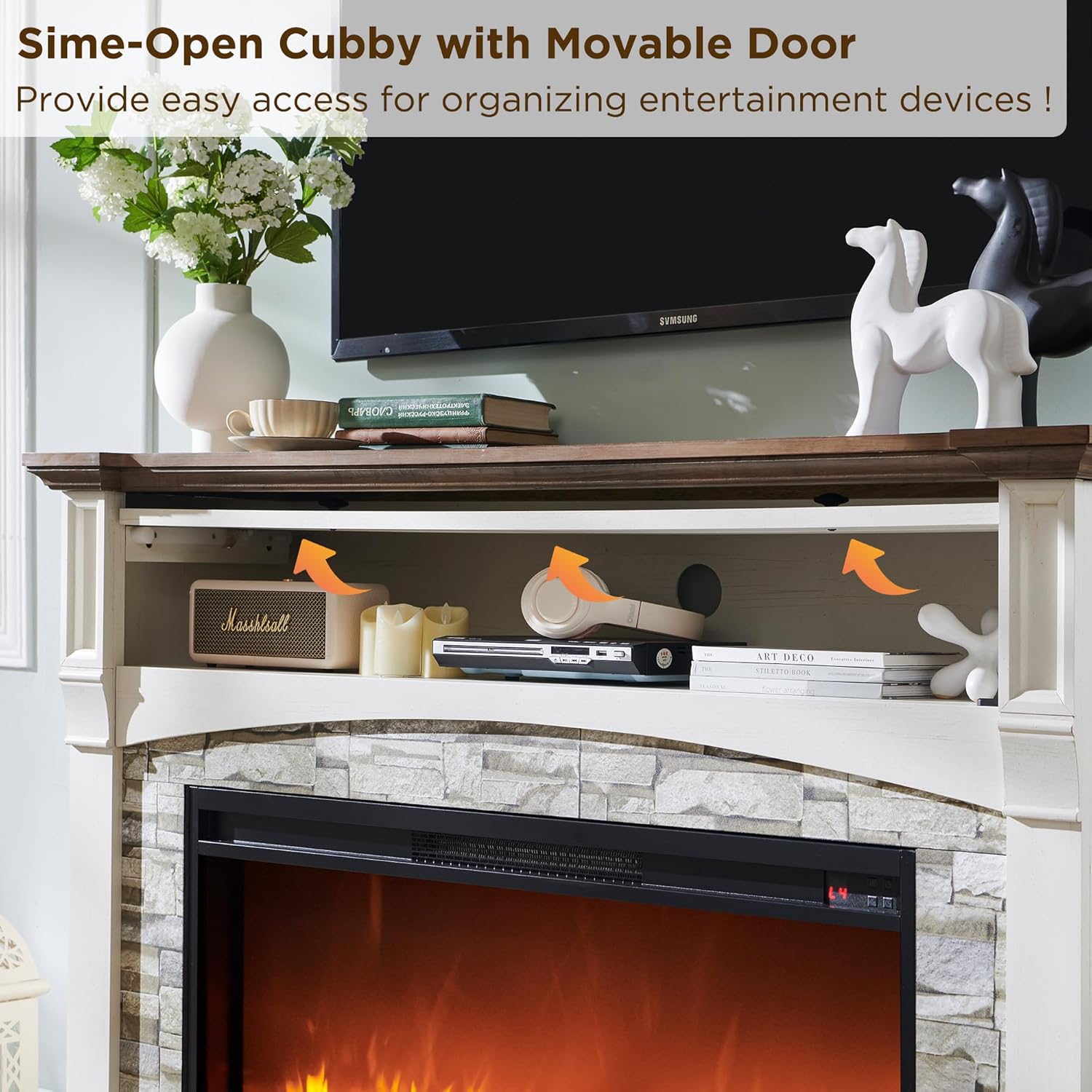
Image: The concealed flip-top storage cubby with various items stored inside.
Maintenance
Regular maintenance ensures optimal performance and longevity of your fireplace.
- Cleaning: Ensure the unit is unplugged and cool before cleaning. Use a soft, damp cloth to wipe surfaces. Do not use abrasive cleaners.
- Air Vents: Periodically check and clean the air intake and exhaust vents to ensure proper airflow.
- Light Bulbs: The flame effect uses LED technology, which typically does not require bulb replacement.
Troubleshooting
| Problem | Possible Cause | Solution |
|---|---|---|
| Fireplace does not turn on. | No power, tripped circuit breaker, loose connection. | Check power cord, ensure outlet is functional, reset circuit breaker. |
| No heat output. | Heater function not activated, thermostat setting too low, thermal cut-off activated. | Activate heater, increase temperature setting, unplug unit for 5 minutes to reset thermal cut-off. |
| Flame effect not working. | Flame effect turned off, LED issue. | Ensure flame effect is activated via control panel or remote. If issue persists, contact support. |
| Remote control not working. | Dead batteries, obstruction, remote out of range. | Replace batteries, remove obstructions, ensure remote is within operating range. |
Specifications
- Brand: OKD
- Model Name: RPC52FP36V2-ROWAW (Fireplace TV Stand), RPC52FP36V2 (Fireplace Insert)
- Product Dimensions: 52"W x 15.59"D x 36"H
- Material: Engineered Wood
- Color: Antique White
- Power Source: Corded Electric
- Installation Type: Freestanding
- Heating Area: Up to 400 Sq.Ft.
- Heat Output: 5000 BTU
- Temperature Range: 62°F - 82°F (22 levels)
- Timer: Up to 6 hours
- Flame Effects: 3D Realistic Flame, 4 Brightness Levels
- Item Weight: 131 pounds
- Included Components: Remote Control
Warranty and Support
This product comes with a limited warranty. For detailed warranty information, please refer to the warranty card included in your package or contact OKD customer service.
If you have any questions, require assistance with assembly, or need troubleshooting support, please contact our customer service team. Our friendly customer service team is available 24/7 to assist you.
Customer Service: Refer to your product packaging or the OKD official website for contact details.