
1. Introduction
This manual provides essential instructions for the safe and efficient use of your onerbl Multi-Port USB Wall Charger. This AC-DC adapter is designed to convert AC power from electrical outlets into DC power, suitable for charging various compatible devices, including the LATIMERIA M4W Solar Charger Power Bank (45800mAh Lithium Polymer Battery, DC5V 2.4A / 5VDC 2400mA / 5.0V). Please read this manual thoroughly before use and retain it for future reference.
2. Safety Information
- Electrical Safety: Always plug the adapter into a properly grounded electrical outlet. Do not use if the adapter or cable is damaged.
- Environment: Use the adapter in a dry environment. Avoid exposure to water, moisture, or extreme temperatures.
- Ventilation: Ensure adequate ventilation around the adapter during use. Do not cover it with cloth or other materials.
- Children: Keep the adapter out of reach of children.
- Disassembly: Do not attempt to disassemble or modify the adapter. This will void the warranty and may cause electric shock or fire.
- Compatibility: Use only with devices that match the adapter's output specifications (DC5V, 2.4A).
3. Package Contents
Verify that your package contains the following items:
- 1 x onerbl Multi-Port USB Wall Charger
- 2 x USB-C to USB-C Charging Cables
4. Product Overview
The onerbl Multi-Port USB Wall Charger is a compact and efficient power adapter designed for charging multiple devices simultaneously. It features multiple USB ports for versatile connectivity.
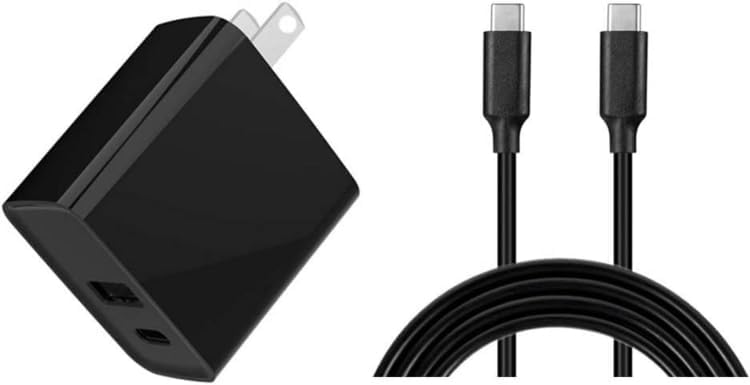
The image above displays the main components: the black wall adapter with foldable prongs for easy storage and travel, and two black USB-C to USB-C cables. The adapter is equipped with both USB-A and USB-C output ports to accommodate a wide range of devices.
5. Specifications
| Feature | Description |
|---|---|
| Brand | onerbl |
| Model | Multi-Port USB Wall Charger |
| Input | AC 100-240V, 50/61Hz (Worldwide Compatible) |
| Output | DC 5V, 2.4A (2400mA) |
| Connector Type | USB-A, USB-C |
| Compatible Devices | LATIMERIA M4W Solar Charger Power Bank 45800mAh Lithium Polymer Battery, and other 5V USB-powered devices. |
| Special Feature | Short Circuit Protection |
| Color | Black |
| Power Source | Corded Electric |
6. Setup
- Unpack: Carefully remove the onerbl Multi-Port USB Wall Charger and included cables from its packaging.
- Inspect: Check the adapter and cables for any visible damage. Do not use if damaged.
- Connect to Power: Plug the adapter into a standard AC wall outlet (100-240V). The prongs are foldable for convenience; ensure they are fully extended before plugging in.
- Connect Device: Use one of the provided USB-C cables, or another compatible USB cable, to connect your device (e.g., LATIMERIA M4W Solar Charger Power Bank) to an available USB-A or USB-C port on the wall charger.
7. Operating Instructions
Once properly set up, the onerbl Multi-Port USB Wall Charger will begin charging your connected device(s) automatically. The charging process is indicated by your device's charging indicator.
- Charging Multiple Devices: You can charge multiple devices simultaneously using the available USB ports. The total output current is shared among the connected devices.
- Battery Life Note: Rechargeable batteries have a finite lifespan, typically 1 to 3 years. If a battery is damaged or has reached the end of its lifespan, it may not accept a charge, even with a functional charger. This is a characteristic of the battery, not a defect of the charger.
- Optimal Charging: For optimal charging speed, ensure your device's charging input matches the adapter's output (DC 5V, 2.4A).
8. Maintenance
- Cleaning: Disconnect the adapter from the power outlet before cleaning. Use a soft, dry cloth to wipe the surface. Do not use liquid cleaners or aerosols.
- Storage: When not in use, store the adapter and cables in a cool, dry place, away from direct sunlight and extreme temperatures.
- Cable Care: Avoid bending or crimping the charging cables excessively, as this can damage the internal wires.
9. Troubleshooting
| Problem | Possible Cause / Solution |
|---|---|
| Device not charging |
|
| Adapter feels warm during use |
|
| Slow charging speed |
|
10. Warranty and Support
This onerbl product is tested and designed for reliable performance. For specific warranty details and customer support, please refer to the documentation provided at the time of purchase or contact your retailer. Keep your purchase receipt as proof of purchase.