
1. Important Safety Instructions
Please read and understand all instructions before beginning installation and use. Failure to follow these instructions may result in electric shock, fire, or serious personal injury.
- Always disconnect power at the main circuit breaker before installation or maintenance.
- Ensure all electrical connections comply with local codes and ordinances, as well as the National Electrical Code (NEC).
- This fixture is designed for indoor use only.
- Do not use with dimmer light switches or fan control switches. Use only the provided remote or app for brightness and fan speed adjustments.
- Ensure the mounting structure can support the weight of the fan.
2. Package Contents
Verify that all components are present and undamaged before installation.
- Ceiling Fan with Light Fixture (Pre-assembled)
- Remote Control
- Mounting Hardware Kit
- Instruction Manual

Image: Overview of the ropelux ceiling fan components, including the main fan unit, remote control, and various mounting accessories.
3. Setup & Installation
3.1 Pre-Installation Checklist
- Turn off power at the circuit breaker.
- Ensure you have all necessary tools (screwdriver, wire strippers, etc.).
- Confirm the ceiling junction box is securely mounted and rated for fan support.
3.2 Mounting the Fan
The ropelux ceiling fan is pre-assembled for quick and secure mounting. Follow these general steps:
- Attach the mounting bracket to the ceiling junction box using the provided screws.
- Connect the fan's electrical wires to the household wiring (live, neutral, ground) using wire nuts. Ensure US standard wires are used.
- Secure the fan body to the mounting bracket. Utilize the safety rope to hang the low profile ceiling fan to the metal bracket during wiring.
- Ensure all connections are tight and secure.

Image: Visual guide illustrating the simplified installation process of the ceiling fan, highlighting the pre-assembled design.
3.3 Wall Switch Compatibility
This fixture's dimmable function is controlled by low voltage direct current. Most US dimmers work with 120V AC, therefore, this fixture does not work with local dimmer or fan switches. Please use the provided remote or app to adjust brightness and fan speed.
The fixture works with a regular wall switch, which can be used to turn on/off the light. Press the wall switch within 5 seconds to cycle the light color temperatures. If over 5 seconds, the current mode will be saved for the next operation.

Image: Illustration demonstrating that only regular wall switches are compatible, while dimmer and fan control switches are not.
4. Operating Instructions
4.1 Remote Control Operation
The included remote control allows for independent adjustment of fan speed and light settings.
- ON/OFF: Turns the light on or off.
- ALL OFF: Turns both light and fan off.
- K (Color Temperature): Cycles through 3000K (Warm White), 4500K (Neutral White), and 6500K (Cool White).
- Brightness +/-: Adjusts light brightness steplessly.
- Night Light Mode: Activates a low-brightness setting for nighttime.
- F/R (Forward/Reverse): Changes fan direction for summer (downward) or winter (upward) air circulation.
- 1-6 Fan Speed: Selects one of 6 fan speeds.
- 2H Timer: Sets a 2-hour timer for the fan.
- Natural Wind: Simulates a natural breeze.
- Sleep Wind: Provides a gentle, quiet airflow for sleeping.

Image: The ergonomic remote control for the ropelux ceiling fan, designed for easy handling.

Image: A detailed diagram of the remote control, labeling each button and its corresponding function for clear operation.

Image: The remote control shown with its convenient wall-mountable holder for easy storage and access.
4.2 App Control Operation
The fan can also be controlled via the 'Fan Lamp Pro' application, offering comprehensive control from your smartphone.
- Download the 'Fan Lamp Pro' app from your device's app store.
- Follow the in-app instructions to pair your device with the ceiling fan.
- The app provides independent control over fan speed, light brightness, color temperature, timer settings, natural wind, and sleep wind modes.
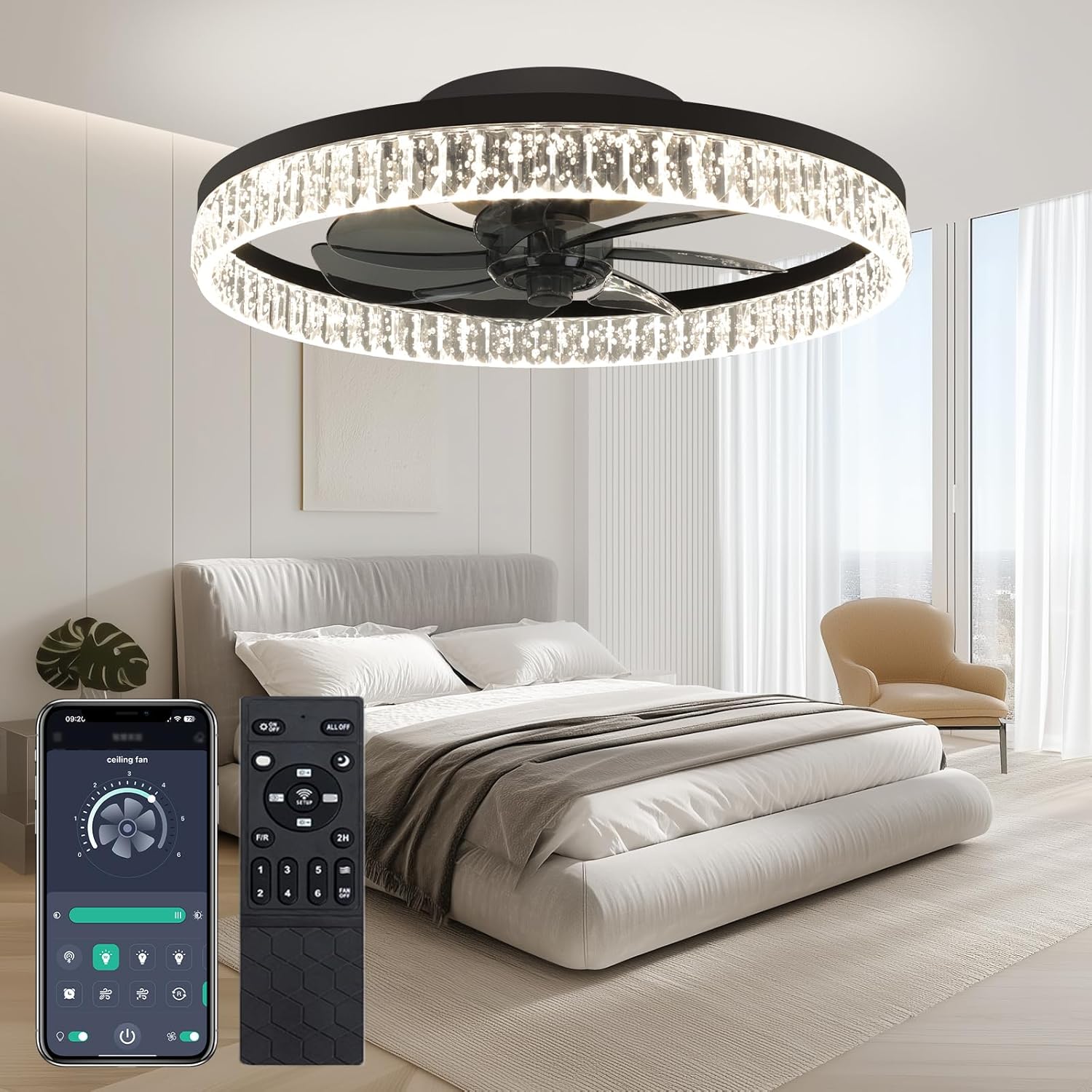
Image: The ropelux ceiling fan shown with both its physical remote control and the digital interface of the 'Fan Lamp Pro' app on a smartphone.

Image: A user interacting with the 'Fan Lamp Pro' mobile application, demonstrating its intuitive interface for controlling the ceiling fan's functions.
4.3 Fan Speed Control
The fan offers 6 customizable speeds, operating at near-silent noise levels for optimal comfort.
- Speeds 1-2: Soft wind, ideal for sleep.
- Speeds 3-4: Natural wind, suitable for daily use.
- Speeds 5-6: Strong wind, perfect for exercise or rapid cooling.

Image: A visual representation of the six fan speed settings, categorized by their suitability for different activities like sleeping, daily use, and exercise.

Image: A chart comparing the fan's quiet operation (around 30dB) to common sound levels like a quiet night or library voice.
4.4 Lighting Control (CCT & Dimmable)
The integrated LED light offers adjustable color temperature (CCT) and stepless dimming, providing versatile illumination.
- Color Temperature: Choose from 3000K (Warm White), 4500K (Neutral White), and 6500K (Cool White) to set the desired ambiance.
- Dimmable: Adjust brightness from 10% to 100% steplessly.
- Anti-Glare Design: Ensures even, eye-friendly light distribution with zero flicker or dizziness.

Image: A visual guide demonstrating the stepless dimming capability and the three color temperature options: Cool 6500K, Neutral 4500K, and Warm 3000K.

Image: Examples of how different color temperatures (3000K, 4500K, 6500K) can be used to create various moods in a bedroom, living room, and kitchen.
4.5 Reversible Airflow
The fan features two directional modes to optimize air circulation throughout the year.
- Downward Mode (Summer): Creates a cooling breeze.
- Upward Mode (Winter): Circulates warm air trapped near the ceiling, reducing humidity and warming the room.

Image: An illustration demonstrating the reversible airflow feature, showing how the fan can cool down the room in forward mode and warm it up in reverse mode.
5. Maintenance
Regular maintenance ensures optimal performance and longevity of your ceiling fan.
- Cleaning: Wipe the fan blades and light fixture with a soft, damp cloth. Do not use abrasive cleaners or solvents.
- Connections: Periodically check all electrical connections and mounting screws to ensure they are secure.
- Light Source: The LED light source is integrated and not user-replaceable.
6. Troubleshooting
If you encounter issues with your ceiling fan, refer to the following table for common problems and solutions.
| Problem | Possible Cause | Solution |
|---|---|---|
| Fan does not operate. | No power supply. | Check circuit breaker and wall switch. |
| Light does not turn on. | Loose wiring connection. | Ensure all electrical connections are secure. |
| Remote control not working. | Batteries are dead or incorrectly inserted. | Replace AAA batteries (1 required). Ensure correct polarity. |
| Fan makes unusual noise. | Loose mounting screws or unbalanced blades. | Tighten all mounting screws. Check for any obstructions. |
| App control not connecting. | Bluetooth/Wi-Fi issue or incorrect pairing. | Ensure Bluetooth/Wi-Fi is enabled on your device. Re-pair the fan in the app. |
7. Specifications
| Feature | Detail |
|---|---|
| Brand | ropelux |
| Model Name | Ceiling Fans with Lights |
| Item Model Number | RP-IOL |
| Color | Crystal-Black |
| Material | Acrylic, Aluminum, Plastic |
| Product Dimensions | 20"L x 20"W x 4.5"H |
| Item Weight | 5.4 Pounds |
| Light Source Type | LED |
| Wattage | 40 watts |
| Brightness | 5000 lumen |
| Voltage | 5 Volts |
| Control Method | Remote Controlled, App Control |
| Fan Speeds | 6 |
| Color Temperature | 3000-6500K (Adjustable) |
| Assembly Required | Yes (Pre-assembled for quick mounting) |
8. Warranty & Support
Ropelux specializes in premium lighting solutions and offers a 3-year warranty (1095 days of coverage) for this product.
If you encounter any problems or have questions regarding your ropelux ceiling fan, please contact our customer support. We are committed to resolving your troubles within 24 hours.
For further assistance, please refer to the contact information provided on the product packaging or the official ropelux website.